

iSearching iTAG ट्रॅकर वापरकर्ता मॅन्युअल


http://www.qrtransfer.com/iSearching.html

https://play.google.com/store/apps/details?id=com.lenzetech.isearchingtwo

https://itunes.apple.com/cn/app/isearching/id
Apple, APP Store, iPhone, iPad आणि iPod touch हे Apple Inc चे ट्रेडमार्क आहेत.
Google play हा Google Inc चा ट्रेडमार्क आहे. येथे वापरलेले इतर सर्व ट्रेडमार्क त्यांच्या संबंधित मालकांची मालमत्ता आहेत.
हे मॅन्युअल तुम्हाला तुमच्या फायद्यासाठी उत्पादन कसे वापरायचे हे पूर्णपणे समजून घेण्यात मदत करण्यासाठी डिझाइन केले आहे.
प्रारंभ करणे
तुमच्या स्मार्टफोनवर ॲप लाँच करा. ट्यूटोरियल पृष्ठ तपासण्यासाठी थोडा वेळ द्या आणि ॲपच्या सूचना चालू करण्यासाठी 'अनुमती द्या' वर टॅप करण्यास विसरू नका.

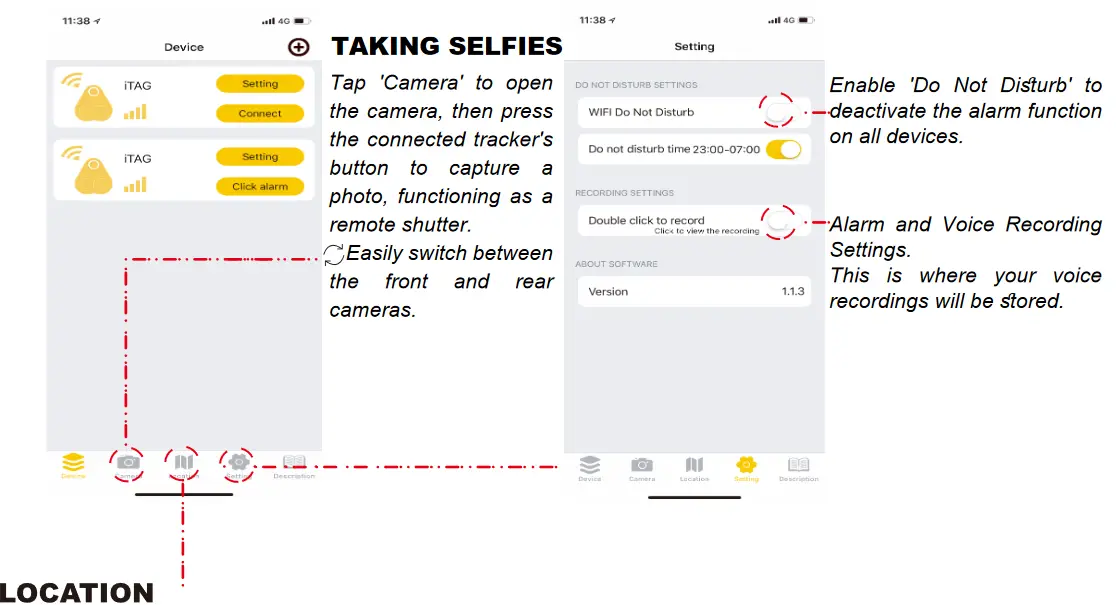
स्थान इतिहास: तुम्ही तुमची कार पार्क करता तेव्हा, नकाशावर तुमचे वर्तमान स्थान चिन्हांकित करण्यासाठी फक्त ट्रॅकरचे बटण दाबा. तुमचे वाहन शोधण्यासाठी, फक्त 'स्थान इतिहास' वर टॅप करा.
गमावलेला इतिहास: जर तुम्ही तुमचा ट्रॅकर चुकीचा ठेवला असेल, तर तो 'हरवलेला इतिहास' मध्ये सहजतेने शोधा. तुम्हाला ट्रॅकरचे स्थान प्रदान करून नकाशावर एक पिन आपोआप सोडला जाईल. रेकॉर्डमध्ये प्रवेश करण्यासाठी फक्त 'हरवलेला इतिहास' वर टॅप करा.
बॅटरी बदलणे
बॅटरी प्रकार: CR2032
CR2032 ही एक सामान्य प्रकारची मानक आकाराची बॅटरी आहे, जी खरेदी करणे आणि बदलणे सोपे करते.
बॅटरी बदलण्यासाठी, फक्त ट्रॅकरचे बटण उघडा जे बॅटरी कव्हर म्हणून काम करते

FCC चेतावणी विधान: अनुपालनासाठी जबाबदार पक्षाद्वारे स्पष्टपणे मंजूर न केलेले बदल किंवा बदल या युनिटमधील बदल उपकरणे चालविण्याचा वापरकर्त्याचा अधिकार रद्द करू शकतात. हे उपकरण तपासले गेले आहे आणि ते FCC नियमांच्या भाग 15 नुसार, वर्ग B डिजिटल उपकरणाच्या मर्यादांचे पालन करत असल्याचे आढळले आहे. या मर्यादा निवासी स्थापनेमध्ये हानिकारक हस्तक्षेपापासून वाजवी संरक्षण प्रदान करण्यासाठी डिझाइन केल्या आहेत. हे उपकरण रेडिओ फ्रिक्वेन्सी उर्जा निर्माण करते, वापरते आणि विकिरण करू शकते आणि, जर सूचनांनुसार स्थापित आणि वापरले नसेल तर, रेडिओ संप्रेषणांमध्ये हानिकारक हस्तक्षेप होऊ शकतो.
तथापि, विशिष्ट स्थापनेत हस्तक्षेप होणार नाही याची कोणतीही हमी नाही. जर या उपकरणामुळे रेडिओ किंवा टेलिव्हिजन रिसेप्शनमध्ये हानिकारक हस्तक्षेप होत असेल, जे उपकरणे बंद आणि चालू करून निर्धारित केले जाऊ शकते, तर वापरकर्त्याला खालीलपैकी एक किंवा अधिक उपायांनी हस्तक्षेप दुरुस्त करण्याचा प्रयत्न करण्यास प्रोत्साहित केले जाते:
- रिसिव्हिंग अँटेना पुनर्स्थित करा किंवा पुनर्स्थित करा.
- उपकरणे आणि रिसीव्हरमधील पृथक्करण वाढवा.
- रिसीव्हर कनेक्ट केलेल्या सर्किटपेक्षा वेगळ्या सर्किटवरील आउटलेटमध्ये उपकरणे कनेक्ट करा.
- मदतीसाठी डीलर किंवा अनुभवी रेडिओ/टीव्ही तंत्रज्ञांचा सल्ला घ्या.
हे डिव्हाइस FCC नियमांच्या भाग 15 चे पालन करते. ऑपरेशन खालील दोन अटींच्या अधीन आहे: (1) हे डिव्हाइस हानिकारक हस्तक्षेप करू शकत नाही आणि (2) या डिव्हाइसने अवांछित ऑपरेशन होऊ शकणाऱ्या हस्तक्षेपासह प्राप्त होणारा कोणताही हस्तक्षेप स्वीकारला पाहिजे.
FCC रेडिएशन एक्सपोजर स्टेटमेंट
सामान्य RF एक्सपोजर आवश्यकता पूर्ण करण्यासाठी डिव्हाइसचे मूल्यमापन केले गेले आहे. साधन निर्बंधाशिवाय पोर्टेबल एक्सपोजर स्थितीत वापरले जाऊ शकते.
कागदपत्रे / संसाधने
 | iTAG ट्रॅकर |
संदर्भ
- वापरकर्ता मॅन्युअलmanual.tools
Não tem recurso de apagar histórico localização no aplicativo ISearching V.2.7.0
How can I delete the location history in the iSearching app version 2.7.0?
Based on the iSearching iTAG Tracker manual, there is no specific instruction provided for deleting or clearing the स्थान इतिहास or Lost History records within the app interface. The manual only describes how to access these records by tapping the respective buttons.
If you are trying to remove a specific device's history, you may try to delete the device itself from the app by sliding the device name to the left in the device list. Please note that this may remove all settings associated with that specific tracker. If the app version 2.7.0 does not provide a direct 'clear' or 'delete' button within the History menus, the data may be stored locally; clearing the app cache or data in your smartphone's system settings might remove the history, but use caution as this will also log you out and reset your paired devices.
Read the full Q&A page
Hi, I was looking to use these on my pets, however it appears that you have to push the button to lock the location in? If my pet gets out and runs away and its out of Bluetooth range then how do I find it? it looks like this is more of a place holder than a tracking tool. Please advise.
धन्यवाद
धन्यवाद
How does the iSearching iTAG tracker work if my pet goes out of Bluetooth range?
The iSearching iTAG is a Bluetooth-based tracker with a range of approximately 25 मीटर (75 फूट). It does not have built-in GPS for real-time long-distance tracking. However, it offers two features to help if your pet goes out of range:
As you noted, the manual mentions pressing the button to mark a location (Location History), but this is a manual feature typically used for parking. For a lost pet, the 'Lost History' pin is dropped automatically at the point of disconnection. Please be aware that if the pet continues to move after the Bluetooth connection is lost, the app will only show where they होते when the signal dropped, not their current live position.
Read the full Q&A page
Weird how they say you can call or use their dogital chat that never tells you anything useful, but they dont give you an option to call. My drop down menu never comes up. What a waste of money
How do I access the drop-down menu to add devices in the iSearching app?
त्यानुसार iSearching iTAG ट्रॅकर वापरकर्ता मॅन्युअल, the drop-down menu is located in the top-left corner of the app's main screen. If the menu is not appearing, please try the following steps:
If the interface remains unresponsive, try restarting the app or your smartphone to refresh the display elements.
Read the full Q&A page