1. परिचय
This manual provides detailed instructions for the installation, operation, and maintenance of your CP PLUS 4MP Smart Wi-Fi CCTV Camera, model CP-E41Q. Please read this manual thoroughly before using the product to ensure proper function and safety. Keep this manual for future reference.
2. सुरक्षितता माहिती
- Ensure the power supply matches the camera's requirements.
- Do not expose the camera to water or moisture. This product is designed for indoor use only.
- कॅमेरा थेट सूर्यप्रकाशात किंवा उष्णतेच्या स्रोतांजवळ ठेवणे टाळा.
- Do not attempt to disassemble or modify the camera. Contact authorized service personnel for repairs.
- कॅमेरा आणि त्याचे सामान मुलांच्या आवाक्याबाहेर ठेवा.
3. पॅकेज सामग्री
तुमच्या पॅकेजमध्ये सर्व वस्तू आहेत का ते तपासा:
- CP PLUS CP-E41Q Camera
- पॉवर अडॅप्टर
- चार्जिंग केबल
- उभे राहा
- माउंटिंग स्क्रू
- वापरकर्ता मॅन्युअल (हा दस्तऐवज)
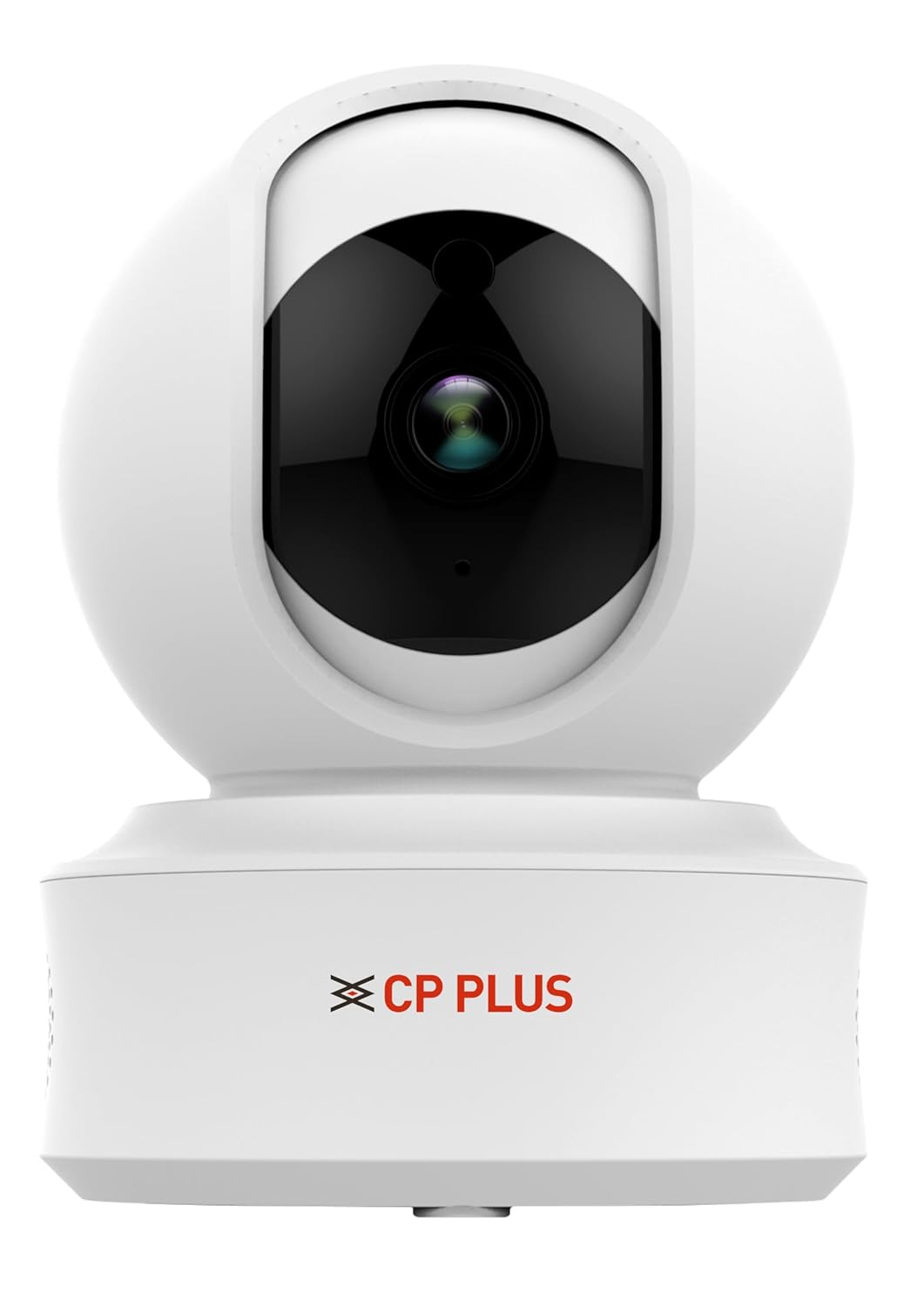
प्रतिमा: CP PLUS CP-E41Q Camera and included accessories. This image displays the main camera unit, power adapter, charging cable, stand, and mounting screws, which are typically found in the product packaging.
4. उत्पादन संपलेview
The CP PLUS CP-E41Q is a 4MP Smart Wi-Fi CCTV Camera designed for indoor security. It features 360° pan and tilt capabilities, 15-meter night vision, two-way audio, and smart detection functions to enhance your home or office security.
प्रमुख वैशिष्ट्ये:
- ५ मेगापिक्सेल अल्ट्रा एचडी रिझोल्यूशन: Captures clear 2560x1440 video.
- ३६०° पॅन आणि टिल्ट: Offers 355° horizontal pan and 71° vertical tilt for wide coverage.
- १० मीटर आयआर नाईट व्हिजन: Provides clear surveillance in low-light conditions up to 15 meters.
- द्वि-मार्ग ऑडिओ: कॅमेऱ्याद्वारे रिअल-टाइम संप्रेषण करण्याची परवानगी देते.
- Smart Detection Suite: Includes motion detection, human detection, sound detection, and motion tracking with instant alerts.
- Cloud Recording & MicroSD Support: Flexible storage options up to 256GB.
- CTC Cyber Secure Tech: Ensures data privacy and security.

प्रतिमा: समोर view of the CP PLUS CP-E41Q Smart Wi-Fi Camera. This image shows the camera lens, indicator lights, and the CP PLUS branding on the base.
5. सेटअप मार्गदर्शक
5.1 भौतिक स्थापना
- एक स्थान निवडा: Select an indoor location with a stable Wi-Fi signal and a power outlet nearby. The camera can be placed on a tabletop or mounted on a ceiling/wall using the provided stand and screws.
- पॉवर चालू: Connect the charging cable to the camera and the power adapter, then plug the adapter into a power outlet. The camera will power on and initiate its startup sequence.
- मायक्रोएसडी कार्ड घाला (पर्यायी): If you plan to use local storage, gently insert a MicroSD card (up to 256GB, Class 10 or higher recommended) into the designated slot on the camera. Ensure the camera is powered off before inserting or removing the card.
5.2 App Installation and Network Connection (EZYKAM+ App Integration)
To set up your camera and connect it to your Wi-Fi network, follow these steps using the EZYKAM+ app:
- Download EZYKAM+ App: Download the "EZYKAM+" app from the Apple App Store (for iOS devices) or Google Play Store (for Android devices).
- खाते नोंदणी करा: Open the app and register a new user account or log in if you already have one.
- डिव्हाइस जोडा: On the app's home page, click the "+" icon to add a new device. Select the model number of your camera (CP-E41Q) from the list.
- Wi-Fi शी कनेक्ट करा: Enter your Wi-Fi network name (SSID) and password when prompted in the app. Ensure your phone is connected to a 2.4GHz Wi-Fi network, as the camera supports 2.4GHz only.
- QR कोड स्कॅन करा: The app will generate a QR code. Hold your phone with the QR code in front of the camera lens (approximately 15-20 cm away) until you hear a voice prompt from the camera indicating successful scanning ("Heard the beep").
- पूर्ण कॉन्फिगरेशन: Wait for the camera's indicator light to turn steady blue, signifying a successful connection and configuration. The camera is now ready for use.
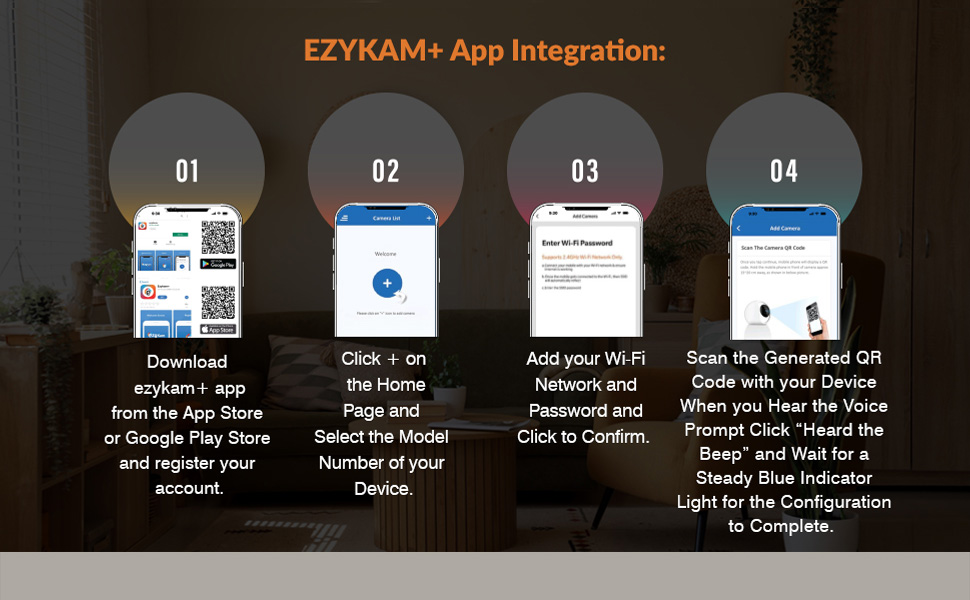
प्रतिमा: EZYKAM+ App Integration Steps. This visual guide illustrates the four main steps for connecting the camera to the EZYKAM+ mobile application: downloading the app, adding the device, entering Wi-Fi details, and scanning the QR code.
6. ऑपरेटिंग सूचना
Once your camera is set up and connected, you can access and control it via the EZYKAM+ app.
6.1 थेट View आणि पॅन आणि टिल्ट नियंत्रण
- Open the EZYKAM+ app and select your CP-E41Q camera from the device list to access the live video feed.
- Use the on-screen joystick or swipe gestures to control the camera's 355° pan (horizontal rotation) and 71° tilt (vertical movement) to view विविध क्षेत्रे.

प्रतिमा: CP PLUS CP-E41Q demonstrating 360-degree view. This image shows the camera's ability to pan and tilt, providing full room coverage without blind spots, as indicated by the circular arrows around the camera.
४.४ टू-वे ऑडिओ
- थेट पासून view screen, tap the microphone icon to enable two-way audio.
- Press and hold the talk button to speak through the camera's speaker. Release to listen.

प्रतिमा: CP PLUS CP-E41Q Two-Way Communication feature. This image depicts a user interacting with someone via the camera's two-way audio function, allowing for remote conversation.
6.3 रात्रीची दृष्टी
- The camera automatically switches to infrared (IR) night vision mode in low-light conditions, providing clear black-and-white video up to 15 meters.
- You can manually toggle night vision settings (Auto/On/Off) within the app's camera settings.
6.4 रेकॉर्डिंग आणि स्टोरेज
- मायक्रोएसडी कार्ड रेकॉर्डिंग: If a MicroSD card is inserted, the camera will record continuously or based on motion detection, depending on your settings. Access recorded footage via the app's playback feature.
- क्लाउड रेकॉर्डिंग: Subscribe to CP PLUS cloud storage services for secure, off-site storage of your video recordings. This ensures footage is safe even if the camera is tampसह ered.

प्रतिमा: CP PLUS CP-E41Q Cloud Recording feature. This image illustrates how video data is securely stored in the cloud, accessible from various devices, ensuring memories are safely preserved.
6.5 Smart Detection Suite
Configure these features in the EZYKAM+ app settings for your camera:
- गती शोधणे: Receive instant alerts on your smartphone when motion is detected in the camera's field of view.
- मानवी शोध: Advanced algorithms differentiate human shapes from other moving objects, reducing false alarms.
- ध्वनी शोध: Get alerts for unusual sounds detected by the camera's microphone.
- मोशन ट्रॅकिंग: When motion is detected, the camera can automatically pan and tilt to follow the moving object or person.
- Built-in Siren: Activate the camera's siren remotely or set it to trigger automatically upon detection of suspicious activity.

प्रतिमा: CP PLUS CP-E41Q Motion Tracking feature. This image demonstrates the camera's ability to automatically track movement, ensuring continuous surveillance of moving subjects.

प्रतिमा: CP PLUS CP-E41Q Sound Detection feature. This image illustrates the camera's capability to detect and alert users to sounds, providing an additional layer of security monitoring.

प्रतिमा: CP PLUS CP-E41Q Built-in Siren feature. This image shows the camera's siren function, designed to deter intruders or alert occupants to detected security events.
6.6 गोपनीयता मोड
- Activate Privacy Mode through the EZYKAM+ app to temporarily disable video recording and live viewing, ensuring privacy when desired. The camera lens will physically retract or turn away.

प्रतिमा: CP PLUS CP-E41Q Privacy Mode. This image illustrates the camera in privacy mode, where the lens is obscured or retracted, ensuring personal privacy when monitoring is not required.
7. देखभाल
- स्वच्छता: कॅमेरा लेन्स आणि बॉडी स्वच्छ करण्यासाठी मऊ, कोरड्या कापडाचा वापर करा. द्रव क्लीनर किंवा अपघर्षक पदार्थ वापरू नका.
- फर्मवेअर अद्यतने: Regularly check the EZYKAM+ app for available firmware updates. Keeping your camera's firmware updated ensures optimal performance, security, and access to new features.
- पॉवर सायकल: जर कॅमेरामध्ये समस्या येत असतील, तर तो १० सेकंदांसाठी पॉवर सोर्समधून अनप्लग करून पुन्हा प्लग इन करून पहा.
8. समस्या निवारण
| समस्या | संभाव्य कारण | उपाय |
|---|---|---|
| कॅमेरा वाय-फायशी कनेक्ट होत नाही. | Incorrect Wi-Fi password, weak signal, 5GHz network used. |
|
| लाईव्ह व्हिडिओ फीड नाही. | Camera offline, network issue, app error. |
|
| मोशन डिटेक्शन अलर्ट खूप वारंवार येतात किंवा काम करत नाहीत. | Sensitivity settings, detection zone. |
|
| रात्रीच्या दृष्टीची गुणवत्ता खराब. | Obstructions, IR reflection. |
|
9. तपशील
| मॉडेल क्रमांक | CP-E41Q |
| ठराव | ५ मेगापिक्सेल (२८८०x१६१६) |
| पॅन/टिल्ट श्रेणी | पॅन: 355°, टिल्ट: 71° |
| नाईट व्हिजन | 15 meters IR Night Vision |
| कनेक्टिव्हिटी | वाय-फाय (फक्त २.४GHz) |
| स्टोरेज पर्याय | MicroSD card (up to 256GB), Cloud Recording |
| ऑडिओ | द्वि-मार्ग ऑडिओ |
| शोध वैशिष्ट्ये | Motion Detection, Human Detection, Sound Detection, Motion Tracking |
| उर्जा स्त्रोत | कॉर्ड केलेले इलेक्ट्रिक |
| इनडोअर/आउटडोअर वापर | इनडोअर |
| परिमाण (LxWxH) | 7.7 x 7.7 x 10.7 सेमी |
| वजन | 176 ग्रॅम |
10. हमी आणि समर्थन
CP PLUS products are designed for reliability and performance. For warranty information, please refer to the warranty card included with your product or visit the official CP PLUS webसाइट. खरेदीचा पुरावा म्हणून तुमची खरेदी पावती ठेवा.
For technical support, troubleshooting assistance, or service inquiries, please contact CP PLUS customer support through their official channels. You can typically find contact information on the CP PLUS website or within the EZYKAM+ app.
ऑनलाइन संसाधने: For additional guides, FAQs, and software downloads, visit the official CP PLUS support page.


