1. परिचय
Welcome to your new CP PLUS CP-E44Q Smart Wi-Fi CCTV Camera. This manual provides detailed instructions to help you set up, operate, and maintain your device, ensuring optimal performance and security.
The CP-E44Q is designed for indoor surveillance, offering advanced features such as 4MP Quad HD resolution, 360° pan and tilt functionality, two-way audio, motion detection with tracking, and IR night vision. It integrates with the ezyKam+ mobile app for remote control and alerts, and supports voice control via Alexa and Google Home.

प्रतिमा 1.1: समोर view of the CP PLUS CP-E44Q Smart Wi-Fi CCTV Camera.
२. बॉक्समध्ये काय आहे?
कृपया तुमच्या पॅकेजमध्ये खालील सर्व घटक समाविष्ट आहेत याची खात्री करा:
- CP PLUS CP-E44Q कॅमेरा
- पॉवर अडॅप्टर
- यूएसबी टाइप-सी केबल
- User Manual QR Card
- माउंटिंग स्क्रू
3. सेटअप
3.1 भौतिक स्थापना
- स्थान निवडा: Select a suitable indoor location for your camera. Ensure the area has a stable 2.4GHz Wi-Fi signal and is within reach of a power outlet.
- प्लेसमेंट: Place the camera on a flat, stable surface, or use the provided mounting screws to secure it to a wall or ceiling.
- वीज कनेक्शन: Connect the camera to the power adaptor using the USB Type-C cable, then plug the adaptor into a power outlet. The camera will power on and initiate its startup sequence.
3.2 App Installation and Configuration (ezyKam+)
The CP-E44Q camera is controlled via the ezyKam+ mobile application. Follow these steps to set up the app and connect your camera:
- अॅप डाउनलोड करा: Download the ezyKam+ app from the Apple App Store (for iOS devices) or Google Play Store (for Android devices).
- नोंदणी/लॉगिन: Open the ezyKam+ app and register for a new account or log in if you already have one.
- डिव्हाइस जोडा: अॅपच्या होम स्क्रीनवर, नवीन डिव्हाइस जोडण्यासाठी "+" आयकॉनवर टॅप करा.
- मॉडेल निवडा: Choose the CP-E44Q model from the list of available devices.
- Wi-Fi शी कनेक्ट करा: Enter your 2.4GHz Wi-Fi network name and password when prompted. Ensure your smartphone is also connected to the same 2.4GHz Wi-Fi network. Confirm the details.
- QR कोड स्कॅन करा: The app will generate a QR code. Hold your smartphone with the QR code approximately 15-20 cm (6-8 inches) in front of the camera lens until the camera scans it.
- पुष्टीकरण: Listen for a voice prompt from the camera indicating successful connection. Once heard, tap "Heard the Beep" in the app. Wait for the camera's indicator light to turn steady blue, signifying that the configuration is complete.
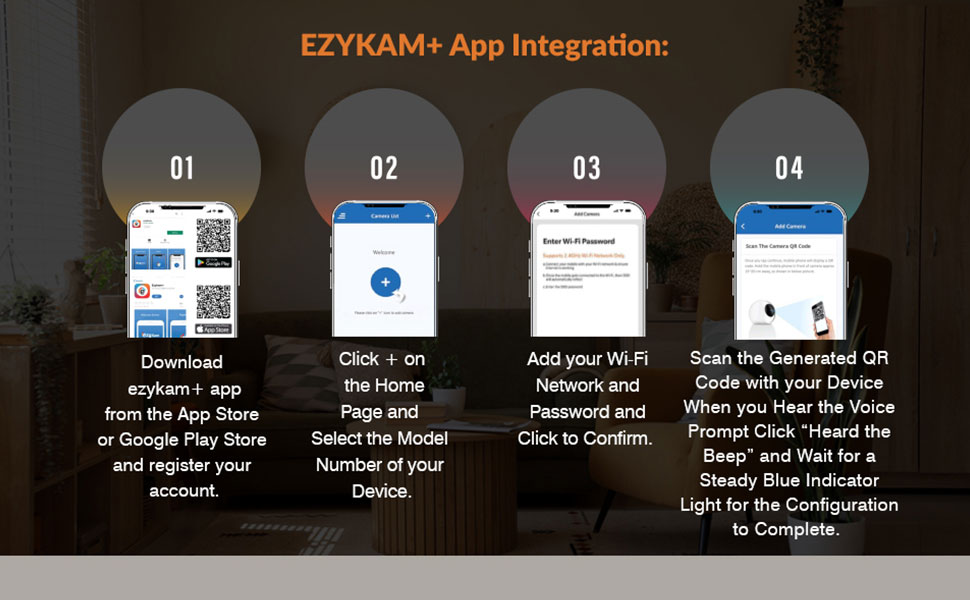
Image 3.1: Visual guide for EZYKAM+ App integration and setup steps.
4. ऑपरेटिंग
4.1 360° Pan & Tilt View
The camera offers full 360° horizontal and 85° vertical rotation. Use the ezyKam+ app to remotely control the camera's movement, allowing you to monitor different areas and eliminate blind spots.

Image 4.1: The camera's 360° pan and tilt capability for comprehensive coverage.
४.४ टू-वे ऑडिओ
The CP-E44Q features a built-in microphone and speaker, enabling two-way communication. Through the ezyKam+ app, you can listen to the camera's surroundings and speak through the camera to interact with individuals in the monitored area.
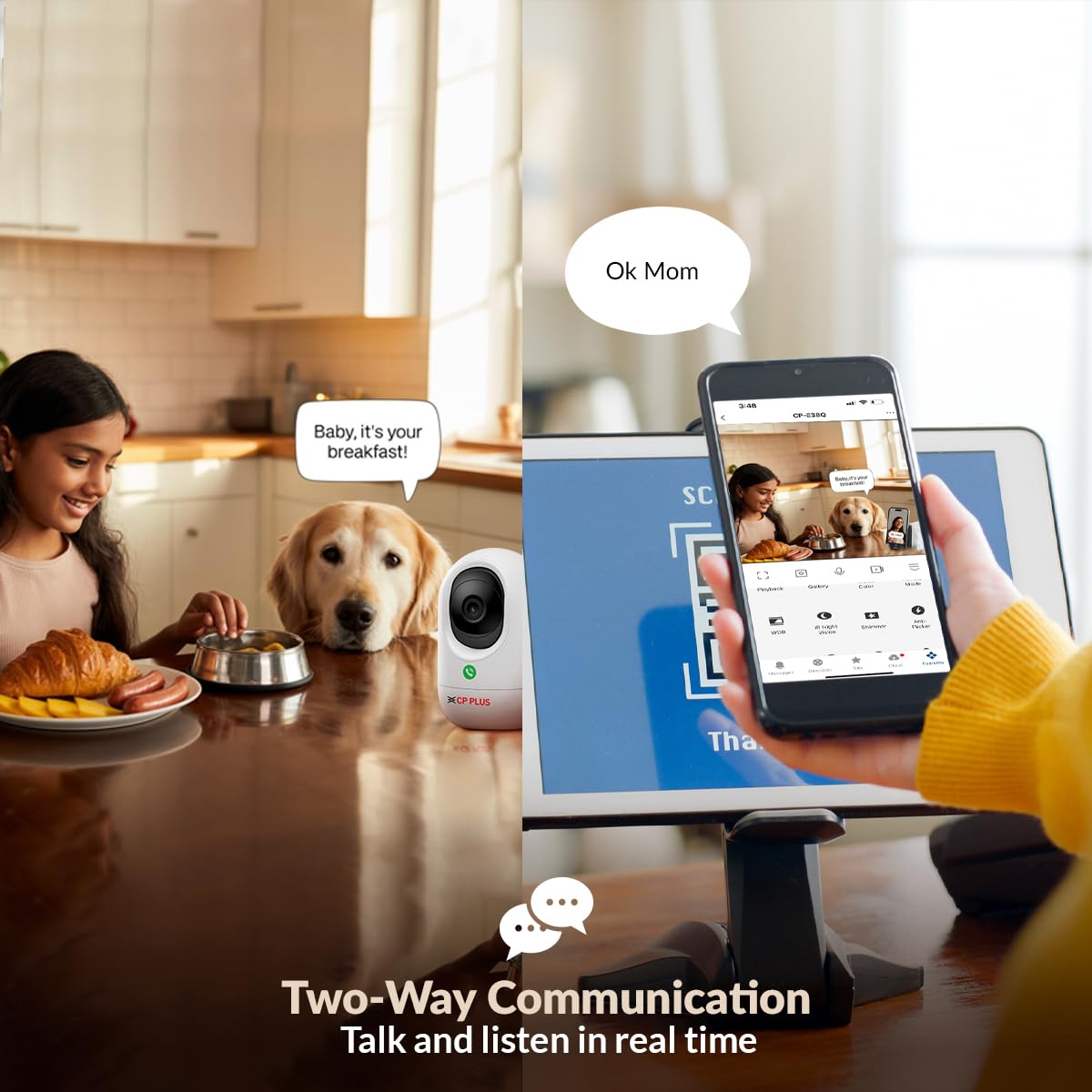
Image 4.2: Illustration of the two-way communication feature.
4.3 Press to Call Feature
A unique feature of this model is the 'Press to Call' button located on the camera. When pressed, it allows individuals near the camera to initiate a video call directly to your ezyKam+ app, facilitating quick and easy communication.
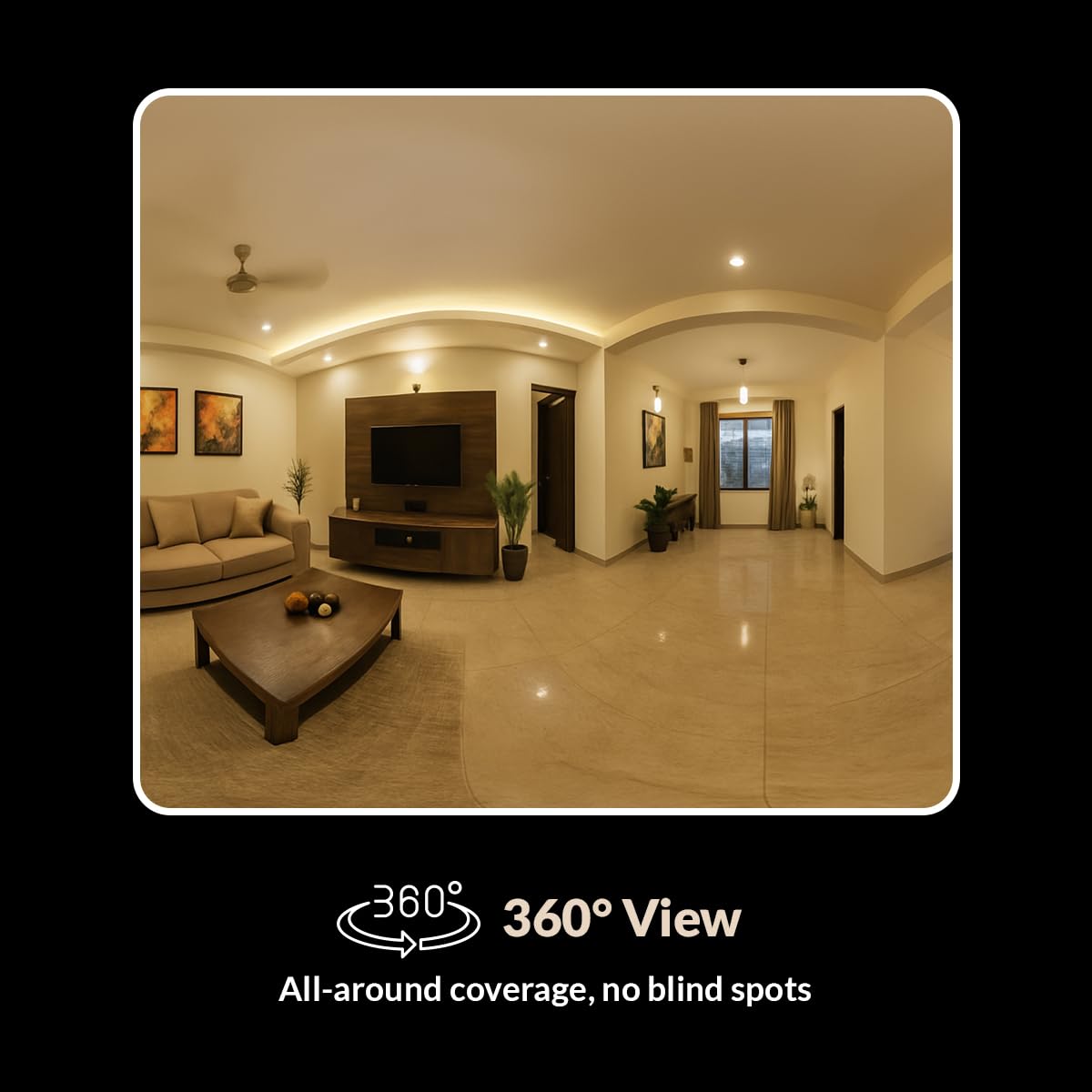
Image 4.3: The 'Press to Call' button for direct video communication.
4.4 AI Motion Detection & Tracking
The camera is equipped with AI-powered motion detection and tracking. It can intelligently identify human movement, track the subject within its field of view, and send real-time alerts to your smartphone via the ezyKam+ app.

प्रतिमा 4.4: ओव्हरview of the Smart Detection Suite features.
4.5 IR Night Vision
The CP-E44Q provides clear black-and-white video footage in low-light conditions, with an effective range of up to 15 meters. This ensures continuous surveillance even in complete darkness.
4.6 गोपनीयता मोड
To ensure privacy when needed, you can activate the Privacy Mode through the ezyKam+ app. This mode temporarily pauses recording and disables live view, providing peace of mind.

Image 4.5: Privacy Mode feature in the ezyKam+ app.
4.7 Cloud Recording & Local Storage
For secure storage and remote access, the camera supports cloud recording (subscription may be required). Alternatively, you can insert a microSD card (up to 256GB, not included) for local video storage, eliminating monthly cloud costs.

Image 4.6: Cloud Recording for secure and accessible footage.
४.३ व्हॉइस कंट्रोल इंटिग्रेशन
The CP-E44Q is compatible with Amazon Alexa and Google Home. You can link your camera to these smart home platforms for convenient hands-free control using voice commands.
5. देखभाल
- स्वच्छता: Gently wipe the camera lens and body with a soft, dry, lint-free cloth. Avoid using liquid cleaners, solvents, or abrasive materials, as these can damage the camera's components.
- फर्मवेअर अद्यतने: Regularly check the ezyKam+ app for available firmware updates. Installing updates ensures your camera has the latest features, security enhancements, and bug fixes.
- नेटवर्क स्थिरता: Ensure your Wi-Fi network remains stable and strong to prevent interruptions in camera operation and video streaming.
- पॉवर सायकल: If the camera experiences connectivity issues or becomes unresponsive, perform a power cycle by unplugging the power adapter, waiting for 10 seconds, and then plugging it back in.
6. समस्या निवारण
| समस्या | संभाव्य कारण | उपाय |
|---|---|---|
| Camera is offline or disconnected. | Weak Wi-Fi signal, incorrect Wi-Fi password, power interruption. | Check Wi-Fi signal strength. Verify Wi-Fi password in the ezyKam+ app. Power cycle the camera (unplug and replug). Ensure the camera is within Wi-Fi range. |
| खराब व्हिडिओ गुणवत्ता. | Dirty lens, low network bandwidth, insufficient lighting. | Clean the camera lens with a soft cloth. Ensure stable internet connection. Adjust camera placement for better lighting. |
| मोशन अलर्ट मिळाले नाहीत. | Motion detection disabled, incorrect app notification settings. | Verify motion detection settings and sensitivity in the ezyKam+ app. Check your smartphone's notification settings for the ezyKam+ app. |
| द्वि-मार्गी ऑडिओ काम करत नाही. | Microphone/speaker permissions not granted, volume too low. | Ensure microphone and speaker permissions are granted to the ezyKam+ app on your smartphone. Check volume settings within the app and on your phone. |
7. तपशील
- उत्पादन परिमाणे: 7.3 x 7.3 x 11.9 सेमी
- आयटम वजन: 172 ग्रॅम
- आयटम मॉडेल क्रमांक: CP-E44Q साठी चौकशी सबमिट करा, आम्ही तुमच्याशी २४ तासांत संपर्क करू.
- कनेक्टिव्हिटी तंत्रज्ञान: वायरलेस (वाय-फाय)
- कनेक्टिव्हिटी प्रोटोकॉल: वाय-फाय (2.4GHz)
- उर्जा स्त्रोत: कॉर्ड केलेले इलेक्ट्रिक
- इनडोअर/आउटडोअर वापर: इनडोअर
- विशेष वैशिष्ट्ये: 2 Way Audio, Cry Detection, HD Resolution, Motion Sensor, Night Vision
- सुसंगत उपकरणे: स्मार्टफोन (अँड्रॉइड, आयओएस)
- नियंत्रक प्रकार: अमेझॉन अलेक्सा, गुगल होम
- निर्माता: AIL DIXON Technologies, CP PLUS
- आयातक: आदित्य इन्फोटेक लि.
8. हमी आणि समर्थन
Your CP PLUS CP-E44Q camera is manufactured by AIL DIXON Technologies and imported by Aditya Infotech Ltd.
For detailed warranty information, technical support, or service inquiries, please refer to the contact information provided on the User Manual QR Card included in your product packaging. You may also visit the official CP PLUS webपुढील सहाय्यासाठी साइट.
- निर्माता: CP PLUS (AIL DIXON Technologies, Shed No .: 1 to 4,YSR EMC Kopparthy, YSR Kadapa, YSR District, Kadapa(Cuddapah), Andhra Pradesh-516003)
- आयातक: Aditya Infotech Ltd. (F-28, Okhla Industrial Area Phase-1, New Delhi-110020)


