परिचय
This manual provides comprehensive instructions for the setup, operation, and maintenance of your Trevi PJ 3030 Digital Projection Clock. Please read this manual carefully before using the device to ensure proper function and longevity.
उत्पादन संपलेview
The Trevi PJ 3030 is a versatile digital clock designed to display time, date, and temperature, with the added feature of time projection. It includes a backlit display for clear readability and a programmable alarm function.
घटक
- डिजिटल डिस्प्ले
- प्रोजेक्शन लेन्स
- Control Buttons (AL, UP, DOWN, SET, MODE)
- बॅटरी कंपार्टमेंट
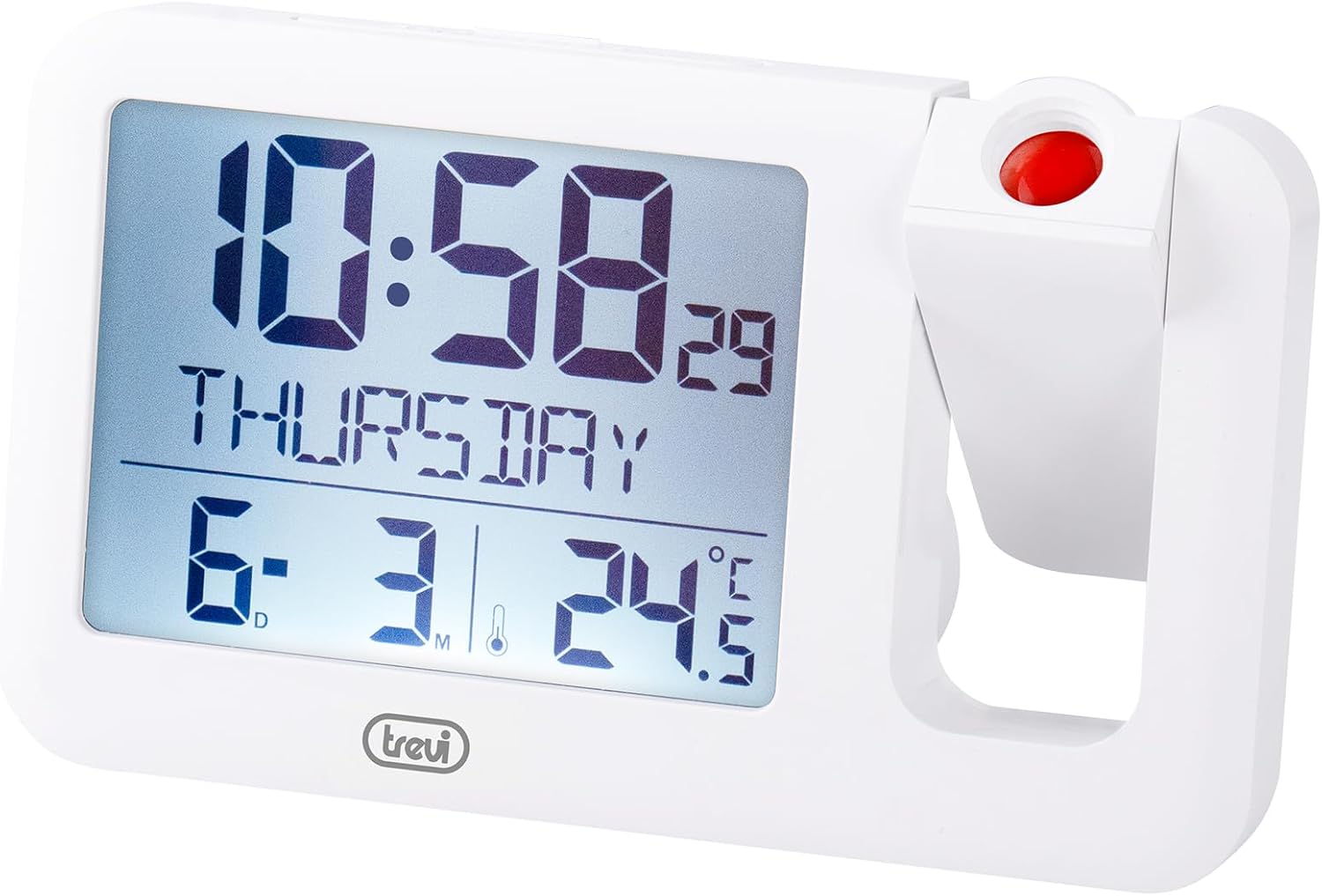
आकृती 1: समोर view of the Trevi PJ 3030 Digital Projection Clock. The image shows the main digital display on the left, indicating time, day, date, and temperature. On the right, the adjustable projection lens is visible with a red button on top.
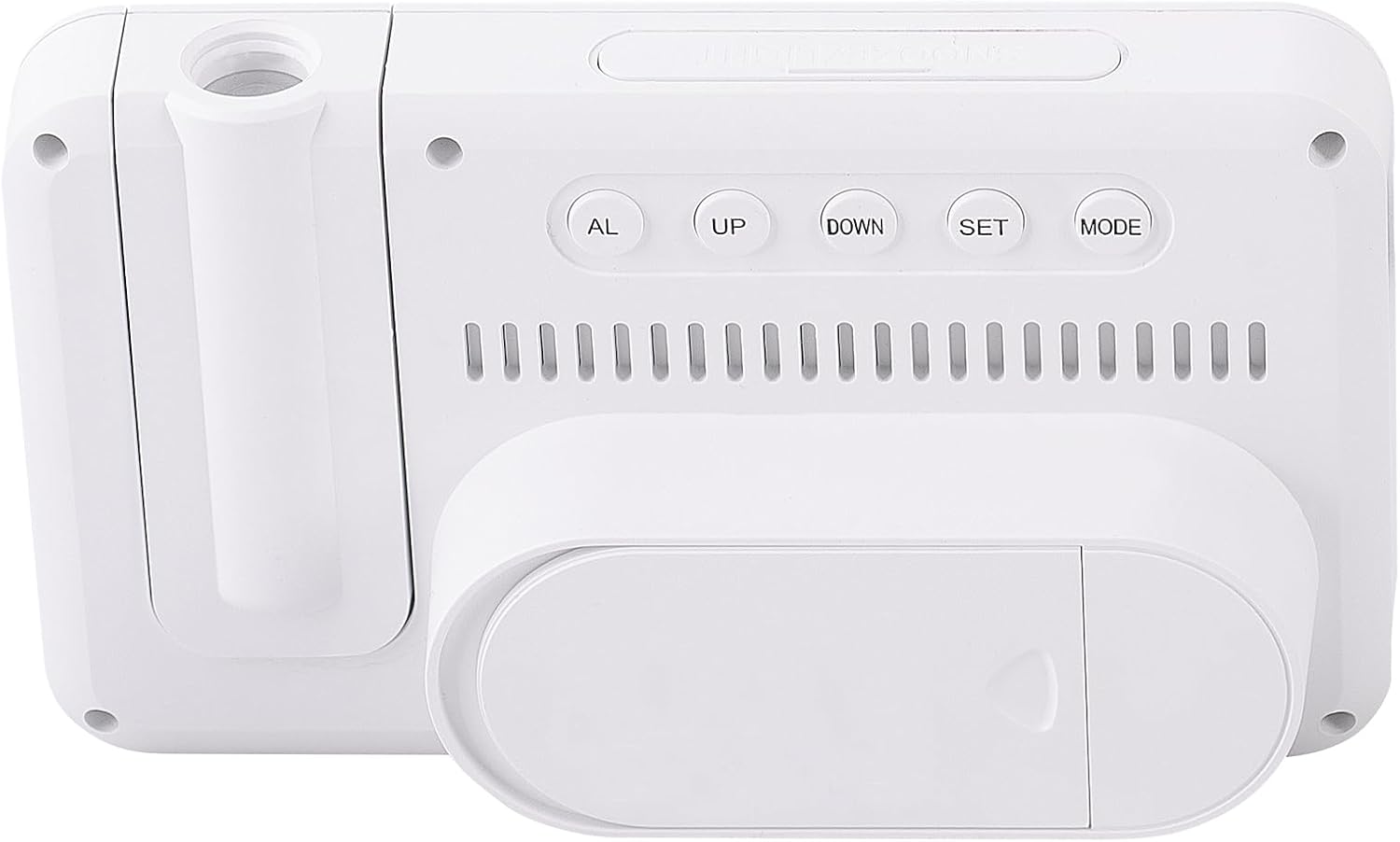
आकृती 2: मागे view of the Trevi PJ 3030 Digital Projection Clock. This view highlights the control buttons: AL, UP, DOWN, SET, and MODE, arranged horizontally. Below the buttons, ventilation slots are visible, and at the bottom, the battery compartment cover is shown.
सेटअप
बॅटरी स्थापना
- डिव्हाइसच्या मागील बाजूस बॅटरी कंपार्टमेंट शोधा (आकृती २.२ पहा).
- बॅटरी कंपार्टमेंट कव्हर उघडा.
- Insert 3 AAA batteries (not included) according to the polarity markings (+/-) inside the compartment.
- बॅटरी कंपार्टमेंट कव्हर सुरक्षितपणे बंद करा.
टीप: The device requires 3 AAA batteries for operation. Batteries are not included with the product.
ऑपरेटिंग सूचना
वेळ आणि तारीख सेट करणे
- दाबा मोड button repeatedly until the time display starts flashing.
- वापरा UP or खाली तास समायोजित करण्यासाठी बटणे.
- दाबा सेट to confirm the hour and move to minute adjustment.
- वापरा UP or खाली मिनिटे समायोजित करण्यासाठी बटणे.
- दाबा सेट to confirm the minutes and move to year adjustment.
- Continue this process, using UP/खाली समायोजित आणि सेट to confirm, for setting the year, month, and day.
- सर्व सेटिंग्ज पूर्ण झाल्यावर, दाबा मोड सेटिंग मोडमधून बाहेर पडण्यासाठी.
अलार्म सेट करत आहे
- दाबा AL button to enter alarm setting mode. The alarm time will flash.
- वापरा UP or खाली अलार्म तास समायोजित करण्यासाठी बटणे.
- दाबा सेट to confirm the alarm hour and move to minute adjustment.
- वापरा UP or खाली अलार्म मिनिटे समायोजित करण्यासाठी बटणे.
- दाबा सेट to confirm the alarm minutes.
- दाबा AL again to activate or deactivate the alarm. An alarm icon will appear on the display when activated.
प्रोजेक्शन फीचर वापरणे
The Trevi PJ 3030 can project the time onto a ceiling or wall.
- Locate the projection lens on the right side of the clock (refer to Figure 1).
- Press the red button located on top of the projection lens to activate the projection.
- Adjust the angle of the projection lens manually to direct the time display to your desired surface.
- The projection will remain active for a short period and then turn off automatically to conserve battery power.
Changing Temperature Unit (°C / °F)
The clock displays temperature in Celsius (°C) or Fahrenheit (°F).
- सामान्य वेळेच्या प्रदर्शन मोडमध्ये, दाबा खाली button to toggle between Celsius and Fahrenheit.
देखभाल
- घड्याळाची पृष्ठभाग मऊ, कोरड्या कापडाने स्वच्छ करा. अपघर्षक क्लीनर किंवा सॉल्व्हेंट्स वापरू नका.
- डिव्हाइसला थेट सूर्यप्रकाश, अति तापमान आणि उच्च आर्द्रतेपासून दूर ठेवा.
- If the clock will not be used for an extended period, remove the batteries to prevent leakage.
समस्यानिवारण
| समस्या | संभाव्य कारण | उपाय |
|---|---|---|
| डिस्प्ले रिकामा किंवा मंद आहे. | कमी किंवा संपलेल्या बॅटरी. | नवीन AAA बॅटरीने बदला. योग्य ध्रुवीयता सुनिश्चित करा. |
| Projection is not visible or dim. | Projection feature not activated; insufficient ambient darkness; projection lens obstructed. | Press the red projection button. Ensure the room is dark enough. Clean the projection lens if necessary. |
| अलार्म वाजत नाही. | अलार्म सक्रिय केलेला नाही; चुकीचा अलार्म वेळ सेट केला आहे. | Ensure the alarm icon is visible on the display. Re-check alarm time settings. |
| Incorrect time/date displayed. | Time/date not set correctly after battery change or initial setup. | Follow the "Setting Time and Date" instructions to reset. |
तपशील
- मॉडेल: Trevi PJ 3030
- डिस्प्ले प्रकार: डिजिटल, बॅकलिट
- कार्ये: Time, Date, Day, Temperature (°C/°F), Alarm, Projection
- उर्जा स्त्रोत: 3 x AAA बॅटरी (समाविष्ट नाही)
- परिमाणे: 14.9W x 9H centimetres
- वजन: 0.2 किलोग्रॅम
- साहित्य: प्लास्टिक
- इनडोअर/आउटडोअर वापर: इनडोअर
हमी आणि समर्थन
For warranty information and customer support, please refer to the documentation provided with your purchase or visit the official Trevi webसाइट. वॉरंटी दाव्यांसाठी तुमचा खरेदीचा पुरावा ठेवा.


