परिचय
The Moman H4M Motorcycle Helmet Headset is designed to enhance your riding experience with advanced audio features and convenient controls. This headset offers a user-friendly LCD screen, Bluetooth 5.3 connectivity, HiFi stereo sound with 6 EQ modes, an AI voice assistant, FM radio, and IPX6 waterproof rating for reliable performance in various conditions. This manual provides detailed instructions for installation, operation, and maintenance.

Image: Moman H4M Motorcycle Headset with LCD Screen, highlighting its key features.
पॅकेज सामग्री
तुमच्या पॅकेजमध्ये सर्व वस्तू आहेत का ते तपासा:
- 1 x H4M Headset Unit
- 1 x Replaceable Microphone (Boom or Soft Wire)
- 1 एक्स परत क्लिप
- 1 x टाइप-सी चार्जिंग केबल
- 1 x वापरकर्ता मॅन्युअल
- 1 x Velcro Clip Kit

Image: Diagram showing the H4M headset and its complete set of accessories, including microphones, clips, and charging cable.
सेटअप
२. हेल्मेटवर बसवणे
The Moman H4M headset can be installed using either the back clip or the Velcro clip kit, depending on your helmet type and preference. Ensure the headset is securely attached to the side of your helmet, allowing easy access to controls.
- Choose the appropriate mounting method (clip or adhesive Velcro).
- Attach the main unit to the helmet.
- Insert the speakers into the helmet's ear pockets.
- Position the microphone (boom mic for open-face helmets, soft wire mic for full-face helmets) near your mouth.
- Connect the speaker and microphone cables to the main unit's interface.

Image: Visual guide demonstrating the easy installation process of the H4M headset onto a motorcycle helmet.
१. सुरुवातीचे चार्जिंग
Before first use, fully charge the headset. Connect the Type-C charging cable to the headset and a power source. The LCD screen will indicate charging status. A full charge takes approximately 2 hours.
3. ब्लूटूथ पेअरिंग
The H4M uses Bluetooth 5.3 for stable connections.
- हेडसेट चालू आहे याची खात्री करा.
- Press and hold the Power/Play/Pause button until the LCD screen displays 'Pairing' or a similar indicator.
- On your smartphone or other Bluetooth device, search for 'Moman H4M' in the Bluetooth settings.
- Select 'Moman H4M' to connect. The LCD screen will confirm a successful connection.
The H4M can simultaneously connect to two smartphones, allowing for navigation, calls, and music playback concurrently.

प्रतिमा: अंतर्गत view of the Moman H4M headset, highlighting the Bluetooth 5.3 chip for enhanced connectivity and the 40mm speaker for superior audio.
ऑपरेटिंग सूचना
१. नियंत्रणेview

Image: Detailed diagram illustrating the location and function of each button and interface on the Moman H4M headset, including volume, power, mode, AI voice assistant, and charging port.
- चालू/बंद की: Press and hold to power on/off. Short press to Play/Pause music or Answer calls.
- आवाज वाढवा/पुढील गाणे: Short press for volume up. Long press for next song.
- Volume Down/Previous Song: Short press for volume down. Long press for previous song.
- AI Voice Assistant Button: Short press to activate your smartphone's voice assistant (Siri, Google Assistant).
- मोड की: Short press to cycle through EQ modes or switch to FM radio.
2. एलसीडी स्क्रीन डिस्प्ले
The integrated LCD screen provides real-time operational information, making it easy to monitor your headset's status.
- बॅटरी पातळी: Displays current battery charge.
- खंड: Shows current audio volume.
- एफएम रेडिओ वारंवारता: Indicates the active FM station.
- Play/Pause Status: Shows music playback status.
- तापमान: Displays ambient temperature (in Celsius or Fahrenheit).
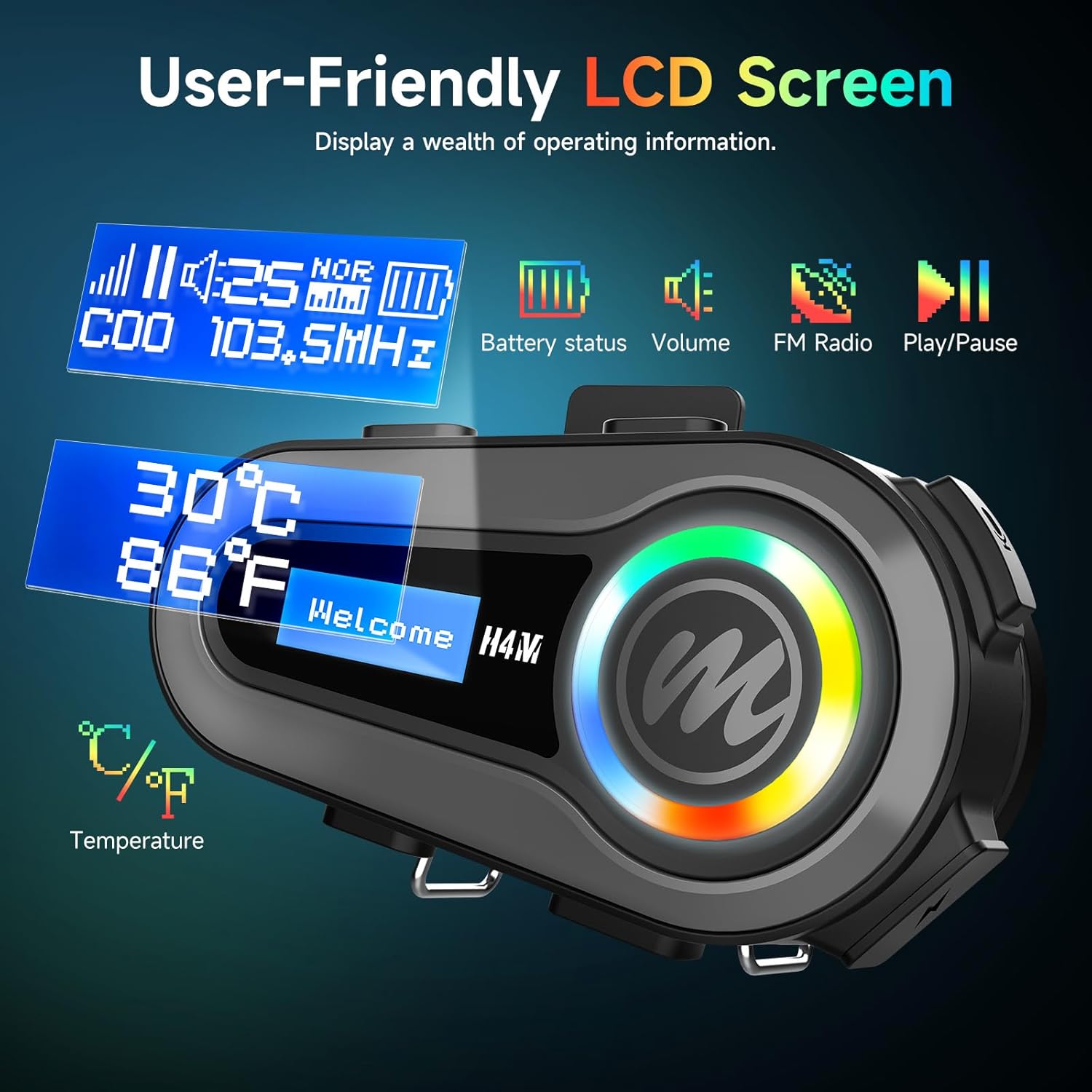
Image: Close-up of the Moman H4M's user-friendly LCD screen, showing battery status, volume, FM frequency, and temperature display.
3. Audio Experience: HiFi Stereo & EQ Modes
The H4M features a 40mm tuned speaker for 3D HiFi stereo sound. Customize your audio with 6 EQ modes:
- जाझ
- सामान्य
- पॉप
- देश
- खडक
- क्लासिक
Press the Mode key to cycle through these equalization settings.

Image: A motorcycle helmet with the Moman H4M headset, visually representing the immersive Hi-Fi stereo sound experience.

Image: The Moman H4M headset's LCD screen showing the selection of 6 personalized EQ modes, including Jazz, Normal, Pop, Country, Rock, and Classic.
4. AI Voice Assistant
Activate your smartphone's voice assistant (Siri or Google Assistant) with a single press of the dedicated voice control button. This allows for hands-free operation of navigation, music, and calls, enhancing safety while riding.

Image: Illustration of the Moman H4M headset's AI Voice Assistant feature, showing a rider interacting with their phone's assistant for hands-free control.
5. एफएम रेडिओ
Enjoy stereo FM radio during your rides. Use the Mode key to switch to FM radio mode and the volume buttons to tune stations.

Image: The Moman H4M headset displaying its Stereo FM Radio capability, surrounded by visual representations of various radio content like music, news, and sports.
देखभाल
The Moman H4M headset is designed with an IPX6 waterproof rating, ensuring protection against strong jets of water. This makes it suitable for use in various weather conditions.
- स्वच्छता: Wipe the headset with a damp कापड कठोर रसायने किंवा अपघर्षक क्लीनर वापरणे टाळा.
- पाणी एक्सपोजर: While IPX6 rated, avoid submerging the device. Ensure charging port covers are securely closed when not charging to maintain water resistance.
- स्टोरेज: वापरात नसताना थंड, कोरड्या जागी साठवा.

Image: The Moman H4M headset shown with water splashing, illustrating its IPX6 waterproof and dustproof design for use in challenging environments.
समस्यानिवारण
If you encounter issues with your Moman H4M headset, refer to the following common solutions:
- शक्ती नाही: Ensure the headset is fully charged. Connect to a power source and check the LCD for charging indication.
- जोडू शकत नाही: Ensure the headset is in pairing mode (LCD displays 'Pairing'). Turn off and on your smartphone's Bluetooth, then try pairing again. Ensure no other devices are actively connected to the headset.
- आवाज नाही/कमी आवाज: Check the volume level on both the headset and your connected device. Ensure speakers are correctly installed and connected.
- Disconnection Issues: Ensure your device is within the effective Bluetooth range. Avoid strong electromagnetic interference.
- व्हॉइस असिस्टंट प्रतिसाद देत नाही: Ensure your smartphone's voice assistant is enabled and the headset is properly connected.
- एफएम रेडिओ स्टॅटिक: चांगले सिग्नल रिसेप्शन असलेल्या भागात जाण्याचा प्रयत्न करा.
If problems persist, consult the official Moman support channels for further assistance.
तपशील
| मॉडेलचे नाव | Moman H4M |
| कनेक्टिव्हिटी तंत्रज्ञान | वायरलेस (ब्लूटूथ ५.३) |
| ध्वनी नियंत्रण | सक्रिय आवाज रद्द करणे |
| बॅटरी आयुष्य | Up to 32 Hours (Working Time), 360 Hours (Standby Time) |
| चार्जिंग वेळ | 2 तास |
| बॅटरी क्षमता | 1000mAh |
| पाणी प्रतिकार पातळी | IPX6 जलरोधक |
| ऑडिओ ड्रायव्हरचा प्रकार | डायनॅमिक ड्रायव्हर (१६.१ मिमी) |
| विशेष वैशिष्ट्ये | LCD Screen, 6 EQ Sound Modes, AI Voice Assistant, FM Radio |
| सुसंगत साधने | Smartphones, Motorcycles, Car Audio Systems |
| साहित्य | प्लास्टिक |
| आयटम वजन | 0.2 किलोग्राम (7 औंस) |

Image: The Moman H4M headset highlighting its 1000mAh large capacity battery, with indicators for 2 hours charging time, 32 hours working time, and 360 hours standby time.
हमी आणि समर्थन
Moman products are designed for quality and reliability. For warranty information, please refer to the documentation included with your purchase or visit the official Moman website. For technical support, troubleshooting assistance, or to inquire about replacement parts, please contact Moman customer service through their official channels.
तुम्हाला अधिक माहिती आणि संपर्क तपशील येथे मिळू शकतात Moman Store on Amazon.


