1. परिचय
This manual provides detailed instructions for the installation, operation, and maintenance of the LINOVISION POE-SWR510GMP Outdoor 8-Port Gigabit PoE Switch. This device is designed for outdoor network deployments, offering robust performance and advanced management capabilities.
The POE-SWR510GMP is an IP65-rated, L2+ managed Power over Ethernet (PoE) switch featuring 8 full Gigabit PoE ports and 2 Gigabit SFP uplink ports. It supports a total PoE budget of 140W and includes remote cloud management functionalities.
2. सुरक्षितता माहिती
Please read and understand all safety instructions before installing or operating this device. Failure to do so may result in injury or damage to the equipment.
- विद्युत सुरक्षा: For safety, a Ground Fault Circuit Interrupter (GFCI) circuit breaker is required at the power input side. Installation should be performed by a licensed electrician.
- वीज पुरवठा: उर्जा स्त्रोत व्हॉल्यूमची खात्री कराtage matches the device's requirements (100-240V AC).
- पर्यावरणीय परिस्थिती: The switch is designed for outdoor use within a temperature range of -20°C to 60°C (-4°F to 140°F). Avoid exposing the device to extreme conditions outside this range.
- लाट संरक्षण: The device includes 4kV PoE surge protection. However, additional external surge protection is recommended in areas prone to lightning.
- माउंटिंग: Securely mount the device using the provided brackets to prevent accidental falls.
3. पॅकेज सामग्री
पॅकेजमध्ये सर्व वस्तू आहेत का ते तपासा:
- LINOVISION POE-SWR510GMP Outdoor PoE Switch
- Metal Straps (for pole mounting)
- वापरकर्ता मॅन्युअल
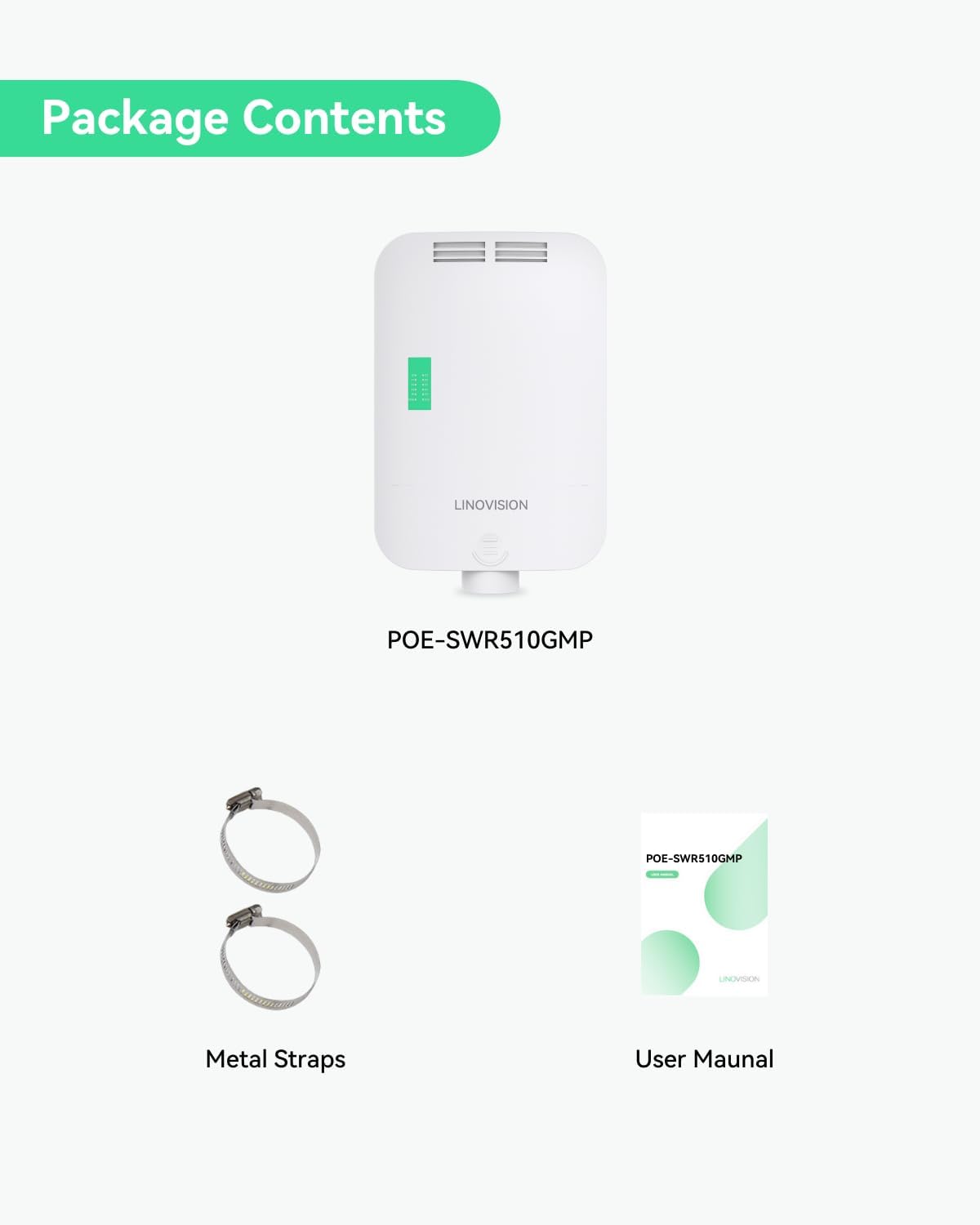
4. उत्पादन संपलेview
4.1 हार्डवेअर वर्णन
The LINOVISION POE-SWR510GMP features a robust, waterproof enclosure designed for outdoor environments. Key components include:
- 8 Gigabit PoE Ports: Provide data and power to connected PoE-compatible devices (e.g., IP cameras, wireless access points). Each port supports up to 30W (IEEE802.3af/at).
- 2 Gigabit SFP Ports: For fiber optic uplinks, enabling long-distance network connections.
- 100-240V AC Input: Power connection terminal.
- रीसेट स्विचः For restoring factory default settings.
- एलईडी निर्देशक: For power, PoE status, and network activity.

4.2 Industrial Design Features
The switch is engineered for durability and reliable operation in challenging outdoor conditions:
- IP65 Waterproof Enclosure: Protects against dust and water ingress.
- विस्तृत ऑपरेटिंग तापमान: Functions reliably from -20°C to 60°C (-4°F to 140°F).
- 4kV Surge Protection: Built-in protection against electrical surges.
- Large-Area Pure Aluminum Heat Sink: Efficiently dissipates heat to prevent overheating, ensuring stable performance.


5. सेटअप आणि स्थापना
5.1 माउंटिंग पर्याय
The POE-SWR510GMP supports both pole mount and wall mount installations. Brackets are included in the package.
- पोल माउंट: Use the provided metal straps to secure the switch to a pole.
- वॉल माउंट: Use appropriate screws and anchors (not included) to fix the switch to a wall.

5.2 वीज जोडणी
Connect the 100-240V AC power source to the designated terminal block on the switch. Ensure the GFCI circuit breaker is installed as per safety guidelines.
5.3 नेटवर्क कनेक्शन्स
- PoE उपकरणे: Connect IP cameras, wireless access points, or other PoE-powered devices to the 8 Gigabit PoE ports using standard Ethernet cables.
- अपलिंक: Use the 2 Gigabit SFP ports for fiber optic connections to your core network or other switches, especially for long-distance data transmission.

6. ऑपरेटिंग सूचना
6.1 L2+ Management Functions
The POE-SWR510GMP is an L2+ managed switch, offering advanced network configuration and monitoring capabilities via its WEB GUI, Telnet, SSH, CLI, SNMP, and MQTT Cloud interfaces.
Key L2+ management features include:
- व्हीएलएएनः Virtual Local Area Network for network segmentation.
- QoS: Quality of Service for prioritizing network traffic.
- ACL: Access Control List for network security.
- स्थिर राउटिंग: For defining fixed paths for network traffic.
- लिंक एकत्रीकरण: Combining multiple network connections for increased throughput and redundancy.
- ONVIF Camera Discovery: Automatic detection of ONVIF-compliant cameras.

6.2 Remote Cloud Management
The switch supports remote monitoring and control of PoE ports through LINOVISION's RemoteMonit Cloud platform or other compatible 3rd party cloud platforms using MQTT protocol. This feature allows for:
- PoE Port On/Off Control
- Port Speed Limit Configuration
- PoE Power Control
- Port Priority Settings
A one-year free subscription for RemoteMonit Cloud is included.

6.3 PoE Compatibility and Safety
The switch utilizes IEEE802.3af/at PoE chipset technology for intelligent power allocation. It automatically detects and classifies Powered Devices (PDs) in four steps: Detection, Classification, Start Up, and Power ON. This ensures appropriate power delivery to IEEE802.3af/at compliant devices and prevents power delivery to non-PoE devices, enhancing safety and compatibility.

7. देखभाल
To ensure optimal performance and longevity of your LINOVISION POE-SWR510GMP switch, follow these maintenance guidelines:
- नियमित तपासणी: Periodically check the enclosure for any signs of damage, corrosion, or loose connections.
- स्वच्छता: Keep the exterior of the switch clean. Use a soft, dry cloth to wipe away dust. Do not use liquid cleaners or solvents.
- वायुवीजन: Ensure that the heat dissipation vents are not obstructed to allow for proper airflow.
- फर्मवेअर अद्यतने: Check the LINOVISION website for available firmware updates to enhance performance and security.
8. समस्या निवारण
If you encounter issues with your POE-SWR510GMP switch, refer to the following common troubleshooting steps:
- शक्ती नाही: Verify the AC power connection and ensure the GFCI circuit breaker is not tripped. Check the power LED indicator on the switch.
- नेटवर्क कनेक्टिव्हिटी नाही: Check Ethernet cable connections for all devices. Ensure the link/activity LEDs on the switch ports are active. Verify IP settings for connected devices.
- PoE डिव्हाइस चालू होत नाही: Confirm the connected device is PoE-compatible (IEEE802.3af/at). Check the PoE status LED for the specific port. Ensure the total PoE budget (140W) is not exceeded. Try connecting the device to a different PoE port.
- प्रवेश करू शकत नाही Web GUI: Ensure your computer's IP address is in the same subnet as the switch's default IP (refer to specifications for default IP). Clear browser cache or try a different browser.
- डिव्हाइस खराबी: If the switch is unresponsive, try performing a soft reset by power cycling the device. If issues persist, use the reset button to restore factory default settings (note: this will erase all configurations).
9. तपशील
Detailed technical specifications for the LINOVISION POE-SWR510GMP switch:
| वैशिष्ट्य | तपशील |
|---|---|
| मॉडेल क्रमांक | POE-SWR510GMP |
| बंदरांची संख्या | 8 Gigabit PoE Ports, 2 Gigabit SFP Ports |
| पो मानक | IEEE802.3af/at |
| Max PoE Power Per Port | 30W |
| एकूण PoE बजेट | 140W |
| डेटा ट्रान्सफर रेट | 10/100/1000Mbps (गीगाबिट) |
| इंटरफेस प्रकार | RJ45, SFP |
| व्यवस्थापन | L2+ Managed (WEB GUI, Telnet, SSH, CLI, SNMP, MQTT Cloud) |
| जलरोधक रेटिंग | IP65 |
| लाट संरक्षण | 4kV PoE |
| ऑपरेटिंग तापमान | -20°C ते 60°C (-4°F ते 140°F) |
| पॉवर इनपुट | 100-240 व्ही एसी |
| उत्पादन परिमाणे | 8.46 x 3.03 x 13.43 इंच (215 x 77 x 341 मिमी) |
| आयटम वजन | 2.33 पौंड (1.06 किलो) |
| माउंटिंग पर्याय | पोल माउंट, वॉल माउंट |
| सुसंगत साधने | Camera, Desktop, Laptop, Printer (PoE-compatible) |

10. हमी आणि समर्थन
LINOVISION provides comprehensive support for its products. For warranty information, technical assistance, or service inquiries, please refer to the official LINOVISION webसाइट किंवा त्यांच्या समर्थन कार्यसंघाशी संपर्क साधा.
- समर्थन: LINOVISION offers 24/7 US local and global technical support.
- हमी: Warranty and replacement services are available from their Texas location.
- ऑनलाइन संसाधने: ला भेट द्या LINOVISION Store on Amazon किंवा त्यांचे अधिकारी website for FAQs, downloads, and contact information.


