1. परिचय
Thank you for choosing the Trevi XR 8A 202 Portable Wireless Speaker. This manual provides essential information for the proper setup, operation, and maintenance of your device. Please read it thoroughly before use and retain it for future reference.
2. सुरक्षितता माहिती
- स्पीकरला अति तापमान, थेट सूर्यप्रकाश किंवा उघड्या ज्वालांच्या संपर्कात आणू नका.
- स्पीकरला तीव्र प्रभाव पाडणे किंवा त्याच्या अधीन करणे टाळा.
- डिव्हाइस स्वतः वेगळे करू नका, दुरुस्त करू नका किंवा त्यात बदल करू नका. मदतीसाठी पात्र सेवा कर्मचाऱ्यांशी संपर्क साधा.
- स्पीकरला वैद्यकीय उपकरणांपासून दूर ठेवा.
- Ensure the charging port is dry before connecting the USB Type-C cable.
- स्थानिक नियमांनुसार बॅटरी आणि इलेक्ट्रॉनिक घटकांची जबाबदारीने विल्हेवाट लावा.
3. पॅकेज सामग्री
पॅकेजमध्ये सर्व वस्तू आहेत का ते तपासा:
- Trevi XR 8A 202 Portable Wireless Speaker
- यूएसबी टाइप-सी चार्जिंग केबल
- वॉरंटी कार्ड
- वापरकर्ता मॅन्युअल (हा दस्तऐवज)
4. उत्पादन संपलेview
स्पीकरचे घटक आणि नियंत्रणे जाणून घ्या.
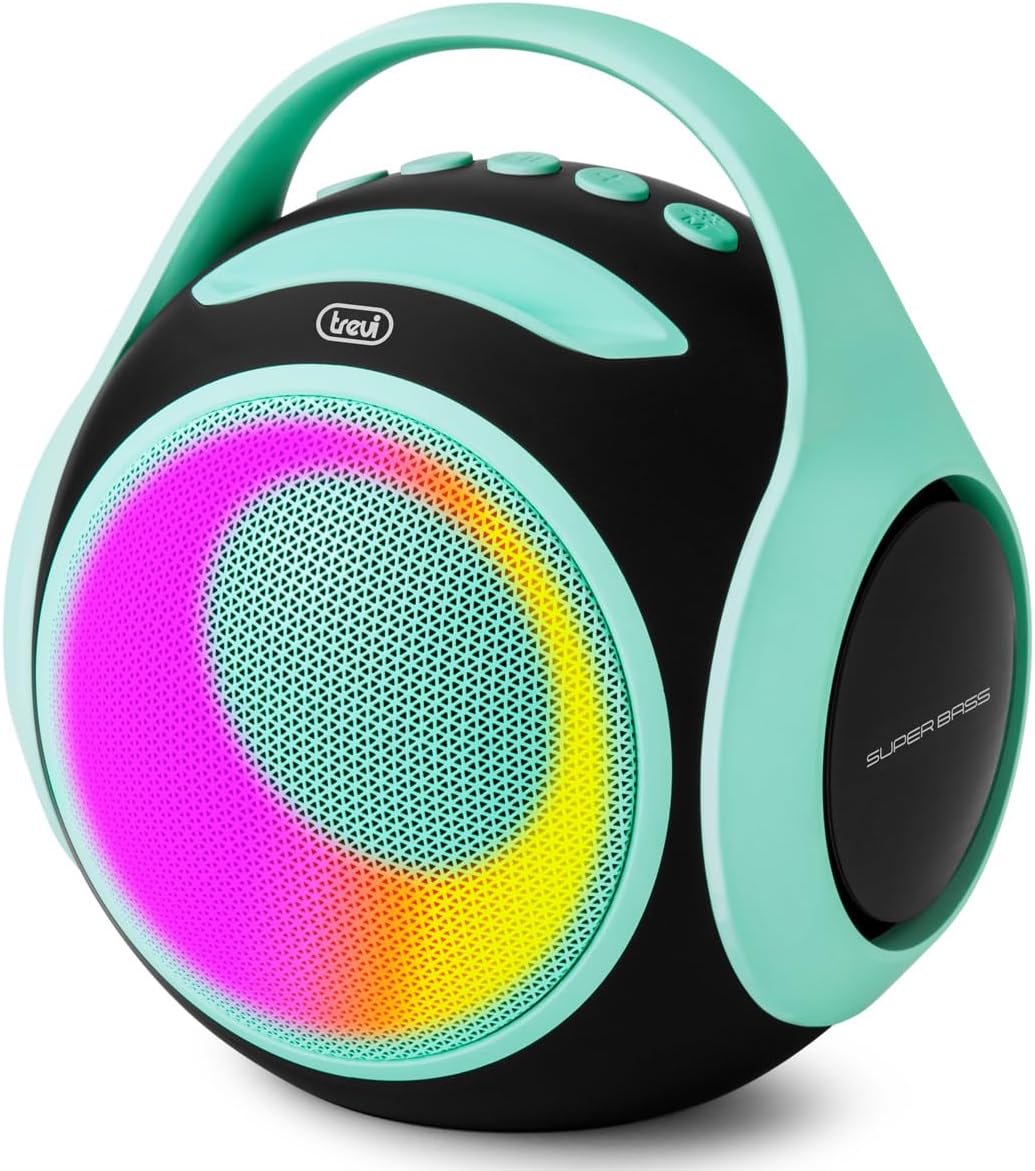
प्रतिमा 1: समोर view of the Trevi XR 8A 202 speaker, showcasing its turquoise color, black body, and dynamic LED lighting on the speaker grille.
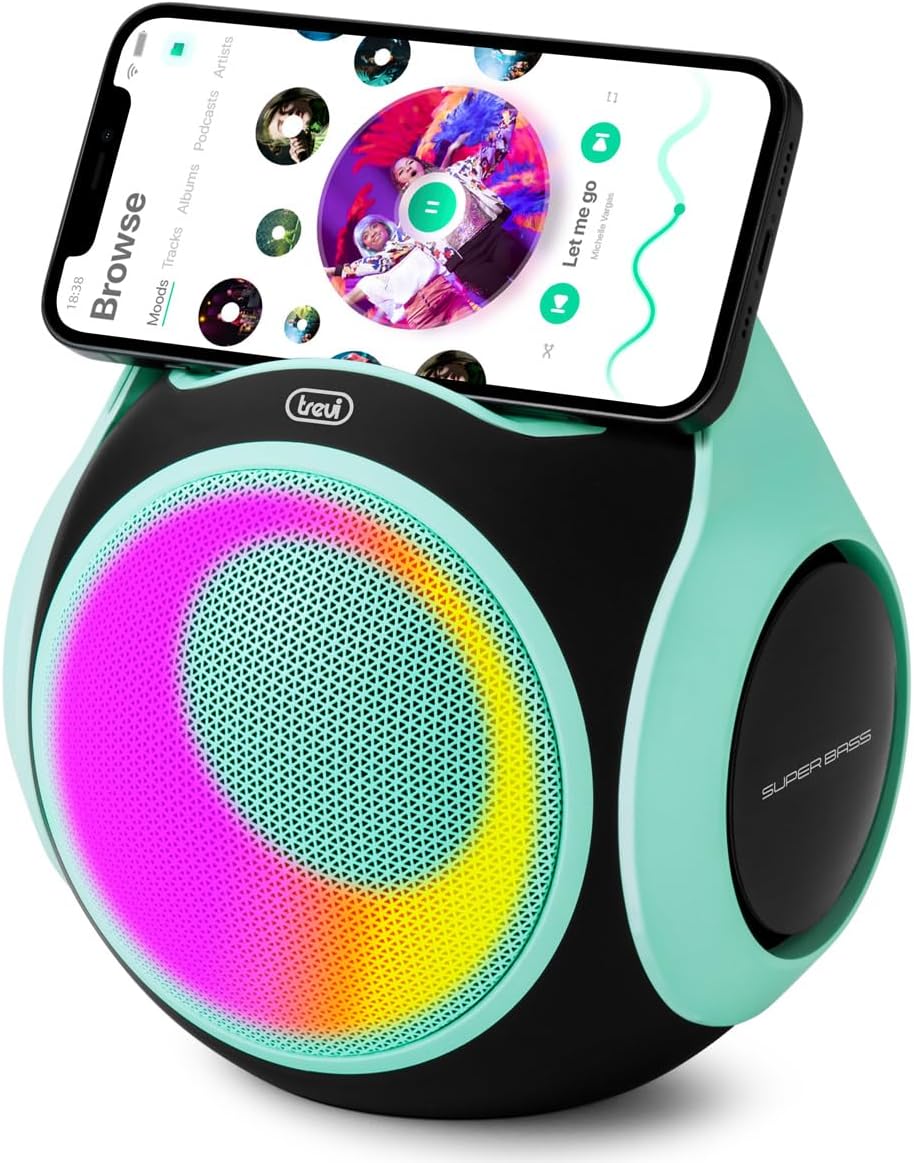
Image 2: The Trevi XR 8A 202 speaker with a smartphone resting in the integrated holder on top, demonstrating its use as a media station.
नियंत्रणे आणि बंदरे:
- पॉवर बटण: चालू/बंद करण्यासाठी दाबा आणि धरून ठेवा.
- प्ले/पॉज बटण: संगीत प्लेबॅक नियंत्रित करते.
- आवाज वाढवा/पुढील ट्रॅक बटण: आवाज वाढवण्यासाठी लहान दाबा, पुढील ट्रॅकसाठी दीर्घ दाबा.
- आवाज कमी/मागील ट्रॅक बटण: आवाज कमी करण्यासाठी शॉर्ट प्रेस, मागील ट्रॅकसाठी जास्त वेळ दाबा.
- मोड बटण: Switches between Bluetooth, USB, Micro SD, and AUX-IN modes.
- यूएसबी पोर्ट: USB फ्लॅश ड्राइव्ह प्लेबॅकसाठी.
- मायक्रो एसडी कार्ड स्लॉट: मायक्रो एसडी कार्ड प्लेबॅकसाठी.
- ऑक्स-इन पोर्ट: वायर्ड ऑडिओ कनेक्शनसाठी.
- यूएसबी टाइप-सी चार्जिंग पोर्ट: अंतर्गत बॅटरी चार्ज करण्यासाठी.
- एलईडी निर्देशक: Displays charging status and connection mode.
5. सेटअप
१. सभापतीला शुल्क आकारणे
- दिलेली USB टाइप-सी केबल स्पीकरच्या चार्जिंग पोर्टशी जोडा.
- केबलचे दुसरे टोक USB पॉवर अॅडॉप्टरशी (समाविष्ट नाही) किंवा संगणकाच्या USB पोर्टशी जोडा.
- चार्जिंग दरम्यान LED इंडिकेटर प्रकाशित होईल आणि पूर्ण चार्ज झाल्यावर बंद होईल.
- पूर्ण चार्ज होण्यासाठी साधारणपणे २-३ तास लागतात.
5.2. पॉवर चालू/बंद
- चालू करण्यासाठी: Press and hold the Power button for 2-3 seconds. You will hear an audible prompt, and the LED lights will activate.
- पॉवर ऑफ करण्यासाठी: Press and hold the Power button for 2-3 seconds. You will hear an audible prompt, and the LED lights will turn off.
6. ऑपरेटिंग सूचना
6.1. ब्लूटूथ कनेक्शन
- Ensure the speaker is powered on and in Bluetooth mode (the LED indicator will flash blue). If not, press the Mode button to switch to Bluetooth.
- तुमच्या स्मार्टफोन किंवा इतर सुसंगत डिव्हाइसवर ब्लूटूथ सक्षम करा.
- साठी शोधा "Trevi XR 8A 202" in your device's Bluetooth settings.
- Select the speaker to pair. Once connected, the LED indicator will stop flashing and remain solid blue, and you will hear a confirmation sound.
- तुम्ही आता तुमच्या डिव्हाइसवरून स्पीकरद्वारे ऑडिओ प्ले करू शकता.
७. ट्रू वायरलेस स्टीरिओ (TWS) फंक्शन
The TWS function allows you to pair two Trevi XR 8A 202 speakers together for a stereo sound experience.
- दोन्ही स्पीकर्स चालू आहेत आणि ब्लूटूथ मोडमध्ये आहेत, परंतु अद्याप कोणत्याही डिव्हाइसशी कनेक्ट केलेले नाहीत याची खात्री करा.
- On one of the speakers (this will be the primary speaker), double-press the Play/Pause button. The speaker will emit a sound indicating it is searching for another TWS speaker.
- The two speakers will automatically pair with each other. Once connected, you will hear a confirmation sound.
- Now, connect your smartphone or device to the primary speaker via Bluetooth as described in section 6.1.
- आता दोन्ही स्पीकर्सद्वारे स्टीरिओमध्ये ऑडिओ प्ले होईल.
३. यूएसबी/मायक्रो एसडी प्लेबॅक
- Insert a USB flash drive or a Micro SD card (with supported audio files) संबंधित पोर्टमध्ये.
- The speaker will automatically switch to USB or Micro SD mode and begin playing audio. If not, press the Mode button to select the correct source.
- प्लेबॅक नियंत्रित करण्यासाठी प्ले/पॉज, व्हॉल्यूम अप/नेक्स्ट ट्रॅक आणि व्हॉल्यूम डाउन/मागील ट्रॅक बटणे वापरा.
६.४. ऑक्स-इन कनेक्शन
- Connect one end of a 3.5mm audio cable (not included) to the AUX-IN port on the speaker.
- Connect the other end of the cable to the audio output of your external device (e.g., smartphone, MP3 player).
- Press the Mode button to switch the speaker to AUX-IN mode.
- तुमच्या बाह्य डिव्हाइसवरून प्लेबॅक आणि व्हॉल्यूम नियंत्रित करा.
५. एलईडी लाईट मोड्स
The speaker features integrated LED lights. These lights typically activate automatically when the speaker is powered on and can cycle through various patterns. Specific controls for changing LED modes may vary or be automatic.
२. पाण्याचा प्रतिकार (IPX5)
The Trevi XR 8A 202 speaker is rated IPX5, meaning it is protected against low-pressure water jets from any direction. This makes it suitable for outdoor use and can withstand splashes or light rain. However, it is not designed to be submerged in water. Ensure all ports are securely closed before exposure to water.
8. देखभाल
- स्पीकर मऊ, कोरड्या कापडाने स्वच्छ करा. अपघर्षक क्लीनर किंवा सॉल्व्हेंट्स वापरू नका.
- Keep the speaker in a cool, dry place when not in use.
- Avoid blocking the speaker grilles to ensure optimal sound quality.
- Charge the battery regularly, even if the speaker is not used for extended periods, to maintain battery health.
9. समस्या निवारण
| समस्या | संभाव्य कारण | उपाय |
|---|---|---|
| स्पीकर चालू होत नाही. | बॅटरी संपली आहे. | दिलेल्या USB Type-C केबलचा वापर करून स्पीकर चार्ज करा. |
| ब्लूटूथ द्वारे पेअर करू शकत नाही. | स्पीकर पेअरिंग मोडमध्ये नाही किंवा डिव्हाइसपासून खूप दूर आहे. | Ensure speaker is in Bluetooth mode (flashing blue LED). Move device closer to speaker. Forget previous pairings on your device and try again. |
| आवाज नाही. | Volume is too low, incorrect mode, or device not playing. | Increase speaker and device volume. Press the Mode button to select the correct input source. Ensure audio is playing on your connected device. |
| TWS पेअरिंग अयशस्वी. | Speakers are already connected to a device or too far apart. | Ensure both speakers are disconnected from any Bluetooth devices. Place speakers close to each other. Follow TWS pairing instructions carefully. |
10. तपशील
| वैशिष्ट्य | तपशील |
|---|---|
| मॉडेलचे नाव | XR 8A 202 |
| आउटपुट पॉवर | 20 वॅट्स |
| कनेक्टिव्हिटी तंत्रज्ञान | Bluetooth 5.3, USB, Micro SD, AUX-IN |
| विशेष वैशिष्ट्ये | LED Light, USB Port, Portable, TWS Function |
| पाणी प्रतिकार | IPX5 |
| उर्जा स्त्रोत | बॅटरीवर चालणारी (१ लिथियम-आयन बॅटरी समाविष्ट) |
| चार्जिंग पोर्ट | यूएसबी टाइप-सी |
| नियंत्रण पद्धत | Tactile Buttons |
| परिमाण (L x W x H) | २०८.९१ x १५६ x १०० सेमी (अंदाजे ८२.२ x ६१.४ x ३९.४ इंच) |
| वजन | 1.1 किलोग्राम (अंदाजे 2.4 पौंड) |
| साहित्य | प्लास्टिक |
| रंग | पिरोजा |
11. हमी आणि समर्थन
This product is covered by a manufacturer's warranty. Please refer to the included warranty card for detailed terms and conditions. For technical support, service, or warranty claims, please contact your retailer or the official Trevi customer service channels.
For more information, visit the official Trevi webसाइट किंवा त्यांच्या समर्थन कार्यसंघाशी संपर्क साधा.


