परिचय
This manual provides detailed instructions for the installation and use of your WALI Speaker Wall Mount, designed specifically for the Sonos Era 100 speaker. Please read these instructions carefully before installation to ensure proper setup and safe operation. This product is intended for mounting Sonos Era 100 speakers to a wall, offering adjustable positioning for optimal sound delivery.
पॅकेज सामग्री
Verify that all components are present before beginning installation. If any parts are missing or damaged, please contact customer support.
- 2 x WALI Speaker Wall Mounts for Sonos Era 100
- १ x वापरकर्ता मॅन्युअल (हे दस्तऐवज)
- माउंटिंग हार्डवेअर (स्क्रू, अँकर)

Image: Two WALI speaker wall mounts, each holding a Sonos Era 100 speaker, shown from a front-side perspective.
सुरक्षितता माहिती
Adhere to the following safety guidelines to prevent injury or damage:
- वजन क्षमता: Do not exceed the maximum weight capacity of 6.6 lbs (3 kg) per mount. This mount is designed specifically for the Sonos Era 100 speaker.
- भिंतीचा प्रकार: Ensure the mounting surface can safely support the combined weight of the mount and speaker. Do not mount on drywall alone without securing to a wood stud or concrete/brick wall.
- साधने: Use appropriate tools for installation. If unsure, consult a qualified professional.
- मुले: गुदमरण्याचा धोका टाळण्यासाठी लहान भाग लहान मुलांपासून दूर ठेवा.
सेटअप आणि स्थापना
Follow these steps for secure installation of your speaker wall mount.

Image: Illustration of compatible wall types: Brick Wall (Yes), Wood Stud (Yes), Concrete Wall (Yes). A note indicates: 'Do not mount on drywall alone'.
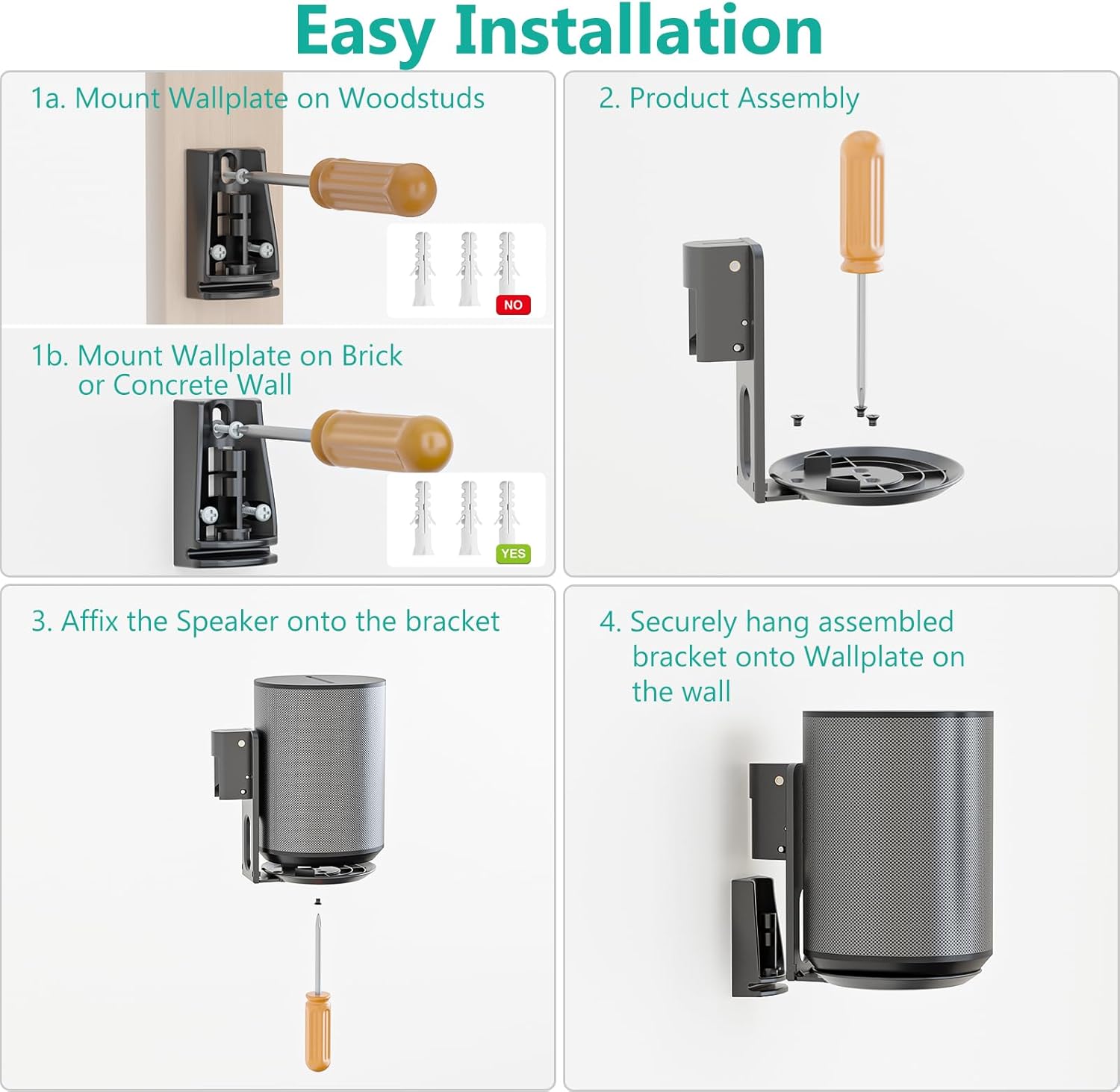
Image: A four-panel diagram illustrating the installation process. Panel 1a shows mounting the wall plate on wood studs. Panel 1b shows mounting on brick or concrete walls. Panel 2 depicts product assembly. Panel 3 shows affixing the speaker to the bracket. Panel 4 illustrates securely hanging the assembled bracket onto the wall plate.
- वॉलप्लेट माउंट करा:
- लाकडी स्टडसाठी: Locate a wood stud. Mark and drill pilot holes. Secure the wallplate using the provided screws directly into the stud.
- For Brick or Concrete Walls: Mark and drill pilot holes. Insert wall anchors into the drilled holes. Secure the wallplate using the provided screws into the anchors.
- उत्पादन असेंब्ली: Attach the speaker's base plate to the mounting arm using the provided screws. Ensure it is securely fastened.
- Affix the Speaker: Carefully place your Sonos Era 100 speaker onto the assembled bracket. Secure the speaker to the bracket using the designated screw from the bottom.
- Hang Assembled Bracket: Align the assembled bracket (with speaker attached) with the wallplate mounted on the wall. Slide it down to securely engage the locking mechanism. Ensure the speaker and mount are stable before releasing.

Image: A WALI speaker wall mount holding a Sonos Era 100 speaker, installed on a wall next to a bed in a room, demonstrating its space-saving design.
ऑपरेटिंग आणि समायोजने
The WALI Speaker Wall Mount allows for precise positioning of your Sonos Era 100 speaker to optimize your listening experience.
कुंडा समायोजन
The mount offers a swivel angle of ±45 degrees. Gently rotate the speaker and mount assembly to the desired left or right angle. Ensure the adjustment is smooth and the speaker remains stable.

Image: A diagram showing a Sonos Era 100 speaker on the mount, with arrows indicating a swivel range of +45 degrees to -45 degrees.
टिल्ट समायोजन
The mount provides a tilt angle adjustment from 0 to -18 degrees. This allows you to direct sound downwards. Loosen the tilt adjustment screw (if applicable, refer to your specific mount design), adjust to the desired angle, and then securely tighten the screw to fix the position.

Image: A diagram showing a Sonos Era 100 speaker on the mount, with arrows indicating a tilt range from 0 degrees to -18 degrees, and a close-up of the tilt adjustment mechanism.
केबल व्यवस्थापन
The mount features a design for clean cable management. Route your speaker's power cable along the mount arm and use the provided strap to secure it, maintaining a tidy appearance.

Image: A Sonos Era 100 speaker mounted on the wall, with its power cable neatly routed along the mount arm and secured with a strap, labeled 'Clean Cable Management'.
देखभाल
To maintain the appearance and functionality of your WALI Speaker Wall Mount:
- स्वच्छता: मऊ, कोरड्या कापडाने माउंट पुसून टाका. फिनिश खराब करू शकणारे अपघर्षक क्लीनर किंवा सॉल्व्हेंट्स टाळा.
- नियतकालिक तपासणी: सर्व स्क्रू आणि कनेक्शन घट्ट आणि सुरक्षित राहतील याची खात्री करण्यासाठी वेळोवेळी तपासा.
समस्यानिवारण
If you encounter issues during or after installation, refer to the following common solutions:
- Mount feels loose: Ensure all mounting screws are fully tightened into the wall and the speaker is securely attached to the bracket. Verify the wall type is appropriate for mounting.
- Speaker not fitting: Confirm that your speaker is a Sonos Era 100 model. This mount is specifically designed for this speaker.
- Difficulty adjusting: Check if any adjustment screws are overtightened. Loosen slightly, adjust, then re-tighten.
तपशील
| वैशिष्ट्य | तपशील |
|---|---|
| मॉडेल क्रमांक | SON005-2B |
| सुसंगतता | सोनोस एरा 100 स्पीकर |
| माउंटिंग प्रकार | वॉल माउंट |
| साहित्य | मिश्र धातु स्टील |
| वजन क्षमता | 6.6 एलबीएस (3 किलो) |
| फिरणारा कोन | ±45° |
| झुकाव कोन | 0° ते -18° |
| उत्पादनाची परिमाणे (L x W x H) | २८ x २५ x ३६ सेमी (११" x ९.८" x १४") |
| आयटम वजन | ५७३.५ ग्रॅम (१.२६ पौंड) |

Image: A detailed diagram illustrating the dimensions of the WALI speaker wall mount, including height (6 inches), width (6.9 inches), and depth (4.5 inches).
ग्राहक समर्थन
For any questions, assistance, or to report missing/damaged parts, please contact WALI customer support. Our experienced and friendly US-based customer support team is available to assist you 7 days a week.
Please refer to the product packaging or the WALI official webविशिष्ट संपर्क माहितीसाठी साइट.


