1. परिचय
This manual provides comprehensive instructions for the installation, operation, and maintenance of your Sonow Smart Cylinder Door Lock. Please read this manual thoroughly before installation and use to ensure proper function and safety. This smart lock offers multiple unlocking methods including fingerprint, app, password, and traditional key, enhancing security and convenience for your home or office.
2. सुरक्षितता माहिती
- Do not attempt to disassemble or repair the lock yourself. Contact qualified personnel for service.
- नुकसान टाळण्यासाठी कुलूप पाणी आणि थेट सूर्यप्रकाशापासून दूर ठेवा.
- Ensure the correct battery type is used and installed according to polarity.
- Store physical keys in a secure location outside the property.
- Regularly check the lock for any signs of wear or damage.
3. पॅकेज सामग्री
पॅकेजमध्ये सर्व वस्तू आहेत का ते तपासा:
- 1 x Fingerprint Lock Cylinder
- 1 x USB चार्जिंग केबल
- 2 x यांत्रिक की
- 1 x पाना
- 1 x QR Code Tutorial (for app download/setup)
- अंगभूत लिथियम बॅटरी (300mAh)

4. तपशील
| वैशिष्ट्य | तपशील |
|---|---|
| साहित्य | Stainless Steel, Brass, Aluminum Alloy |
| बॅटरी | 300mAh Lithium Battery (Built-in) |
| फिंगरप्रिंट क्षमता | Up to 100 unique fingerprints |
| अनलॉक करण्याच्या पद्धती | Fingerprint, Bluetooth APP, Password, Remote Authorization, Mechanical Key |
| दरवाजाची जाडी सुसंगतता | 60-110mm (adjustable) |
| उत्पादन परिमाणे | ११.४"लिटर x ५.८"पॉट |
| आयटम वजन | 1.45 पाउंड |
5. सेटअप आणि स्थापना
The Sonow Smart Cylinder Lock is designed for easy installation, typically replacing an existing cylinder without the need for drilling new holes.
६. सुसंगतता तपासणी
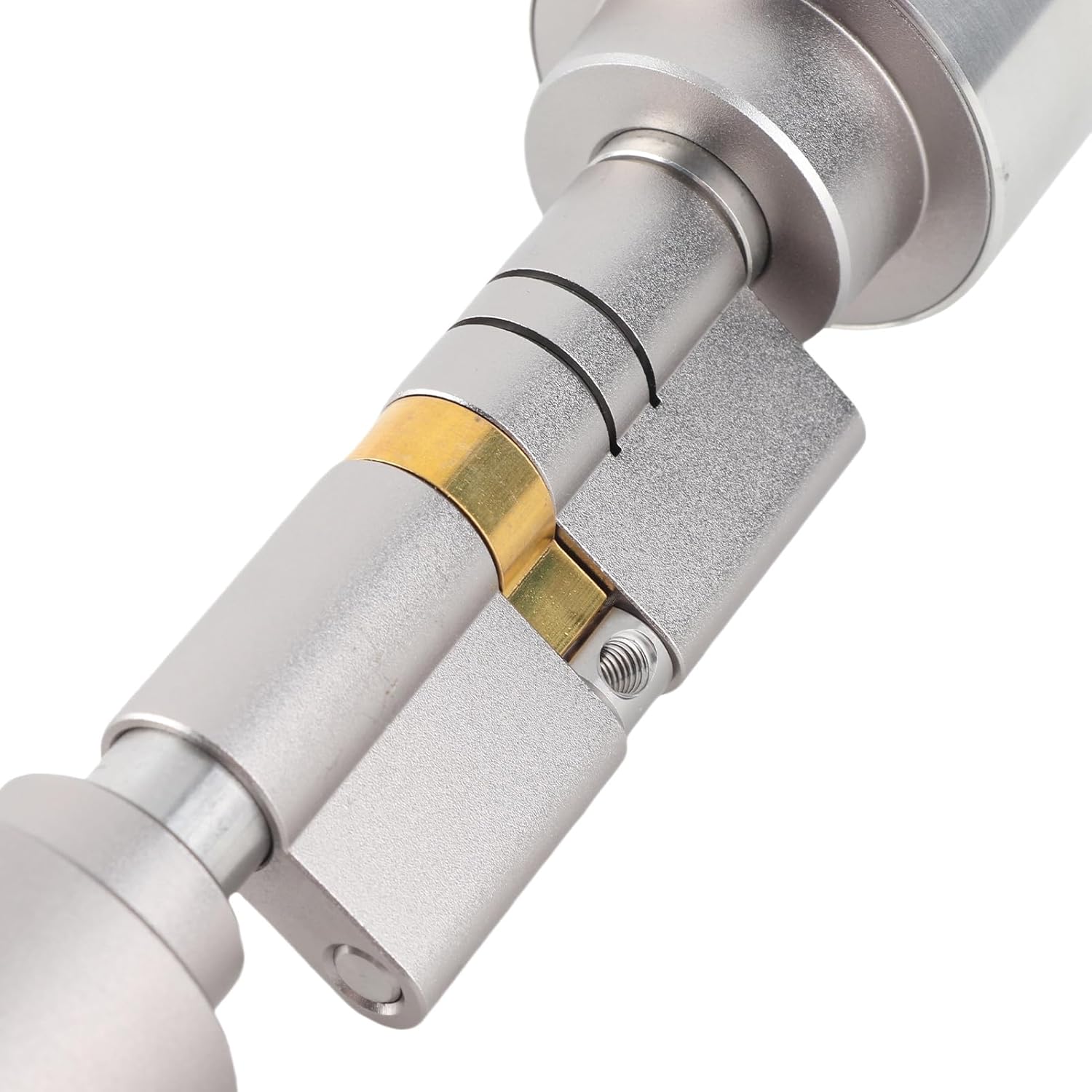
Ensure your door thickness is between 60mm and 110mm. The lock cylinder is adjustable to fit various door thicknesses.

5.2. स्थापना चरण
- Remove Existing Cylinder: Unscrew and remove your current door cylinder.
- Adjust Lock Length: Using the provided wrench, adjust the length of the Sonow Smart Cylinder Lock to match your door's thickness. Refer to Image 5.1 and 5.2 for guidance.
- Insert New Cylinder: Carefully insert the adjusted smart cylinder into the door.
- सुरक्षित लॉक: Fasten the smart cylinder using the screws from your previous lock or the provided hardware, ensuring it is firmly in place.
- चाचणी कार्यक्षमता: Before closing the door, test the lock's mechanism with a mechanical key to ensure smooth operation.


6. ऑपरेटिंग सूचना
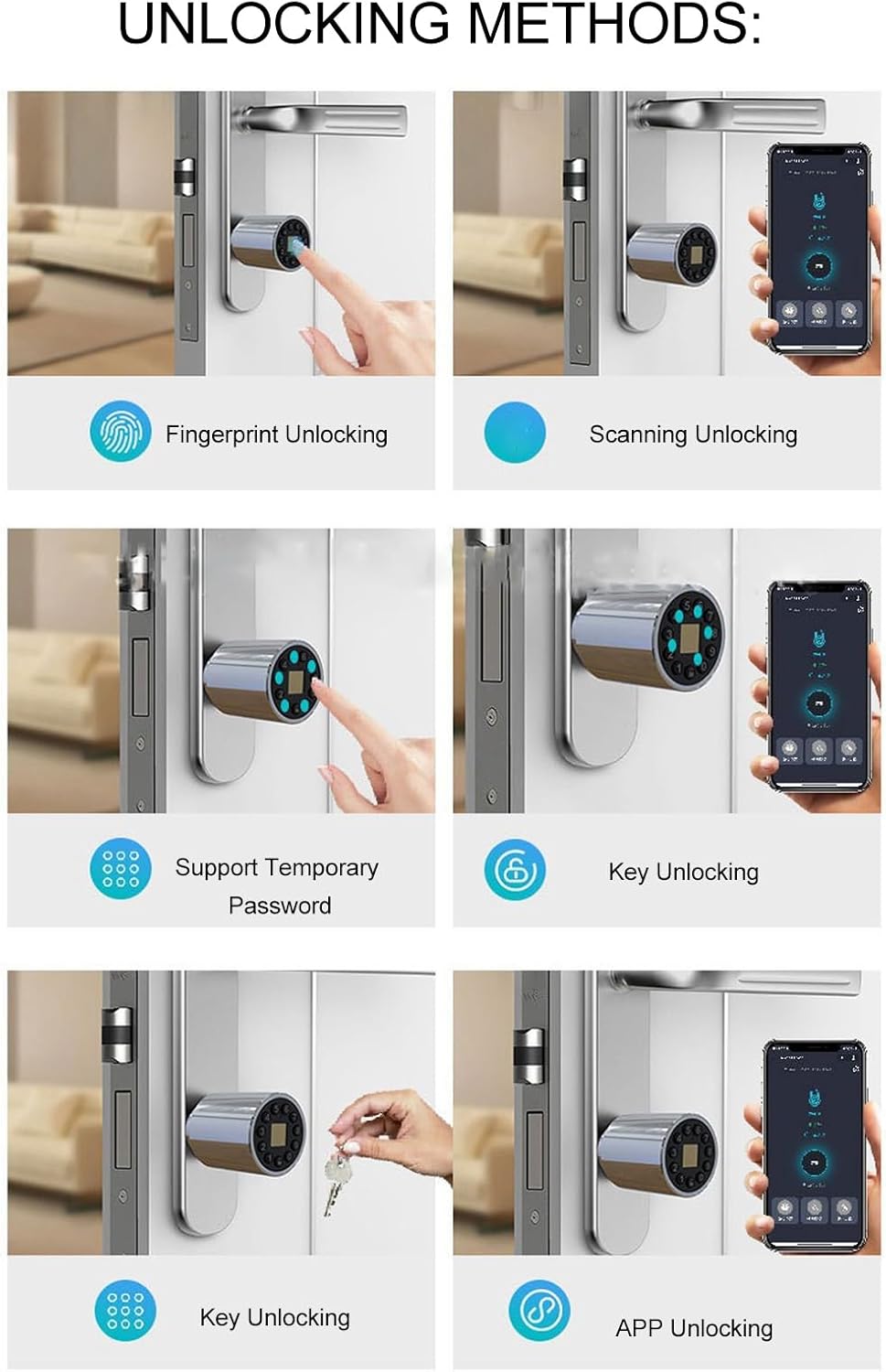
The Sonow Smart Cylinder Lock offers multiple convenient ways to unlock your door.
6.1. Fingerprint Unlocking
- Enroll Fingerprints: Follow the instructions in the companion mobile application (QR code provided in package) to enroll your fingerprints. Up to 100 fingerprints can be stored.
- अनलॉक करा: Place your enrolled finger firmly on the fingerprint sensor. The lock will unlock in approximately 0.5 seconds upon successful recognition.


6.2. Bluetooth APP Unlocking
- अॅप डाउनलोड करा: Scan the QR code provided in the package to download the official Sonow smart lock application.
- डिव्हाइस पेअर करा: Follow the in-app instructions to pair your smartphone with the smart lock via Bluetooth.
- अनलॉक करा: अॅप उघडा, तुमचे लॉक निवडा आणि अनलॉक बटणावर टॅप करा.
6.3. Password Unlocking
- पासवर्ड सेट करा: Use the mobile app to set permanent or temporary passwords.
- अनलॉक करा: Enter your password on the lock's keypad. For enhanced security, you can enter random numbers before or after your correct code (anti-peep function).
6.4. Remote Authorization
Through the mobile application, you can remotely authorize access by generating temporary passwords or granting app access to guests, even when you are not physically present.
6.5. Mechanical Key Unlocking
In case of battery depletion or electronic malfunction, the lock can always be opened using the provided mechanical keys. Insert the key into the hidden keyhole and turn to unlock.
7. देखभाल
7.1. बॅटरी व्यवस्थापन
The lock is equipped with a 300mAh lithium battery. It features a low-power design, allowing it to last approximately 180 days with an average of ten unlocks per day. When the battery is low, the lock will provide an alert. Recharge the battery using the provided USB charging cable.
टीप: The lock can be charged via a standard USB power source. Ensure the charging port is clean and dry before connecting the cable.
७.२. साफसफाई
Wipe the lock's exterior with a soft, dry cloth. Avoid using abrasive cleaners or solvents, as these can damage the finish or electronic components.
7.3. फर्मवेअर अद्यतने
Periodically check the mobile application for available firmware updates. Keeping the firmware updated ensures optimal performance and security features.
8. समस्या निवारण
- लॉक प्रतिसाद देत नाही: Check battery level. If low, recharge using the USB cable. If fully charged, try using the mechanical key.
- फिंगरप्रिंट ओळखले नाही: Ensure your finger is clean and dry. Try re-enrolling your fingerprint through the app if issues persist.
- अॅप कनेक्टिव्हिटी समस्या: Ensure Bluetooth is enabled on your smartphone and you are within range of the lock. Restart the app or your phone if necessary.
- Lock malfunction: If the lock experiences a malfunction, only the lock core needs to be replaced, not the entire lock body. Contact customer support for assistance.
9. हमी आणि समर्थन
For warranty information, technical support, or service inquiries, please refer to the contact details provided with your purchase documentation or visit the official Sonow webसाइट. वॉरंटी दाव्यांसाठी तुमचा खरेदीचा पुरावा ठेवा.
ऑनलाइन संसाधने: For additional support and frequently asked questions, visit the Sonow Store on Amazon.