1. परिचय
The Zuomeng WiFi Electricity Usage Monitor (Model ZM-046) is a plug-in power meter designed to help users monitor and manage the electricity consumption of their appliances, particularly refrigerators. This device integrates Wi-Fi connectivity, allowing for remote monitoring and data analysis via the GeniLife mobile application. It provides real-time data, cost prediction, and overload alarms to optimize energy usage and reduce electricity bills.

Figure 1: The Zuomeng WiFi Electricity Usage Monitor (left) and its corresponding mobile application interface (right), demonstrating real-time power monitoring.
2. प्रमुख वैशिष्ट्ये
- Cloud Assistant (Wi-Fi Control): Remotely monitor energy consumption and record historical data via the GeniLife APP.
- Wi-Fi APP Data Monitoring: High-precision current sensor and high-resolution real-time monitoring of watts, volt-ampere, kilowatt-hours, accumulated working time, running time, current, voltage, power factor, and frequency.
- Cost Prediction: Detailed electricity consumption forecasts by hour, day, week, month, and year through the GeniLife APP.
- Double Warning System: Set overload alarm points (0-3000W). The device emits an audible alarm and sends APP notifications if the set threshold is exceeded.
- कार्यक्षम आणि पर्यावरणपूरक: Helps detect excessive power usage, manage energy, extend appliance lifespan, and contribute to energy saving. Compatible with various appliances like refrigerators, air conditioners, and washing machines.
3. सेटअप मार्गदर्शक
- Download the GeniLife APP: साठी शोधा "GeniLife" in your smartphone's app store (iOS App Store or Google Play Store) and install the application.
- Plug in the Monitor: Insert the Zuomeng WiFi Electricity Usage Monitor into a standard wall outlet.
- उपकरण कनेक्ट करा: Plug the appliance you wish to monitor (e.g., refrigerator) into the outlet on the front of the Zuomeng monitor.
- Pair with APP:
- Open the GeniLife APP and create an account or log in.
- Follow the in-app instructions to add a new device. This typically involves putting the monitor into pairing mode (refer to the device's display or buttons for specific instructions, usually a long press on a button).
- Connect the monitor to your home 2.4GHz Wi-Fi network. Ensure your Wi-Fi password is correct.
- Set Overload Alarm (Optional): Within the GeniLife APP, navigate to the device settings and set your desired overload alarm threshold (e.g., 2000W). This will trigger an alarm if the connected appliance exceeds this power consumption.

Figure 2: The GeniLife app interface showing real-time observation of appliance energy consumption, with the monitor plugged into a wall outlet next to a refrigerator.
4. ऑपरेटिंग सूचना
4.1. Monitoring Data via GeniLife APP
Once the monitor is successfully paired with the GeniLife APP, you can access comprehensive energy data:
- रिअल-टाइम मॉनिटरिंग: View current wattage (W), voltage (V), current (A), and power factor (PF).
- Accumulated Data: Track total kilowatt-hours (kWh) consumed, accumulated working time, and running time.
- ऐतिहासिक माहिती: Access graphs and reports showing energy usage trends over time (daily, weekly, monthly, yearly).
- Cost Prediction: Input your electricity rate in the app settings to receive estimated electricity costs based on consumption.
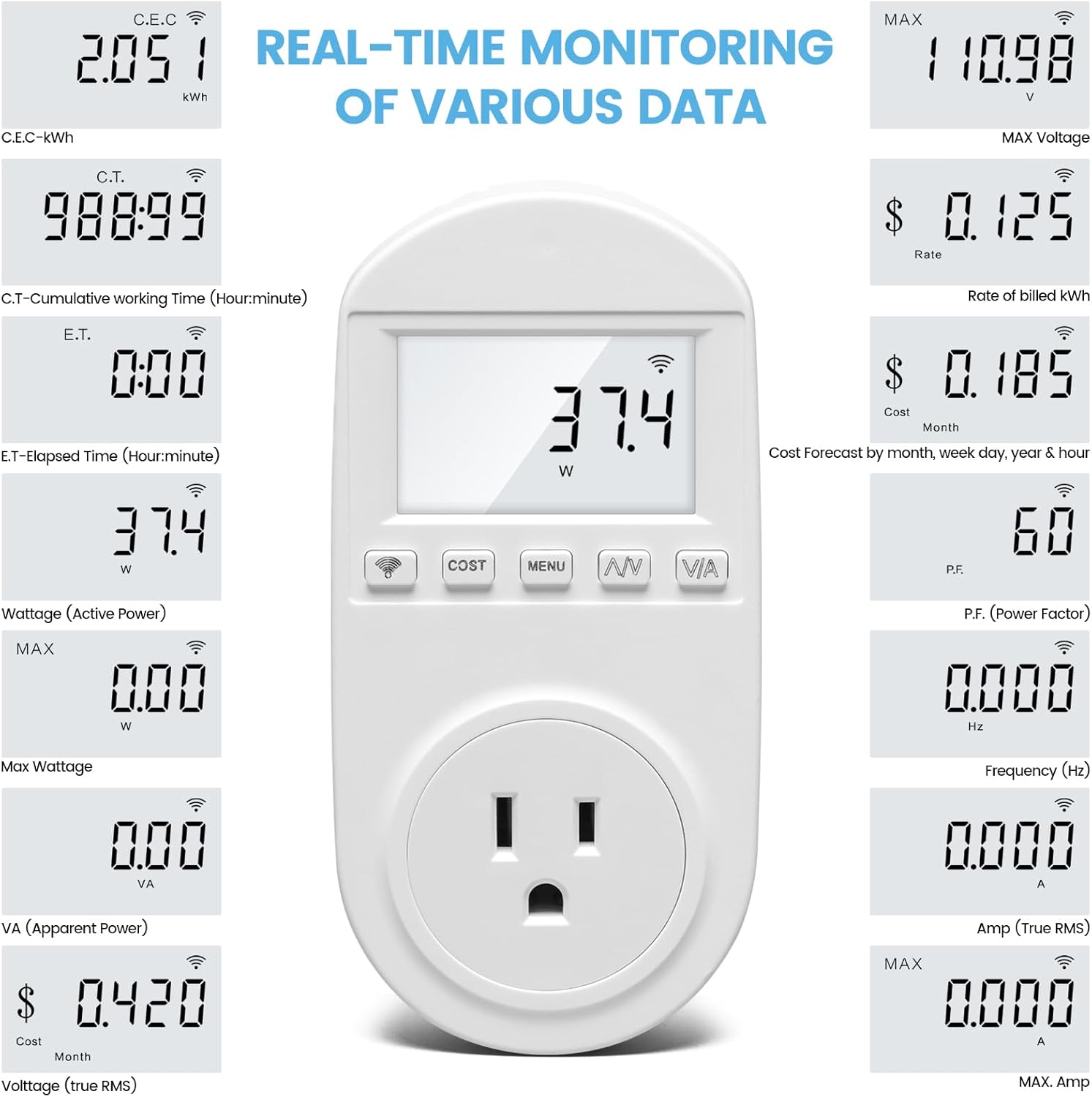
Figure 3: A visual representation of the various data points monitored by the device, including kWh, working time, wattage, खंडtage, frequency, and cost predictions.
4.2. On-Device Display and Buttons
The monitor features a built-in LCD screen and several buttons for direct interaction:
- डिस्प्ले: Shows real-time wattage (W) by default.
- बटणे:
- Wi-Fi Icon Button: Used for Wi-Fi pairing mode.
- खर्च बटण: Cycles through cost-related data.
- मेनू बटण: Accesses device settings and display modes.
- A/V Button: Cycles through Ampere (A) and Voltage (V) readings.
- V/A Button: Cycles through Voltage (V) आणि Ampere (A) readings.
4.3. Overload Alarm Functionality
If the power consumption of the connected appliance exceeds the set threshold, the monitor will:
- Emit an audible buzzer alarm.
- Send an alarm notification to your GeniLife APP.

Figure 4: The monitor in use, illustrating its dual alarm system with both an audible buzzer and remote notifications sent to the mobile application.
5. देखभाल
To ensure the longevity and accurate operation of your Zuomeng WiFi Electricity Usage Monitor, follow these simple maintenance guidelines:
- स्वच्छता: मऊ, कोरड्या कापडाने उपकरण पुसून टाका. अपघर्षक क्लीनर किंवा सॉल्व्हेंट्स वापरू नका.
- पर्यावरण: उपकरणाला अति तापमान, उच्च आर्द्रता किंवा थेट सूर्यप्रकाशाच्या संपर्कात आणणे टाळा.
- स्टोरेज: If storing for an extended period, unplug the device and keep it in a cool, dry place.
- फर्मवेअर अद्यतने: Periodically check the GeniLife APP for any available firmware updates for the monitor to ensure optimal performance and new features.
6. समस्या निवारण
| समस्या | संभाव्य कारण | उपाय |
|---|---|---|
| Device not connecting to Wi-Fi. | Incorrect Wi-Fi password; 5GHz Wi-Fi network; device too far from router; router firewall settings. |
|
| चुकीचे पॉवर रीडिंग. | Loose connection; device malfunction. |
|
| Overload alarm not working. | Alarm threshold not set or set too high; APP notifications disabled. |
|
| मॉनिटरवर डिस्प्ले नाही. | No power; device malfunction. |
|
7. तपशील

Figure 5: Product dimensions of the Zuomeng WiFi Electricity Usage Monitor.
| विशेषता | तपशील |
|---|---|
| ब्रँड | झुओमेन्ग |
| मॉडेलचे नाव | ZM-046 |
| भाग क्रमांक | ZM-046 |
| उत्पादन परिमाणे | 12.7 x 8.89 x 5.84 cm; 181 g (5.0 x 3.5 x 2.3 inches; 0.4 lbs) |
| खंडtage | 112.06 Volts (Typical operating voltage, actual may vary by region) |
| उर्जा स्त्रोत प्रकार | कॉर्ड केलेले इलेक्ट्रिक |
| कनेक्टर प्रकार | वाय-फाय (फक्त २.४GHz) |
| प्रदर्शन तंत्रज्ञान | एलसीडी |
| विशेष वैशिष्ट्ये | Smart/Connected, Audible Alarm, Remote Monitoring |
| सुसंगत साधने | Appliances up to 3000W (e.g., Refrigerator, Air Conditioner, Washing Machine) |
8. हमी आणि समर्थन
Zuomeng products are designed for reliability and performance. For warranty information, technical support, or any inquiries regarding your ZM-046 monitor, please refer to the contact information provided on the product packaging or visit the official Zuomeng webजागा. वॉरंटी दाव्यांसाठी तुमची खरेदी पावती ठेवा.
अधिकृत Webसाइट: www.zuomeng.com (टीप: हे एक प्लेसहोल्डर आहे. URL. Please refer to actual product documentation for the correct webसाइट)
ग्राहक सेवा ईमेल: support@zuomeng.com (Note: This is a placeholder email. Please refer to actual product documentation for the correct email.)


