परिचय
खरेदी केल्याबद्दल धन्यवाद.asing the Konix Hello Kitty Wireless Bluetooth 5.3 Headphones. This manual provides essential information for setting up, operating, maintaining, and troubleshooting your new headphones. Please read this manual thoroughly before use to ensure optimal performance and longevity of your device.

प्रतिमा: समोर view of the Konix Hello Kitty Wireless Bluetooth 5.3 Headphones, showcasing the white and pink design with Hello Kitty graphics on the earcups.
उत्पादन वैशिष्ट्ये
- आरामदायक डिझाइन: Lightweight construction with padded ear cushions and an adjustable headband for extended wear comfort.
- वायरलेस कनेक्टिव्हिटी: Equipped with Bluetooth 5.3 for stable and efficient wireless connection to PC, smartphones, and tablets.
- दीर्घ बॅटरी आयुष्य: Enjoy up to 30 hours of music playback on a single charge.
- अंगभूत मायक्रोफोन: Facilitates clear communication for calls and voice commands.
- बहुमुखी कनेक्टिव्हिटी: Includes a 3.5mm jack cable for wired audio connection, offering flexibility when wireless is not preferred or battery is low.
- उच्च-गुणवत्तेचा ऑडिओ: Features 40mm speakers for an immersive listening experience.
- एकात्मिक नियंत्रणे: Direct controls on the headphone for volume adjustment, voice assistant activation (Siri/Android compatible), and call management.

Image: A person wearing the Konix Hello Kitty headphones, with icons illustrating key features such as Bluetooth 5.3 connectivity, a built-in microphone, and the inclusion of a 3.5mm audio jack and Type-C charging cable.
पॅकेज सामग्री
- Konix Hello Kitty Wireless Bluetooth 5.3 Headphones
- 3.5 मिमी ऑडिओ जॅक केबल
- यूएसबी टाइप-सी चार्जिंग केबल
- वापरकर्ता मॅन्युअल (हा दस्तऐवज)

Image: The front of the retail packaging for the Konix Hello Kitty Bluetooth headset, showing the product image and key features.
सेटअप
५. हेडफोन चार्ज करणे
Before first use, fully charge your headphones. Connect the USB Type-C charging cable to the charging port on the headphones and the other end to a USB power source (e.g., computer USB port, wall adapter). The charging indicator light will show the charging status.
- चार्जिंग वेळ: अंदाजे 2.5 तास.
- Battery Life: Up to 30 hours of playtime on a full charge.
- Standby Time: Up to 200 hours.

Image: The Konix Hello Kitty headphones with an overlay indicating a 30-hour playtime, 200-hour standby time, and 2.5-hour charging time.
2. ब्लूटूथ पेअरिंग
- हेडफोन चार्ज केलेले आणि बंद असल्याची खात्री करा.
- LED इंडिकेटर लाईट चमकेपर्यंत पॉवर बटण दाबा आणि धरून ठेवा, जो पेअरिंग मोड दर्शवितो.
- तुमच्या डिव्हाइसवर (स्मार्टफोन, टॅबलेट, पीसी), ब्लूटूथ सक्षम करा आणि उपलब्ध डिव्हाइस शोधा.
- Select "Konix Hello Kitty" (or similar name) from the list of found devices.
- Once paired, the LED indicator will change (e.g., solid blue) and you will hear an audible confirmation.
६.४.२. वायर्ड कनेक्शन (पर्यायी)
If you prefer a wired connection or if the battery is depleted, you can use the included 3.5mm audio jack cable.
- ३.५ मिमी ऑडिओ केबलचा एक टोक हेडफोन्सवरील ऑडिओ जॅकमध्ये प्लग करा.
- तुमच्या डिव्हाइसच्या ३.५ मिमी ऑडिओ आउटपुट पोर्टमध्ये दुसरे टोक प्लग करा.
- हेडफोन्स आपोआप वायर्ड मोडवर स्विच होतील.
ऑपरेटिंग सूचना
पॉवर चालू/बंद
- पॉवर चालू: पॉवर बटण सुमारे ३ सेकंद दाबा आणि धरून ठेवा.
- वीज बंद: पॉवर बटण सुमारे ३ सेकंद दाबा आणि धरून ठेवा.
संगीत प्लेबॅक
- प्ले/पॉज: मल्टी-फंक्शन बटण दाबा.
- आवाज वाढवणे: व्हॉल्यूम अप बटण दाबा.
- आवाज कमी: व्हॉल्यूम डाउन बटण दाबा.
- पुढील ट्रॅक: Press and hold (or double-press, depending on model) the Volume Up button.
- मागील ट्रॅक: Press and hold (or double-press, depending on model) the Volume Down button.
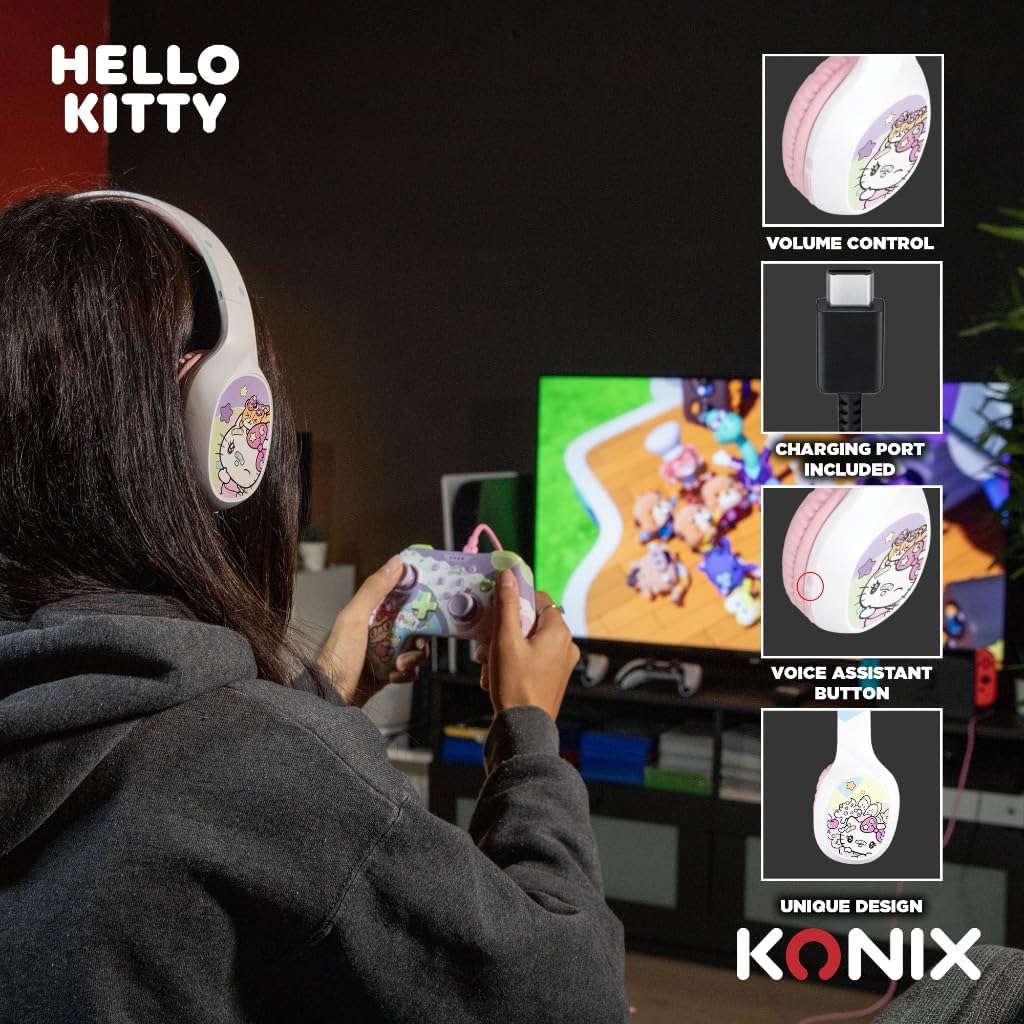
Image: A user interacting with the Konix Hello Kitty headphones, with insets highlighting the volume control, charging port, and voice assistant button located on the earcup.
कॉल व्यवस्थापन
- उत्तर द्या/कॉल संपवा: मल्टी-फंक्शन बटण दाबा.
- कॉल नाकारणे: मल्टी-फंक्शन बटण दाबा आणि धरून ठेवा.
- शेवटचा क्रमांक पुन्हा डायल करा: मल्टी-फंक्शन बटण डबल-दाबा.
व्हॉइस असिस्टंट
Activate your device's voice assistant (Siri, Google Assistant, etc.) directly from the headphones.
- व्हॉईस सहाय्यक सक्रिय करा: Press the dedicated Voice Assistant button.
देखभाल आणि काळजी
- स्वच्छता: हेडफोन्स मऊ, कोरड्या कापडाने पुसून टाका. अपघर्षक क्लीनर किंवा सॉल्व्हेंट्स वापरू नका.
- स्टोरेज: हेडफोन्स थेट सूर्यप्रकाश आणि अति तापमानापासून दूर थंड, कोरड्या जागी ठेवा.
- बॅटरी काळजी: बॅटरीचे आयुष्य वाढवण्यासाठी, बॅटरी वारंवार पूर्णपणे डिस्चार्ज करणे टाळा. हेडफोन्स नियमितपणे चार्ज करा, जरी ते जास्त काळ वापरात नसले तरीही.
- पाणी प्रतिकार: हे हेडफोन्स वॉटरप्रूफ नाहीत. पाण्याच्या संपर्कात येणे किंवा जास्त आर्द्रता टाळा.
- हाताळणी: हेडफोन स्वतः टाकू नका, वेगळे करू नका किंवा दुरुस्त करण्याचा प्रयत्न करू नका. यामुळे वॉरंटी रद्द होऊ शकते आणि नुकसान होऊ शकते.
समस्यानिवारण
| समस्या | संभाव्य कारण | उपाय |
|---|---|---|
| हेडफोन चालू होत नाहीत. | कमी बॅटरी. | हेडफोन पूर्णपणे चार्ज करा. |
| ब्लूटूथ द्वारे पेअर करू शकत नाही. | हेडफोन पेअरिंग मोडमध्ये नाहीत; डिव्हाइस ब्लूटूथ बंद आहे; डिव्हाइसपासून खूप दूर आहे. | Ensure headphones are in pairing mode; Turn on Bluetooth on your device; Move headphones closer to your device (within 10 meters). |
| आवाज नाही किंवा आवाज कमी नाही. | Volume too low on headphones or device; Incorrect audio output selected; Headphones not properly connected (wired). | Increase volume on both headphones and device; Check device's audio output settings; Ensure 3.5mm cable is fully inserted. |
| मायक्रोफोन काम करत नाहीये. | Microphone muted on device; Incorrect input device selected. | Check microphone settings on your device; Ensure "Konix Hello Kitty" is selected as the input device. |
| अधूनमधून कनेक्शन. | Interference; Too far from device; Obstacles between devices. | Move away from other wireless devices; Reduce distance to paired device; Remove obstacles. |
तपशील
| वैशिष्ट्य | तपशील |
|---|---|
| मॉडेल क्रमांक | 3328170001175 |
| कनेक्टिव्हिटी | वायरलेस (ब्लूटूथ ५.०), वायर्ड (३.५ मिमी जॅक) |
| ब्लूटूथ आवृत्ती | 5.3 |
| स्पीकरचा आकार | 40 मिमी |
| वारंवारता श्रेणी | २० हर्ट्झ - २०,००० हर्ट्झ |
| बॅटरी लाइफ (खेळण्याचा वेळ) | 30 तासांपर्यंत |
| स्टँडबाय वेळ | 200 तासांपर्यंत |
| चार्जिंग वेळ | अंदाजे 2.5 तास |
| मायक्रोफोन | अंगभूत |
| रंग | पांढरा, गुलाबी |
| वजन | ४.२ ग्रॅम (अंदाजे) |
| परिमाण (पॅकेज) | 20.1 x 18.8 x 8 सेमी |
| ध्वनी नियंत्रण | हायब्रिड नॉइज कॅन्सलेशन |
हमी आणि समर्थन
Konix products are designed and manufactured to the highest quality standards. For information regarding warranty coverage and customer support, please refer to the warranty card included with your product or visit the official Konix webसाइट. कृपया वॉरंटी दाव्यांसाठी तुमचा खरेदीचा पुरावा जपून ठेवा.
For technical assistance or inquiries, please contact Konix customer support through their official channels.


