परिचय
This manual provides detailed instructions for the assembly, operation, and maintenance of your Bresser BX-10 Pro Tripod. Designed for stability and versatility, this tripod features a 12 kg load capacity and a fluid pan-tilt head, making it suitable for various cameras, binoculars, and spotting scopes. Please read this manual thoroughly before using the product to ensure proper and safe operation.
उत्पादन वैशिष्ट्ये
- Versatile tripod, suitable for cameras, binoculars, spotting scopes, and astro scopes.
- Robust aluminum alloy construction with quick-release leg locks.
- Professional fluid pan-tilt head for smooth movements.
- Maximum load capacity of 12 kg.
- Adjustable working height from 78 cm to 216 cm.
- Integrated spirit level for precise leveling.
- Quick release plate with 1/4" and 3/8" screws for camera attachment.
- Central hook for adding stability weight.
- Handle mountable on either the left or right side.
- Compact transport length of 82 cm.
- Includes a transport bag.
पॅकेज सामग्री
अनपॅक करताना, कृपया सर्व घटक उपस्थित आहेत का ते तपासा:
- Bresser BX-10 Pro Tripod
- Fluid Pan-Tilt Head
- पॅन हँडल
- Quick Release Plate (with 1/4" and 3/8" screws)
- वाहतूक बॅग

Image: The Bresser BX-10 Pro Tripod fully assembled, alongside its dedicated transport bag.
सेटअप सूचना
- Unfold the Tripod Legs: Release the leg locks on each of the three tripod legs. Extend the legs to your desired height and secure the leg locks firmly. Ensure all legs are extended evenly for maximum stability.

Image: The tripod extended to its maximum height of 216 cm, illustrating its adjustable leg sections.
- Adjust Center Column: If additional height is required, loosen the center column lock and extend the center column. Tighten the lock securely once the desired height is reached. The maximum height with the center column extended is 216 cm.
- Attach Pan Handle: The pan handle can be mounted on either the left or right side of the fluid head. Insert the handle into the designated socket and tighten the locking screw.

प्रतिमा: सविस्तर view of the fluid pan-tilt head, showing the quick release plate, pan handle attachment point, and 360-degree rotation capability. The handle can be mounted on either side.
- Attach Quick Release Plate to Camera: Locate the quick release plate. It has both 1/4" and 3/8" mounting screws. Select the appropriate screw for your camera or device and securely attach the plate to its base.
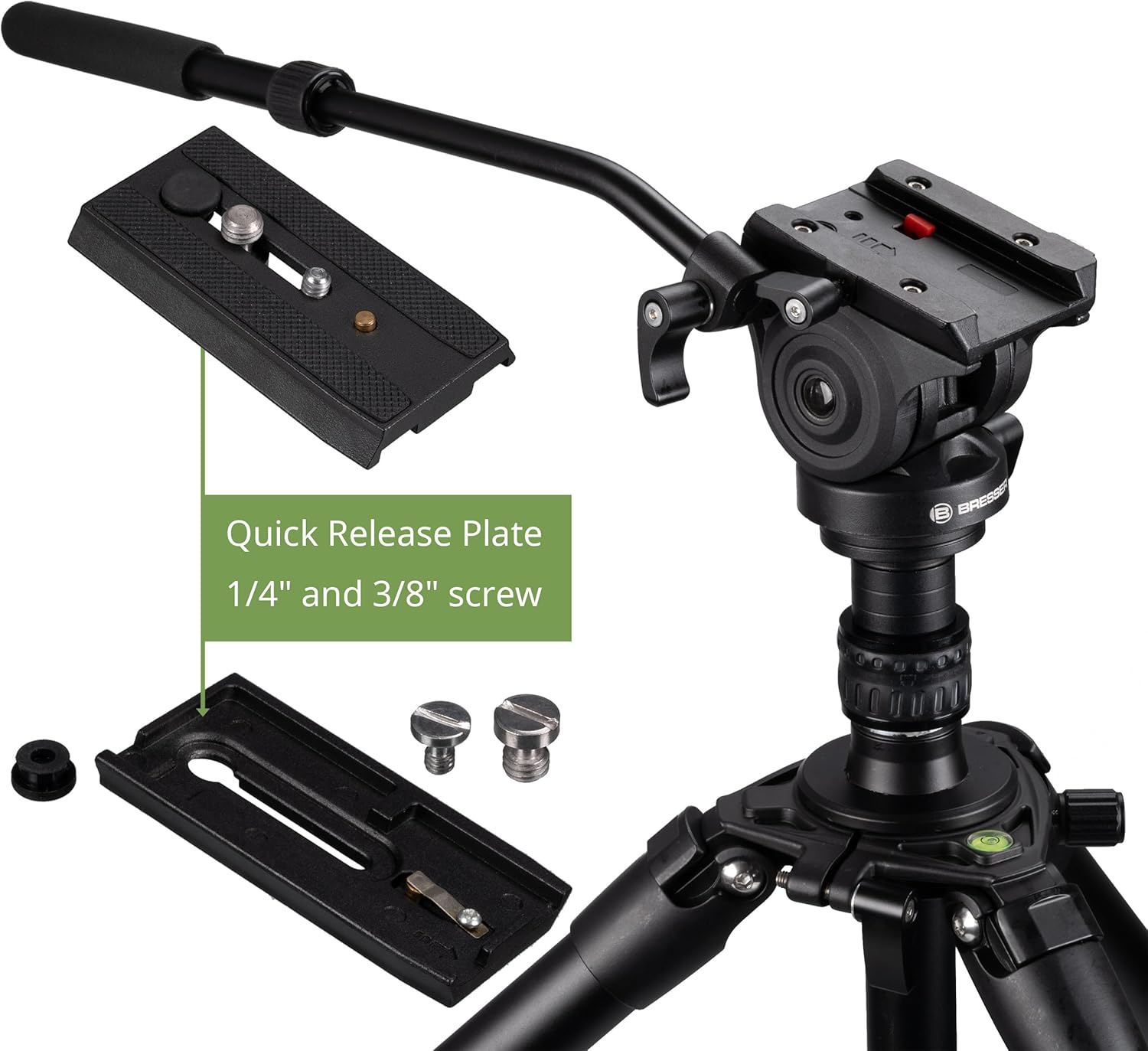
Image: The quick release plate, highlighting the interchangeable 1/4" and 3/8" mounting screws for various camera types.
- Mount Camera to Tripod Head: Slide the quick release plate with your attached camera into the receiver on the fluid head. Ensure it clicks into place and then engage the safety lock mechanism to prevent accidental detachment.
- स्तर तपासा: Use the integrated spirit level on the tripod head to ensure your setup is perfectly horizontal. Adjust the leg lengths as needed.
- Add Stability Weight (Optional): For increased stability, especially in windy conditions or with heavy equipment, attach a weight bag to the central hook located at the bottom of the center column.
ऑपरेटिंग सूचना
- पॅन चळवळ: To rotate the camera horizontally (pan), loosen the pan lock knob on the fluid head. Use the pan handle to smoothly rotate the camera 360 degrees. Tighten the pan lock knob to secure the position.
- तिरपा हालचाल: To adjust the camera vertically (tilt), loosen the tilt lock knob on the fluid head. Use the pan handle to smoothly tilt the camera from +90 to -70 degrees. Tighten the tilt lock knob to secure the position.
- Adjusting Leg Angles: Each tripod leg can be independently adjusted to different angles for uneven terrain or low-angle shots. Release the leg angle lock near the top of each leg, adjust the angle, and re-engage the lock.

Image: The tripod demonstrating its flexible adjustment options, including varying leg angles for stability on uneven surfaces or for achieving different shooting heights.
- Transporting the Tripod: When not in use, collapse the center column and legs to their minimum length. Detach the pan handle if desired. Place the tripod in the provided transport bag for protection and easy carrying.

Image: The black transport bag with red accents, designed to protect and carry the Bresser BX-10 Pro Tripod.
देखभाल
- स्वच्छता: Wipe the tripod with a soft, dry cloth after each use to remove dust and dirt. For stubborn grime, use a slightly damp cloth and mild soap, then dry thoroughly. Avoid abrasive cleaners or solvents.
- स्नेहन: The fluid head is designed for smooth operation and generally does not require user lubrication. If movements become stiff, consult Bresser customer support.
- स्टोरेज: Store the tripod in its transport bag in a cool, dry place, away from direct sunlight and extreme temperatures.
- तपासणी: Periodically check all screws, locks, and joints for tightness. Tighten any loose components to ensure safe operation.
समस्यानिवारण
- Tripod is unstable:
- Ensure all leg locks are fully tightened.
- Verify that the legs are spread evenly and the tripod is on a flat surface.
- Check the spirit level and adjust leg lengths if necessary.
- Consider attaching a weight to the central hook for added stability.
- Camera is not secure on the head:
- Ensure the quick release plate is securely attached to your camera with the correct screw (1/4" or 3/8").
- Verify that the quick release plate is fully inserted into the fluid head receiver and the safety lock is engaged.
- Pan or tilt movements are stiff:
- Ensure the pan and tilt lock knobs are fully loosened.
- Clean any dust or debris from the head mechanisms. If the issue persists, contact customer support.
तपशील
| ब्रँड | बासरी |
| मॉडेल क्रमांक | F005110 |
| साहित्य | ॲल्युमिनियम |
| कमाल लोड क्षमता | 12 किलो |
| कमाल उंची | 216 सें.मी |
| किमान उंची | 78 सें.मी |
| दुमडलेली लांबी | 82 सें.मी |
| उत्पादनाचे परिमाण (फोल्ड केलेले) | 82 x 17 x 17 सेमी |
| डोके प्रकार | Fluid Pan-Tilt Head |
| पॅन रेंज | 360 अंश |
| टिल्ट रेंज | +90 to -70 degrees |
| Quick Release Plate Screws | ५/८" आणि १/४" |
| रंग | काळा |
हमी आणि समर्थन
For warranty information, technical support, or service inquiries, please refer to the official Bresser webसाइटवर जा किंवा त्यांच्या ग्राहक सेवा विभागाशी थेट संपर्क साधा. खरेदीचा पुरावा म्हणून तुमची खरेदी पावती ठेवा.
निर्माता: बासरी
Webसाइट: www.bresser.de (or relevant regional Bresser webजागा)


