परिचय
This manual provides comprehensive instructions for the MOBAPAD Hall Effect Drift-Proof Wireless Switch Controller. Designed for enhanced gaming, this controller features advanced contactless joystick technology, ensuring a longer lifespan, greater durability, and smoother operation compared to traditional designs. Its drift-proof performance guarantees precise and accurate control input. Experience enhanced gaming with realistic HD Rumble feedback, simulating various tactile sensations for deeper immersion.
प्रमुख वैशिष्ट्ये
- Hall Electromagnetic Joysticks: Contactless technology for drift-proof, precise control and extended durability.
- HD Rumble: Generated by ALPS dual-axis linear motors for realistic vibrations and tactile feedback.
- Mechanical Face Buttons: Durable buttons with a 5 million click lifespan, offering shorter throw, faster rebound, and instant trigger response.
- ६-अॅक्सिस जायरोस्कोप: Supports motion sensing for compatible games.
- Local Macro Programming: Create and store macros directly on the controller without external software.
- टर्बो फंक्शन: Independent Turbo button with two auto-shooting setups for rapid input.
- NFC रीडर: Super sensitive NFC reader for Amiibo compatibility.
- Interchangeable D-Pad: Customize your D-pad with included options.
- Remappable Back Paddles: Two programmable back paddles (M1, M2) for personalized control, which can also be disabled.
- दीर्घ बॅटरी आयुष्य: Equipped with a 1000mAh rechargeable lithium battery, providing approximately 30 hours of usage.
- मल्टी-प्लॅटफॉर्म सुसंगतता: Connects wirelessly to Nintendo Switch (Pro/Lite/OLED), PC (via Bluetooth or wired), iOS (version 13 and above), and Android devices.
पॅकेज सामग्री
- 1 x MOBAPAD Hall Effect Wireless Switch Controller
- 1 x USB-C ते USB-A चार्जिंग केबल
- 1 x Interchangeable Cross-shaped D-Pad
- 1 x User Manual / Startup Guide

Image: The MOBAPAD controller in its packaging, showing the main unit and included accessories.
सेटअप
Connecting to Nintendo Switch
- तुमच्या Nintendo स्विचवर, HOME मेनूवर जा.
- Select "Controllers" from the bottom menu.
- Choose "Change Grip/Order".
- On the MOBAPAD controller, press the small pairing button located on the back (next to the M1/M2 buttons) once. The "M" logo will light up, and the channel LED will flash.
- Once the controller is detected by the Switch, the channel LED will become solid, indicating a successful connection.

Image: The MOBAPAD controller connected and interacting with a Nintendo Switch console.
Connecting to PC (Windows) via Bluetooth
- Ensure the controller is powered off (no LED lights).
- Press and hold the Home button (M logo) until the middle channel LED flashes quickly.
- On your PC, go to Bluetooth settings and search for "MOBAPAD PRO-HD".
- Select the device to pair. Once connected, the LED will become solid.
Connecting to PC via Wired Connection
Connect the controller to your PC using the provided USB-C cable. The controller will automatically switch to wired mode. For Windows 10 and Steam games that support controller input, the mode is set to "Switch Pro mode".
Connecting to Apple Devices (iOS Version 13 or Above)
- Ensure the controller is powered off (no LED lights).
- Press and hold the Home button (M logo) until the middle channel LED flashes quickly.
- Go to your iOS device's Bluetooth settings and search for "Xbox Wireless Controller".
- Select the device to pair. Once connected, your phone will display "Connected" and the middle channel LED will become solid.
Connecting to Android Devices
- Ensure the controller is powered off (no LED lights).
- Press and hold the Home button (M logo) until the middle channel LED flashes quickly.
- Go to your Android device's Bluetooth settings and search for "MOBAPAD PRO-HD".
- Select the device to pair. Once connected, your phone will display "Connected" and the middle channel LED will become solid.
ऑपरेटिंग सूचना
नियंत्रक मांडणी आणि कार्ये
प्रतिमा: समोर view of the MOBAPAD controller, highlighting buttons and joysticks.
- A/B/X/Y Buttons: Mechanical face buttons for crisp, responsive input.
- हॉल इफेक्ट जॉयस्टिक्स: Contactless joysticks for precise, drift-free movement.
- डी-पॅड: Interchangeable D-pad (comes with a circular and a cross-shaped option).
- टर्बो बटण: Activates rapid-fire function.
- Macro Programming Button: Used to record and execute complex button sequences.
- स्क्रीनशॉट बटण: Captures in-game screenshots.
- होम बटण: होम स्क्रीनवर परत येतो.
- एनएफसी क्षेत्र: Located near the Home button, supports Amiibo scanning.
- यूएसबी-सी पोर्ट: Located on the top, used for charging and wired connection.
- M1/M2 Back Paddles: Two remappable buttons on the underside for custom commands.
- जोडणी बटण: Small button on the back for initiating Bluetooth pairing.
- भोक रीसेट करा: Small pinhole for resetting the controller if needed.
अदलाबदल करण्यायोग्य डी-पॅड
The controller comes with two D-pad options: a pre-installed circular D-pad and an additional cross-shaped D-pad. To change the D-pad, simply lift the current D-pad off the controller and align the new D-pad with the magnetic base, then gently press it into place.
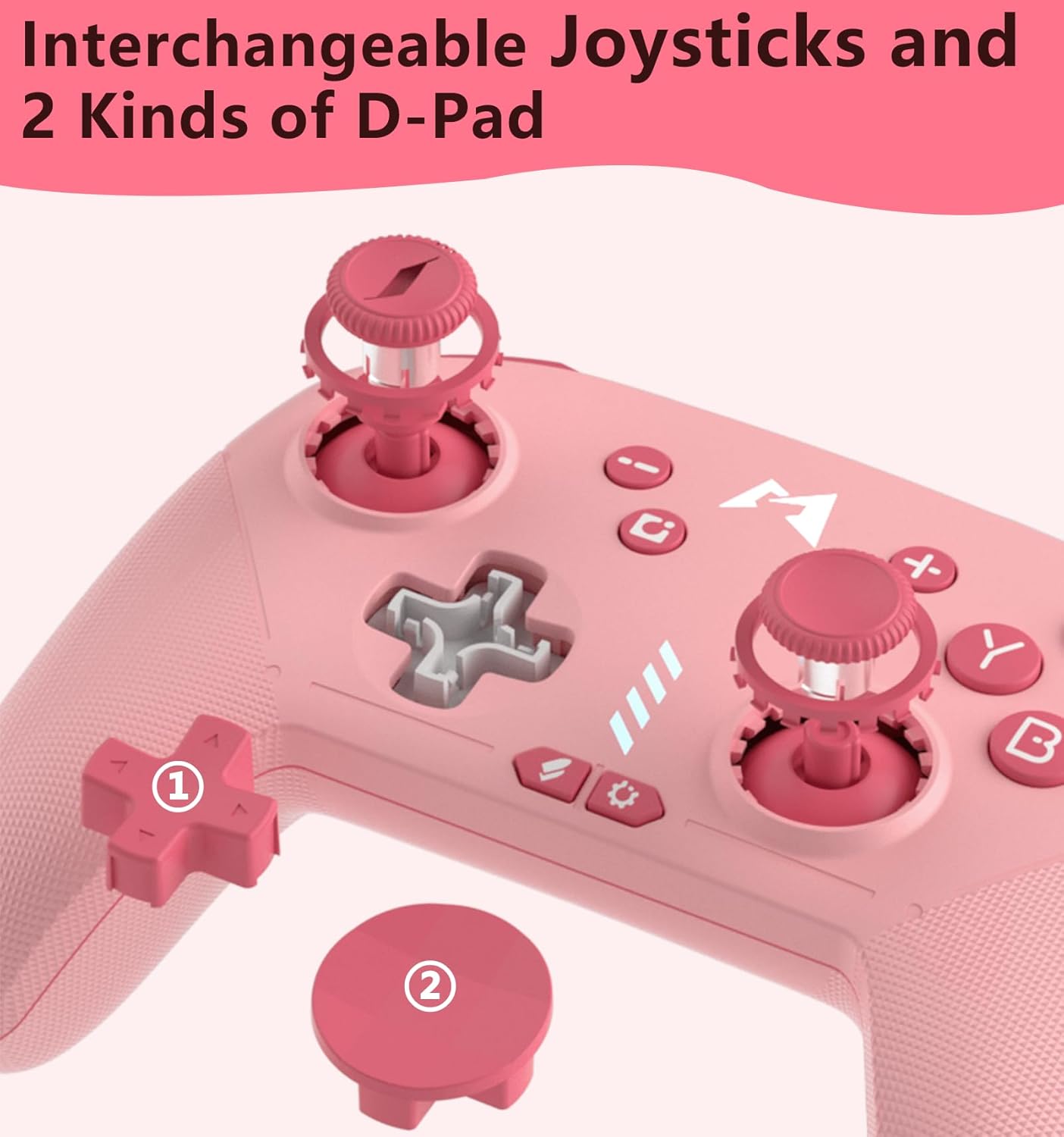
प्रतिमा: क्लोज-अप view of the interchangeable D-pad mechanism and the two D-pad styles.
मॅक्रो प्रोग्रामिंग
The MOBAPAD controller supports local macro programming. Refer to the included startup guide for detailed steps on how to record and assign macros to the M1 and M2 back paddles.
स्वयं-बंद वैशिष्ट्य
The controller features an auto-off function to conserve battery. If connected to a Nintendo Switch, the controller will go to sleep when the Switch enters sleep mode. If not connected to any device, the controller will automatically power off after 15 minutes of inactivity.
देखभाल
- मऊ, कोरड्या कापडाने कंट्रोलर पुसून तो स्वच्छ ठेवा.
- Avoid exposing the controller to extreme temperatures, direct sunlight, or moisture.
- शारीरिक नुकसान टाळण्यासाठी कंट्रोलर सुरक्षित ठिकाणी ठेवा.
समस्यानिवारण
- कंट्रोलर पेअर होत नाही: Ensure the controller is fully charged. Try resetting the controller by inserting a thin object into the reset hole on the back. Re-initiate the pairing process on both the controller and your device.
- इनपुट लॅग किंवा डिस्कनेक्शन: Ensure you are within the effective range of your device's Bluetooth. Minimize interference from other wireless devices.
- बटणे प्रतिसाद देत नाहीत: Check if the controller is charged. If the issue persists, try resetting the controller.
तपशील
| वैशिष्ट्य | तपशील |
|---|---|
| मॉडेल क्र. | PRO-HD |
| उत्पादक | Dongguan Heng xun Energy Technology CO., Ltd. |
| बॅटरी क्षमता | 1000mAh लिथियम बॅटरी |
| अंदाजे बॅटरी आयुष्य | ~ 30 तास |
| चार्जिंग पोर्ट | यूएसबी-सी |
| जॉयस्टिक तंत्रज्ञान | ALPS Hall-Effect (Drift-Proof) |
| Rumble Feedback | HD Rumble (ALPS Dual-Axis Linear Motors) |
| गती नियंत्रण | 6-अक्ष गायरोस्कोप |
| बटण प्रकार | Mechanical Face Buttons |
| NFC समर्थन | Yes (for Amiibo) |
हमी आणि समर्थन
For warranty information and technical support, please refer to the documentation included with your product or visit the official MOBAPAD webसाइट. खरेदीचा पुरावा म्हणून तुमची खरेदी पावती ठेवा.


