1. परिचय
This manual provides detailed instructions for the installation, operation, and maintenance of your Sonew Smart Peephole Camera. Please read this manual thoroughly before using the product to ensure proper function and safety. This device is designed to enhance home security by providing a clear view of your doorstep and enabling remote monitoring via the TUYA smartphone application.
2. पॅकेज सामग्री
खाली सूचीबद्ध केलेल्या सर्व वस्तू तुमच्या पॅकेजमध्ये आहेत याची खात्री करा:
- 1 x Outdoor Host (Peephole Camera)
- 1 x Indoor Device (Monitor)
- 1 x चार्जिंग केबल
- 8 x स्क्रू
- 1 x हँगिंग प्लेट
- १ x वापरकर्ता मॅन्युअल (हे दस्तऐवज)

प्रतिमा: ओव्हरview of the main components, including the outdoor peephole camera with its connecting cable and the indoor monitor unit.
3. उत्पादन संपलेview
The Sonew Smart Peephole Camera system consists of an outdoor camera unit and an indoor monitor. It offers high-definition monitoring, a wide viewing angle, and remote control capabilities via a smartphone application.

Image: The indoor monitor unit with its display and a button, alongside the circular outdoor peephole camera.
प्रमुख वैशिष्ट्ये:
- वाइड अँगल View: Provides a broad perspective of your doorstep, ensuring you don't miss any details.
- High Definition Monitoring: Delivers clear video images for effective surveillance.
- Remote Control via TUYA App: Allows unlocking and video viewing from your smartphone.
- दार Viewer Function: See who is at your door without opening it, enhancing security.
- वायरलेस सुविधा: Simplifies installation by minimizing complex wiring.
- Automatic Photographing: Captures images automatically (feature indicated in product graphics).
- Ultra Low Power Design: Optimized for extended battery life (feature indicated in product graphics).
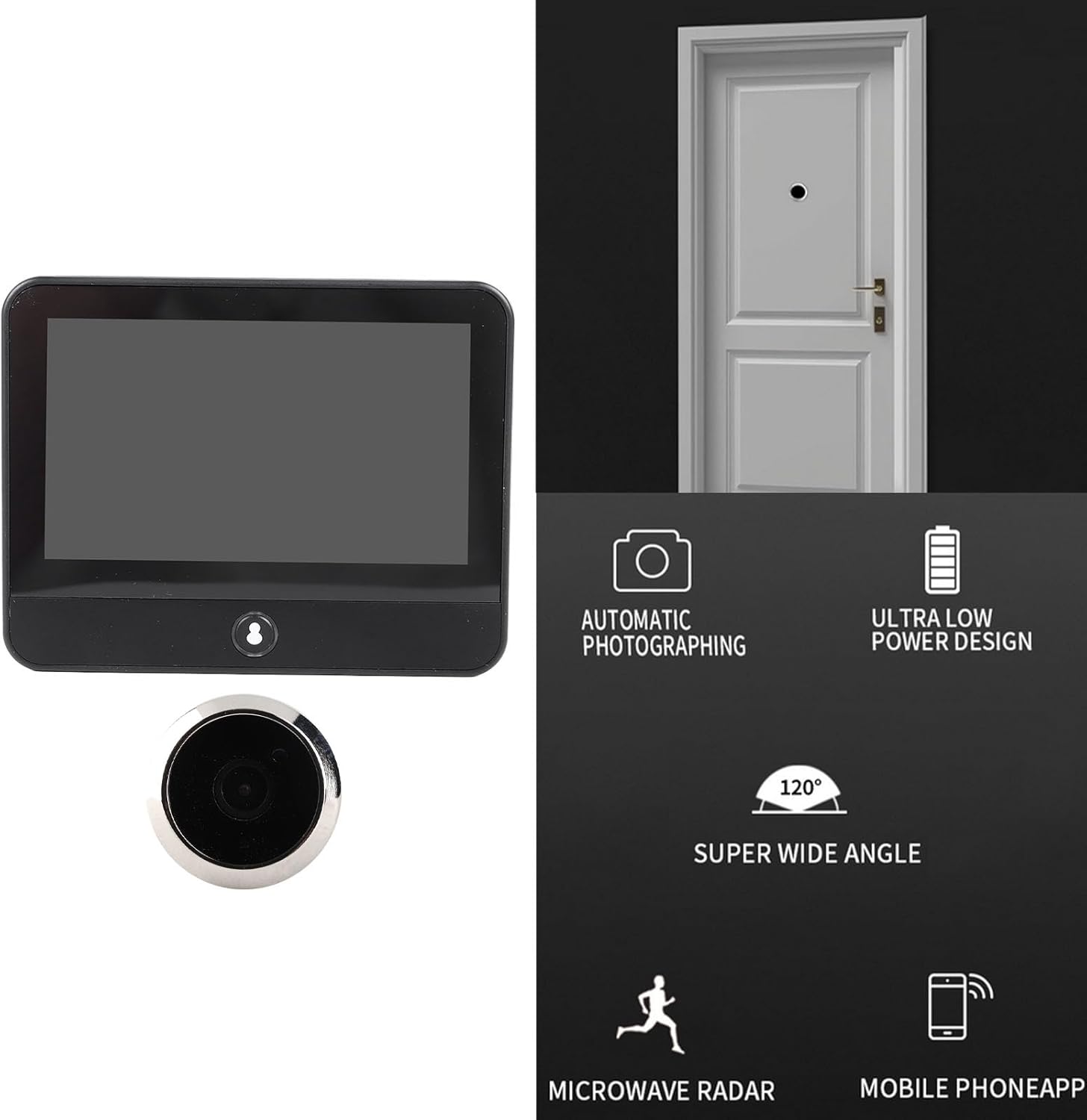
Image: Visual representation of the product's core functionalities, including automatic image capture, power efficiency, wide-angle lens, motion detection, and smartphone app integration.
4. सेटअप आणि स्थापना
Follow these steps to install your Sonew Smart Peephole Camera:
- दरवाजा तयार करा: Ensure your door has a standard peephole opening. If not, professional installation may be required to drill a suitable hole.
- Install Outdoor Host: Insert the outdoor peephole camera through the door from the outside. Ensure the ribbon cable passes through the hole to the inside of the door.
- Mount Hanging Plate: On the inside of the door, secure the hanging plate using the provided screws. The ribbon cable from the outdoor unit should pass through the opening in the hanging plate.
- Connect Indoor Device: Carefully connect the ribbon cable from the outdoor host to the corresponding port on the back of the indoor monitor.
- Attach Indoor Device: Slide the indoor monitor onto the hanging plate, ensuring it is securely fastened.
- पॉवर ऑन आणि चार्ज: Connect the charging cable to the indoor monitor and a power source to fully charge the built-in 5000mAh battery before first use.
- App Setup (TUYA):
- Download the TUYA Smart app from your smartphone's app store.
- Register or log in to your TUYA account.
- Follow the in-app instructions to add your Sonew Smart Peephole Camera. This typically involves putting the device into pairing mode (refer to the device's button for WiFi indication) and connecting it to your home Wi-Fi network.

Image: The rear panel of the indoor monitor, highlighting the slot where the outdoor camera's ribbon cable connects.
5. ऑपरेटिंग सूचना
5.1. Using the Indoor Monitor
Once installed and powered on, the indoor monitor will display the view from the outdoor camera. Press the button on the indoor unit to activate the screen and view who is outside your door.

Image: The indoor monitor screen showing a clear image of individuals, demonstrating its function as a digital door viewएर
5.2. Using the TUYA App for Remote Monitoring
The TUYA Smart app allows you to access your peephole camera remotely:
- लाइव्ह View: Open the TUYA app and select your device to view a live feed from the outdoor camera anytime, anywhere.
- सूचना: Receive alerts on your smartphone when motion is detected at your door.
- द्वि-मार्ग ऑडिओ: (If supported by model) Communicate with visitors through the app.
- Recording/Snapshots: Capture video or still images directly from the app. The device also supports automatic photographing.

Image: A visual depicting the camera's ability to monitor activity at the door with high definition clarity, potentially including motion detection.
6. देखभाल
- स्वच्छता: Use a soft, dry cloth to clean the indoor monitor screen and the outdoor camera lens. Avoid abrasive cleaners or solvents.
- बॅटरी चार्जिंग: The indoor monitor has a built-in 5000mAh lithium battery. Recharge it using the provided charging cable when the battery indicator shows low power.
- फर्मवेअर अद्यतने: Periodically check the TUYA app for any available firmware updates for your device to ensure optimal performance and security.
7. समस्या निवारण
| समस्या | संभाव्य कारण | उपाय |
|---|---|---|
| इनडोअर मॉनिटरवर कोणतीही प्रतिमा नाही. |
|
|
| Cannot connect to TUYA app. |
|
|
| खराब प्रतिमा गुणवत्ता. |
|
|
| लहान बॅटरी आयुष्य. |
|
|
8. तपशील
| वैशिष्ट्य | तपशील |
|---|---|
| आयटम प्रकार | डिजिटल दरवाजा Viewer |
| साहित्य | झिंक मिश्रधातू |
| Indoor Device Size (Approx.) | 12 x 10 x 2 सेमी / 4.72 x 3.94 x 0.79 इन |
| बॅटरी प्रकार | Lithium Battery (Built-in) |
| बॅटरी क्षमता | 5000mAh |
| मॉडेल क्रमांक | Sonew7h986te0iy |
| उत्पादन परिमाणे | 20 x 12 x 8 cm; 470 g (Packaging/Overall) |

Image: Detailed measurements of the indoor monitor unit for reference.
9. हमी आणि समर्थन
For warranty information, technical support, or service inquiries, please refer to the contact information provided with your purchase or visit the manufacturer's official webसाइट. खरेदीचा पुरावा म्हणून तुमची खरेदी पावती ठेवा.