1. परिचय
This manual provides essential information for the safe and efficient installation, operation, and maintenance of your DIHOOL Solar Panel Disconnect Switch Box. Please read this manual thoroughly before installation and retain it for future reference. This device is designed to protect photovoltaic (PV) systems, specifically for RV applications with a single string up to 1000VDC.
2. सुरक्षितता माहिती
चेतावणी: Installation and maintenance should only be performed by qualified personnel. High DC voltage is present and can cause severe injury or death. Always disconnect power sources before servicing.
- स्थापना किंवा देखभाल करण्यापूर्वी सर्व वीज स्रोत डिस्कनेक्ट केले आहेत याची खात्री करा.
- खंड सत्यापित कराtage and current ratings of your solar array match the specifications of this device.
- योग्य वैयक्तिक संरक्षक उपकरणे (पीपीई) वापरा, ज्यामध्ये इन्सुलेटेड हातमोजे आणि डोळ्यांचे संरक्षण समाविष्ट आहे.
- Do not open the enclosure or attempt repairs if you are not qualified.
- सिस्टमचे योग्य ग्राउंडिंग सुनिश्चित करा.
3. उत्पादन संपलेview आणि पॅकेज सामग्री
The DIHOOL Solar Panel Disconnect Switch Box is an IP65-rated enclosure containing a 40 Amp DC circuit breaker and a 20-40kA 2P DC1000V surge protector. It is designed for outdoor use and offers protection against overcurrent and lightning strikes in a single string PV system.

आकृती 3.1: DIHOOL Solar Panel Disconnect Switch Box and accessories. This image shows the main disconnect switch box along with MC4 connectors, mounting screws, wall anchors, and a grounding wire.
पॅकेज सामग्री:
- 1x IP65 Waterproof Housing (PC+ABS material)
- 1x Surge Protector DC 1000V 2P 20kA / 40kA Type 2
- 1x Solar Disconnect Switch 2-pole DC1000V 40A
- MC4 Connectors (for Type B wiring)
- माउंटिंग स्क्रू आणि वॉल अँकर
- ग्राउंडिंग वायर

आकृती 3.2: तपशीलवार view of the disconnect switch box, showing the internal circuit breaker and surge protector, along with external connectors and mounting hardware.
उत्पादन वैशिष्ट्ये:
- Durable Enclosure: Constructed from high-quality PC+ABS engineering plastics, offering long service life, IP65 waterproof and dustproof rating, anti-ultraviolet properties, and flame retardancy. Features a transparent viewing window for easy status checks.
- Fast Arc Extinguishing: The DC circuit breaker is designed with a robust arc extinguishing capability to safely interrupt high DC voltages
- Enhanced Surge Protection: Utilizes a standard lightning protection chip for effective voltage surge absorption, superior to piezoresistor-based devices.

आकृती 3.3: This image compares the PC+ABS material used for the enclosure, highlighting its superior corrosion resistance, heat resistance, and UV resistance compared to standard ABS or iron enclosures, making it suitable for harsh outdoor environments.

आकृती 3.4: This image illustrates key features including the fast arc extinguishing capability of the circuit breaker, the flame-retardant properties of the PC+ABS enclosure material, and general wiring considerations.
4. तपशील
| उत्पादन परिमाणे | 8.27 x 5.51 x 3.86 इंच |
| आयटम वजन | 3.02 पाउंड |
| ब्रँड | डीआयहूल |
| मॉडेल क्रमांक | 1 (1 String 1000VDC) |
| साहित्य | PC+ABS Engineering Plastics |
| प्रवेश संरक्षण (आयपी) रेटिंग | IP65 (वॉटरप्रूफ आणि डस्टप्रूफ) |
| डीसी सर्किट ब्रेकर | 40 Amp, 2-pole, 1000VDC |
| सर्ज रक्षक | 20-40kA, 2-pole, 1000VDC |
| लागू खंडtage श्रेणी | डीसी 12V ~ 1000V |
| लागू केबल | 6mm² / 10AWG Cable (for MC4), 5-10mm² / 10-4AWG Cable (for direct wiring) |
| सभोवतालचे हवेचे तापमान | -25°C ~ 55°C |

आकृती 4.1: Physical dimensions of the DIHOOL Solar Panel Disconnect Switch Box, showing measurements of 140mm width and 285mm height.

आकृती 4.2: Illustration of the IP65 waterproof rating, indicating resistance to various environmental conditions including temperature, snow, and rain.
5. स्थापना आणि सेटअप
5.1 संलग्नक माउंट करणे
The enclosure is designed for screw installation. Select a suitable outdoor location, ensuring it is easily accessible for operation and maintenance, and protected from direct mechanical impact.
- Mark the drilling points on the mounting surface using the enclosure as a template.
- Drill holes and insert the provided wall anchors.
- Secure the enclosure to the surface using the provided screws.
आकृती 5.1: Diagram showing the screw installation points within the enclosure and the included mounting hardware.
३.४ वायरिंग पद्धती
The DIHOOL Disconnect Switch Box supports two primary wiring methods:

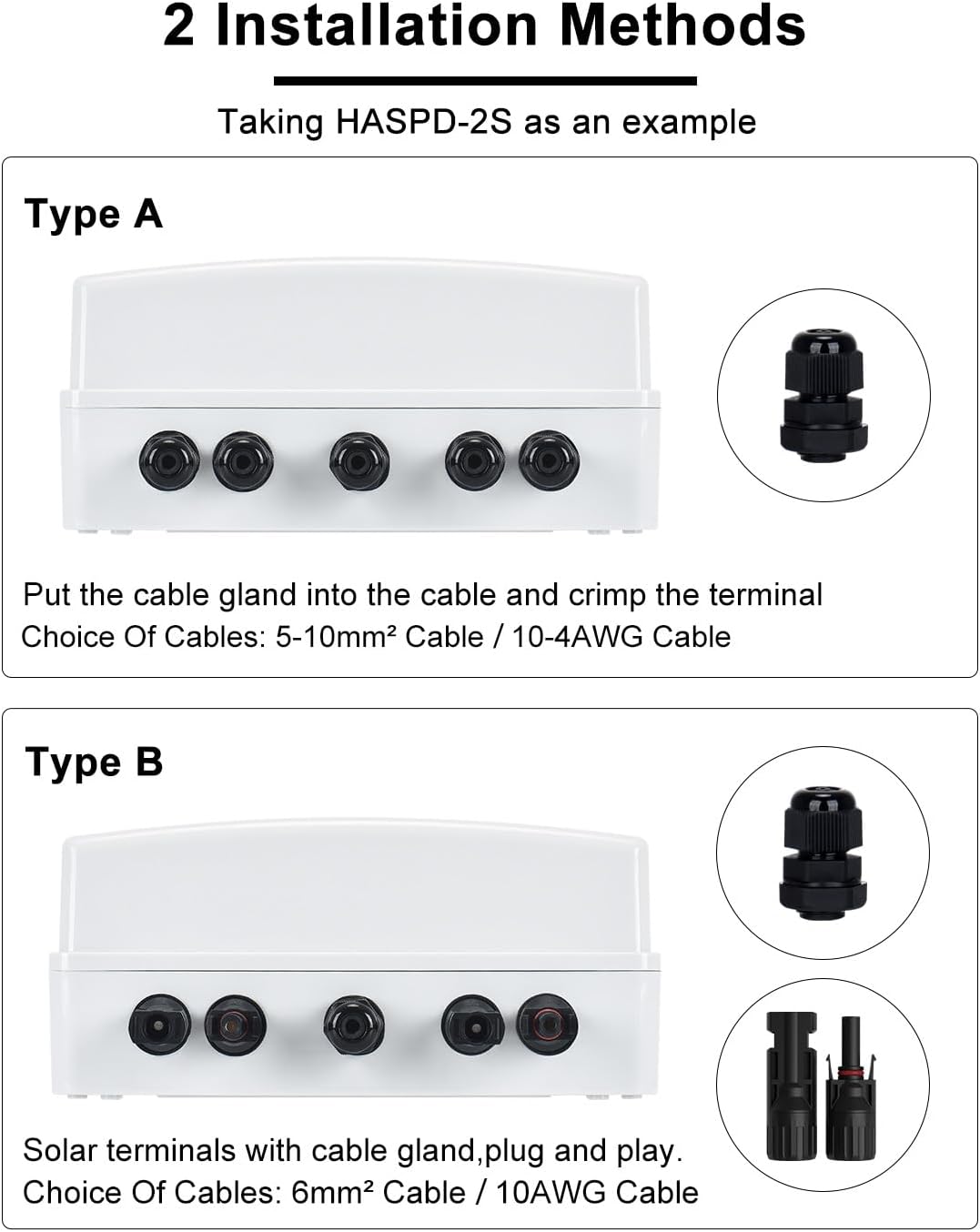
आकृती 5.2: Illustration of Type A (direct wiring with cable gland) and Type B (plug-and-play with solar terminals) wiring methods.
Type A: Direct Wiring through Waterproof Connectors and Terminals
- For this method, use 5-10mm² (10-4AWG) cables.
- Feed the cables through the waterproof cable glands at the bottom of the enclosure.
- Strip the cable insulation and crimp appropriate terminals onto the wires.
- Connect the positive (+) and negative (-) wires from the solar panel string to the corresponding terminals inside the box.
- Connect the output wires to your MPPT controller or inverter.
- सर्व कनेक्शन घट्ट आणि सुरक्षित असल्याची खात्री करा.
- Tighten the cable glands to maintain IP65 rating.
Type B: Solar Connectors (MC4) for Plug-and-Play
- This method uses MC4 solar terminals for faster and safer connection.
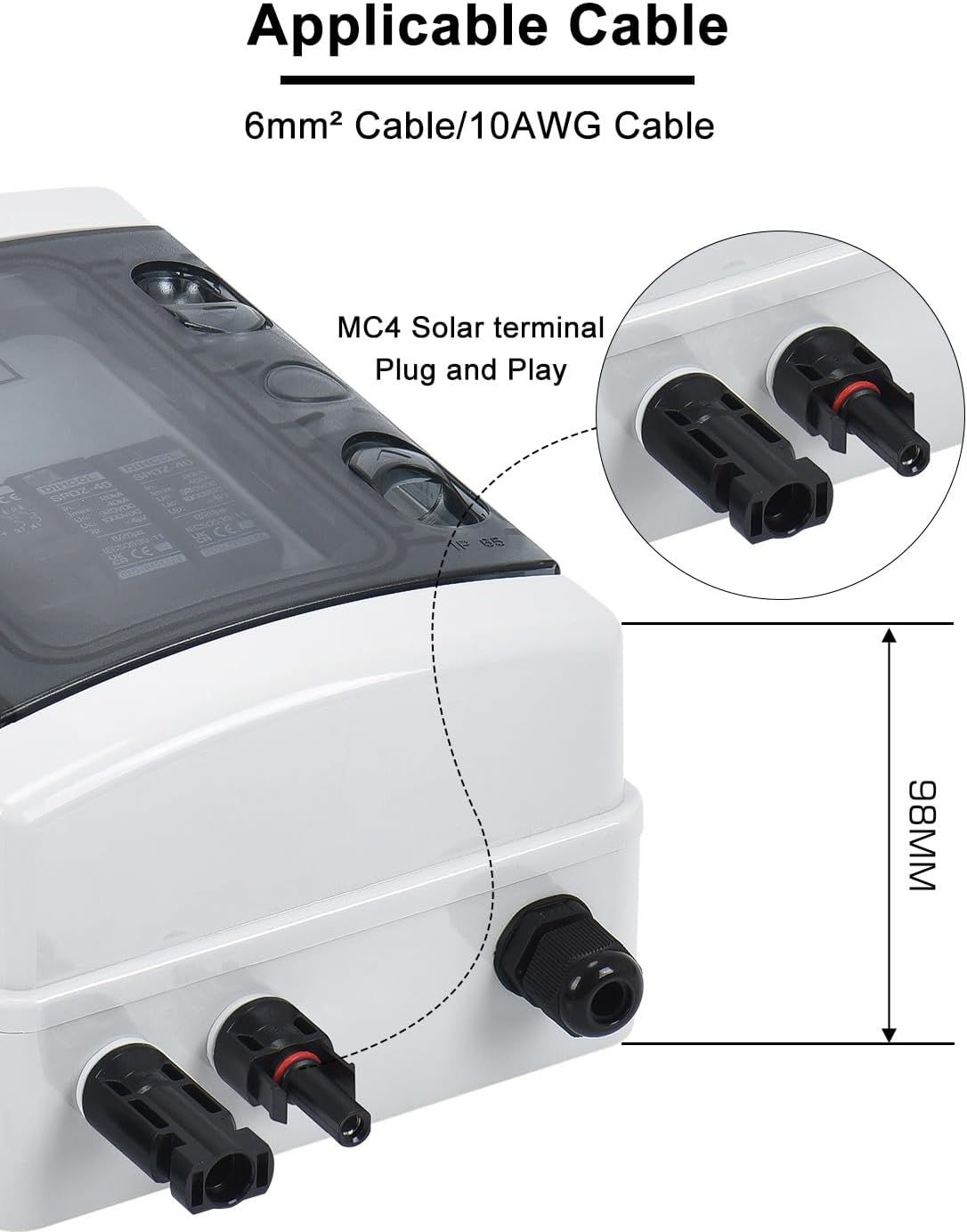
- Use 6mm² (10AWG) cables with pre-attached MC4 connectors.
- Connect the MC4 connectors from your solar panel string directly to the input MC4 ports on the disconnect box.
- Connect the output MC4 ports from the disconnect box to your MPPT controller or inverter.
- Ensure all MC4 connections are fully seated and locked.
आकृती 5.3: क्लोज-अप view of the MC4 solar terminal, indicating compatibility with 6mm² / 10AWG cable.
5.3 सिस्टम वायरिंग आकृती
Refer to the following diagram for a typical installation of the disconnect switch box within a solar PV system.

आकृती 5.4: A typical wiring diagram showing the connection of the solar panel disconnect switch box between the solar panel array and an MPPT charge controller, leading to a battery bank. The diagram also illustrates the grounding connection.
5.4 Grounding and Sealing
Proper grounding is crucial for safety. Connect the provided grounding wire from the designated grounding terminal inside the enclosure to a reliable earth ground point. Ensure all cable glands are securely tightened after wiring to maintain the IP65 waterproof and dustproof rating.

आकृती 5.5: The image highlights the sealing rubber ring and waterproof cable gland, which contribute to the IP65 rating and protect internal components from moisture and dust.
6. ऑपरेटिंग सूचना
6.1 DC Circuit Breaker Operation
The integrated DC circuit breaker acts as the main disconnect switch. It is designed to interrupt the DC current from the solar panels to the rest of the system.
- चालू करण्यासाठी: Push the breaker switch to the "ON" position (typically indicated by a color, often red).
- बंद करण्यासाठी: Push the breaker switch to the "OFF" position (typically indicated by a color, often green). This disconnects the solar array from the system.
- In case of an overcurrent event, the breaker will automatically trip to the "OFF" position. Investigate the cause before resetting.
6.2 Surge Protector Status
The surge protector is designed to protect your system from lightning strikes and voltage surges.
- The surge protector has an indicator light.
- If the indicator light is हिरवा, the surge protector is functioning correctly.
- If the indicator light turns लाल, it indicates that a lightning strike or significant surge has occurred, and the surge protection module needs to be replaced.

आकृती 6.1: This image illustrates the difference between DIHOOL's surge protector, which uses a standard lightning protection chip for effective voltage release, and other brands that may use less effective piezoresistors.
7. देखभाल
7.1 सामान्य तपासणी
- Periodically inspect the enclosure for any signs of damage, cracks, or loose connections.
- Ensure the transparent viewing window is clean for clear visibility of the breaker and surge protector status.
- Check that all cable glands are securely tightened.
7.2 Surge Protector Replacement
If the surge protector indicator turns red, the module has absorbed a surge and needs replacement to ensure continued protection.
- चेतावणी: Disconnect all power to the solar array and the system before attempting to replace the surge protector.
- बंदिस्त उघडा.
- Carefully remove the old surge protector module from its DIN rail mounting.
- Install a new, compatible surge protector module (DC 1000V 2P 20kA / 40kA Type 2).
- बंदिस्त सुरक्षितपणे बंद करा.
- Restore power and verify the new surge protector indicator is green.
7.3 Disassembly of Solar Terminals (MC4)
If you need to disconnect MC4 solar terminals, use an MC4 wrench as shown below:

आकृती 7.1: Step-by-step guide for safely disassembling MC4 solar terminals using a specialized MC4 wrench. This process involves preparing the wrench, inserting it into the terminal groove, clamping, and applying force to separate the terminals.
8. समस्या निवारण
| समस्या | संभाव्य कारण | उपाय |
|---|---|---|
| No power output from the box. | DC circuit breaker is in the "OFF" or tripped position. | Check the breaker position. If tripped, investigate for overcurrent (e.g., short circuit, overloaded panels) before resetting. |
| Surge protector indicator is red. | Surge protector has absorbed a voltage लाट. | Replace the surge protector module immediately to restore protection. |
| Loose or intermittent connections. | Wiring not properly secured. | Ensure all MC4 connectors are fully seated and locked. For direct wiring, check terminal tightness and cable gland seals. |
| Water or dust ingress into the enclosure. | Improperly sealed cable glands or damaged enclosure. | Check and tighten all cable glands. Inspect the enclosure for damage; replace if compromised. |
9. वॉरंटी माहिती
DIHOOL products are manufactured to high-quality standards. For specific warranty terms and conditions, please refer to the warranty card included with your product or contact DIHOOL customer support. The warranty typically covers defects in materials and workmanship under normal use.
10. ग्राहक समर्थन
If you encounter any issues or have questions regarding your DIHOOL Solar Panel Disconnect Switch Box, please contact DIHOOL customer support through the retailer where you purchased the product or visit the official DIHOOL webसंपर्क माहितीसाठी साइट.
For more information about DIHOOL products, you can visit the DIHOOL Store on Amazon.


