परिचय
The Raycon Impact Speaker is engineered for durability and exceptional sound, designed to withstand challenging environments. This wireless, waterproof, and shockproof Bluetooth speaker features military-grade impact resistance and an IP67 rating, making it suitable for various outdoor and indoor activities. With its stereo sound capabilities and magnetic base, it offers a versatile audio experience. This manual provides essential information for setting up, operating, maintaining, and troubleshooting your Impact Speaker.

Figure 1: Raycon Impact Speaker. This image shows the front view of the black Raycon Impact Speaker, highlighting its rugged design and speaker grille.
बॉक्समध्ये काय आहे
Upon unboxing your Raycon Impact Speaker, please ensure all the following components are present:
- द इम्पॅक्ट स्पीकर
- USB-USB-C Charging Cable
- द्रुत प्रारंभ मार्गदर्शक
- अनुपालन पुस्तिका
उत्पादन वैशिष्ट्ये
The Raycon Impact Speaker is equipped with several key features designed for performance and durability:
- Military Grade Impact Resistance: The speaker features a durable outer shell that resists scratches and shocks, with a shock-absorbent rubber lining. It is MIL-STD-810 impact tested, ensuring reliability in demanding conditions.
- Universal Mountability: A 1/4"-20 universal mount allows the speaker to be attached to various accessories, making it ideal for outdoor adventures like mountain climbing or cave diving.
- चुंबकीय पाया: Built with Neodymium magnets in its base, the speaker securely attaches to magnetized surfaces, elevating your audio experience.
- IP67 वॉटरप्रूफ आणि डस्टप्रूफ: With an IP67 rating, the speaker is highly resistant to water and dust, allowing you to use it in various environments without concern for damage.
- 15-तास बॅटरी आयुष्य: Enjoy extended playtime with a long-lasting battery, perfect for a full day of use.
- अंगभूत मायक्रोफोन: Facilitates hands-free calls.
- Multi-Link Mode: Connect multiple Impact Speakers for an enhanced audio experience.
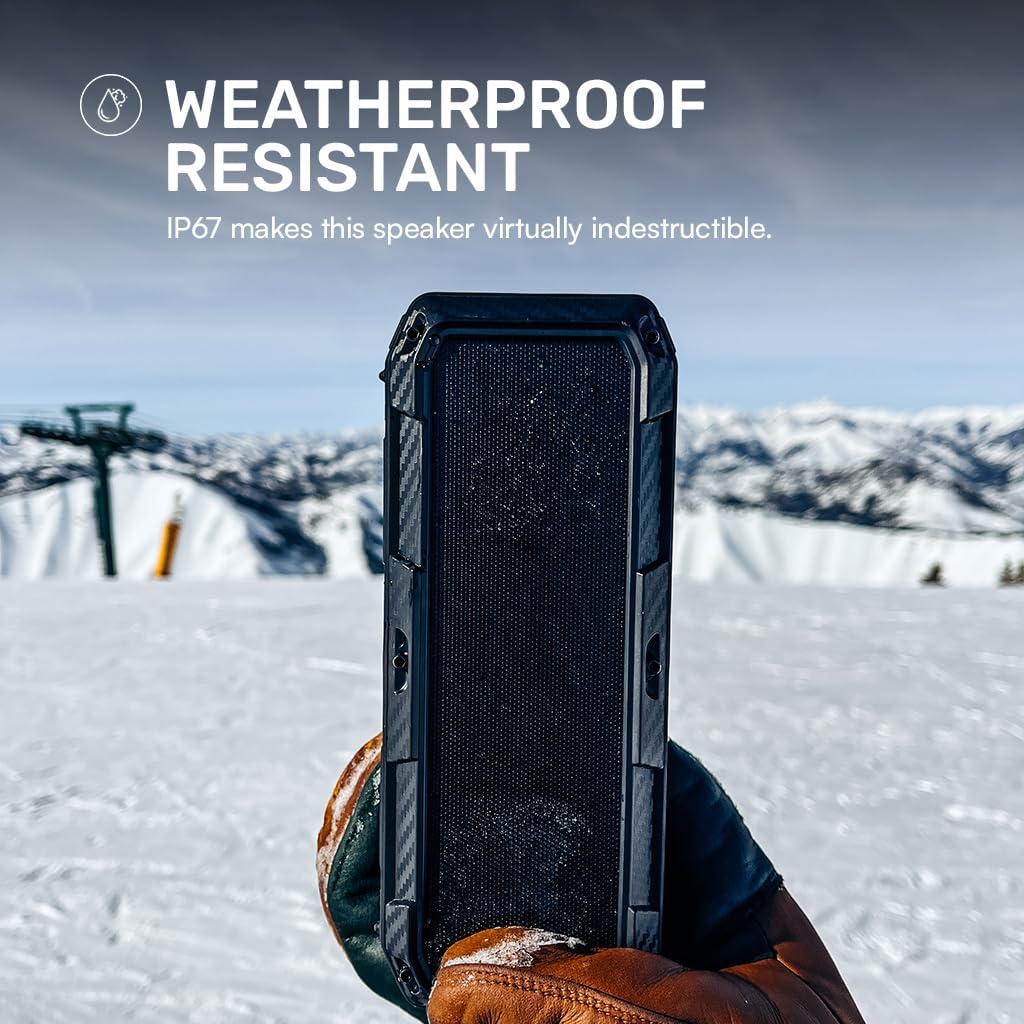
Figure 2: Internal Components and Durability Features. This image displays an exploded view of the Raycon Impact Speaker, highlighting its MIL-STD-810 impact resistant casing, 1/4"-20 base mount, Neodymium magnets, 10-watt speakers, steel carabiner, built-in microphone, Lithium Ion battery, and IP67 dust & water resistant rubber gasket.

Figure 3: Universal Mount Feature. The image shows the Raycon Impact Speaker from an angled view, emphasizing the universal mount point on its side, allowing for versatile attachment options.

Figure 4: Magnetic Base in Use. This image depicts the Raycon Impact Speaker magnetically attached to a metal pole outdoors, demonstrating the strength and utility of its Neodymium magnetic base.

Figure 5: Weatherproof Design. The image shows the Raycon Impact Speaker being held by a gloved hand in a snowy, mountainous environment, illustrating its IP67 weatherproof and resistant capabilities.
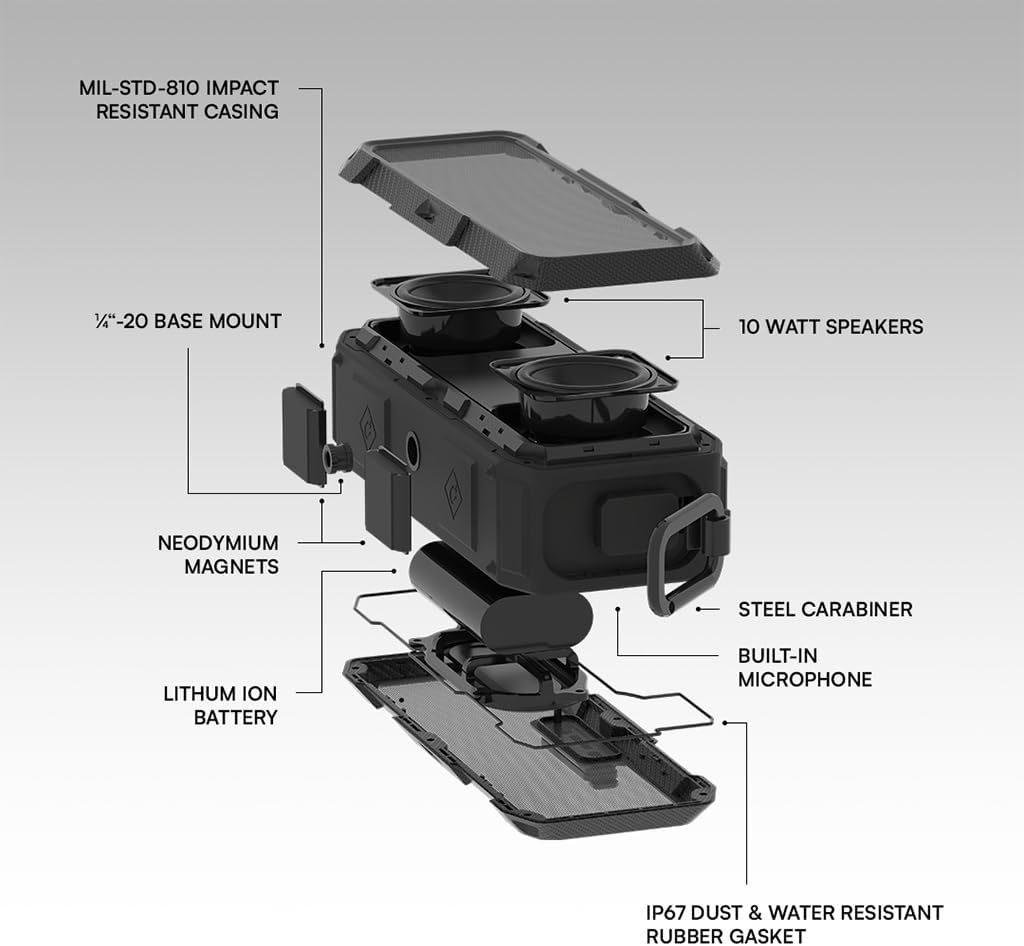
Figure 6: Extended Battery Life. This image features a person holding the Raycon Impact Speaker outdoors, with text indicating its 15-hour battery life, emphasizing its suitability for extended adventures.
सेटअप
१. सभापतीला शुल्क आकारणे
Before first use, fully charge your Raycon Impact Speaker. Connect the provided USB-USB-C charging cable to the speaker's USB-C port and the other end to a compatible USB power adapter (not included) or a computer's USB port. The charging indicator light will show the charging status and turn off or change color when fully charged.
2. पॉवर चालू/बंद
- चालू करण्यासाठी: Press and hold the Power button for approximately 3 seconds until you hear an audible prompt and the indicator light illuminates.
- पॉवर ऑफ करण्यासाठी: Press and hold the Power button for approximately 3 seconds until you hear an audible prompt and the indicator light turns off.
3. ब्लूटूथ पेअरिंग
To connect your Impact Speaker to a Bluetooth-enabled device:
- Ensure the speaker is powered on and in pairing mode (the indicator light will typically flash rapidly).
- तुमच्या डिव्हाइसवर (स्मार्टफोन, टॅबलेट, इ.), ब्लूटूथ सक्षम करा आणि उपलब्ध डिव्हाइस शोधा.
- Select "Raycon Impact Speaker" from the list of found devices.
- Once connected, you will hear a confirmation sound, and the indicator light on the speaker will become solid.
The speaker will automatically attempt to reconnect to the last paired device when powered on, if that device is within range and has Bluetooth enabled.
ऑपरेटिंग सूचना
मूलभूत नियंत्रणे
- आवाज वर/खाली: Press the '+' or '-' buttons to adjust the volume.
- प्ले/पॉज: ऑडिओ प्ले करण्यासाठी किंवा थांबवण्यासाठी एकदा प्ले/पॉज बटण दाबा.
- पुढील ट्रॅक: '+' बटण २ सेकंद दाबा आणि धरून ठेवा.
- मागील ट्रॅक: '-' बटण २ सेकंद दाबा आणि धरून ठेवा.
- उत्तर द्या/कॉल संपवा: इनकमिंग कॉल दरम्यान एकदा प्ले/पॉज बटण दाबा.
- कॉल नाकारणे: Press and hold the Play/Pause button for 2 seconds during an incoming call.
Multi-Link Mode (Connecting Multiple Speakers)
To create a stereo sound experience or amplify your audio, you can connect two Raycon Impact Speakers together:
- Ensure both Impact Speakers are powered on and not connected to any Bluetooth device.
- On one speaker (this will be your primary speaker), press the Multi-Link button (refer to the Quick Start Guide for button identification).
- On the second speaker, press the Multi-Link button.
- The speakers will automatically connect to each other. You will hear a confirmation sound once connected.
- Now, connect your device to the primary speaker via Bluetooth as described in the 'Bluetooth Pairing' section. Both speakers will play audio simultaneously.
देखभाल
Proper maintenance ensures the longevity and optimal performance of your Raycon Impact Speaker:
- स्वच्छता: मऊ वापरा, डीamp cloth to wipe the speaker's exterior. Avoid using harsh chemicals, solvents, or abrasive cleaners, as these can damage the finish or internal components.
- स्टोरेज: जास्त काळ वापरात नसताना, स्पीकर थेट सूर्यप्रकाश आणि अति तापमानापासून दूर थंड, कोरड्या जागी ठेवा.
- पाणी एक्सपोजर: While the speaker is IP67 waterproof, ensure the charging port cover is securely closed before exposing it to water. After exposure to water, dry the speaker thoroughly before charging.
- बॅटरी काळजी: To preserve battery life, avoid fully discharging the speaker frequently. Charge it regularly, even if not in use, to maintain battery health.
समस्यानिवारण
If you encounter issues with your Raycon Impact Speaker, refer to the following common problems and solutions:
| समस्या | संभाव्य कारण | उपाय |
|---|---|---|
| स्पीकर चालू होत नाही. | कमी बॅटरी. | प्रदान केलेली USB-C केबल वापरून स्पीकर चार्ज करा. |
| ब्लूटूथ डिव्हाइससह जोडू शकत नाही. | स्पीकर पेअरिंग मोडमध्ये नाही; डिव्हाइस ब्लूटूथ बंद आहे; स्पीकरपासून खूप दूर आहे. | Ensure speaker is in pairing mode (flashing light). Turn device Bluetooth off and on. Move device closer to speaker (within 50 feet). |
| आवाज नाही किंवा कमी आवाज नाही. | Volume too low; device not connected; incorrect audio source. | Increase speaker and device volume. Re-pair the device. Ensure correct audio output is selected on your device. |
| Multi-Link mode not working. | Speakers already paired to a device; incorrect pairing sequence. | Disconnect both speakers from any Bluetooth devices. Follow the Multi-Link pairing instructions carefully. |
तपशील
Detailed technical specifications for the Raycon Impact Speaker:
| वैशिष्ट्य | तपशील |
|---|---|
| मॉडेलचे नाव | द इम्पॅक्ट स्पीकर |
| मॉडेल क्रमांक | RBS970-23E-BLA |
| साहित्य | कार्बन फायबर |
| स्पीकरचा प्रकार | निष्क्रिय रेडिएटर |
| कनेक्टिव्हिटी तंत्रज्ञान | ब्लूटूथ |
| वायरलेस कम्युनिकेशन रेंज | 50 फूट पर्यंत |
| जलरोधक रेटिंग | IP67 |
| बॅटरी आयुष्य | 15 तास |
| उर्जा स्त्रोत | बॅटरीवर चालणारी (१ लिथियम आयन बॅटरी, समाविष्ट) |
| स्पीकर कमाल आउटपुट पॉवर | 20 वॅट्स |
| ऑडिओ आउटपुट मोड | भोवती |
| सबवूफर व्यास | 47 मिलीमीटर |
| उत्पादनाची परिमाणे (L x W x H) | 5.61 x 18.21 x 7.39 cm (5.6D x 18.2W x 7.4H Centimetres) |
| आयटम वजन | २८.३५ ग्रॅम (१ औंस) |
| माउंटिंग प्रकार | चुंबकीय |
| विशेष वैशिष्ट्ये | Dustproof, Impact Resistant, Magnetic Base, Universal Mount, Waterproof |
हमी आणि समर्थन
Raycon products are manufactured to the highest quality standards. For information regarding warranty coverage, technical support, or service inquiries, please refer to the Compliance Booklet included with your product or visit the official Raycon webसाइट. वॉरंटी दाव्यांसाठी तुमचा खरेदीचा पुरावा ठेवा.


