1. परिचय
The GALAYOU Indoor Security Camera 2K, Model G2, is designed to provide comprehensive home surveillance with advanced features for monitoring pets, babies, elders, or general home security. It offers 2K super HD live streaming, 360-degree coverage, intelligent motion detection, enhanced night vision, and two-way audio communication. This manual will guide you through the setup, operation, and maintenance of your G2 camera.
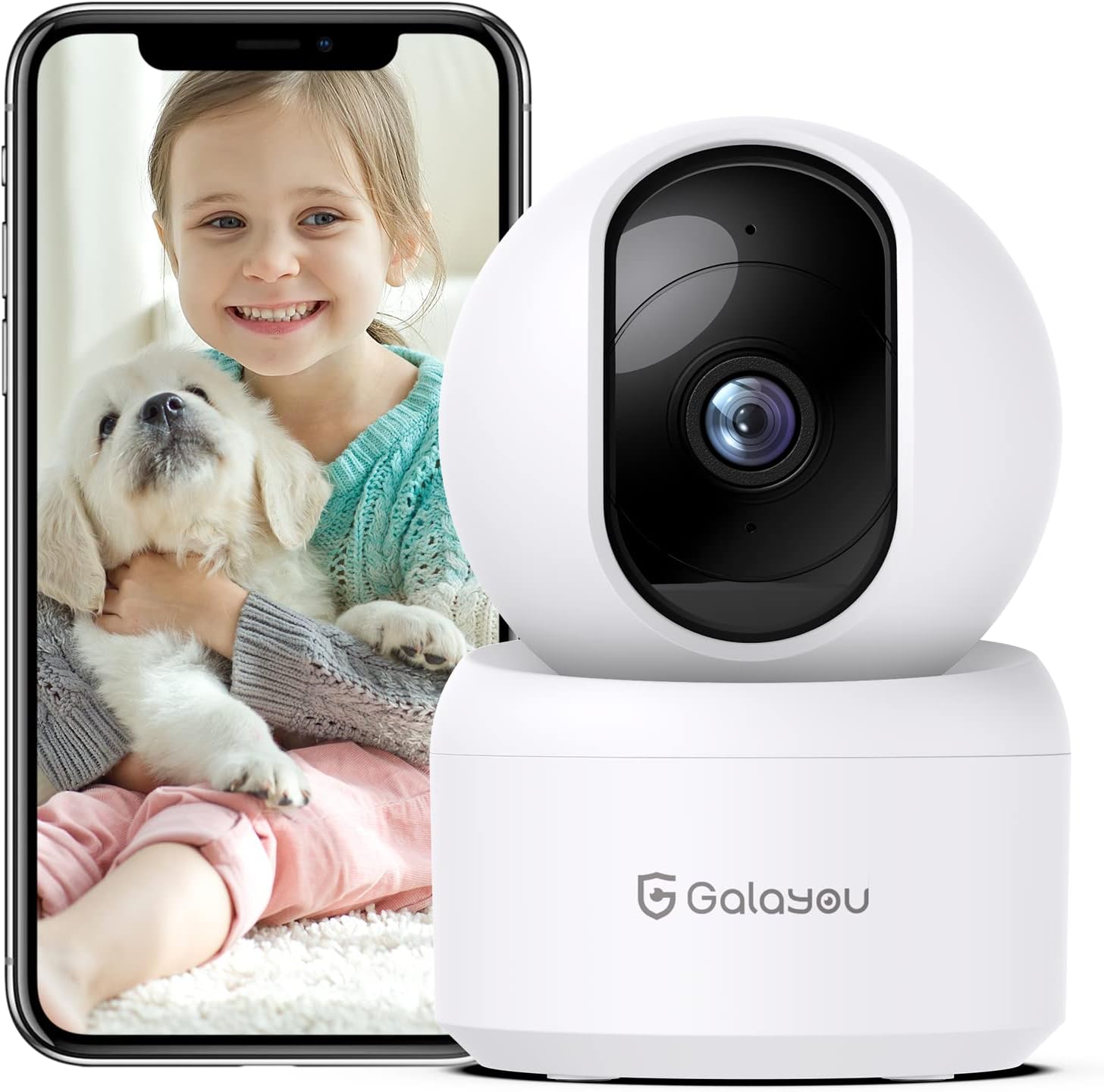
Image: The GALAYOU G2 Indoor Security Camera, a white dome-shaped device, shown next to a smartphone displaying a live feed of a child holding a puppy, illustrating its use for pet and baby monitoring.
2. पॅकेज सामग्री
तुमच्या पॅकेजमध्ये सर्व वस्तू आहेत का ते तपासा:
- Camera body (GALAYOU G2)
- Type-C Cable + USB Adapter
- माउंटिंग स्क्रू
- स्थापना मार्गदर्शक
3. उत्पादन संपलेview
The GALAYOU G2 camera features a compact design with advanced functionalities for indoor security.
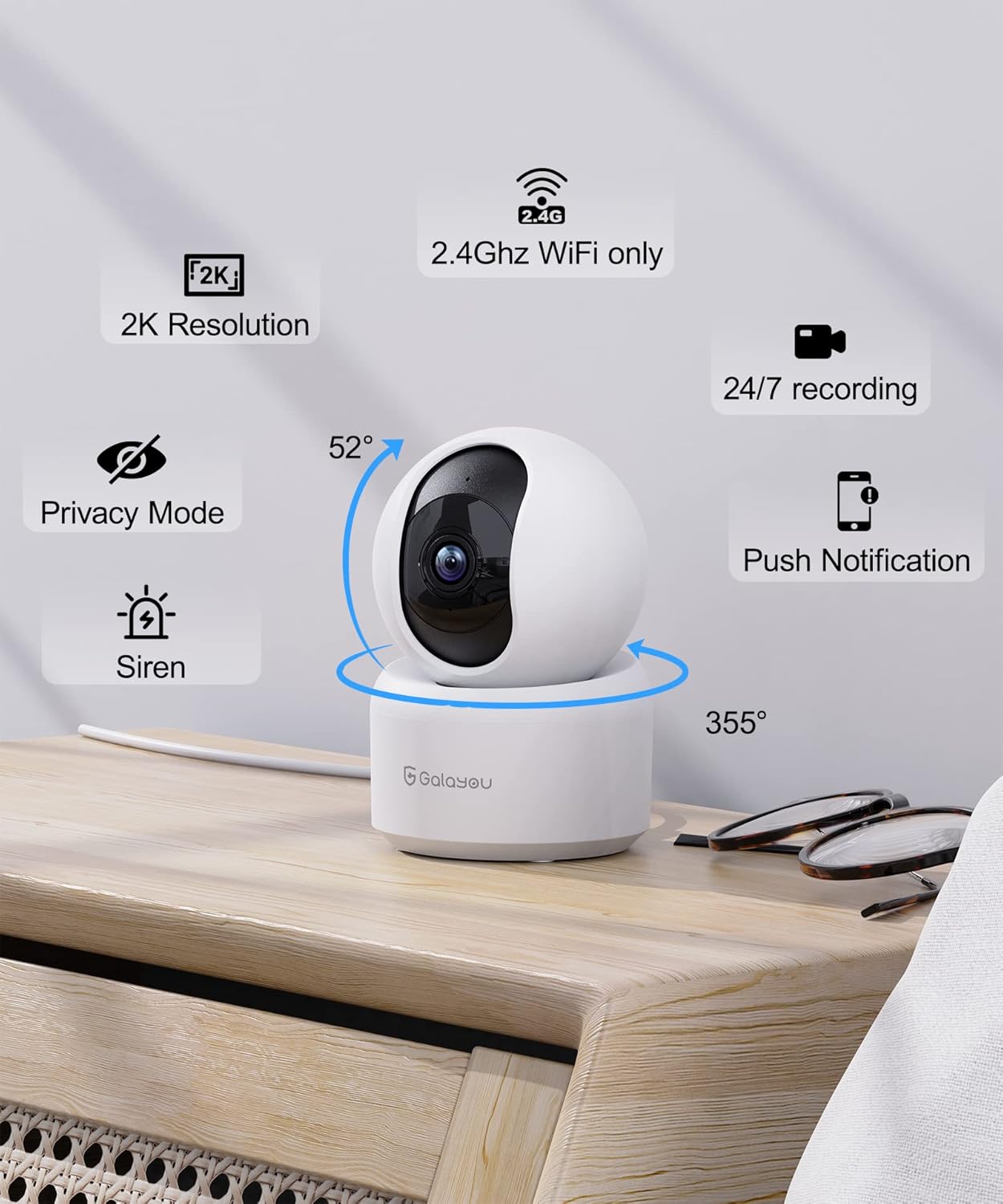
प्रतिमा: सविस्तर view of the GALAYOU G2 camera on a wooden surface, with icons illustrating its key features: 2K Resolution, 2.4GHz WiFi compatibility, 24/7 recording, Privacy Mode, Siren, Push Notifications, and its 355° horizontal and 52° vertical rotation capabilities.
प्रमुख वैशिष्ट्ये:
- 2K Resolution & 360° Coverage: Provides super HD live stream with 355° horizontal and 52° vertical rotation for full room coverage.
- Intelligent Motion Detection & Siren Alarm: Sends instant alerts and records 10-second video clips upon motion detection, with an optional siren to deter intruders.
- Enhanced Night Vision & Two-Way Audio: Equipped with 4pcs 940nm infrared lights for clear night vision up to 32ft, and a built-in microphone and speaker for two-way communication.
- Optional Cloud & 24/7 SD Card Storage: Supports local storage via SD card (up to 128GB, not included) and a 30-day trial cloud storage for continuous recording and data safety.
- मल्टी-डिव्हाइस Viewसामील होणे आणि शेअर करणे: Allows adding multiple cameras to the app and viewing up to 4 live feeds simultaneously. Share access with up to 3 other devices.
- व्हॉइस असिस्टंट इंटिग्रेशन: सोयीस्कर व्हॉइस कंट्रोलसाठी Amazon Alexa आणि Google Assistant शी सुसंगत.
4. तपशील
| वैशिष्ट्य | तपशील |
|---|---|
| मॉडेलचे नाव | G2 |
| इनडोअर/आउटडोअर वापर | इनडोअर |
| उर्जा स्त्रोत | कॉर्डेड इलेक्ट्रिक (५ व्होल्ट, ६ वॅट्स) |
| कनेक्टिव्हिटी प्रोटोकॉल | वाय-फाय (फक्त २.४GHz) |
| कंट्रोलर प्रकार | Amazon Alexa/Google Assistant |
| माउंटिंग प्रकार | वॉल माउंट |
| व्हिडिओ कॅप्चर रिझोल्यूशन | 1296p (2K) |
| रंग | पांढरा |
| परिमाण (L x W x H) | 2.83 x 2.83 x 4.29 इंच |
| आयटम वजन | 10.8 औंस (0.31 किलोग्रॅम) |
| Viewing Angle (Lens) | 95 अंश |
| च्या फील्ड View (Pan/Tilt) | 360 अंश |
| नाइट व्हिजन रेंज | 10 मीटर (32 फूट) |
| फ्रेम दर | 15fps/से |
| पाणी प्रतिकार पातळी | पाणी प्रतिरोधक नाही |
| फोटो सेन्सर तंत्रज्ञान | CMOS |
| व्हिडिओ कॅप्चर स्वरूप | MPEG-4 |
| नियंत्रण पद्धत | ॲप |
| विशेष वैशिष्ट्य | सायरन |
5. सेटअप मार्गदर्शक
Follow these steps to set up your GALAYOU G2 camera and connect it to your Wi-Fi network.
5.1 Download the Wansview क्लाउड अॅप
- Scan the QR code provided in the Quick Installation Guide or search for "Wansview Cloud" in the Google Play Store (for Android) or Apple App Store (for iOS).
- Download and install the "Wansview Cloud" application on your smartphone.

Image: A visual guide demonstrating the steps for quick installation, including downloading the Wansview Cloud app, registering an account, plugging in the camera, and completing Wi-Fi configuration.
5.2 Register and Log In to Your Account
- वन्स उघडाview क्लाउड अॅप.
- Tap on "Sign up" to create a new account.
- Enter your email address and create a strong password (8-16 characters, including digits, uppercase letters, lowercase letters, and special characters).
- You will receive a verification code via email. Enter this code into the app to complete registration.
- Once registered, log in to your new Wansview मेघ खाते.
Video: A tutorial demonstrating how to download the Wansview Cloud App, register an account, and log in. This video guides users through the initial setup process for the camera's accompanying application.
5.3 Wi-Fi शी कनेक्ट करा
- Plug in your GALAYOU G2 camera using the provided Type-C cable and USB adapter. The camera will power on.
- Ensure your smartphone is connected to a 2.4GHz Wi-Fi network. The G2 camera does not support 5GHz Wi-Fi.
- वॅनमध्येview Cloud app, tap the "+" icon to add a new device.
- Follow the on-screen instructions in the app to complete the Wi-Fi configuration. This typically involves scanning a QR code displayed on your phone with the camera lens.
6. ऑपरेटिंग सूचना
Once your camera is set up, you can utilize its various features through the Wansview क्लाउड अॅप.
6.1 थेट View आणि पॅन/टिल्ट नियंत्रण
- वन्स उघडाview Cloud app and select your G2 camera from the device list to access the live view.
- Use the directional controls within the app to remotely pan (355° horizontal) and tilt (52° vertical) the camera lens, allowing you to view different areas of your room.
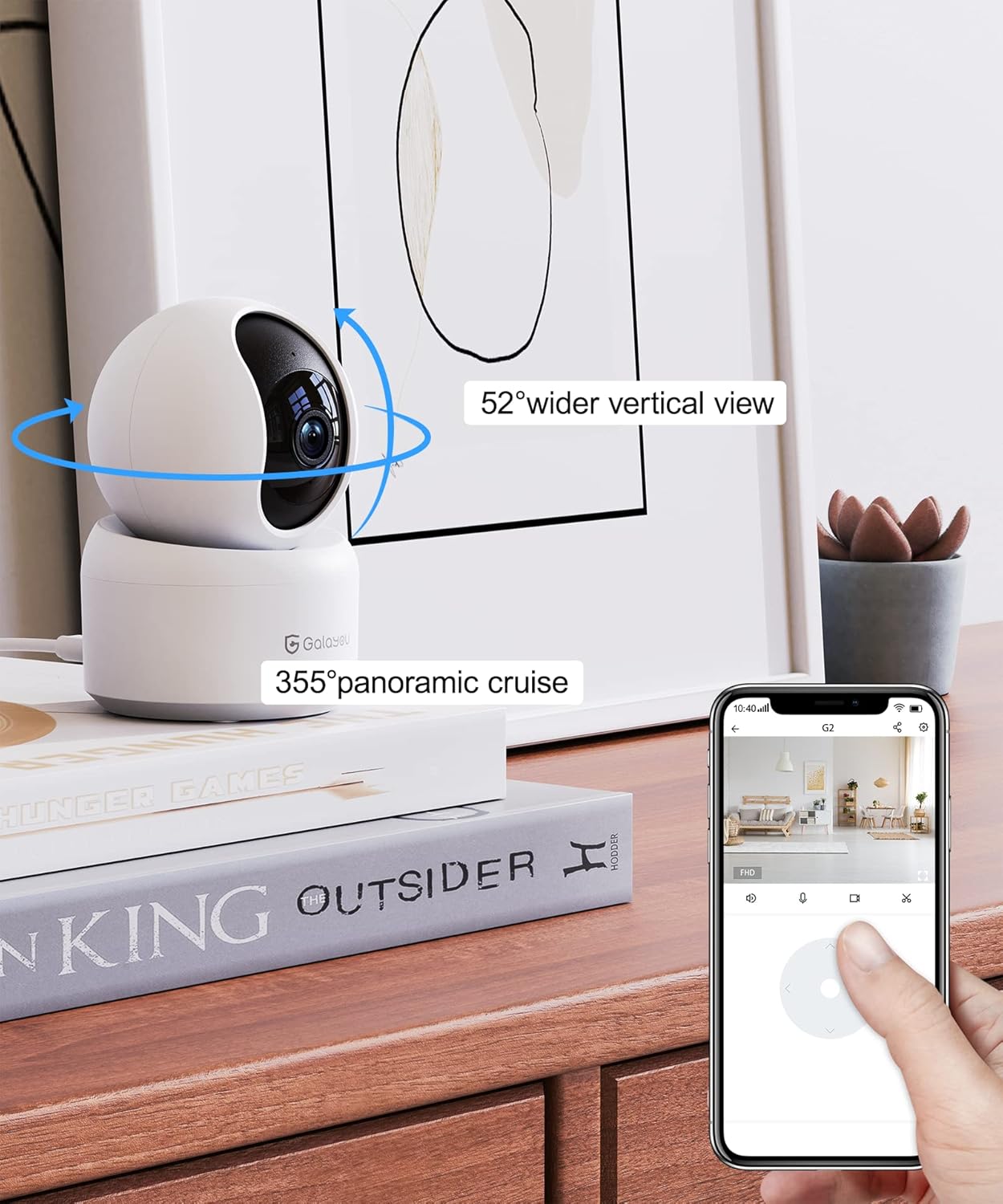
Image: A smartphone screen displaying the Wansview Cloud app's controls for the GALAYOU G2 camera, demonstrating its 355° panoramic cruise and 52° wider vertical view क्षमता
Image: A panoramic view of a modern living space, illustrating the extensive coverage provided by the GALAYOU G2 camera's 355° pan and 52° tilt viewक्षमता.
6.2 Motion Detection and Siren Alarm
- Enable motion detection in the app settings to receive instant alert notifications on your phone when movement is detected.
- The camera will automatically record 10-second video clips of detected motion and save them to the app.
- Activate the siren feature through the app to emit an audible alarm when motion is detected, serving as a deterrent.

Image: A smartphone screen displaying a "Motion alarm" notification from the Wansview Cloud app, overlaid on a scene of a child in a crib, indicating real-time alerts for motion in customized areas.

Image: An illustration of the camera's siren feature, showing an intruder being startled by the camera's alarm, highlighting its deterrent capability.
५.६ वर्धित रात्रीची दृष्टी
- The camera automatically switches to night vision mode in low-light conditions, providing clear black and white images up to 32 feet (10 meters).

Image: A dark room scene with a child sleeping, demonstrating the camera's enhanced night vision capabilities and two-way audio feature, allowing communication even in low light.
Image: A clear, black and white image of a baby sleeping in a crib at night, demonstrating the camera's ability to provide clear visuals in low-light conditions.
४.४ टू-वे ऑडिओ
- Use the built-in microphone and speaker to communicate with family members or pets through the camera from anywhere.

Image: A scene depicting a puppy in a living room, with speech bubbles indicating two-way audio communication between a user and the pet via the camera.
५.७ स्टोरेज पर्याय
- SD कार्ड स्टोरेज: Insert a Micro SD card (up to 128GB, not included) into the camera's slot for 24/7 continuous recording.
- क्लाउड स्टोरेज: Utilize the 30-day trial cloud storage service to securely save alert videos and access them anytime, anywhere.

Image: The GALAYOU G2 camera positioned with a hand inserting an SD card, illustrating local storage. Above, a cloud icon with an arrow points upwards, representing the encrypted 30-day trial cloud storage option.

Image: A graphic illustrating the flow of video data from the camera to both local SD card storage (up to 128GB) and cloud storage, emphasizing the 30-day trial experience.
४.७ मल्टी-डिव्हाइस Viewनोंदणी आणि शेअरिंग
- Add multiple GALAYOU cameras to your Wansview Cloud app to monitor different areas simultaneously. The app supports displaying up to 4 live video feeds at once.
- Share access to your camera's live feed and recordings with up to 3 other devices, allowing family members to view.
Image: A smartphone screen showing the Wansview Cloud app interface with multiple camera feeds displayed simultaneously, demonstrating the multi-device viewक्षमता.

Image: A visual representation of the device sharing feature within the Wansview Cloud app, showing how users can invite others to view the camera feed, enabling shared monitoring.
२.४ व्हॉइस असिस्टंट इंटिग्रेशन
- Connect your GALAYOU G2 camera with Amazon Alexa or Google Assistant for hands-free control.
- Use voice commands such as "Alexa, show me the living room camera" to view सुसंगत स्मार्ट डिस्प्लेवरील लाईव्ह फीड.

Image: The GALAYOU G2 camera positioned next to an Amazon Echo Show, demonstrating its compatibility with Alexa. A speech bubble shows a user asking Alexa to display the living room camera.

Image: A woman in a kitchen interacting with an Amazon Echo Show, which displays the camera feed, illustrating the convenience of voice control with Alexa for monitoring.
7. देखभाल
- स्वच्छता: Gently wipe the camera lens and body with a soft, dry cloth. Avoid using liquid cleaners or abrasive materials.
- फर्मवेअर अद्यतने: नियमितपणे वॅन तपासाview Cloud app for available firmware updates to ensure optimal performance and security.
- प्लेसमेंट: Ensure the camera is placed in a stable, dry indoor environment, away from direct sunlight, heat sources, and strong electromagnetic fields.
- वीज पुरवठा: कॅमेऱ्याचे नुकसान टाळण्यासाठी फक्त दिलेला पॉवर अॅडॉप्टर वापरा.
8. समस्या निवारण
सामान्य समस्या आणि उपाय:
- कॅमेरा ऑफलाइन:
- कॅमेरा चालू आहे का आणि पॉवर अॅडॉप्टर सुरक्षितपणे जोडलेला आहे का ते तपासा.
- Ensure your Wi-Fi router is working correctly and the camera is within range.
- Verify that your Wi-Fi network is 2.4GHz. The camera does not support 5GHz networks.
- कॅमेरा आणि तुमचा राउटर रीस्टार्ट करा.
- Wi-Fi शी कनेक्ट करण्यात अक्षम:
- Confirm you are connecting to a 2.4GHz Wi-Fi network.
- अॅपमध्ये एंटर केलेला वाय-फाय पासवर्ड बरोबर असल्याची खात्री करा.
- Place the camera closer to the router during initial setup.
- Reset the camera (refer to the Installation Guide for reset instructions) and try the setup process again.
- खराब व्हिडिओ गुणवत्ता:
- Check your internet connection speed. A stable and fast connection is required for 2K streaming.
- कॅमेरा लेन्स स्वच्छ आणि धूळ किंवा डागांपासून मुक्त असल्याची खात्री करा.
- Adjust the camera's position to optimize lighting conditions.
- मोशन डिटेक्शन काम करत नाही:
- Verify that motion detection is enabled in the Wansview Cloud app settings.
- गती शोध संवेदनशीलता सेटिंग्ज समायोजित करा.
- कॅमेरामध्ये कोणतेही अडथळे नाहीत याची खात्री करा. view शोध क्षेत्रात.
9. हमी आणि समर्थन
GALAYOU products typically come with a manufacturer's warranty. Please refer to the original packaging or the official GALAYOU webविशिष्ट वॉरंटी अटी आणि शर्तींसाठी साइट.
For technical support, troubleshooting assistance, or any inquiries regarding your GALAYOU G2 camera, please contact GALAYOU customer service through their official channels. You may find contact information on the product packaging, the Wansview Cloud app, or the GALAYOU brand webसाइट
निर्माता: GALAYOU
ब्रँड Webसाइट: Visit the GALAYOU Store on Amazon


