1. परिचय
The NEDIS VMAT3482AT HDMI 4x2 Matrix Switcher is designed to connect up to four HDMI source devices to two HDMI displays independently. This device supports 4K@60Hz resolution and a data rate of 18 Gbps, ensuring high-quality video transmission. It also features integrated audio extraction, providing both analog (3.5mm) and digital (optical S/PDIF) audio outputs. Control the switcher conveniently via the front panel buttons or the included infrared remote control.
This matrix switcher allows for flexible routing, enabling you to display different sources on different screens simultaneously. For example, you can watch content from Input 1 on Output 1, while content from Input 3 is displayed on Output 2.
2. पॅकेज सामग्री
- NEDIS VMAT3482AT HDMI 4x2 Matrix Switcher
- पॉवर अडॅप्टर (5V DC, 2A)
- इन्फ्रारेड रिमोट कंट्रोल
- वापरकर्ता मॅन्युअल (हा दस्तऐवज)

The NEDIS VMAT3482AT HDMI Matrix Switcher with its power adapter and infrared remote control.
3. डिव्हाइस लेआउट
3.1 फ्रंट पॅनेल
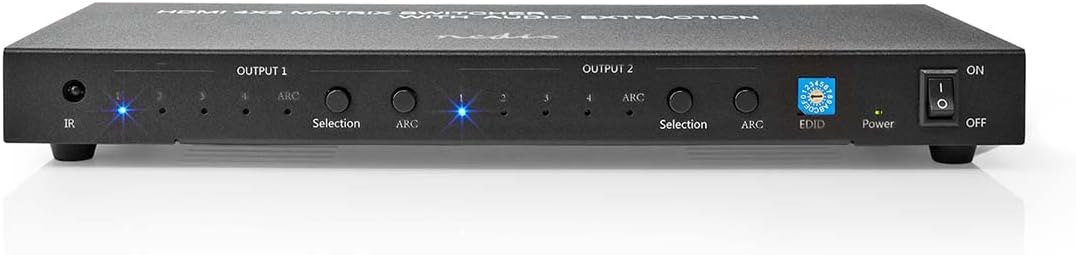
समोर view of the NEDIS VMAT3482AT HDMI Matrix Switcher, showing power button, EDID switch, selection buttons, and IR receiver.
- आयआर प्राप्तकर्ता: रिमोट कंट्रोल कडून सिग्नल प्राप्त होतात.
- Output 1 Selection Buttons (1-4): Selects the HDMI input for Output 1.
- Output 1 ARC Indicator: Lights up when Audio Return Channel is active for Output 1.
- Output 2 Selection Buttons (1-4): Selects the HDMI input for Output 2.
- Output 2 ARC Indicator: Lights up when Audio Return Channel is active for Output 2.
- EDID स्विच: Adjusts Extended Display Identification Data settings.
- पॉवर इंडिकेटर: Shows the power status of the device.
- चालू / बंद स्विच: डिव्हाइस चालू किंवा बंद करते.
3.2 मागील पॅनेल
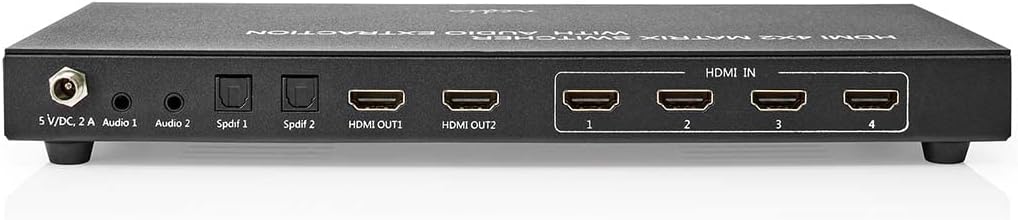
मागील view of the NEDIS VMAT3482AT HDMI Matrix Switcher, displaying HDMI input ports (1-4), HDMI output ports (1-2), S/PDIF audio outputs, 3.5mm audio outputs, and the 5V DC power input.
- 5V/DC 2A Power Input: दिलेला पॉवर अॅडॉप्टर येथे कनेक्ट करा.
- Audio 1 (3.5mm): Analog audio output for Output 1.
- Audio 2 (3.5mm): Analog audio output for Output 2.
- S/PDIF 1 (Optical): Digital audio output for Output 1.
- S/PDIF 2 (Optical): Digital audio output for Output 2.
- HDMI आउट 1: Connect to your first HDMI display.
- HDMI आउट 2: Connect to your second HDMI display.
- 1-4 मध्ये HDMI: Connect your HDMI source devices (e.g., Blu-ray player, game console, set-top box).
४. सेटअप सूचना
- Ensure all devices (source devices, displays, and the matrix switcher) are powered off before making connections.
- Connect your HDMI source devices (e.g., Blu-ray player, game console, streaming box) to the 1-4 मध्ये HDMI ports on the rear panel of the matrix switcher using high-quality HDMI cables.
- Connect your HDMI displays (e.g., TV, monitor, projector) to the HDMI आउट 1 आणि HDMI आउट 2 ports on the rear panel using high-quality HDMI cables.
- (पर्यायी) If you wish to extract audio, connect your audio receiver or amplifier to the corresponding S/PDIF 1/2 (optical) or Audio 1/2 (3.5mm) outputs.
- Connect the provided 5V DC power adapter to the 5V/DC 2A Power Input port on the rear panel, then plug the adapter into a power outlet.
- Power on the matrix switcher using the पॉवर चालू/बंद स्विच on the front panel. The power indicator will illuminate.
- Power on your HDMI source devices and displays.
5. ऑपरेटिंग सूचना
5.1 इनपुट निवडणे
You can select the desired HDMI input for each output using either the front panel buttons or the remote control.
- फ्रंट पॅनल: संबंधित दाबा निवड button (1-4) under आउटपुट 1 or आउटपुट 2 to cycle through the available HDMI inputs for that specific output. The indicator light above the selected input number will illuminate.
- रिमोट कंट्रोल: Use the dedicated buttons for आउटपुट 1 (११०५-१०५) किंवा आउटपुट 2 (1-4) to directly select the desired HDMI input for each output.
5.2 ऑडिओ एक्सट्रॅक्शन
The matrix switcher automatically extracts audio from the selected HDMI input and sends it to the corresponding 3.5mm and S/PDIF audio outputs. Ensure your audio receiver or amplifier is connected to the correct audio output (Audio 1/2 or S/PDIF 1/2) and is set to the appropriate input.
5.3 ARC (Audio Return Channel)
If your display and audio system support ARC, you can enable it for the respective output. When ARC is active, the ARC indicator on the front panel will light up. This allows audio from your display (e.g., smart TV apps) to be sent back to your audio system via the HDMI cable.
5.4 EDID सेटिंग्ज
The EDID (Extended Display Identification Data) switch allows you to manage how the source device recognizes the display's capabilities. Different EDID settings can resolve compatibility issues or optimize video/audio formats. Refer to the product's full technical documentation or manufacturer's website for detailed EDID configuration options.
6. देखभाल
- स्वच्छता: उपकरण स्वच्छ करण्यासाठी मऊ, कोरडे कापड वापरा. द्रव क्लीनर किंवा एरोसोल वापरू नका.
- स्टोरेज: थेट सूर्यप्रकाश आणि अति तापमानापासून दूर थंड, कोरड्या जागी डिव्हाइस साठवा.
- हाताळणी: डिव्हाइसवर जोरदार प्रभाव टाकणे किंवा त्याच्या अधीन करणे टाळा.
- वायुवीजन: Ensure proper ventilation around the device to prevent overheating. Do not block ventilation openings.
7. समस्या निवारण
- चित्र/सिग्नल नाही:
- Ensure the matrix switcher is powered on and the power indicator is lit.
- Verify all HDMI cables are securely connected to both source devices, the matrix switcher, and displays.
- Check that the correct input is selected for each output on the matrix switcher.
- Confirm that your display is set to the correct HDMI input.
- Try using different HDMI cables or connecting a source directly to the display to rule out cable or source issues.
- "Out of Range" or Incorrect Resolution Displayed:
- This often indicates a resolution or refresh rate mismatch between the source and the display.
- Adjust the resolution settings on your source device to match the native resolution of your display.
- Experiment with the EDID settings on the matrix switcher to ensure proper communication of display capabilities to the source.
- Ensure your HDMI cables are rated for the resolution and refresh rate you are attempting to use (e.g., High-Speed HDMI for 4K).
- ऑडिओ नाही:
- Check all audio connections (HDMI, 3.5mm, S/PDIF) are secure.
- Ensure your audio receiver/amplifier is powered on and set to the correct input.
- Verify audio settings on your source device.
- If using ARC, ensure it is enabled on both the display and the matrix switcher, and that your audio system supports ARC.
- रिमोट कंट्रोल काम करत नाही:
- Ensure there are no obstructions between the remote control and the IR receiver on the front panel.
- आवश्यक असल्यास रिमोट कंट्रोलमधील बॅटरी तपासा आणि बदला.
- तुम्ही रिमोट कंट्रोलच्या प्रभावी रेंजमध्ये आहात याची खात्री करा.
8. तपशील
| ब्रँड | नेडिस |
| मॉडेल क्रमांक | VMAT3482AT |
| रंग | अँथ्रासाइट |
| HDMI इनपुट | 4 |
| HDMI आउटपुट | 2 |
| ऑडिओ आउटपुट | 2x Optical S/PDIF, 2x 3.5mm Jack |
| कमाल निराकरण | 4K@60Hz |
| डेटा दर | 18 Gbps |
| विशेष वैशिष्ट्ये | 4K, 3D Support, Audio Extraction, ARC, EDID Management |
| नियंत्रण | Front Panel Buttons, Infrared Remote Control |
| वीज पुरवठा | 5 व्ही डीसी, 2 ए |
| सुसंगत साधने | Television, Blu-ray players, Game Consoles, etc. |
| मूळ देश | चीन |
9. हमी आणि समर्थन
For warranty information, technical support, or further assistance, please refer to the official NEDIS webवेबसाइटला भेट द्या किंवा त्यांच्या ग्राहक समर्थनाशी थेट संपर्क साधा. वॉरंटी दाव्यांसाठी खरेदीचा पुरावा ठेवा.
ऑनलाइन संसाधने: www.nedis.com


