1. परिचय
Thank you for choosing the AOAS K10 Gaming Mouse. This manual provides essential information for setting up, operating, and maintaining your new gaming mouse. Please read these instructions carefully to ensure optimal performance and longevity of your device.
2. उत्पादन संपलेview
The AOAS K10 is an ergonomic gaming mouse designed for comfort and precision. It features adjustable DPI settings, vibrant RGB lighting, and a durable USB connection.

Image 1: The AOAS K10 Gaming Mouse presented in its retail packaging.
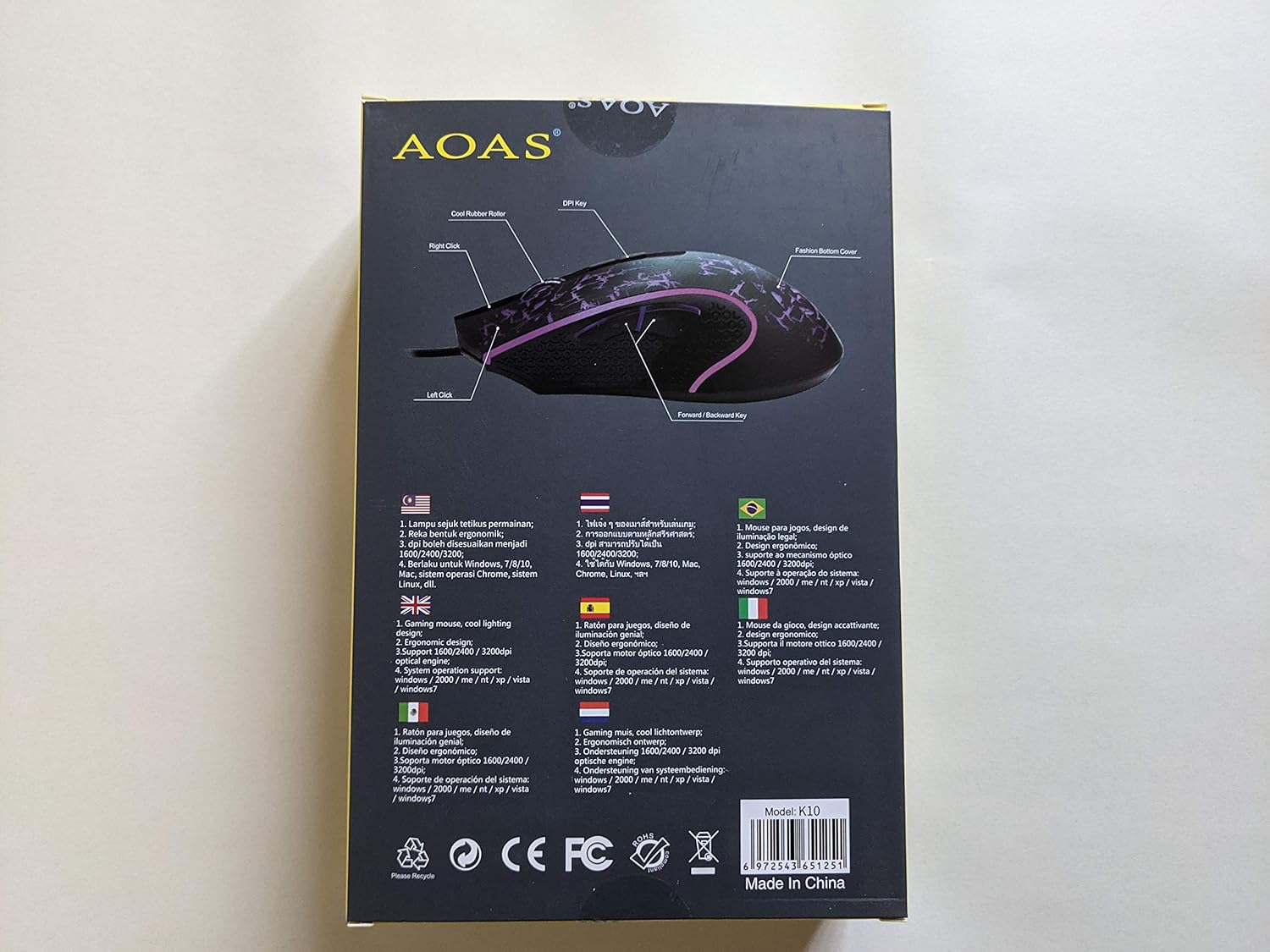
Image 2: This diagram illustrates the key components of the AOAS K10 Gaming Mouse, including the Left Click, Right Click, DPI Key, Forward/Backward Key, and Bottom Cover.
3. वैशिष्ट्ये
- आरजीबी लाइटिंग: Dynamic and cool RGB lighting design enhances the gaming atmosphere.
- अर्गोनॉमिक डिझाइन: Crafted for comfortable use during extended gaming sessions.
- समायोज्य DPI: Three adjustable DPI settings (1600/2400/3200) for precision control.
- ऑप्टिकल इंजिन: High-performance optical engine for accurate tracking.
- USB कनेक्टिव्हिटी: Reliable wired connection via a 1.8m (6 ft.) USB cable.
- अॅम्बिडेक्स्ट्रस डिझाइन: डाव्या आणि उजव्या हाताच्या वापरकर्त्यांसाठी योग्य.
- टिकाऊ बटणे: दीर्घकाळ टिकणाऱ्या कामगिरीसाठी डिझाइन केलेले.
4. सेटअप
Setting up your AOAS K10 Gaming Mouse is a simple plug-and-play process.
- तुमच्या संगणकावर उपलब्ध USB पोर्ट शोधा.
- Plug the USB connector of the AOAS K10 Gaming Mouse into the USB port.
- Your operating system will automatically detect and install the necessary drivers. This may take a few moments.
- Once installation is complete, the mouse is ready for use.
5. ऑपरेटिंग सूचना
बेसिक ऑपरेशन
- लेफ्ट क्लिक: Primary action, selection, and activation.
- राईट क्लिक: Accesses contextual menus and secondary functions.
- स्क्रोल व्हील: कागदपत्रांमधून स्क्रोल करतो आणि web पृष्ठे. मधल्या क्लिक बटण म्हणून देखील कार्य करू शकते.
- Forward/Backward Keys: Navigate forward or backward in web ब्राउझर आणि file शोधक
डीपीआय समायोजन
The AOAS K10 Gaming Mouse features a dedicated DPI button to switch between sensitivity levels.
- दाबा डीपीआय की (located on the top of the mouse, usually behind the scroll wheel) to cycle through the available DPI settings.
- The mouse supports 1600, 2400, and 3200 DPI. Each press will switch to the next level.
- Observe the cursor speed on your screen to select the DPI setting that best suits your preference and current task.
6. देखभाल
To ensure the longevity and optimal performance of your AOAS K10 Gaming Mouse, follow these maintenance guidelines:
- स्वच्छता: माऊसची पृष्ठभाग पुसण्यासाठी मऊ, कोरडे कापड वापरा. हट्टी घाणीसाठी, किंचित डीampकपड्यावर पाणी किंवा सौम्य स्वच्छता द्रावण घाला. कठोर रसायने टाळा.
- सेन्सर काळजी: Keep the optical sensor on the bottom of the mouse clean and free from dust or debris. Use a cotton swab if necessary.
- केबल व्यवस्थापनः नुकसान टाळण्यासाठी USB केबलला तीक्ष्ण वाकणे किंवा जास्त ओढणे टाळा.
- स्टोरेज: वापरात नसताना, माऊसला अत्यंत तापमानापासून दूर स्वच्छ, कोरड्या वातावरणात ठेवा.
7. समस्या निवारण
If you encounter issues with your AOAS K10 Gaming Mouse, try the following steps:
- उंदीर प्रतिसाद देत नाही:
- तुमच्या संगणकावरील कार्यरत USB पोर्टमध्ये USB केबल सुरक्षितपणे जोडलेली असल्याची खात्री करा.
- माउसला वेगळ्या USB पोर्टमध्ये प्लग करून पहा.
- तुमचा संगणक रीस्टार्ट करा.
- समस्या माऊसमध्ये आहे की तुमच्या संगणकाच्या सेटअपमध्ये आहे हे निश्चित करण्यासाठी दुसऱ्या संगणकावर माऊसची चाचणी करा.
- Cursor Movement is Erratic or Jumpy:
- माऊसच्या तळाशी असलेला ऑप्टिकल सेन्सर स्वच्छ करा.
- तुम्ही माउस स्वच्छ, नॉन-रिफ्लेक्टिव्ह आणि एकसमान पृष्ठभागावर (उदा. माउस पॅड) वापरत आहात याची खात्री करा.
- आरजीबी लाइटिंग काम करत नाही:
- Verify the mouse is properly connected to your computer.
- Some operating systems or software may interfere with lighting controls; check your system settings.
8. तपशील
| वैशिष्ट्य | तपशील |
|---|---|
| मॉडेल क्रमांक | K10 |
| ब्रँड | AOAS |
| कनेक्टिव्हिटी तंत्रज्ञान | यूएसबी (वायर्ड) |
| केबलची लांबी | 1.8 मीटर (6 फूट) |
| हालचाल शोध तंत्रज्ञान | ऑप्टिकल |
| डीपीआय सेटिंग्ज | 1600 / 2400 / 3200 |
| बटणांची संख्या | 3 (Left, Right, Scroll Wheel/Middle Click) + DPI Key + Forward/Backward Keys |
| हाताची दिशा | उभयपक्षी |
| विशेष वैशिष्ट्ये | Ergonomic Design, RGB Lighting |
| शिफारस केलेला वापर | गेमिंग |
| सुसंगत ऑपरेटिंग सिस्टम | Windows XP, Windows 7, Linux, Personal Computer |
9. हमी आणि समर्थन
वॉरंटी माहिती आणि तांत्रिक समर्थनासाठी, कृपया तुमच्या खरेदीसोबत दिलेल्या कागदपत्रांचा संदर्भ घ्या किंवा तुमच्या किरकोळ विक्रेत्याशी संपर्क साधा. कोणत्याही वॉरंटी दाव्यांसाठी तुमचा खरेदीचा पुरावा ठेवा.


