परिचय
खरेदी केल्याबद्दल धन्यवाद.asing the Crown 32-inch HD Ready Smart TV. This manual provides essential information for setting up, operating, maintaining, and troubleshooting your new television. Please read this manual thoroughly before using the product and retain it for future reference.
This television features HD Ready resolution, a 178-degree viewing angle, and an Android operating system for smart functionalities. It includes Dolby Audio for an enhanced sound experience.
पॅकेज सामग्री
खाली सूचीबद्ध केलेल्या सर्व वस्तू तुमच्या पॅकेजमध्ये समाविष्ट आहेत याची खात्री करा:
- १ एलईडी टीव्ही युनिट
- 1 Table Stand Pair
- 1 रिमोट कंट्रोल
- 1 वॉरंटी कार्ड
- १ वापरकर्ता पुस्तिका (हा दस्तऐवज)
सेटअप सूचना
१. अनपॅकिंग आणि प्लेसमेंट
Carefully remove the TV from its packaging. Place the TV on a stable, flat surface or prepare for wall mounting. Ensure adequate ventilation around the TV.
2. Installing the Table Stand
- स्क्रीनचे नुकसान टाळण्यासाठी टीव्हीचा चेहरा मऊ, स्वच्छ कापडावर ठेवा.
- Align the table stand pair with the corresponding holes on the bottom of the TV.
- दिलेल्या स्क्रू वापरून स्टँड सुरक्षित करा. जास्त घट्ट करू नका.
Note: If wall mounting, refer to the wall mount kit instructions. The TV supports VESA standard wall mounts.
3. कनेक्टिंग पॉवर
Plug the power cord into the TV's power input, then into a standard electrical outlet. Ensure the power outlet is easily accessible.
4. बाह्य उपकरणे कनेक्ट करणे
टीव्हीमध्ये विविध कनेक्टिव्हिटी पर्याय आहेत:
- HDMI पोर्ट (x2): Connect set-top boxes, Blu-ray players, gaming consoles.
- यूएसबी पोर्ट (x2): Connect USB drives for media playback, or other USB devices.
- VGA Port (x1): Connect a laptop or PC.
- ऑडिओ इनपुट: बाह्य ऑडिओ स्रोतांसाठी.
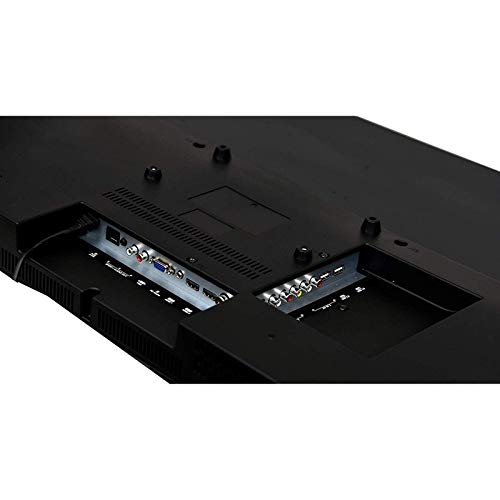
Image: Rear panel of the TV displaying HDMI, USB, and VGA ports for connecting external devices.
ऑपरेटिंग सूचना
1. First Time Setup and Initial Power On
- दाबा शक्ती रिमोट कंट्रोल किंवा टीव्हीवरील बटण.
- Follow the on-screen instructions to select your language, country, and connect to a Wi-Fi network.
- Complete the initial Android TV setup, including signing in with your Google account for full smart TV functionality.

Image: The TV displaying its smart interface with various application shortcuts.
२. मूलभूत टीव्ही कार्ये
- पॉवर चालू/बंद: रिमोट किंवा टीव्हीवरील पॉवर बटण वापरा.
- आवाज नियंत्रण: वापरा व्हीओएल +/- रिमोटवरील बटणे.
- चॅनल निवड: वापरा सीएच +/- buttons or number pad on the remote.
- इनपुट स्रोत: दाबा स्त्रोत or इनपुट button on the remote to switch between HDMI, USB, VGA, and TV inputs.
- मेनू नेव्हिगेशन: Use the arrow keys and OK मेनू नेव्हिगेट करण्यासाठी बटण.
3. Smart TV Features (Android OS)
Your Crown Smart TV runs on the Android operating system, providing access to a wide range of applications and features:
- ॲप प्रवेश: Navigate to the home screen to access pre-installed apps like YouTube, or download new apps from the Google Play Store.
- इंटरनेट कनेक्टिव्हिटी: Connect to your home Wi-Fi network for online streaming and browsing.
- ब्लूटूथ: The TV supports Bluetooth technology for connecting compatible wireless devices.
देखभाल आणि काळजी
- स्क्रीन साफ करणे: मऊ, लिंट-फ्री कापडाने स्क्रीन हळूवारपणे पुसून टाका. हट्टी खुणा असल्यास, किंचित डीampकापड पाण्याने किंवा विशेष स्क्रीन क्लीनरने धुवा. थेट स्क्रीनवर द्रव फवारू नका.
- कॅबिनेट साफ करणे: टीव्ही कॅबिनेट पुसण्यासाठी मऊ, कोरड्या कापडाचा वापर करा. अपघर्षक क्लीनर किंवा सॉल्व्हेंट्स वापरणे टाळा.
- वायुवीजन: जास्त गरम होण्यापासून रोखण्यासाठी टीव्हीवरील वायुवीजन छिद्रे बंद केलेली नाहीत याची खात्री करा.
- पॉवर कॉर्ड: पॉवर कॉर्डला कोणतेही नुकसान झाले आहे का ते नियमितपणे तपासा. जर नुकसान झाले असेल तर बदलण्यासाठी ग्राहक समर्थनाशी संपर्क साधा.
- अनप्लग करणे: वीज कोसळत असताना किंवा बराच काळ वापरात नसताना टीव्ही पॉवर आउटलेटमधून अनप्लग करा.
समस्यानिवारण मार्गदर्शक
| समस्या | संभाव्य कारण | उपाय |
|---|---|---|
| शक्ती नाही | पॉवर कॉर्ड जोडलेला नाही; पॉवर आउटलेट काम करत नाही. | Ensure power cord is securely plugged in; Test the outlet with another device. |
| चित्र नाही, पण आवाज आहे. | Incorrect input source selected; External device not connected properly | दाबा स्त्रोत button to select the correct input; Check HDMI/VGA cable connections. |
| आवाज नाही, पण चित्र आहे. | Volume is muted or too low; Audio cables not connected; External audio system issue | Increase volume; Check if mute is active; Ensure audio cables are connected correctly; If using external audio, check its settings. |
| रिमोट कंट्रोल काम करत नाही | Batteries are dead or incorrectly inserted; Obstruction between remote and TV | Replace batteries; Ensure correct polarity; Remove any obstructions; Point remote directly at the TV's IR sensor. |
| Smart TV apps not loading or slow | Poor Wi-Fi connection; App cache issues; Outdated software | Check Wi-Fi signal strength; Restart router; Clear app cache in TV settings; Check for system software updates. |
If the problem persists after trying these solutions, please contact Crown customer support.
तांत्रिक तपशील
| ब्रँड | Crown (Generic) |
| मॉडेलचे नाव | 24DJ |
| मॉडेल क्रमांक | Crown-SmartTv-32-inch |
| स्क्रीन आकार | 32 इंच |
| प्रदर्शन तंत्रज्ञान | एलईडी |
| ठराव | HD तयार (१३६६ x ७६८ पिक्सेल) |
| रीफ्रेश दर | 60 Hz |
| Viewकोन | 178 अंश |
| ऑपरेटिंग सिस्टम | Android |
| ऑडिओ आउटपुट | 150 वॅट्स |
| समर्थित ऑडिओ स्वरूप | MP3, WAV, MKA |
| कनेक्टिव्हिटी | 2 HDMI, 2 USB, 1 VGA |
| ब्लूटूथ सपोर्ट | होय |
| उत्पादनाचे परिमाण (LxWxH) | 7 x 55.5 x 33 सेंटीमीटर |
| आयटम वजन | 4 किलो |
| माउंटिंग प्रकार | Wall Mount, Table Stand |
| विशेष वैशिष्ट्ये | Flat Panel, Dolby Audio, 178-degree viewing angle, dot noise reduction, A+ grade panel, reduced motion blur, enhanced skin tone, real colors, moisture resistant and dust resistant. |
हमी आणि समर्थन
Your Crown 32-inch HD Ready Smart TV comes with a 1 वर्षाची वॉरंटी खरेदीच्या तारखेपासून. तपशीलवार अटी आणि शर्तींसाठी कृपया समाविष्ट केलेल्या वॉरंटी कार्डचा संदर्भ घ्या.
For technical assistance, troubleshooting beyond this manual, or warranty claims, please contact Crown customer support. Keep your purchase receipt and warranty card handy when contacting support.
Contact information for support is typically found on the warranty card or the manufacturer's official webसाइट


