परिचय
Thank you for choosing the Trevi RC 85D8 DAB Digital Alarm Clock Radio. This compact device offers DAB/DAB+ and FM RDS radio reception, a large LED display, dual alarms, snooze, sleep functions, and a unique time projection feature. This manual provides detailed instructions to help you set up and operate your new alarm clock radio effectively.
पॅकेज सामग्री
- Trevi RC 85D8 DAB Digital Alarm Clock Radio
- पॉवर अडॅप्टर
- वापरकर्ता मॅन्युअल (हा दस्तऐवज)
सुरक्षितता माहिती
Please read all safety instructions before using the device. Keep this manual for future reference.
- डिव्हाइसला पाऊस किंवा ओलावा उघड करू नका.
- उपकरण वेगळे करू नका. सर्व सर्व्हिसिंग पात्र कर्मचाऱ्यांकडे पाठवा.
- फक्त प्रदान केलेले पॉवर ॲडॉप्टर वापरा.
- डिव्हाइसभोवती योग्य वायुवीजन सुनिश्चित करा.
- बॅटरी जबाबदारीने निकाली काढा.
उत्पादन संपलेview
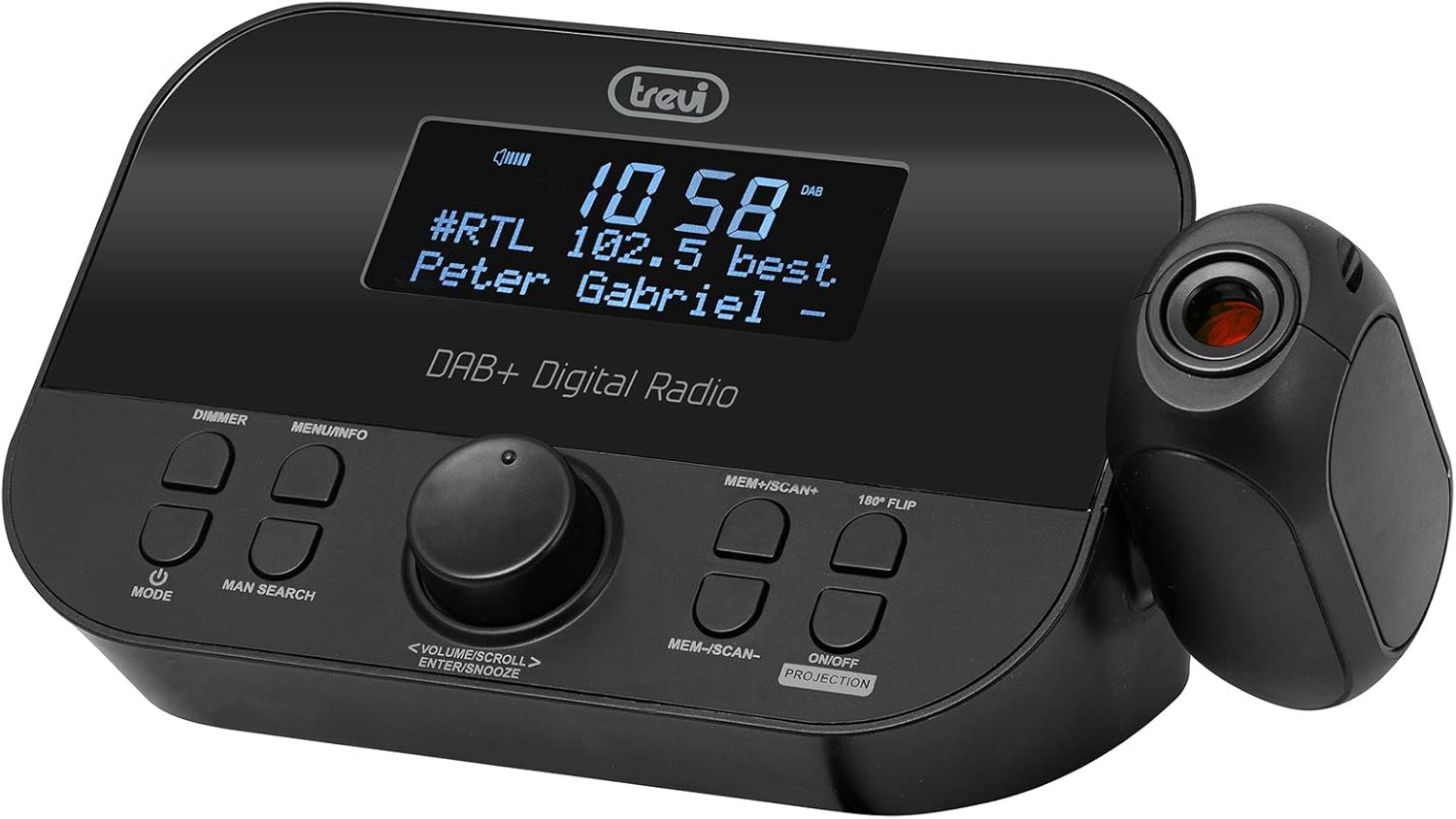
समोर view of the Trevi RC 85D8 DAB Digital Alarm Clock Radio, showing the LED display, control buttons, and the time projector.
नियंत्रणे आणि प्रदर्शन:
- नेतृत्व प्रदर्शन: Shows time, radio station, song title/artist, volume, and other information.
- मंद बटण: डिस्प्ले ब्राइटनेस समायोजित करते.
- MENU/INFO Button: Accesses menu options and displays radio information.
- मोड बटण: Switches between DAB, FM, and other modes.
- MAN SEARCH Button: Initiates manual station search.
- VOLUME/SCROLL/ENTER/SNOOZE Knob: Multi-function knob for volume control, menu navigation, selection, and snooze activation.
- MEM+/SCAN+ Button: Stores/recalls presets, scans forward.
- MEM-/SCAN- Button: Stores/recalls presets, scans backward.
- 180° FLIP Button: Rotates projected time display.
- ON/OFF PROJECTION Button: Turns the time projection on or off.
- प्रोजेक्शन लेन्स: Projects time onto a surface.
सेटअप
1. वीज जोडणी
- Connect the provided power adapter to the DC IN port on the back of the alarm clock radio.
- अॅडॉप्टरला मानक वॉल आउटलेटमध्ये प्लग करा.
- The device will power on and the display will illuminate.
2. Battery Backup Installation (Optional)
The device has a battery compartment for anti-failure backup (2 AAA batteries, not included). This ensures time and alarm settings are retained during a power outage.
- युनिटच्या तळाशी असलेले बॅटरी कंपार्टमेंट कव्हर उघडा.
- योग्य ध्रुवीयता (+/-) पाळत २ AAA बॅटरी घाला.
- बॅटरी कंपार्टमेंट कव्हर सुरक्षितपणे बंद करा.
3. अँटेना सेटअप
Extend the telescopic antenna fully for optimal DAB/DAB+ and FM radio reception. Adjust its position for the best signal.

बाजू view of the Trevi RC 85D8 DAB Digital Alarm Clock Radio, showing the extended telescopic antenna for improved reception.
३. सुरुवातीची वेळ आणि तारीख सेटिंग
Upon first power-on, the device will attempt to synchronize time and date automatically via DAB or FM RDS signal. If automatic synchronization fails or you wish to set it manually:
- दाबा मेनू/माहिती मेनू प्रविष्ट करण्यासाठी बटण.
- फिरवा VOLUME/SCROLL knob to navigate to "Time/Date" or "Settings".
- दाबा प्रविष्ट करा (push the knob) to select.
- Follow the on-screen prompts to set the time, date, and 12/24-hour format using the VOLUME/SCROLL knob आणि प्रविष्ट करा बटण
ऑपरेटिंग सूचना
1. पॉवर चालू/बंद
- चालू करण्यासाठी, दाबा मोड बटण
- बंद करण्यासाठी, दाबा आणि धरून ठेवा मोड बटण
2. Radio Mode Selection (DAB/DAB+ / FM RDS)
- दाबा मोड button repeatedly to cycle between DAB/DAB+ and FM radio modes.
3. Tuning and Scanning
DAB/DAB+ रेडिओ:
- डीएबी मोडमध्ये, दाबा MEM+/SCAN+ or MEM-/SCAN- to automatically scan for available stations.
- वैकल्पिकरित्या, दाबा MAN SEARCH to manually tune. Rotate the VOLUME/SCROLL knob to select a station, then press प्रविष्ट करा.
एफएम आरडीएस रेडिओ:
- एफएम मोडमध्ये दाबा MEM+/SCAN+ or MEM-/SCAN- पुढील उपलब्ध स्टेशनसाठी स्वयंचलितपणे स्कॅन करण्यासाठी.
- दाबा MAN SEARCH to manually tune. Rotate the VOLUME/SCROLL knob to adjust the frequency, then press प्रविष्ट करा.
४. प्रीसेट साठवणे आणि परत मागवणे
- आपल्या इच्छित स्टेशनवर ट्यून करा.
- दाबा आणि धरून ठेवा MEM+/SCAN+ or MEM-/SCAN- until the display shows "Preset Store".
- फिरवा VOLUME/SCROLL knob to select a preset number (e.g., P01, P02).
- दाबा प्रविष्ट करा स्टेशनची पुष्टी करण्यासाठी आणि जतन करण्यासाठी.
- To recall a preset, briefly press MEM+/SCAN+ or MEM-/SCAN- to cycle through stored stations.
5. आवाज नियंत्रण
- फिरवा VOLUME/SCROLL knob to adjust the listening volume.
6. Setting Alarms (Dual Alarms)
The Trevi RC 85D8 supports two independent alarms (Alarm 1 and Alarm 2).
- दाबा मेनू/माहिती मेनू प्रविष्ट करण्यासाठी बटण.
- फिरवा VOLUME/SCROLL knob to navigate to "Alarm 1 Setup" or "Alarm 2 Setup".
- दाबा प्रविष्ट करा निवडण्यासाठी.
- Follow the on-screen prompts to set:
- अलार्म वेळ: Set the desired wake-up time.
- अलार्म स्त्रोत: Choose between "Buzzer" or "Radio" (DAB or FM).
- अलार्म आवाज: इच्छित अलार्म व्हॉल्यूम सेट करा.
- अलार्म वारंवारता: Select "Daily", "Weekdays", "Weekends", or "Once".
- अलार्म स्थिती: Turn the alarm "On" or "Off".
- दाबा प्रविष्ट करा प्रत्येक सेटिंगची पुष्टी करण्यासाठी.
४. स्नूझ फंक्शन
- जेव्हा अलार्म वाजतो, तेव्हा दाबा VOLUME/SCROLL/ENTER/SNOOZE knob to activate snooze. The alarm will pause for a set period (usually 9 minutes) and sound again.
- To cancel snooze and turn off the alarm, press the मोड बटण
४. स्लीप टाइमर फंक्शन
स्लीप टाइमर रेडिओला आपोआप बंद होण्यापूर्वी एका निश्चित कालावधीसाठी प्ले करण्याची परवानगी देतो.
- दाबा मेनू/माहिती मेनू प्रविष्ट करण्यासाठी बटण.
- फिरवा VOLUME/SCROLL knob to navigate to "Sleep Timer".
- दाबा प्रविष्ट करा निवडण्यासाठी.
- फिरवा VOLUME/SCROLL knob to choose the desired sleep duration (e.g., 15, 30, 60, 90 minutes, or Off).
- दाबा प्रविष्ट करा पुष्टी करण्यासाठी.
9. Time Projection Feature
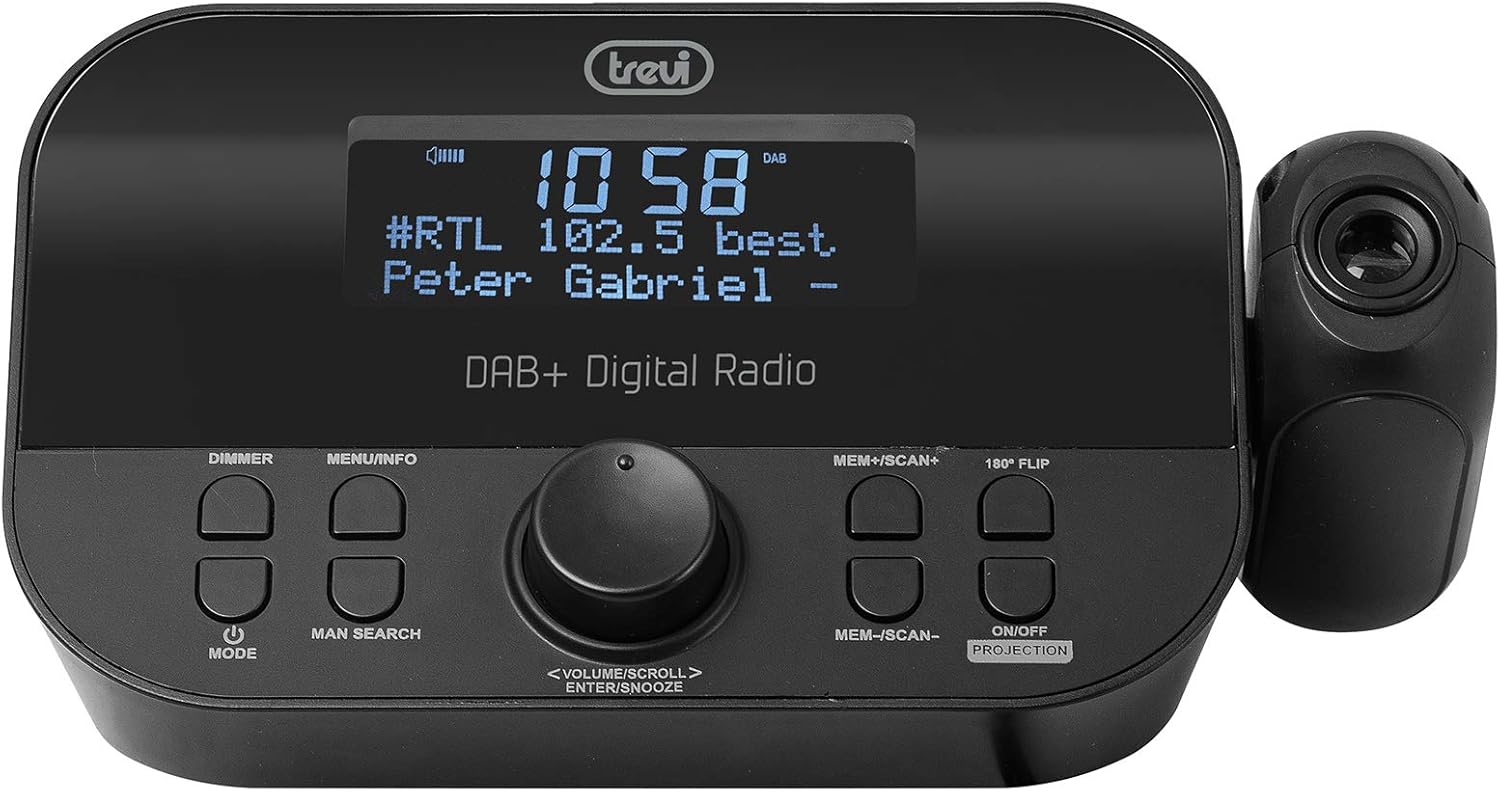
The Trevi RC 85D8 DAB Digital Alarm Clock Radio projecting the time onto a surface, demonstrating the adjustable projection lens.
- Turn Projection On/Off: दाबा ON/OFF PROJECTION बटण
- प्रक्षेपण कोन समायोजित करा: Manually adjust the projection lens on the side of the unit to direct the time display onto your ceiling or wall.
- Rotate Projected Time: If the projected time is upside down or sideways, press the 180° FLIP button to rotate it for correct viewing
- फोकस समायोजित करा: Rotate the ring around the projection lens to sharpen the projected image.
३. डिस्प्ले डिमर
- दाबा डिमर button repeatedly to cycle through different brightness levels for the main LED display (e.g., High, Medium, Low, Off).
देखभाल
- स्वच्छता: Use a soft, dry cloth to clean the surface of the device. Do not use abrasive cleaners or solvents.
- अँटेना काळजी: Handle the telescopic antenna gently to avoid damage.
- बॅटरी बदलणे: If using battery backup, replace AAA batteries annually or when the low battery indicator appears.
समस्यानिवारण
| समस्या | संभाव्य कारण | उपाय |
|---|---|---|
| पॉवर/डिस्प्ले बंद नाही | Power adapter not connected; Power outlet faulty; DIMMER set to Off. | Ensure power adapter is securely connected and outlet is functional. Press डिमर button to adjust display brightness. |
| खराब रेडिओ रिसेप्शन (DAB/FM) | Antenna not extended; Weak signal area; Interference from other electronics. | Fully extend and adjust the telescopic antenna. Try repositioning the unit. Move away from other electronic devices. Perform a full scan for DAB stations. |
| अलार्म वाजत नाही | Alarm not activated; Alarm volume too low; Incorrect alarm time/frequency. | Check alarm settings (Alarm 1/2 Setup) to ensure it is "On", time is correct, frequency is set, and volume is audible. |
| Projected time is blurry or unclear | Focus not adjusted; Projection distance too far/close. | Rotate the ring around the projection lens to adjust focus. Ensure the projection surface is within an optimal distance. |
| Projected time is upside down/sideways | Projection orientation incorrect. | दाबा 180° FLIP button to rotate the projected image. |
| Display is too bright at night | Dimmer setting too high. | दाबा डिमर button repeatedly to select a lower brightness level or turn the display off. |
तपशील
| वैशिष्ट्य | तपशील |
|---|---|
| ब्रँड | ट्रेव्ही |
| मॉडेल क्रमांक | RC 85D8 (0RC85D800) |
| रंग | काळा |
| ट्यूनिंग तंत्रज्ञान | DAB, FM RDS |
| रेडिओ बँड समर्थित | DAB/DAB+, FM |
| विशेष वैशिष्ट्ये | Alarm, Snooze, Sleep Timer, Time Projection, Dual Alarms |
| कनेक्टिव्हिटी तंत्रज्ञान | 3.5 mm Jack (for headphones) |
| उर्जा स्त्रोत | AC Power Adapter (included), Battery backup (2x AAA, not included) |
| उत्पादन परिमाणे | 23L x 13W x 14H centimeters (approx.) |
| डिस्प्ले | LED Display with Dimmer |
हमी आणि समर्थन
For warranty information and technical support, please refer to the documentation provided with your purchase or visit the official Trevi webसाइट. वॉरंटी दाव्यांसाठी तुमचा खरेदीचा पुरावा ठेवा.
निर्माता: ट्रेव्ही एसपीए
मूळ देश: चीन


