1. परिचय
The DIGITNOW! USB 2.0 Digital Audio Capture Card is designed to convert analog audio sources into digital formats such as MP3 or WAV. This device allows you to preserve your old vinyl records, cassette tapes, and other audio media by digitizing them on your computer. It is compatible with Windows and Mac operating systems.

Image 1: The DIGITNOW! USB 2.0 Digital Audio Capture Card, including the main unit, RCA cables, 3.5mm audio cable, and software installation CD.
2. सुरक्षितता माहिती
- डिव्हाइसला पाणी आणि आर्द्रतेपासून दूर ठेवा.
- Do not attempt to open or modify the device.
- Use only with compatible audio sources and computer systems.
- तीव्र तापमान आणि थेट सूर्यप्रकाश टाळा.
- Disconnect the device from your computer when not in use.
3. पॅकेज सामग्री
तुमच्या पॅकेजमध्ये सर्व वस्तू आहेत का ते तपासा:
- DIGITNOW! USB 2.0 Digital Audio Capture Card
- यूएसबी केबल (इंटिग्रेटेड)
- RCA Audio Cables (Red/White)
- 3.5 मिमी ऑडिओ केबल
- द्रुत स्थापना मार्गदर्शक
- Software Installation CD (Audacity)
- Additional Adapters (e.g., RCA to 3.5mm, 3.5mm to 3.5mm)
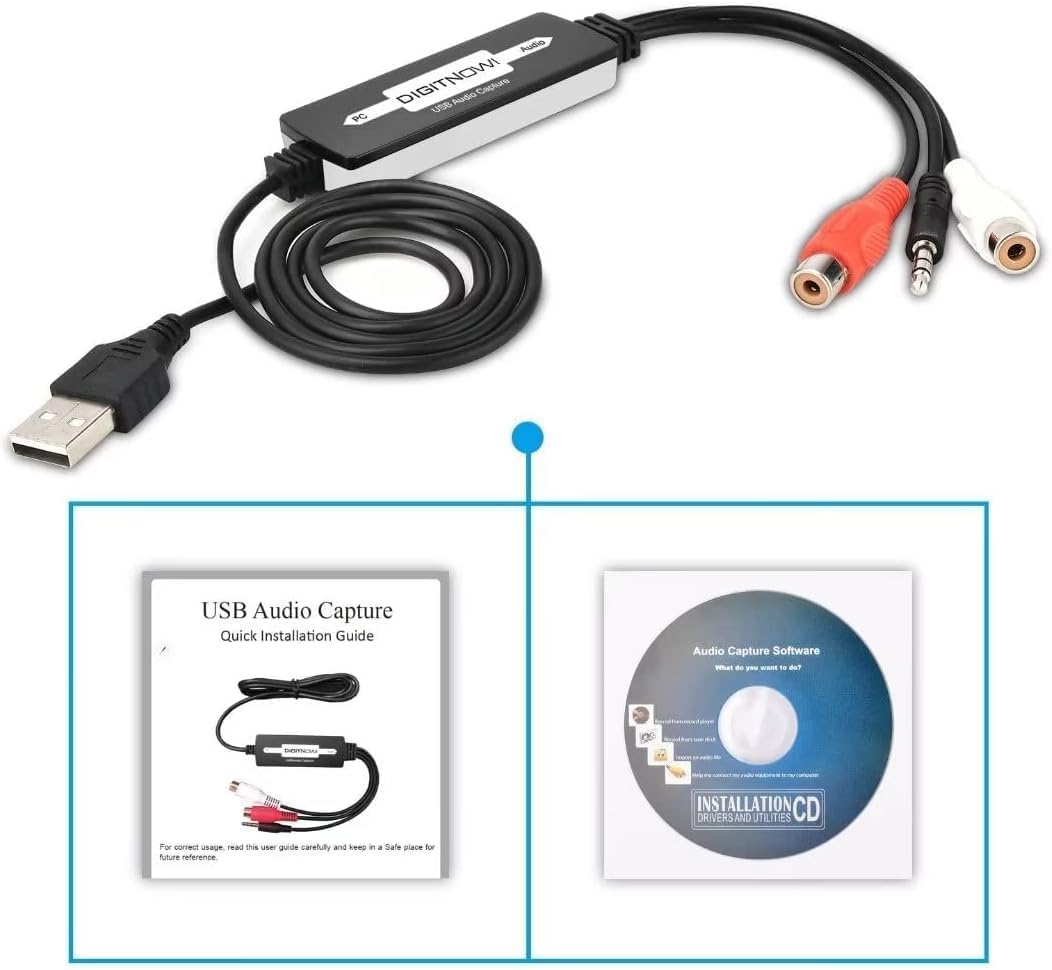
Image 2: The Quick Installation Guide and the included software installation CD.
4. उत्पादन संपलेview
The audio capture card features a USB connector for your computer and various audio input options for your analog devices. It is a compact, plug-and-play device designed for ease of use.
२.१ उपकरण घटक
- यूएसबी कनेक्टर: Connects to your computer's USB port.
- RCA Input (Red/White): For connecting audio sources with RCA output (e.g., record players, CD players).
- 3.5 मिमी ऑडिओ इनपुट: For connecting audio sources with a 3.5mm jack (e.g., cassette players, MP3 players).
5. सेटअप मार्गदर्शक
5.1 सॉफ्टवेअर इंस्टॉलेशन
- Insert the provided software installation CD into your computer's CD/DVD drive.
- Follow the on-screen instructions to install the Audacity audio capture and editing software.
- Alternatively, you can download the latest version of Audacity from its official website for updated features and compatibility.
३.२ तुमच्या संगणकाशी कनेक्ट करणे
- तुमच्या संगणकावर (डेस्कटॉप किंवा लॅपटॉप) उपलब्ध असलेला USB पोर्ट शोधा.
- Plug the USB connector of the audio capture card into the USB port. Your computer should automatically detect the device.

Image 3: Illustration of connecting various audio sources like a radio, cassette player, or record player to the DIGITNOW! audio capture card, which then connects to a computer.
४.३ ऑडिओ स्रोत जोडणे
The audio capture card supports various analog audio devices. Choose the appropriate connection method for your source:
- For devices with RCA output (e.g., Record Players, CD Players, Receivers):
- Connect the red RCA plug from your audio source to the red RCA input on the capture card.
- Connect the white RCA plug from your audio source to the white RCA input on the capture card.
- Ensure your record player has a built-in pre-amplifier or is connected to a receiver with a phono input, as the capture card does not provide phono pre-ampबंधन
- For devices with 3.5mm audio output (e.g., Cassette Players, MP3 Players, Portable Radios):
- Connect the 3.5mm audio cable from your audio source's headphone or line-out jack to the 3.5mm input on the capture card.
- Use the provided adapters if necessary (e.g., a 3.5mm female to female adapter if your source has a male 3.5mm plug).

Image 4: A record player connected to a laptop using the DIGITNOW! USB audio capture card.

Image 5: Detailed diagram illustrating both 3.5mm audio cable and RCA (left and right channel) cable connections from various audio devices to a laptop via the USB audio capture card.
6. ऑपरेटिंग सूचना
6.1 Recording Audio with Audacity
- Open the Audacity software on your computer.
- In Audacity, go to Edit > Preferences (किंवा Audacity > Preferences on Mac).
- अंतर्गत उपकरणे tab, select the DIGITNOW! USB Audio Capture Card as your recording device.
- Adjust the recording volume levels within Audacity to prevent clipping or distortion. Start with a lower volume and gradually increase it while monitoring the input levels.
- Start playback on your analog audio source (e.g., play a record or cassette).
- वर क्लिक करा रेकॉर्ड button (red circle) in Audacity to begin capturing the audio.
- Once the audio has finished playing, click the थांबा button (yellow square) in Audacity.
6.2 Editing and Exporting Audio
- Use Audacity's editing tools to trim silence, remove noise, or split tracks as needed.
- To save your recording, go to File > Export.
- Choose your desired format (e.g., MP3, WAV) and select a destination folder on your computer.
- Fill in any metadata (artist, title, etc.) if prompted, then click जतन करा.
Video 1: An instructional video demonstrating the setup and basic operation of the DIGITNOW! USB 2.0 Digital Audio Capture Card.
7. देखभाल
- मऊ, कोरड्या कापडाने उपकरण स्वच्छ करा. द्रव क्लीनर वापरू नका.
- वापरात नसताना यंत्र थंड, कोरड्या जागी साठवा.
- Regularly check for and install updates for the Audacity software to ensure optimal performance and compatibility.
8. समस्या निवारण
| समस्या | संभाव्य कारण | उपाय |
|---|---|---|
| No audio input detected by computer/software. | Incorrect device selection in software; loose connections; faulty cable; audio source not playing. |
|
| Low recording volume. | Input volume too low in software; audio source volume too low; no pre-amplifier for phono. |
|
| Distorted or clipped audio. | Input volume too high in software or on source. |
|
| Software CD not readable. | Mini CD incompatibility; drive issue. |
|
9. तपशील
| वैशिष्ट्य | तपशील |
|---|---|
| मॉडेल क्रमांक | बीआर 605-111 |
| हार्डवेअर इंटरफेस | USB 2.0, 3.5mm Audio, RCA Audio (L/R) |
| ऑपरेटिंग सिस्टम सुसंगतता | Windows 10 / 8.1 / 8 / 7 / Vista / XP, Mac OS 10.7-10.14 (Not compatible with Mac OS 10.15 and above) |
| शिफारस केलेला वापर | Audio Recording (Analog to Digital Conversion) |
| उत्पादन परिमाणे | 3.54 x 0.98 x 0.43 इंच |
| आयटम वजन | 1.92 औंस |
| विशेष वैशिष्ट्य | Analog-to-digital audio conversion and broad operating system compatibility |

Image 6: Technical diagram illustrating the dimensions of the audio capture card and its cable, along with icons indicating compatibility with Linux, Windows, and Mac OS systems.
10. हमी आणि समर्थन
For warranty information and technical support, please refer to the DIGITNOW! official webवेबसाइटवर जा किंवा त्यांच्या ग्राहक सेवेशी थेट संपर्क साधा. वॉरंटी दाव्यांसाठी तुमची खरेदी पावती जपून ठेवा.
For software-related issues with Audacity, please visit the official Audacity support forums or documentation.


