1. परिचय
The Kami 1080P Wire-Free Home Camera Kit (Model WK101) provides a comprehensive and flexible security solution for your home or office. This system features a completely wire-free design, powered by a long-lasting rechargeable battery, offering unparalleled placement versatility. It includes advanced motion detection, enhanced night vision, and two-way audio communication, all accessible via the Kami APP or YI Home APP.
The kit is designed for both indoor and outdoor use, with an IP-65 weather-resistant rating, ensuring reliable performance in various environmental conditions. The modular system allows for expansion with additional cameras and sensors to create a tailored security network.

Figure 1.1: Kami 1080P Wire-Free Home Camera Kit showing the camera, rechargeable battery, and base station.
2. सेटअप
Setting up your Kami Wire-Free Camera Kit is designed to be quick and hassle-free, requiring no drilling or complex wiring. The system guides you through the setup process in just minutes.
२.१ प्रारंभिक कनेक्शन
- बॅटरी चार्ज करा: Ensure the camera's rechargeable Lithium-ion battery is fully charged before installation.
- Connect Base Station: Connect the Kami Smart Security Base Station to your home network using the supplied Ethernet cable.
- अॅप डाउनलोड करा: Download the Kami APP or YI Home APP from your device's app store.
- पेअर डिव्हाइसेस: Follow the in-app instructions to pair the base station with your camera and any additional sensors. This typically involves installing the battery, pressing and holding the power button, and placing the camera near the base station.
- Wi-Fi शी कनेक्ट करा: The system connects to your Wi-Fi network and is ready to send alerts to your phone.
2.2 स्थापना पद्धती
The Kami Wire-Free Camera offers flexible installation options:
- चुंबकीय पाया: Attach the camera's magnetic base directly to a metal surface for flexible rotation and easy adjustment.
- Metal Plate Base: Install the included metal plate base on your desired surface (e.g., wall, ceiling) and then attach the camera magnetically to it.
- 1/4" Screw Support: For more permanent installations, use a 1/4" screw support (not included) to fix the camera body securely.
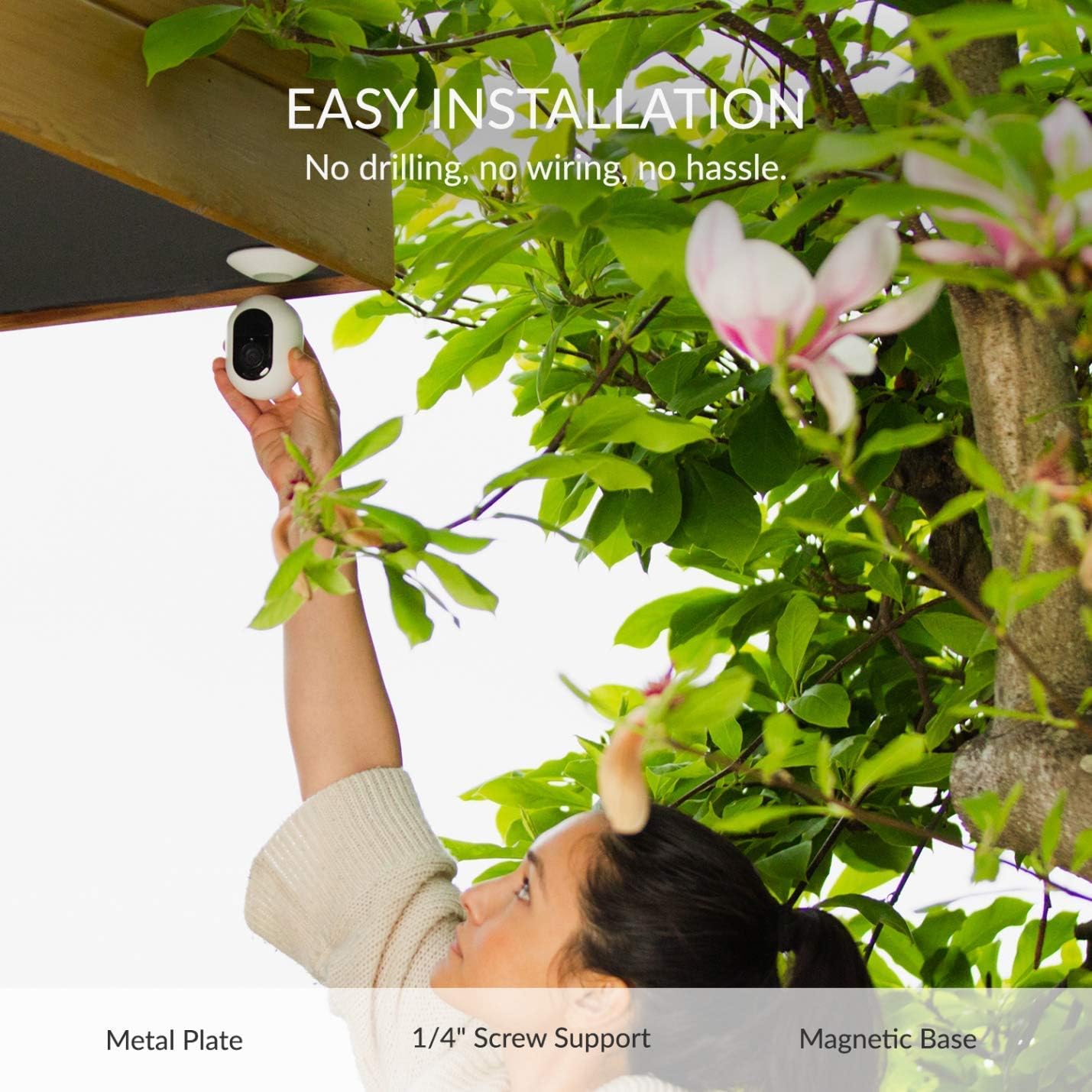
Figure 2.1: Easy installation of the Kami Wire-Free Camera, demonstrating its adaptability.

Figure 2.2: Various installation methods for the Kami camera, including metal plate, 1/4" screw support, and magnetic base.
2.3 उत्पादन संपलेview व्हिडिओ
व्हिडिओ १: एक षटकview of the Kami Home Family of products, highlighting ease of setup and key features.
3. ऑपरेटिंग सूचना
3.1 Monitoring and Alerts
The Kami camera system provides continuous monitoring and sends alerts directly to your smartphone. You can search and review your recordings securely in the Kami Cloud.
- गती शोधणे: The camera features advanced motion detection to identify visitors, animals, or deliveries.
- Human Heat Signatures: Wireless motion sensors (if included or added) can also detect human heat signatures for precise alerts.
- द्वि-मार्ग ऑडिओ: Communicate from anywhere using the built-in two-way audio feature, allowing you to speak with individuals near the camera.
- Pan and Tilt (Indoor Camera): The intelligent indoor camera automatically turns and pans to follow people and pets, ensuring continuous coverage.

Figure 3.1: The Kami Wire-Free Camera installed as a wireless outdoor camera, fitting various needs.
3.2 Night Vision and Weather Resistance
The camera is equipped with enhanced night vision and is built to withstand various weather conditions.
- वर्धित रात्रीची दृष्टी: By adopting the SmartSens SC2310 CMOS Sensor and IR CUT filter, the camera provides clear night vision even in low-light conditions, ensuring your home is safe around the clock.
- IP-65 Weather Resistant: With an IP-65 water-resistant design and a working temperature range of 14°F to 122°F, the Kami Wire-Free Camera is suitable for year-round outdoor use.

Figure 3.2: Enhanced night vision capability allows clear viewing even in complete darkness.

Figure 3.3: The camera's IP-65 weather resistance ensures durability for year-round outdoor use.
3.3 Expandable Security System
The Kami Smart Security Base Station forms the core of a powerful modular security system. It communicates with up to 4 cameras and an unlimited number of Kami Entry Sensors or Kami Motion Sensors, allowing you to customize and expand your home security solution as needed.

Figure 3.4: The Kami system can be extended with multiple cameras and sensors for comprehensive coverage.
4. देखभाल
4.1 बॅटरी व्यवस्थापन
The Kami Wire-Free Camera is powered by a rechargeable Lithium-ion battery. A fully charged battery can record for up to a whole month or trigger up to 2,800 alerts, depending on usage. The kit includes a backup battery for seamless transition during charging.
- चार्जिंग: When the battery level is low, remove the battery from the camera and charge it using the provided charger.
- बॅटरी बदलणे: Utilize the backup battery to ensure continuous operation while the primary battery is charging.

Figure 4.1: The camera features an easily accessible battery compartment for convenient charging and replacement.
4.2 स्वच्छता आणि काळजी
To ensure optimal performance and longevity of your Kami camera:
- कॅमेरा लेन्स आणि बॉडी नियमितपणे सॉफ्ट, डी ने पुसून टाका.amp धूळ आणि मोडतोड काढण्यासाठी कापड.
- Avoid using harsh chemicals or abrasive cleaners, as these can damage the camera's finish or components.
- Ensure the camera's seals are intact, especially after battery changes, to maintain its IP-65 weather resistance.
5. समस्या निवारण
If you encounter issues with your Kami 1080P Wire-Free Home Camera Kit, consider the following common troubleshooting steps:
- No Power/Camera Offline: Check the battery level and ensure it is properly inserted. Verify the base station is powered on and connected to the network.
- खराब व्हिडिओ गुणवत्ता: कॅमेरा लेन्स स्वच्छ असल्याची खात्री करा. तुमच्या वाय-फाय सिग्नलची ताकद तपासा; कमकुवत सिग्नलमुळे व्हिडिओ स्ट्रीमिंगची गुणवत्ता प्रभावित होऊ शकते.
- गती शोध समस्या: Adjust the motion detection sensitivity settings in the app. Ensure there are no obstructions blocking the camera's view.
- कनेक्टिव्हिटी समस्या: Restart your Wi-Fi router and the Kami base station. Ensure the camera is within the effective range of the base station (up to 65 feet).
- अॅप समस्या: Ensure your Kami APP or YI Home APP is updated to the latest version. Try force-closing and reopening the app.
For persistent issues, refer to the in-app help section or contact Kami customer support.
6. तपशील
| वैशिष्ट्य | तपशील |
|---|---|
| मॉडेल क्रमांक | WK101 |
| व्हिडिओ कॅप्चर रिझोल्यूशन | 1080p |
| इनडोअर/आउटडोअर वापर | Outdoor (IP65 Weather Resistant) |
| उर्जा स्त्रोत | बॅटरीवर चालणारे (रिचार्ज करण्यायोग्य लिथियम-आयन) |
| कनेक्टिव्हिटी प्रोटोकॉल | वाय-फाय |
| कंट्रोलर प्रकार | Amazon Alexa, Vera |
| माउंटिंग प्रकार | Magnetic, Screw Mount |
| चे फील्ड View | 140 अंश |
| सतर्कता प्रकार | फक्त गती |
| आयटमचे परिमाण (L x W x H) | 8.3 x 5.2 x 4.6 इंच |
| आयटम वजन | 1.04 पाउंड |
| उत्पादक | YI तंत्रज्ञान |

Figure 6.1: The Kami camera offers a wide 140-degree field of view व्यापक कव्हरेजसाठी.
7. हमी आणि समर्थन
For information regarding warranty coverage, technical support, or service inquiries, please refer to the official Kami website or contact their customer service directly. Details can typically be found in the product packaging or within the Kami APP/YI Home APP's support section.
Always ensure you have your product model number (WK101) and purchase information available when contacting support.


