1. परिचय
This manual provides instructions for the proper setup, operation, and maintenance of your Sonew eecoo14 WiFi USB Digital Microscope Camera. This device is designed for detailed observation and analysis, offering magnification from 50x to 1000x. It can be used for various applications, including inspecting hair follicles, skin conditions, and other microscopic details. The microscope supports connectivity via both WiFi and USB, allowing it to be used with Android, iOS, Windows, and Mac operating systems.

Image 1.1: The Sonew eecoo14 Digital Microscope Camera. This image displays the main unit of the digital microscope, highlighting its compact and ergonomic design.
2. पॅकेज सामग्री
खाली सूचीबद्ध केलेल्या सर्व वस्तू तुमच्या पॅकेजमध्ये आहेत याची खात्री करा:
- 1 x Sonew eecoo14 Digital Microscope Camera
- 1 x USB केबल
- 1 x Software Installation CD
- 1 x Software Flash Disk (USB Drive)
- १ x पॉवर अॅडॉप्टर (यूएस प्लग)
- 1 x Aluminum Lift Stand
- १ x वापरकर्ता मॅन्युअल (हे दस्तऐवज)
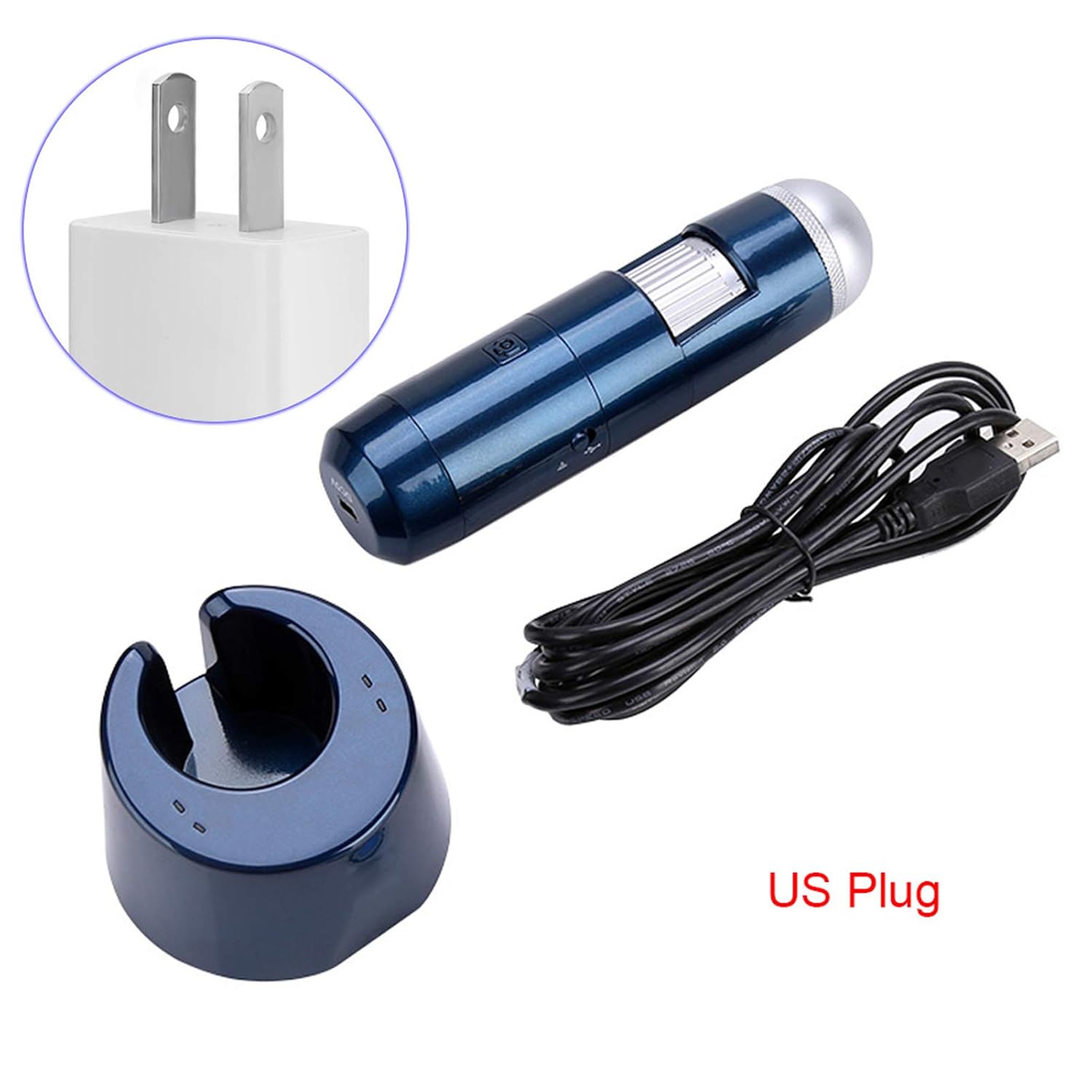
Image 2.1: Included accessories. This image shows the digital microscope, USB cable, power adapter (US plug), and the aluminum lift stand, illustrating the complete set of components.
3. उत्पादन संपलेview
Familiarize yourself with the components of your digital microscope:
- फोकस व्हील: Adjusts the focus for clear images.
- मोठेीकरण समायोजन: Allows changing the magnification level.
- एलईडी प्रदीपन: Built-in 8-LED light source for illuminating specimens.
- पॉवर बटण: डिव्हाइस चालू किंवा बंद करते.
- कॅप्चर बटण: Takes still images or starts/stops video recording.
- USB Port (DC5V): चार्जिंग आणि संगणकांना वायर्ड कनेक्शनसाठी.
- वायफाय मॉड्यूल: Enables wireless connection to mobile devices.

Image 3.1: Microscope features. This image provides a close-up view of the digital microscope, highlighting its various parts such as the focus wheel, power button, capture button, and USB port.
4. सेटअप
4.1 डिव्हाइस चार्ज करणे
- Connect the provided USB cable to the microscope's DC5V port.
- USB केबलचे दुसरे टोक पॉवर अडॅप्टरमध्ये प्लग करा.
- पॉवर अॅडॉप्टर एका मानक इलेक्ट्रिकल आउटलेटमध्ये घाला.
- Allow the device to charge fully before first use. The charging indicator light will change when charging is complete.
4.2 सॉफ्टवेअर इंस्टॉलेशन
ला view images and control the microscope, you need to install the appropriate software or application.
For Windows/Mac PC:
- Insert the Software Installation CD or the Software Flash Disk into your computer.
- Follow the on-screen instructions to install the viewing सॉफ्टवेअर.
- Alternatively, you may download the latest software from the manufacturer's website (refer to the included documentation for the URL).
For Android/iOS Smartphones/Tablets:
- साठी शोधा the recommended application (e.g., "WiFi View" or similar, check included documentation) in your device's app store (Google Play Store for Android, Apple App Store for iOS).
- अनुप्रयोग डाउनलोड आणि स्थापित करा.
4.3 Connecting to a PC (USB Connection)
- याची खात्री करा viewing software is installed on your PC.
- दिलेल्या USB केबलचा वापर करून मायक्रोस्कोप तुमच्या पीसीशी जोडा.
- पॉवर बटण वापरून मायक्रोस्कोप चालू करा.
- Launch the installed viewing software. The microscope feed should appear automatically.
4.4 Connecting to a Mobile Device (WiFi Connection)
- Ensure the dedicated application is installed on your mobile device.
- पॉवर बटण वापरून मायक्रोस्कोप चालू करा.
- On your mobile device, go to WiFi settings.
- Locate and connect to the microscope's WiFi network (e.g., "WiFi_Cam_XXXX"). The default password, if any, will be in the included documentation.
- Open the installed application. The microscope feed should appear.

Image 4.1: Wireless and USB connectivity. This image illustrates the flexibility of the microscope, showing it connected wirelessly to a smartphone and via USB to a computer monitor, demonstrating its dual connection capabilities.
5. ऑपरेटिंग सूचना
5.1 पॉवरिंग चालू/बंद
- चालू करण्यासाठी: इंडिकेटर लाईट उजळेपर्यंत पॉवर बटण दाबा आणि धरून ठेवा.
- पॉवर ऑफ करण्यासाठी: इंडिकेटर लाईट बंद होईपर्यंत पॉवर बटण दाबा आणि धरून ठेवा.
६.२ मोठेपणा आणि लक्ष केंद्रित करणे समायोजित करणे
- Place the microscope over the object you wish to observe.
- Rotate the magnification adjustment ring to select the desired magnification level (50x to 1000x).
- Slowly turn the focus wheel until the image on your screen is clear and sharp.
5.3 Using the LED Illumination
The microscope features 8 built-in LEDs to provide optimal lighting for your observations. The brightness can typically be adjusted via a control on the microscope body or within the viewing software/app.
५.४ प्रतिमा आणि व्हिडिओ कॅप्चर करणे
Once the image is focused, you can capture still images or record videos:
- Using the Capture Button: Press the physical Capture button on the microscope to take a photo. Press and hold to start/stop video recording (functionality may vary by software).
- Using Software/App Controls: बहुतेक viewing applications provide on-screen buttons for capturing images and recording videos. Refer to your software's help section for specific instructions.
5.5 Specific Applications: Scalp and Skin Analysis
The Sonew eecoo14 is particularly useful for detailed analysis of scalp and skin conditions:
- Ensure the microscope is fully charged and connected to your viewing साधन.
- Gently place the microscope lens directly onto the area of the scalp or skin you wish to examine.
- Adjust the focus and magnification to achieve a clear view of hair follicles, skin texture, or other details.
- Use the capture function to document observations for analysis or record changes over time.
- The software allows for storage and printing of analysis data, aiding in professional assessments.

Image 5.1: Scalp analysis on a monitor. This image shows the digital microscope being used to examine a person's scalp, with the magnified view displayed on a computer monitor, demonstrating its application as a skin and hair scalp detector.

Image 5.2: Hair follicle view on a smartphone. This image illustrates the microscope connected wirelessly to a smartphone, displaying a magnified view of hair follicles, highlighting its utility for detailed hair analysis.

Image 5.3: Skin texture view on a smartphone. This image shows the digital microscope connected wirelessly to a smartphone, displaying a magnified view of skin texture, demonstrating its capability for detailed skin examination.
6. देखभाल
6.1 स्वच्छता
- Ensure the device is powered off and disconnected from any power source before cleaning.
- Use a soft, dry cloth to wipe the body of the microscope.
- For the lens, use a specialized lens cleaning cloth and solution to avoid scratches. Do not use abrasive cleaners or solvents.
५.८.१ स्टोरेज
- Store the microscope in a cool, dry place, away from direct sunlight and extreme temperatures.
- धूळ साचणे आणि शारीरिक नुकसान टाळण्यासाठी ते त्याच्या मूळ पॅकेजिंगमध्ये किंवा संरक्षक आवरणात ठेवा.
- जर जास्त काळ साठवत असाल, तर बॅटरीचे आयुष्य वाढवण्यासाठी ती अंशतः चार्ज झाली आहे (सुमारे ५०%) याची खात्री करा.
7. समस्या निवारण
If you encounter issues with your microscope, refer to the following common problems and solutions:
| समस्या | संभाव्य कारण | उपाय |
|---|---|---|
| स्क्रीनवर कोणतीही प्रतिमा नाही | Device not powered on; Low battery; Incorrect connection; Software not running or installed. | Ensure device is on; Charge battery; Reconnect USB/WiFi; Launch or reinstall software/app. |
| प्रतिमा अस्पष्ट आहे | Out of focus; Incorrect working distance. | Adjust the focus wheel; Ensure the microscope is at an appropriate distance from the object. |
| वायफाय कनेक्शन अयशस्वी | Incorrect WiFi password; Device too far from microscope; Interference. | Verify WiFi password; Move device closer; Try connecting in a different location. |
| LEDs काम करत नाहीत | एलईडी बंद आहेत; बॅटरी कमी आहे. | Check LED control in software/app or on device; Charge battery. |
या उपाययोजना वापरूनही समस्या कायम राहिल्यास, कृपया ग्राहक समर्थनाशी संपर्क साधा.
8. तपशील
| वैशिष्ट्य | तपशील |
|---|---|
| मॉडेल क्रमांक | eecoo14 |
| ठराव | 640 x 840 / 1280 x 1024 |
| मोठेपणा | 50x ते 1000x |
| इंटरफेस | WiFi Wireless + USB 2.0 |
| प्रकाश स्रोत | 8-LED (0-30000 MLUX) |
| वीज पुरवठा | Built-in Lithium Battery, USB (5V DC) |
| समर्थित प्रणाली | iOS (iPad/iPhone), Android (phone/tablet with OTG), Windows XP/Vista/7/8/10, Mac |
| आयटम वजन | 491 ग्रॅम |
| लांबी | अंदाजे 14.2 सेमी (5.6 इंच) |

Image 8.1: Microscope dimensions. This image provides a visual representation of the microscope's length, indicating it is approximately 14.2 cm.
9. हमी आणि समर्थन
This product comes with a standard manufacturer's warranty. For specific warranty terms and conditions, please refer to the documentation included with your purchase or contact the retailer. For technical support, troubleshooting assistance beyond this manual, or service inquiries, please contact Sonew customer service through their official webसाइट किंवा तुमच्या उत्पादन पॅकेजिंगमध्ये दिलेली संपर्क माहिती.