परिचय
This manual provides detailed instructions for the setup, operation, maintenance, and troubleshooting of your DIGITNOW! M503 Multi-Function Turntable System. Please read this manual thoroughly before using the product to ensure proper function and longevity.
प्रमुख वैशिष्ट्ये
- 3-speed turntable (33, 45, and 78 RPM) with Bluetooth connectivity and built-in stereo speakers (3W RMS x 2).
- Integrated CD player, MP3 player, cassette deck, and analog AM/FM stereo tuner.
- USB port, SD/MMC card reader, and Aux-in for versatile audio input.
- Direct recording function (from turntable, CD, USB, SD, MMC) and encoding feature for digital conversion of songs to MP3 format.
पॅकेज सामग्री
अनबॉक्सिंग करताना सर्व वस्तू उपस्थित असल्याची खात्री करा:
- DIGITNOW! M503 Multi-Function Turntable System
- पॉवर केबल
- रिमोट कंट्रोल
- वापरकर्ता मॅन्युअल
- External Speakers (if included with your specific model)
उत्पादन संपलेview
Familiarize yourself with the components and controls of your M503 system.

आकृती 1: समोर view of the DIGITNOW! M503 Multi-Function Turntable System, showcasing the turntable, control panel, and CD tray.
फ्रंट पॅनल नियंत्रणे आणि इनपुट

Figure 2: Close-up of the front panel, showing the display, control buttons, USB port, SD/MMC slot, and volume/tuning knobs.
- औक्स इन: बाह्य ऑडिओ उपकरणांसाठी ३.५ मिमी इनपुट.
- यूएसबी पोर्ट: For USB flash drives (playback and recording).
- SD/MMC स्लॉट: For SD or MMC memory cards (playback and recording).
- हेडफोन जॅक: खाजगी ऐकण्यासाठी ३.५ मिमी आउटपुट.
- डिस्प्ले स्क्रीन: वर्तमान मोड, ट्रॅक माहिती आणि रेडिओ फ्रिक्वेन्सी दाखवते.
- नियंत्रण बटणे: Play/Pause, Stop, Skip Forward/Backward, Mode selection, Folder navigation, Delete, Record.
- ट्युनिंग नॉब: रेडिओ फ्रिक्वेन्सी समायोजित करते.
- पॉवर/व्हॉल्यूम नॉब: Turns the unit on/off and adjusts volume.
- सीडी ट्रे: ऑडिओ सीडी घालण्यासाठी.
इनपुट/आउटपुट ओव्हरview

Figure 3: Visual representation of various input and output options, including Aux In, USB, Headphone, SD Card, CD Tray, and Cassette Holder.
सेटअप
- अनपॅक करणे: Carefully remove the unit from its packaging. Retain the packaging for future transport or storage.
- प्लेसमेंट: Place the system on a stable, level surface away from direct sunlight, heat sources, and excessive dust or moisture. Ensure adequate ventilation around the unit.
- वीज कनेक्शन: Connect the power cable to the AC inlet on the rear of the unit and then to a standard wall outlet.
- Speaker Connection (if applicable): If your model includes external speakers, connect them to the speaker output jacks on the rear of the main unit.
- धुळीचे आवरण: Ensure the dust cover is properly seated on the turntable.
ऑपरेटिंग सूचना
टर्नटेबल ऑपरेशन
- धुळीचे आवरण उघडा.
- टर्नटेबल प्लेटवर विनाइल रेकॉर्ड ठेवा.
- Select the appropriate speed (33, 45, or 78 RPM) using the speed selector switch. For 45 RPM records, place the included 45 RPM adapter on the center spindle.
- टोन आर्म लॉक सोडा.
- Gently lift the tone arm using the cue lever and position the stylus over the desired track on the record.
- Lower the tone arm slowly using the cue lever. The record will begin to play.
- Adjust the volume using the Power/Volume knob.
- To stop playback, lift the tone arm using the cue lever and return it to the tone arm rest. Secure the tone arm lock.
सीडी प्लेयर ऑपरेशन
- Press the MODE button until "CD" appears on the display.
- सीडी ट्रे उघडण्यासाठी ओपन/क्लोज बटण दाबा.
- ट्रेमध्ये एक ऑडिओ सीडी ठेवा ज्यामध्ये लेबलची बाजू वर असेल.
- Press the OPEN/CLOSE button again to close the tray. The system will read the CD and begin playback automatically.
- Use the Play/Pause, Stop, and Skip buttons to control playback.
कॅसेट प्लेअर ऑपरेशन
- Insert a cassette tape into the cassette holder on the side of the unit.
- Press the MODE button until "TAPE" appears on the display.
- Press the Play button on the cassette deck to begin playback.
- Use the Fast Forward and Rewind buttons as needed. Note that advanced controls like pause or track skip may not be available on all cassette decks.
एएम/एफएम रेडिओ ऑपरेशन
- Press the MODE button until "RADIO" appears on the display.
- Select AM or FM band using the band selector switch (if available, otherwise it might cycle through modes).
- Rotate the TUNING knob to search for radio stations.
- Extend the FM antenna (if applicable) for better reception.
USB/SD/MMC Playback
- Insert a USB flash drive into the USB port or an SD/MMC card into the corresponding slot.
- Press the MODE button until "USB" or "SD" appears on the display. The system will automatically detect and begin playing compatible audio files (उदा., MP3).
- Use the Play/Pause, Stop, Skip, and Folder buttons to navigate and control playback.
ब्लूटूथ कनेक्टिव्हिटी

Figure 4: The M503 system wirelessly connected to a smartphone via Bluetooth, enabling audio streaming.
- Press the MODE button until "BLUETOOTH" or "BT" appears on the display. The unit will enter pairing mode.
- On your smartphone or other Bluetooth-enabled device, enable Bluetooth and search for available devices.
- Select "DIGITNOW M503" (or similar) from the list of devices to pair.
- Once paired, you can stream audio from your device to the M503 system.
ऑक्स-इन कनेक्शन
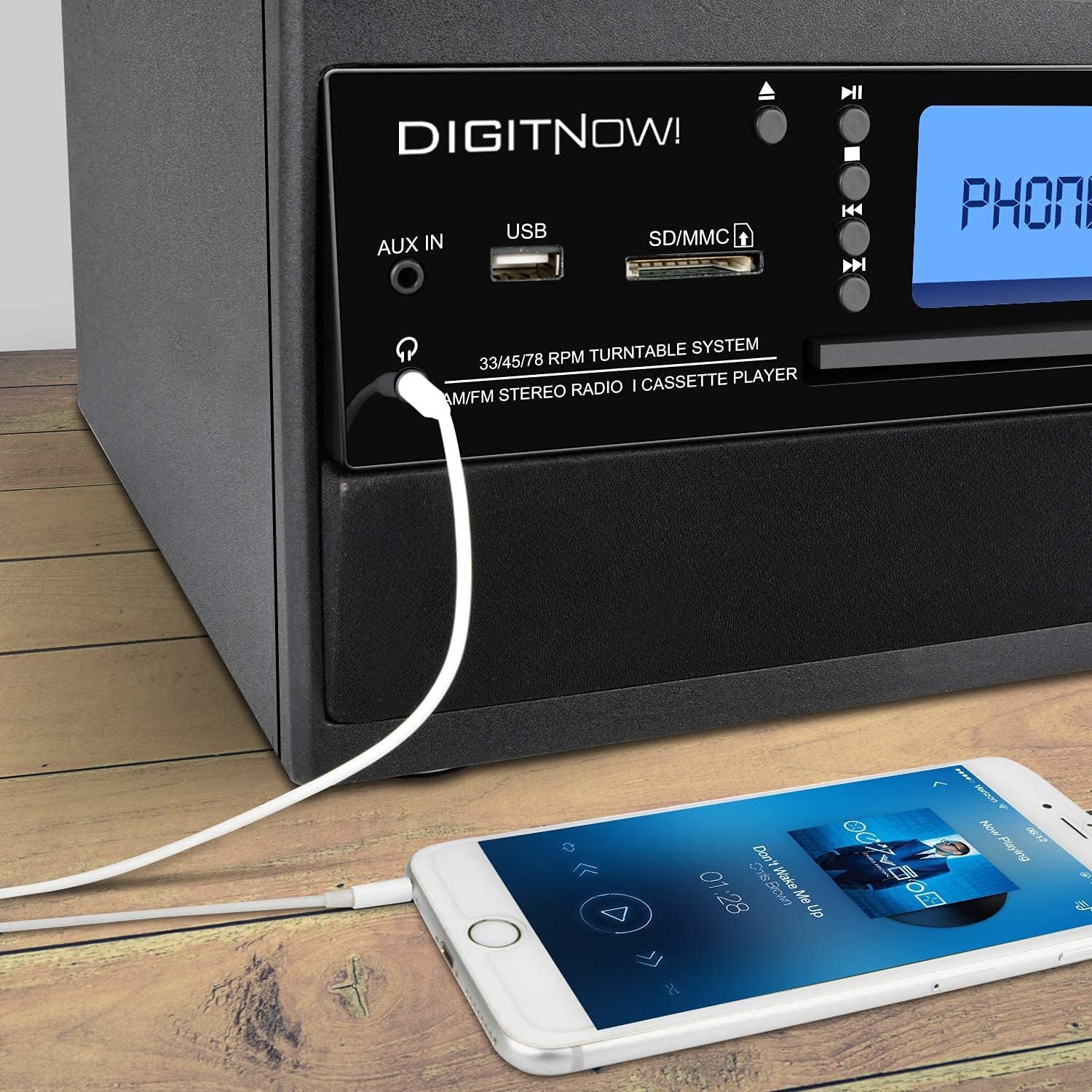
Figure 5: A smartphone connected to the M503 system using a 3.5mm Aux-In cable for wired audio playback.
- Connect one end of a 3.5mm audio cable (not included) to the AUX IN jack on the front panel of the M503.
- Connect the other end of the cable to the headphone jack or audio output of your external device (e.g., smartphone, MP3 player).
- Press the MODE button until "AUX" appears on the display.
- Start playback on your external device and adjust the volume on both the device and the M503.
Direct Recording (Encoding to MP3)
The M503 allows you to record audio from the turntable, CD, or cassette directly to a USB flash drive or SD/MMC card in MP3 format.
- Insert a USB flash drive or SD/MMC card into the respective slot.
- Select the desired source (Turntable, CD, or Cassette) using the MODE button and prepare it for playback (e.g., place a record, insert a CD/cassette).
- Press the REC button on the front panel. The display will indicate recording mode.
- Start playback on your chosen source. The system will begin recording the audio to the USB drive or SD/MMC card.
- Press the REC button again to stop recording. The recorded file will be saved as an MP3.
देखभाल
- युनिट साफ करणे: युनिटच्या बाहेरील बाजू पुसण्यासाठी मऊ, कोरड्या कापडाचा वापर करा. अपघर्षक क्लीनर किंवा सॉल्व्हेंट्स वापरू नका.
- लेखणी काळजी: Gently clean the stylus regularly with a soft brush designed for turntable styli. Avoid touching the stylus with your fingers.
- धुळीचे आवरण: Keep the dust cover closed when the turntable is not in use to prevent dust accumulation.
- CD/Cassette Care: Handle CDs by the edges and store them in their cases. Keep cassette tapes away from magnetic fields.
समस्यानिवारण
| समस्या | संभाव्य कारण | उपाय |
|---|---|---|
| शक्ती नाही | पॉवर केबल जोडलेली नाही; आउटलेट सक्रिय नाही. | Ensure power cable is securely connected and the outlet is functional. |
| आवाज नाही | Volume too low; incorrect mode selected; external speakers not connected. | Increase volume; select correct input mode; check speaker connections. |
| Turntable not spinning or playing slowly | Incorrect speed selected; drive belt issue; stylus dirty or damaged. | Verify speed setting (33/45/78 RPM); check drive belt; clean or replace stylus. |
| ब्लूटूथ पेअरिंग अयशस्वी | Device too far; Bluetooth not enabled on external device; unit not in pairing mode. | Ensure devices are close; enable Bluetooth on external device; set M503 to Bluetooth mode. |
| CD/USB/SD not reading | Disc/media dirty or damaged; incompatible file स्वरूप | Clean disc/media; try different media; ensure files are compatible (e.g., MP3). |
तपशील
| मॉडेल क्रमांक | M503 |
| ब्रँड | DIGITNOW |
| परिमाण (L x W x H) | 31.7 x 20 x 29 सेमी |
| वजन | 3.71 किलो |
| उर्जा स्त्रोत | Electric Cable (220 Volts) |
| टर्नटेबल स्पीड्स | 33 / 45 / 78 RPM |
| ऑडिओ आउटपुट | Built-in Stereo Speakers (3W RMS x 2), Headphone Jack |
| कनेक्टिव्हिटी | Bluetooth Receiver, USB, SD/MMC Card Reader, Aux-In |
| समर्थित मीडिया | Vinyl Records, Audio CDs, Cassette Tapes, USB drives, SD/MMC cards |
| विशेष वैशिष्ट्ये | MP3 Encoding (from Vinyl, CD, Cassette to USB/SD) |
हमी आणि समर्थन
For warranty information, technical support, or service inquiries, please refer to the warranty card included with your product or contact DIGITNOW! customer service directly. Keep your proof of purchase for warranty claims.
This product is designed for home use. Any unauthorized modifications or repairs will void the warranty.


