परिचय
This manual provides detailed instructions for the Redlemon Cassette to MP3 Converter and Player, Model 56084. This device allows you to play audio cassettes and convert their content directly to MP3 format on a USB flash drive. It also functions as a portable cassette player.
Please read this manual carefully before using the device to ensure proper operation and to maximize its features.
उत्पादन संपलेview
घटक आणि नियंत्रणे
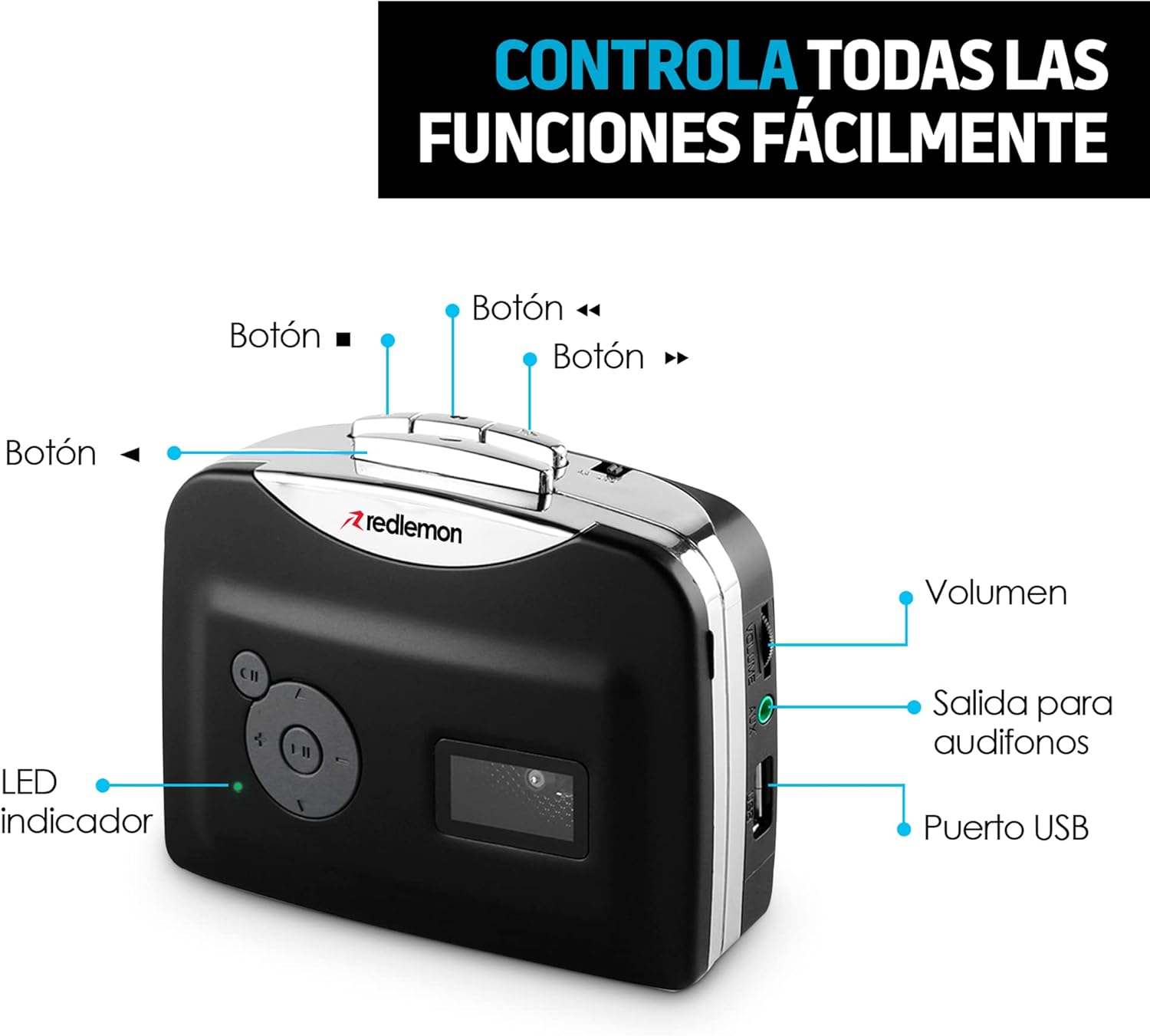
प्रतिमा: समोर आणि बाजूला view of the Redlemon Cassette to MP3 Converter with labels indicating various buttons and ports.
- Play/Stop Button (►/■): Initiates or stops cassette playback.
- Fast Forward Button (►►): टेप लवकर पुढे सरकवते.
- Rewind Button (◄◄): टेप पटकन रिवाइंड करतो.
- Direction Button (CH): Changes the playback direction of the cassette.
- Record Button (●): Starts or stops MP3 recording.
- आवाज नियंत्रण: ऑडिओ आउटपुट पातळी समायोजित करते.
- 3.5 मिमी हेडफोन जॅक: Connects headphones for private listening.
- यूएसबी पोर्ट: Connects a USB flash drive for MP3 recording and playback, or for power supply.
- एलईडी निर्देशक: Shows the device's status (e.g., power on, recording).

Image: The Redlemon Cassette to MP3 Converter with its lid open, revealing the cassette tape mechanism and internal components.
सेटअप
डिव्हाइसला शक्ती देणे
The device can be powered by two AA batteries or via a USB cable.
- बॅटरी पॉवर: Open the battery compartment on the back of the device. Insert two AA batteries, ensuring correct polarity. Close the compartment.

Image: A Redlemon Cassette to MP3 Converter with its battery compartment open, showing two AA batteries being inserted.
- यूएसबी पॉवर: Connect the included USB cable to the device's USB port and to a USB power adapter (not included) or a computer's USB port.
कॅसेट टाकत आहे
- Gently press the 'Open' button or slide the latch to open the cassette compartment lid.
- Insert an audio cassette with the open side facing upwards.
- Close the compartment lid until it clicks securely.
Connecting Headphones or USB Drive
- हेडफोन: Plug the 3.5mm jack of your headphones into the headphone port on the side of the device.
- USB फ्लॅश ड्राइव्ह: Insert a USB flash drive into the USB port on the side of the device. Ensure the drive is formatted to FAT32.
ऑपरेटिंग सूचना
कॅसेट वाजवतोय
- Ensure a cassette is properly inserted and the device is powered on.
- Connect headphones to the 3.5mm jack.
- Press the Play button (►). The LED indicator will light up.
- व्हॉल्यूम कंट्रोल वापरून आवाज समायोजित करा.
- To change tape direction, press the CH button.
- To fast forward or rewind, press the ►► or ◄◄ buttons respectively.
- प्लेबॅक थांबवण्यासाठी, थांबवा बटण (■) दाबा.

Image: A person smiling while listening to music through headphones connected to the Redlemon Cassette Player.
Converting Cassettes to MP3
This device allows direct recording of cassette audio to a USB flash drive in MP3 format.
- Ensure a cassette is inserted and a USB flash drive is connected to the USB port.
- Press the Play button (►) to start playing the cassette.
- Immediately after starting playback, press the Record button (●). The LED indicator will flash, indicating that recording has started.
- To stop recording, press the Record button (●) again. The LED indicator will stop flashing.
- To stop cassette playback, press the Stop button (■).
- रेकॉर्ड केलेला MP3 files will be saved on the USB flash drive. You can then transfer these files to a computer, tablet, or smartphone.

Image: The Redlemon Cassette to MP3 Converter positioned next to a laptop displaying music management software, illustrating the digital conversion process.
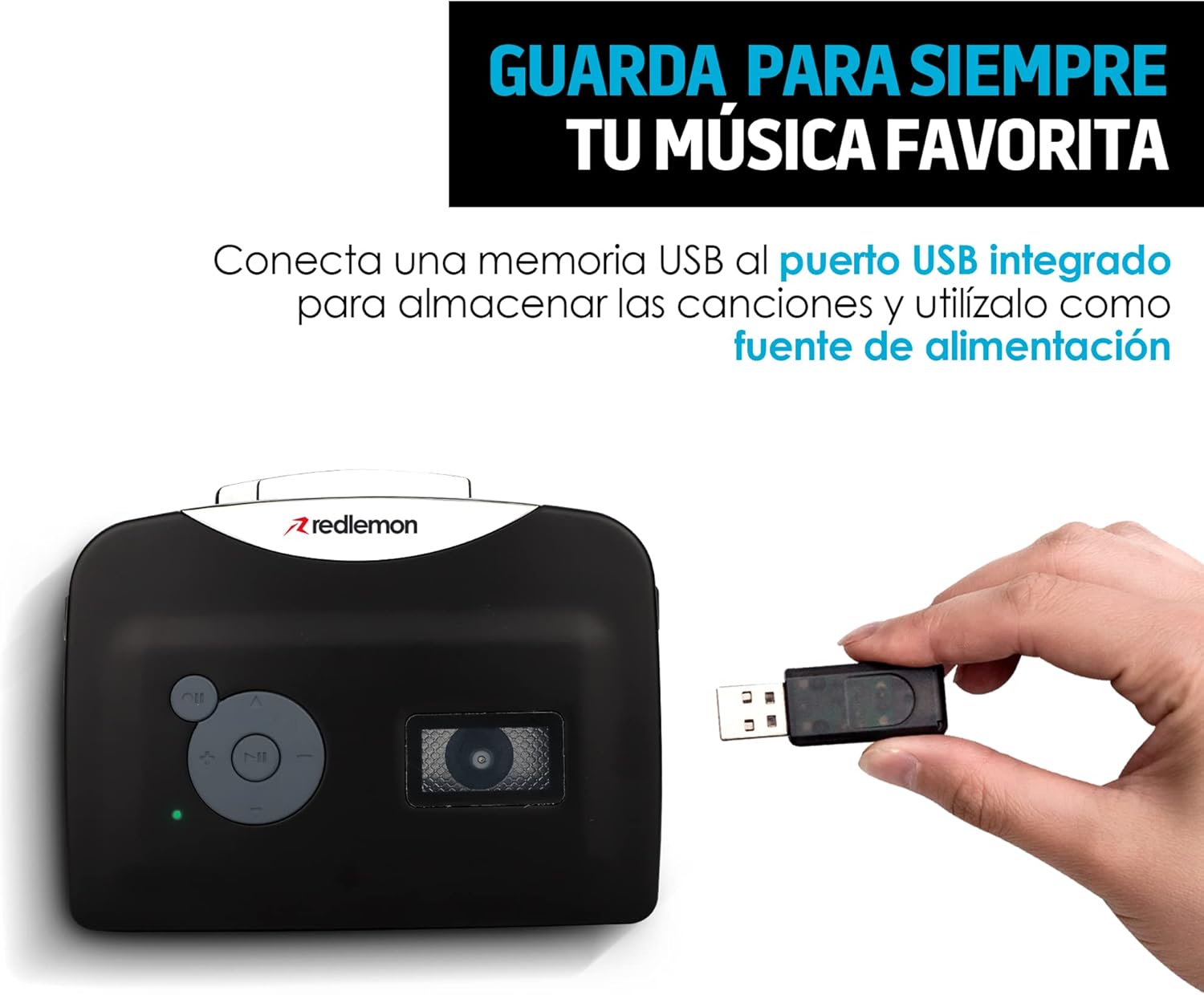
Image: A hand inserting a USB flash drive into the Redlemon Cassette to MP3 Converter, demonstrating how to save digital audio files.
Video Guide: Converting Cassettes to MP3
Video: A demonstration of how to use the Redlemon Cassette to MP3 Converter, including the recording process. (Duration: 1:20)
व्हिडिओ: थोडक्यात माहितीview of the Redlemon Cassette to MP3 Converter's features and operation. (Duration: 0:30)
देखभाल
साफसफाई
- डिव्हाइसच्या बाहेरील भाग स्वच्छ करण्यासाठी मऊ, कोरडे कापड वापरा.
- लिक्विड क्लीनर किंवा एरोसोल वापरू नका.
- वेळोवेळी टेप हेड्स स्वच्छ करा आणि रोलर्स कापसाच्या बोळ्याने हलकेच पिंच करा.ampइष्टतम ध्वनी गुणवत्ता सुनिश्चित करण्यासाठी आणि टेपचे नुकसान टाळण्यासाठी आयसोप्रोपिल अल्कोहोलने भरलेले.
स्टोरेज
- जास्त काळ वापरात नसताना, गळती टाळण्यासाठी AA बॅटरी काढून टाका.
- थेट सूर्यप्रकाश आणि अति तापमानापासून दूर थंड, कोरड्या जागी डिव्हाइस साठवा.
समस्यानिवारण
सामान्य समस्या आणि उपाय
- डिव्हाइस चालू होत नाही:
- Check if AA batteries are inserted correctly and are not depleted.
- If using USB power, ensure the USB cable is securely connected to a working power source.
- प्लेबॅक दरम्यान आवाज नाही:
- हेडफोन्स योग्यरित्या जोडलेले आहेत याची खात्री करा.
- व्हॉल्यूम कंट्रोल समायोजित करा.
- Check if the cassette tape is correctly inserted and not damaged.
- Recording to MP3 fails or produces poor quality:
- Ensure the USB flash drive is inserted correctly and has sufficient free space.
- Verify the USB drive is formatted to FAT32.
- Important Recording Sequence: First, press the Play button (►) for the cassette, then immediately press the Record button (●). Pressing Record before Play may result in unwanted ambient noise being recorded.
- Check the condition of the cassette tape. Older or damaged tapes may produce lower quality recordings or inconsistent playback.
- Ensure the device is stable during recording to avoid interruptions or pauses in the audio.
- Cassette tape is not moving:
- Check if the cassette is properly seated in the compartment.
- Ensure the tape is not tangled or damaged.
तपशील
| ब्रँड | Redlemon |
| मॉडेल | 56084 |
| सुसंगत साधने | Personal computer, Headphones, USB device |
| विशेष वैशिष्ट्ये | हलके, पोर्टेबल |
| प्रदर्शन तंत्रज्ञान | डिस्प्ले नाही |
| बॅटरी आवश्यक | हो (४ x AA, समाविष्ट नाही) |
| उर्जा स्त्रोत | 2 AA Batteries or USB Cable |
| कनेक्टर प्रकार | AUX (3.5mm), USB |
| समर्थित ऑडिओ स्वरूप | MP3 |
| मीडिया प्रकार | Cassette, MP3 |
| रिचार्ज करण्यायोग्य बॅटरी समाविष्ट आहे | नाही |
| रिमोट कंट्रोल समाविष्ट आहे | नाही |
| परिमाण | 15 x 11.5 x 4.7 सेमी |
| वजन | 240 ग्रॅम |
| UPC | 631145835990 |
हमी आणि समर्थन
For warranty information and technical support, please refer to the official Redlemon webसाइटवर जा किंवा त्यांच्या ग्राहक सेवेशी थेट संपर्क साधा. कोणत्याही वॉरंटी दाव्यांसाठी खरेदीचा पुरावा म्हणून तुमची खरेदी पावती ठेवा.
You can visit the Redlemon store on Amazon for more information: Redlemon Store


