1. परिचय
This manual provides essential instructions for the safe and effective use of your Olympus OM-D E-M1 Mark II Micro Four Thirds System Camera. The E-M1 Mark II is engineered for high performance, featuring a 20.4 Megapixel Live MOS sensor, 5-axis image stabilization, and an advanced autofocus system. Please read this manual thoroughly before using the camera and keep it in a safe place for future reference.
2. सुरक्षितता माहिती
To prevent injury to yourself or others, or damage to your equipment, observe the following safety precautions:
- Do not disassemble, repair, or modify the camera or lens.
- Keep the camera away from water and moisture. This camera is weather-sealed, but not submersible.
- कॅमेरा अति तापमान, जास्त काळ थेट सूर्यप्रकाश किंवा उच्च आर्द्रतेला तोंड देऊ नका.
- Use only Olympus-approved batteries and chargers.
- Do not look at the sun or bright light sources through the viewfinder or lens, as this can cause permanent vision damage.
- मुलांच्या आवाक्याबाहेर ठेवा.
3. पॅकेज सामग्री
तुमच्या पॅकेजमध्ये सर्व वस्तू आहेत का ते तपासा:
- Olympus OM-D E-M1 Mark II Camera Body
- M.Zuiko Digital ED 12-40mm F2.8 PRO Lens
- BLH-1 Li-ion Battery
- BCH-1 Li-ion Battery Charger
- यूएसबी केबल
- केबल क्लिप
- खांद्याचा पट्टा
- FL-LM3 Flash
- Instruction Manual (basic guide)
- वॉरंटी कार्ड
२.२. कॅमेरा घटक
तुमच्या कॅमेऱ्याच्या विविध भागांशी परिचित व्हा.
4.1 समोर View with Lens

This image displays the Olympus OM-D E-M1 Mark II camera body with the M.Zuiko 12-40mm PRO lens mounted. Key features visible include the lens barrel, focus ring, zoom ring, and the Olympus branding on the camera body.
4.2 समोर View (Body Only)
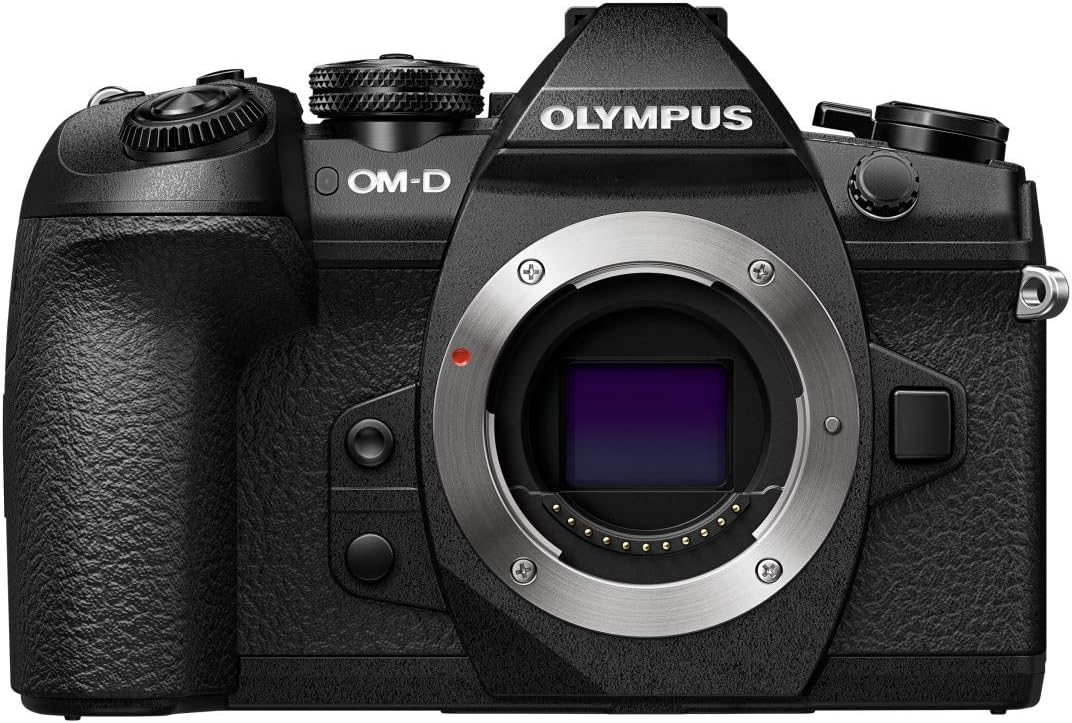
This image shows the front of the Olympus OM-D E-M1 Mark II camera body without a lens attached, revealing the Micro Four Thirds lens mount, the red lens release button, and the textured grip.
4.3 शीर्ष View
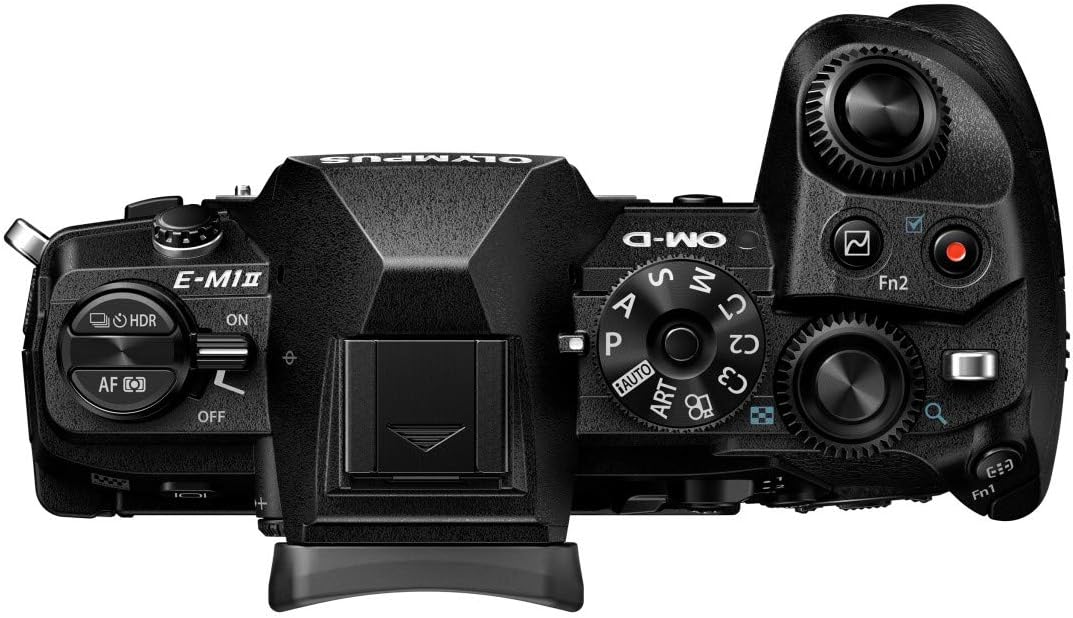
वरचा view of the camera highlights the mode dial (P, A, S, M, ART, C1-C4), power switch, shutter button, front and rear control dials, and the hot shoe for external flash.
4.4 मागील View

This image presents the rear of the camera with the LCD screen in its closed position. Visible elements include the electronic viewfinder, various function buttons, the directional pad, and the 'OK' button.
4.5 Articulated Screen

The camera's rear view with the LCD screen articulated, demonstrating its flexibility for shooting from various angles. The screen is a 3-inch capacitive touch display.
4.6 बाजू View

एक बाजू view of the Olympus OM-D E-M1 Mark II, highlighting the deep ergonomic grip and the covered ports for connectivity (USB, video out).
4.7 परिमाणे आणि वजन

This diagram illustrates the physical dimensions and weights of the camera body (574g with battery and memory card), the M.Zuiko 12-40mm lens (382g), and an SD card, emphasizing the compact and lightweight design.
5. सेटअप
5.1 बॅटरी चार्ज करणे
- Insert the BLH-1 Li-ion battery into the BCH-1 Li-ion battery charger.
- चार्जरला पॉवर आउटलेटमध्ये प्लग करा. चार्जिंग इंडिकेटर लाईट प्रकाशित होईल.
- इंडिकेटर लाईट बंद झाल्यावर चार्जिंग पूर्ण होते.
२.३ बॅटरी आणि मेमरी कार्ड घालणे
- कॅमेऱ्याच्या तळाशी असलेले बॅटरी/कार्ड कंपार्टमेंट कव्हर उघडा.
- Insert the charged BLH-1 battery with the correct orientation until it clicks into place.
- Insert an SDHC or SDXC memory card into one of the two available memory card slots until it clicks. Ensure the card is facing the correct direction.
- कंपार्टमेंट कव्हर सुरक्षितपणे बंद करा.
४.३ लेन्स जोडणे
- Remove the body cap from the camera and the rear lens cap from the M.Zuiko 12-40mm PRO lens.
- लेन्सवरील पांढऱ्या इंडेक्स मार्कला कॅमेरा बॉडीवरील पांढऱ्या इंडेक्स मार्कशी संरेखित करा.
- Mount the lens by turning it clockwise until it clicks into place.
5.4 प्रारंभिक सेटिंग्ज
Upon first power-on, you will be prompted to set the date, time, and language. Follow the on-screen instructions using the directional pad and 'OK' button.
6. कॅमेरा चालवणे
6.1 पॉवर चालू/बंद
कॅमेऱ्याच्या वरच्या बाजूला असलेला पॉवर स्विच 'चालू' किंवा 'बंद' स्थितीत स्लाइड करा.
५.२ शूटिंग मोड्स
Rotate the mode dial to select your desired shooting mode:
- पी (प्रोग्राम ऑटो): कॅमेरा इष्टतम एक्सपोजरसाठी एपर्चर आणि शटर स्पीड सेट करतो.
- अ (छिद्र प्राधान्य): तुम्ही एपर्चर सेट करता, कॅमेरा शटर स्पीड सेट करतो.
- एस (शटर प्राधान्य): तुम्ही शटर स्पीड सेट करता, कॅमेरा एपर्चर सेट करतो.
- एम (मॅन्युअल): तुम्ही एपर्चर आणि शटर स्पीड दोन्ही सेट करता.
- ART (Art Filter): Apply various creative filters to your photos.
- C1-C4 (Custom Modes): Save and recall your preferred camera settings.
५.२ फोटो काढणे
- Turn the camera on and select a shooting mode.
- Frame your shot using the electronic viewfinder or the LCD monitor.
- Press the shutter button halfway down to activate autofocus and exposure metering.
- Press the shutter button fully to capture the image.
२.३ ऑटोफोकस सिस्टम
The OM-D E-M1 Mark II features a high-speed autofocus system with 121 cross-type phase detection AF points. You can select various AF modes and areas through the camera's menu to suit your subject and shooting conditions.
५.५ प्रतिमा स्थिरीकरण
The camera incorporates a powerful 5-axis in-body image stabilization system, providing up to 5.5 EV steps of correction. This allows for sharp handheld shots even in low light or with longer shutter speeds.
6.6 व्हिडिओ रेकॉर्डिंग
The E-M1 Mark II supports 4K (2160p) and Cinema 4K video recording. To start recording, rotate the mode dial to the movie mode or press the dedicated video record button (if assigned).
6.7 प्लेबॅक
Press the playback button to review your captured images and videos. Use the directional pad or control dials to navigate through your media.
6.8 मेनू नेव्हिगेशन
Press the MENU button to access the camera's settings. Use the directional pad or the touch screen to navigate through menus and adjust parameters. The camera's extensive menu system allows for fine-tuning of various functions.
7. देखभाल
४.१ कॅमेरा साफ करणे
- Use a blower brush to remove dust from the lens and camera body.
- For stubborn smudges on the lens, use a specialized lens cleaning cloth and solution.
- Wipe the camera body with a soft, dry cloth. Do not use organic solvents.
५.८.१ स्टोरेज
- जास्त काळ वापरात नसताना, बॅटरी काढून टाका.
- कॅमेरा थंड, कोरड्या, हवेशीर जागेत, थेट सूर्यप्रकाश आणि उच्च आर्द्रतेपासून दूर ठेवा.
- Consider using a desiccant to prevent mold growth, especially in humid environments.
8. समस्या निवारण
जर तुम्हाला तुमच्या कॅमेऱ्यात समस्या येत असतील, तर खालील सामान्य समस्या आणि उपाय पहा:
| समस्या | संभाव्य कारण | उपाय |
|---|---|---|
| कॅमेरा चालू होत नाही. | बॅटरी संपली आहे किंवा चुकीच्या पद्धतीने घातली आहे. | बॅटरी पूर्णपणे चार्ज करा आणि ती योग्यरित्या घातली आहे याची खात्री करा. |
| प्रतिमा अस्पष्ट आहेत. | Incorrect focus, slow shutter speed, or camera shake. | Check focus mode, increase shutter speed, or utilize the 5-axis image stabilization. |
| मेमरी कार्ड त्रुटी. | कार्ड भरलेले आहे, दूषित आहे किंवा विसंगत आहे. | अनावश्यक हटवा files, format the card (this will erase all data), or try a different compatible card. |
| फ्लॅश चालू होत नाही. | फ्लॅश मोड बंद आहे किंवा बॅटरी कमी आहे. | Check flash settings in the menu; ensure battery is charged. |
For more detailed troubleshooting, refer to the comprehensive digital manual available on the Olympus support webसाइट
9. तपशील
Key technical specifications for the Olympus OM-D E-M1 Mark II:
| वैशिष्ट्य | तपशील |
|---|---|
| मॉडेलचे नाव | ऑलिंपस ओएम-डी ई-एम१ मार्क II |
| सेन्सर प्रकार | राज्यमंत्री |
| प्रभावी तरीही ठराव | 20.4 MP |
| प्रतिमा स्थिरीकरण | 5-Axis Electronic |
| सुसंगत माउंटिंग | सूक्ष्म चार तृतीयांश |
| ऑटोफोकस पॉइंट्स | ३९९ (फेज डिटेक्शन) |
| व्हिडिओ रिझोल्यूशन | 2160p (4K) |
| स्क्रीन आकार | 3 इंच |
| डिस्प्ले प्रकार | Articulating LCD, Capacitive Touch Screen |
| मेमरी स्लॉट उपलब्ध | 2 (SDHC, SDXC) |
| कनेक्टिव्हिटी तंत्रज्ञान | यूएसबी, वाय-फाय |
| प्रोसेसर | Olympus TruePic VIII |
| वजन (शरीर) | 1 Kilogram (approx. 574g with battery/card) |
| पाणी प्रतिकार पातळी | Water Resistant (Splashproof) |
10. हमी आणि समर्थन
Your Olympus OM-D E-M1 Mark II camera comes with a limited warranty. Please refer to the warranty card included in your package for specific terms and conditions. For technical support, service, or to download the full digital instruction manual, please visit the official Olympus support website or contact your local Olympus service center.
ऑनलाइन समर्थन: www.olympus-imaging.com/support/


