1. परिचय
The Seltron SGC-sgc16 is an advanced solar differential controller designed for efficient management of solar thermal and combined heating systems. It features a backlit liquid crystal display (LCD) that shows hydraulic schemes and various functional data, ensuring intuitive user interaction through graphical icons. This manual provides detailed instructions for the proper installation, operation, and maintenance of your SGC-sgc16 controller.
2. सुरक्षितता माहिती
Please read all safety instructions carefully before installing or operating the device. Failure to comply with these instructions may result in electric shock, fire, or serious injury.
- विद्युत सुरक्षा: Installation and wiring must be performed by a qualified electrician in accordance with all local and national electrical codes. Ensure the power supply is disconnected before any wiring or maintenance.
- पर्यावरणीय परिस्थिती: Do not expose the controller to direct sunlight, extreme temperatures, high humidity, or corrosive environments.
- हाताळणी: शारीरिक नुकसान टाळण्यासाठी उपकरण काळजीपूर्वक हाताळा.
- अभिप्रेत वापर: This device is intended solely for controlling solar thermal and combined heating systems as described in this manual. Any other use is considered improper.
3. उत्पादन संपलेview
The Seltron SGC-sgc16 controller features a user-friendly interface with a clear LCD and tactile buttons for navigation and parameter adjustment.
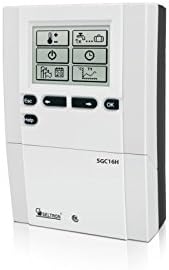
आकृती 3.1: समोर view of the Seltron SGC-sgc16 Solar Controller. This image shows the main display, navigation buttons (ESC, HELP, OK), and function buttons with graphical icons for temperature, pump status, time, system configuration, and data logging.
3.1. घटक
- एलसीडी डिस्प्ले: Backlit screen for displaying system status, parameters, and hydraulic schemes.
- नेव्हिगेशन बटणे:
- ESC: Exits current menu or cancels an action.
- मदत: Provides context-sensitive help or information.
- ठीक आहे: Confirms selection or enters a menu.
- Up/Down Arrows (implied by icons): For navigating through menus and adjusting values.
- फंक्शन चिन्ह: Represent various system functions and settings, such as temperature, pump operation, time settings, and system configuration.
4. तपशील
Key technical specifications for the Seltron SGC-sgc16 solar controller:
| तपशील | मूल्य |
|---|---|
| उत्पादक | सेलट्रॉन |
| आयटम वजन | 2 kg (2 Kilograms) |
| ASIN | B01EVAOGW2 |
| प्रथम उपलब्ध तारीख | १३ मे २०२३ |

Figure 4.1: Dimensions of the Seltron SGC-sgc16 Solar Controller. The diagram indicates a height of 163 mm, a width of 113 mm, and a depth of 48 mm.
5. सेटअप आणि स्थापना
Installation of the SGC-sgc16 controller should only be performed by qualified personnel, such as a certified electrician or heating technician. Incorrect installation can lead to system malfunction, damage, or safety hazards.
5.1. माउंटिंग
- Choose a dry, well-ventilated location, away from direct sunlight, heat sources, and excessive moisture.
- Ensure sufficient space around the controller for ventilation and access to wiring terminals.
- Mount the controller securely to a wall or panel using appropriate screws and anchors. Refer to the dimension diagram in Section 4 for mounting hole locations.
३.३. विद्युत जोडणी
Before making any electrical connections, ensure the main power supply to the heating system is disconnected at the circuit breaker.
- वीज पुरवठा: Connect the controller to a stable power supply according to local electrical regulations.
- सेन्सर कनेक्शन: Connect temperature sensors (e.g., collector sensor, tank sensor) to the designated terminals. Ensure correct polarity if applicable.
- Pump/Valve Connections: Connect the solar pump(s) and any control valves to the appropriate output terminals. Verify that the connected devices' power ratings do not exceed the controller's output capacity.
- ग्राउंडिंग: Ensure the controller is properly grounded to prevent electrical hazards.
After all connections are made, double-check wiring for correctness and security before restoring power.
6. ऑपरेटिंग सूचना
The SGC-sgc16 controller is designed for intuitive operation. Upon initial power-up, the controller may guide you through a setup wizard to configure basic system parameters.
6.1. Initial Power-Up and Basic Settings
- पॉवर चालू: Restore power to the controller. The display will illuminate.
- भाषा निवड: If prompted, select your preferred language using the navigation buttons and confirm with OK.
- तारीख आणि वेळ: Set the current date and time. This is crucial for functions like holiday modes or timed operations.
- Hydraulic Scheme Selection: The controller comes with pre-installed hydraulic schemes. Select the scheme that matches your solar and heating system configuration. This is typically represented graphically on the display.
३.१. मेनू नेव्हिगेशन
Use the buttons on the front panel to navigate through the menus:
- ओके बटण: Enters a menu or confirms a selection/value.
- ESC बटण: Returns to the previous menu level or cancels an input.
- Arrow Buttons (implied): Navigate up/down through menu options or increase/decrease values.
- मदत बटण: Provides information about the currently displayed parameter or menu item.
६.३. पॅरामीटर समायोजन
To adjust a parameter (e.g., differential temperature, maximum tank temperature):
- Navigate to the desired parameter using the arrow buttons.
- Press OK to enter edit mode for that parameter. The value may start blinking.
- Use the arrow buttons to change the value.
- Press OK to save the new value and exit edit mode. Press ESC to discard changes.
३.३. सिस्टम स्थितीचे निरीक्षण करणे
The main display provides real-time information about your system. You can typically view:
- Current temperatures from all connected sensors.
- Status of pumps and valves (on/off).
- System operating mode.
- Error messages or warnings.
7. देखभाल
The Seltron SGC-sgc16 controller requires minimal maintenance to ensure long-term reliable operation.
७.२. साफसफाई
- Wipe the exterior of the controller with a soft, dry, or slightly damp कापड
- अपघर्षक क्लीनर, सॉल्व्हेंट्स किंवा रासायनिक स्प्रे वापरू नका, कारण ते सी ला नुकसान करू शकतात.asing किंवा डिस्प्ले.
- Ensure no liquid enters the device.
४.२. सिस्टम तपासणी
- सर्व वायरिंग कनेक्शन घट्टपणा आणि झीज किंवा नुकसानीच्या लक्षणांसाठी वेळोवेळी तपासा.
- Monitor the system's performance via the controller's display to ensure it is operating within expected parameters.
- Ensure sensors are securely in place and not damaged.
For any internal maintenance or repairs, contact a qualified service technician. Do not attempt to open the controller casinस्वतःला.
8. समस्या निवारण
This section provides solutions to common issues you might encounter with your SGC-sgc16 controller. For problems not listed here, or if solutions do not resolve the issue, contact Seltron customer support or a qualified technician.
| समस्या | संभाव्य कारण | उपाय |
|---|---|---|
| कंट्रोलर डिस्प्ले रिकामा आहे. | No power supply; loose connection; internal fault. | Check power supply to the controller. Verify all electrical connections. If power is present and connections are secure, contact support. |
| System not heating or pump not running. | Incorrect temperature differential settings; faulty sensor; pump malfunction; air in system. | Check differential temperature settings. Verify sensor readings on display. Inspect pump for operation. Bleed air from the system if necessary. |
| डिस्प्लेवर एरर मेसेज. | Sensor fault; communication error; system parameter out of range. | Note the error code/message. Refer to the HELP function on the controller or consult the full technical manual for specific error codes. Check sensor connections. |
| चुकीचे तापमान वाचन. | Faulty sensor; sensor not properly installed; wiring issue. | Ensure sensors are correctly positioned and making good contact. Check sensor wiring for damage or loose connections. Replace faulty sensors if necessary. |
9. विल्हेवाट लावणे
This product contains electronic components and should not be disposed of with household waste. Please dispose of the device in accordance with local regulations for electronic waste. Contact your local authorities or recycling center for information on proper disposal methods.


