परिचय
This manual provides comprehensive instructions for setting up, operating, maintaining, and troubleshooting your Belkin Wireless N Router F5D8236-4. Please read this guide thoroughly to ensure proper installation and optimal performance of your device.
1. सेटअप
1.1 हार्डवेअर कनेक्शन
आपला राउटर कनेक्ट करण्यासाठी या चरणांचे अनुसरण करा:
- Unplug Power: तुमच्या मॉडेम आणि कोणत्याही विद्यमान राउटरमधून वीजपुरवठा खंडित करा.
- Connect Modem to Router: Connect one end of an Ethernet cable (not supplied) to the Ethernet port on your modem and the other end to the WAN (Internet) port on the Belkin Wireless N Router.
- वीज कनेक्ट करा: Plug the power adapter into the router's power port and then into an electrical outlet.
- पॉवर चालू: Power on your modem first, wait for it to fully initialize (usually indicated by stable lights), then power on your Belkin router.
- दिवे पडताळून पहा: Check the indicator lights on the front of the router. The power, internet, and wireless lights should be illuminated and stable once the setup is complete.
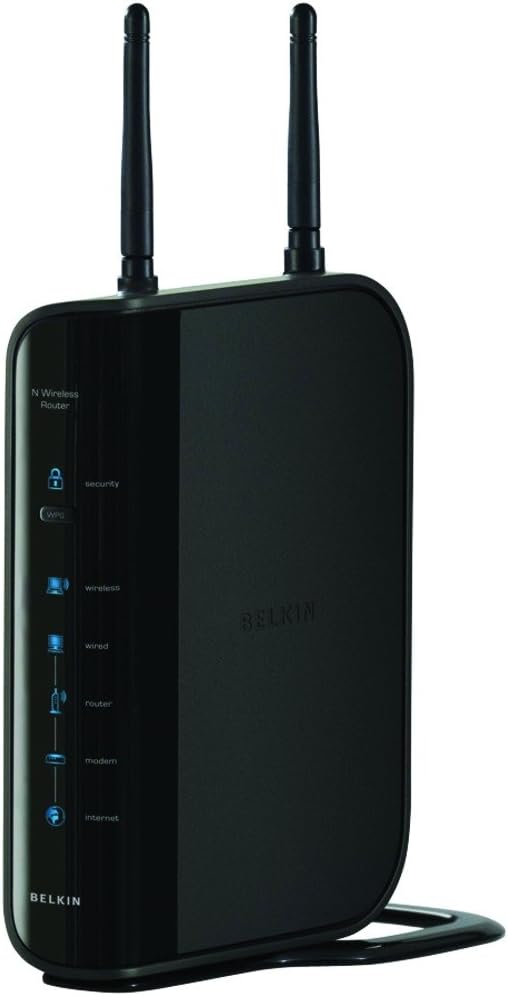
आकृती 1: समोर view of the Belkin Wireless N Router F5D8236-4, showing indicator lights and antennas.
1.2 सॉफ्टवेअर कॉन्फिगरेशन
To configure your router's settings:
- संगणक कनेक्ट करा: Connect a computer to one of the router's LAN ports using an Ethernet cable, or connect wirelessly using the default Wi-Fi network name (SSID) and password printed on the router's label.
- सेटअप पृष्ठावर प्रवेश करा: उघडा ए web browser (Internet Explorer 6.0+, Firefox 1.0+, or Safari 2.0+) and enter the router's default IP address (e.g., 192.168.2.1 or belkin.router) into the address bar.
- ऑन-स्क्रीन सूचनांचे अनुसरण करा: The setup wizard will guide you through configuring your internet connection, Wi-Fi network name (SSID), and password. It is highly recommended to change the default Wi-Fi password for security.
2. ऑपरेटिंग सूचना
The Belkin Wireless N Router F5D8236-4 operates on IEEE 802.11n draft 2.0, IEEE 802.11g, and IEEE 802.11b wireless standards, offering a link rate of up to 300 Mbps in 40 MHz channel mode. It provides an operating range of up to 1200 feet, suitable for home use.
2.1 नेटवर्क सुरक्षा
The router supports strong network security protocols including WPA, WPA2, WPS, and 64- and 128-bit WEP. It is crucial to configure and enable WPA2 security with a strong, unique password for your wireless network to protect your data and prevent unauthorized access.
2.2 Wired Connections
The router includes four 10/100 Mbps Ethernet ports for wired devices, allowing for stable and fast connections for computers, gaming consoles, or other network-enabled devices.

Figure 2: A typical home setup showing a router providing wireless connectivity for entertainment.
3. देखभाल
नियमित देखभाल तुमच्या राउटरचे दीर्घायुष्य आणि इष्टतम कार्यप्रदर्शन सुनिश्चित करते:
- फर्मवेअर अद्यतने: Periodically check the Belkin support website for firmware updates. Keeping your router's firmware up-to-date can improve performance, add new features, and enhance security.
- भौतिक स्थान: Place the router in a central location in your home, away from obstructions and devices that emit electromagnetic interference (e.g., microwaves, cordless phones) to maximize wireless range and signal strength.
- नियमित रीबूट: Occasionally reboot your router (unplug from power for 10-15 seconds, then plug back in) to clear its memory and resolve minor connectivity issues.
- स्वच्छता: जास्त गरम होऊ नये म्हणून राउटर स्वच्छ आणि धूळमुक्त ठेवा. स्वच्छतेसाठी मऊ, कोरडे कापड वापरा.
4. समस्या निवारण
If you encounter issues with your Belkin Wireless N Router, consider the following:
- इंटरनेट कनेक्शन नाही:
- Ensure all cables are securely connected to the correct ports on both the modem and the router.
- Reboot your modem and router in sequence (modem first, then router).
- Check your Internet Service Provider (ISP) status for outages
- Slow Wireless Speeds:
- Move the router to a more central location.
- इतर इलेक्ट्रॉनिक उपकरणांचा हस्तक्षेप कमी करा.
- Ensure your wireless adapter drivers on your computer are up-to-date.
- Verify that your router's firmware is the latest version.
- वाय-फायशी कनेक्ट करण्यात अडचण:
- Double-check your Wi-Fi network name (SSID) and password.
- Ensure your device supports the wireless standards (IEEE 802.11n/g/b) used by the router.
- If using WPS, ensure it is enabled on both the router and your device.
- Network Security Concerns:
- Always use WPA2 encryption for your wireless network.
- Change the default administrator password for your router's settings page.
- नियमितपणे रेview connected devices through the router's administration interface.
5. तपशील
| वैशिष्ट्य | तपशील |
|---|---|
| मॉडेल क्रमांक | F5D8236-4 |
| वायरलेस मानके | IEEE 802.11n draft 2.0; IEEE 802.11g; IEEE 802.11b; IEEE 802.3u; IEEE 802.3 |
| बंदरे | 4x computer/device ports (RJ-45), 1x modem port (RJ-45) |
| ऑपरेटिंग रेंज | 1200 फुटांपर्यंत |
| दुवा दर | Up to 300 Mbps in 40 MHz channel mode |
| सुरक्षा | WPA, WPA2, WPS, 64- and 128-bit WEP |
| इथरनेट पोर्ट्स | Four 10/100 Mbps Ethernet ports |
| उत्पादन परिमाणे | 10 x 4.1 x 8.1 इंच |
| आयटम वजन | 1.4 पाउंड |
| प्रथम उपलब्ध | ५ जुलै २०२४ |
6. वॉरंटी माहिती
Please note that this product is an older generation model. The provided product information indicates a legal disclaimer of "sale is final". For specific warranty details applicable at the time of your purchase, please refer to the documentation included with your product or contact Belkin customer support directly.
7. समर्थन
For further assistance, technical support, or to access the latest drivers and firmware, please visit the official Belkin support website. You can often find FAQs, troubleshooting guides, and contact information for customer service there.


