
1. परिचय
Welcome to the user manual for your MEIZE D116 Android 14 Tablet. This guide provides essential information on setting up, operating, maintaining, and troubleshooting your device. Please read this manual thoroughly to ensure optimal performance and longevity of your tablet.
२. काय समाविष्ट आहे
Your MEIZE D116 Tablet package includes the following items:
- 10-inch Tablet
- संरक्षणात्मक केस
- ब्लूटूथ कीबोर्ड
- वायरलेस माउस
- टाइप-सी केबल
- स्क्रीन संरक्षक
- अॅडॉप्टर चार्जर
- Ejection Pin (for SIM/MicroSD tray)
- वापरकर्ता मॅन्युअल (हा दस्तऐवज)

Image: The MEIZE D116 Tablet displayed with its included accessories: a protective case, Bluetooth keyboard, wireless mouse, Type-C cable, charger, and stylus.
3. सेटअप मार्गदर्शक
२.३ सुरुवातीचे चार्जिंग आणि पॉवर चालू
- Connect the provided Type-C cable to the tablet's charging port and the adapter charger to a power outlet.
- Allow the tablet to charge fully before first use. The battery indicator on the screen will show charging status.
- To power on, press and hold the power button located on the side of the tablet until the MEIZE logo appears.
- पॉवर ऑफ करण्यासाठी, पॉवर बटण दाबा आणि धरून ठेवा, नंतर पर्यायांमधून "पॉवर ऑफ" निवडा.
3.2 Connecting the Bluetooth Keyboard
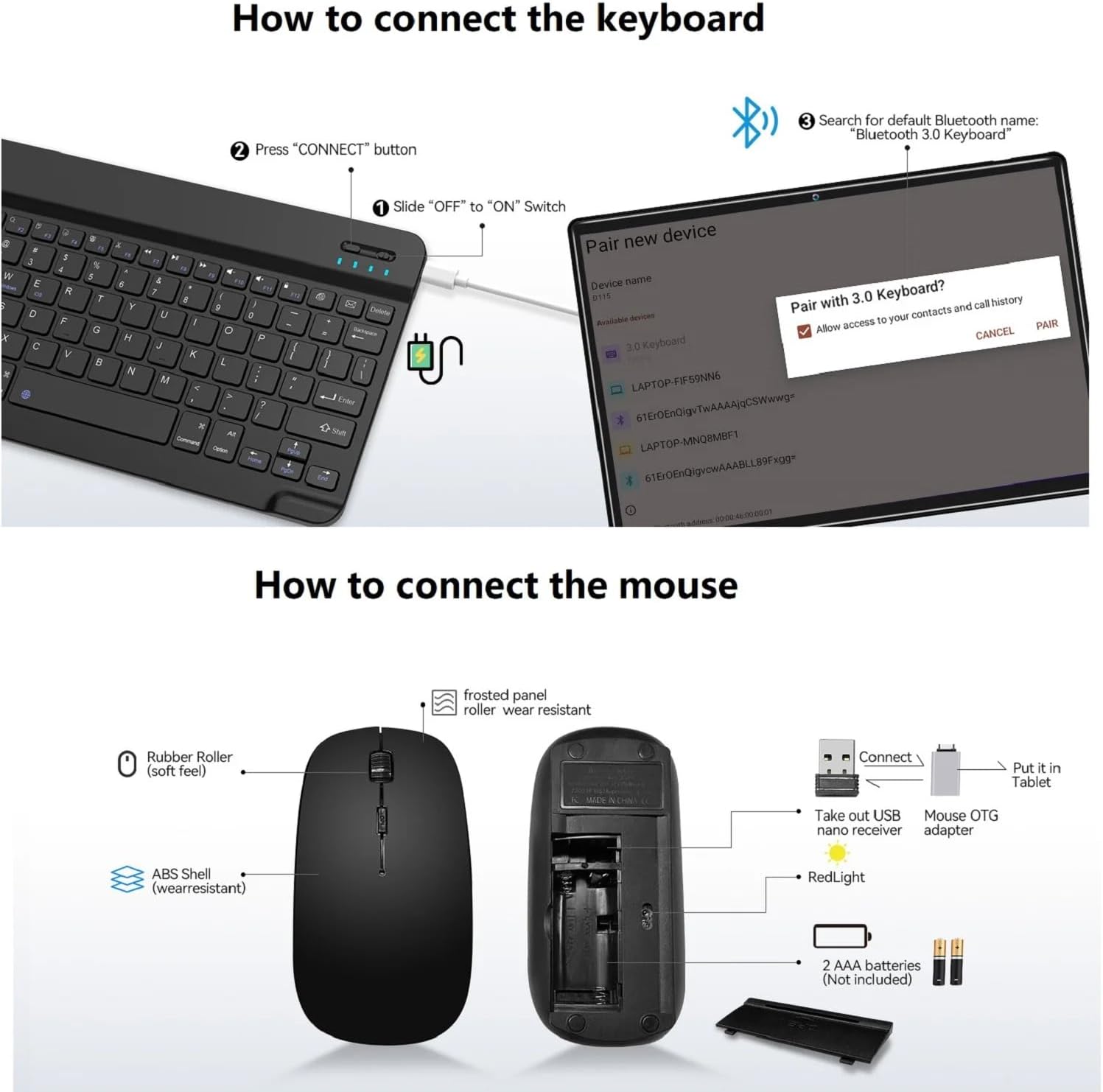
Image: A diagram illustrating the steps to connect the Bluetooth keyboard. It shows sliding the power switch to ON, pressing the CONNECT button, and then pairing via the tablet's Bluetooth settings.
- ब्लूटूथ कीबोर्ड चार्ज झाला आहे याची खात्री करा.
- Slide the "OFF" to "ON" switch on the keyboard.
- Press the "CONNECT" button on the keyboard. The Bluetooth indicator light will flash.
- On your MEIZE D116 tablet, go to सेटिंग्ज > कनेक्ट केलेली उपकरणे > ब्लूटूथ.
- ब्लूटूथ चालू करा आणि उपलब्ध उपकरणे शोधा.
- Select "Bluetooth 3.0 Keyboard" (or similar name) from the list to pair.
3.3 Connecting the Wireless Mouse
Image: A diagram showing the components of the wireless mouse, including the USB nano receiver, battery compartment, and how to connect it to the tablet using an OTG adapter.
- Open the battery compartment of the wireless mouse and insert 2 AAA batteries (not included).
- Take out the USB nano receiver from the mouse's compartment.
- Connect the USB nano receiver to the provided OTG adapter.
- Plug the OTG adapter with the receiver into the tablet's Type-C port. The mouse should connect automatically.
3.4 वाय-फाय कनेक्शन
- वर जा सेटिंग्ज > नेटवर्क आणि इंटरनेट > वाय-फाय.
- वाय-फाय चालू करा. टॅबलेट उपलब्ध नेटवर्कसाठी स्कॅन करेल.
- Select your desired 2.4GHz or 5GHz network and enter the password if prompted.

Image: The MEIZE D116 Tablet showcasing its key features, including support for 2.4GHz/5GHz dual-band Wi-Fi for stable network connections.
२.२ सिम कार्ड आणि मायक्रोएसडी कार्डची स्थापना

Image: A close-up of the MEIZE D116 Tablet's side, revealing the tray for SIM cards and a MicroSD card, indicating its expandability and cellular capabilities.
- टॅब्लेटच्या बाजूला सिम/मायक्रोएसडी कार्ड ट्रे शोधा.
- ट्रे उघडण्यासाठी त्याच्या शेजारी असलेल्या लहान छिद्रात इजेक्शन पिन घाला.
- Place your SIM card(s) and/or MicroSD card into the designated slots on the tray. Ensure correct orientation.
- टॅब्लेट जागी येईपर्यंत ट्रे हळूवारपणे परत टॅब्लेटमध्ये ढकला.
५. तुमचा टॅब्लेट चालवणे
३.१ बेसिक नेव्हिगेशन (अँड्रॉइड १४)
- होम स्क्रीन: Swipe left or right to access different home screens. Tap app icons to open them.
- सूचना: स्क्रीनच्या शीर्षापासून खाली स्वाइप करा view सूचना आणि जलद सेटिंग्ज.
- अॅप ड्रॉवर: सर्व स्थापित अनुप्रयोगांमध्ये प्रवेश करण्यासाठी स्क्रीनच्या तळापासून वर स्वाइप करा.
- मल्टीटास्किंग: Swipe up from the bottom and hold to see recently used apps.
4.2 प्रदर्शन वैशिष्ट्ये
The MEIZE D116 features a 10.1-inch 1920x1200 IPS FHD display.
- डोळा संरक्षण मोड: Reduces blue light emission to minimize eye strain, especially during prolonged use. Activate this feature in सेटिंग्ज > डिस्प्ले.
- गडद मोड: Changes the system's color scheme to a darker palette, which can be more comfortable in low-light environments and save battery on some displays. Activate in सेटिंग्ज > डिस्प्ले.
६.२ कॅमेरा वापर
Your tablet is equipped with an 8MP front camera and a 13MP rear camera.

Image: The MEIZE D116 Tablet highlighting its 8MP front and 13MP rear cameras, suitable for video calls and capturing photos.
- उघडा कॅमेरा तुमच्या होम स्क्रीन किंवा अॅप ड्रॉवरमधून अॅप.
- पुढील आणि मागील कॅमेऱ्यांमध्ये स्विच करण्यासाठी कॅमेरा आयकॉनवर टॅप करा.
- फोटो काढण्यासाठी किंवा व्हिडिओ रेकॉर्डिंग सुरू/थांबवण्यासाठी शटर बटणावर टॅप करा.
4.4 स्टोरेज व्यवस्थापन
The tablet comes with 128GB of internal storage (ROM) and 16GB (8+8 virtual) of RAM. Storage can be expanded up to 1TB using a MicroSD card.
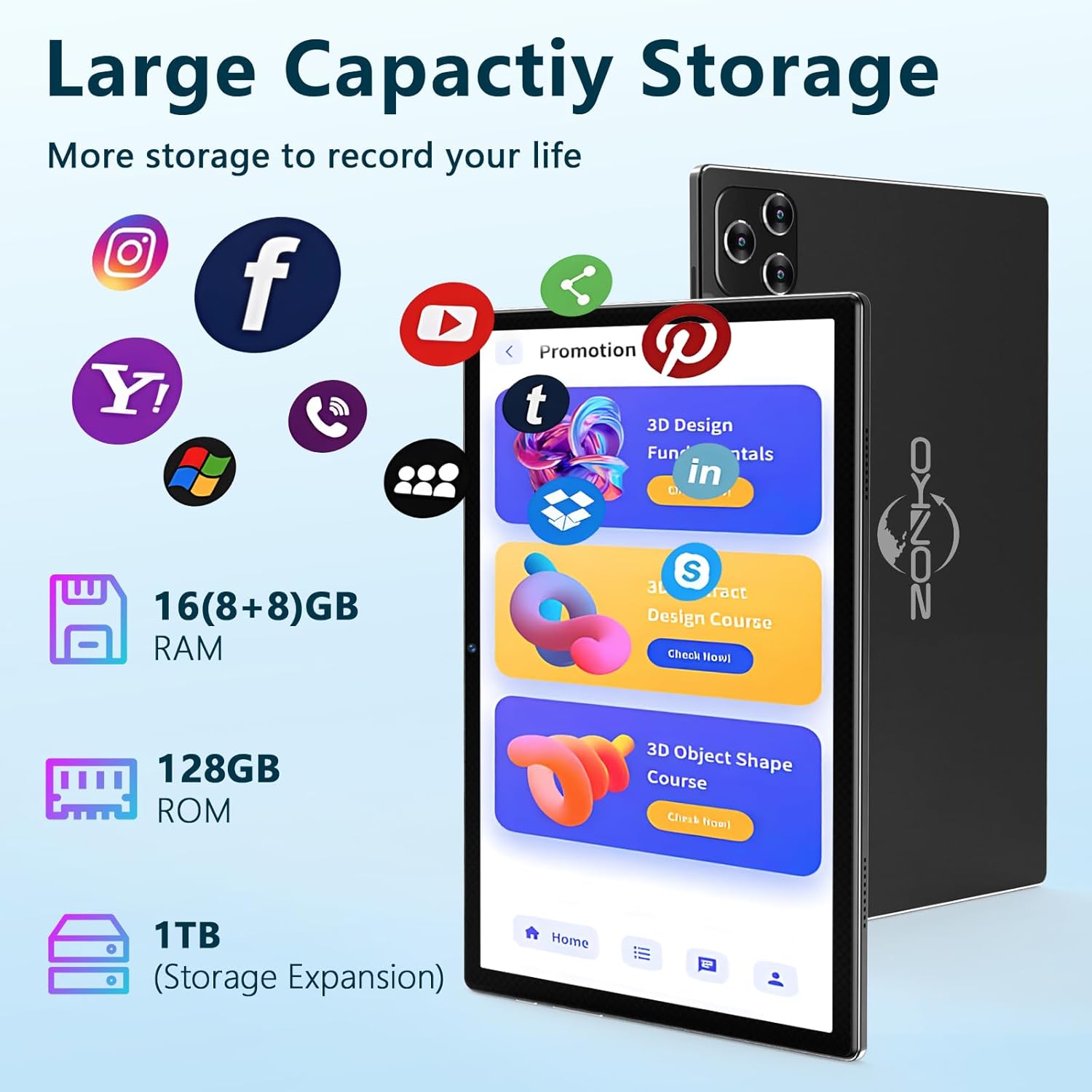
Image: The MEIZE D116 Tablet illustrating its large storage capacity, including 16GB RAM, 128GB ROM, and the ability to expand storage up to 1TB with a MicroSD card.
- स्टोरेज तपासा: वर जा सेटिंग्ज > स्टोरेज करण्यासाठी view internal and external storage usage.
- हलवा Files: You can move photos, videos, and other files to the MicroSD card to free up internal space.
- ॲप व्यवस्थापन: Uninstall unused apps or clear their cache in सेटिंग्ज > ॲप्स.
4.5 बॅटरी व्यवस्थापन
The tablet is equipped with an 8000mAh battery, providing extended usage time.

Image: The MEIZE D116 Tablet emphasizing its 8000mAh long-lasting battery, designed to meet various entertainment and work needs.
- बॅटरी सेव्हर: Activate Battery Saver mode in सेटिंग्ज > बॅटरी बॅटरीचे आयुष्य वाढवण्यासाठी.
- वापर ऑप्टिमाइझ करा: Reduce screen brightness, turn off Wi-Fi/Bluetooth when not in use, and close background apps to conserve power.
- चार्जिंग: Use the provided charger for optimal charging speed and battery health.
4.6 General Usage Scenarios

Image: A collage showing the MEIZE D116 Tablet being used in various scenarios: for work with a keyboard, for learning, for reading, and for playing games, demonstrating its versatility.
The MEIZE D116 Tablet is designed for versatile use, including:
- कार्यरत: Utilize the Bluetooth keyboard and mouse for productivity tasks.
- शिकणे: Access educational apps and online resources.
- वाचन: Enjoy e-books and articles with the eye-protection mode.
- खेळत आहे: Experience games and multimedia content on the HD display.
5. देखभाल
४.१ तुमचा टॅब्लेट साफ करणे
- टॅब्लेटची स्क्रीन आणि बॉडी स्वच्छ करण्यासाठी मऊ, लिंट-फ्री कापड वापरा.
- हट्टी डागांसाठी, किंचित डीampइलेक्ट्रॉनिक्ससाठी डिझाइन केलेले पाणी किंवा स्क्रीन क्लीनर असलेले कापड.
- कठोर रसायने, अपघर्षक पदार्थ किंवा जास्त ओलावा वापरणे टाळा.
5.2 सॉफ्टवेअर अद्यतने
Regularly check for and install software updates to ensure your tablet has the latest features, security patches, and performance improvements.
- वर जा सेटिंग्ज > प्रणाली > सिस्टम अपडेट.
- Follow the on-screen instructions to download and install any available updates. Ensure your tablet is sufficiently charged or connected to power during updates.
५.४ स्टोरेज ऑप्टिमायझेशन
- वेळोवेळी पुन्हाview your installed applications and uninstall those you no longer use.
- Clear cache data for apps that consume a lot of space (सेटिंग्ज > ॲप्स > Select App > स्टोरेज आणि कॅशे > कॅशे साफ करा).
- Transfer large media files (photos, videos) to a MicroSD card or cloud storage.
6. समस्या निवारण
6.1 सामान्य समस्या आणि उपाय
| इश्यू | संभाव्य उपाय |
|---|---|
| टॅब्लेट चालू होत नाही. | Ensure the tablet is charged. Connect to the charger for at least 30 minutes, then try powering on again. |
| वाय-फाय कनेक्शन समस्या. | Restart your Wi-Fi router. On the tablet, turn Wi-Fi off and on again. Forget the network and reconnect. |
| Bluetooth accessory not connecting. | Ensure the accessory is in pairing mode and fully charged. Restart Bluetooth on the tablet. Try re-pairing the device. |
| टॅब्लेट हळू आहे किंवा प्रतिसाद देत नाही. | Close unused background apps. Clear app caches. Restart the tablet. Check for available software updates. |
| Apps are crashing. | समस्याग्रस्त अॅपसाठी कॅशे आणि डेटा साफ करा (सेटिंग्ज > ॲप्स). Reinstall the app if the issue persists. |
7. तपशील
Below are the technical specifications for the MEIZE D116 Android 14 Tablet:
| वैशिष्ट्य | तपशील |
|---|---|
| ब्रँड | MEIZE |
| मॉडेलचे नाव | D116 |
| ऑपरेटिंग सिस्टम | Android 14.0 |
| प्रोसेसर | Octa-Core Processor, 2 GHz |
| रॅम मेमरी | २० जीबी (६ जीबी फिजिकल + १४ जीबी व्हर्च्युअल) |
| अंतर्गत स्टोरेज (ROM) | 128GB |
| विस्तारण्यायोग्य स्टोरेज | मायक्रोएसडी कार्डद्वारे २ टीबी पर्यंत |
| स्क्रीन आकार | 10.1 इंच |
| डिस्प्ले रिझोल्यूशन | 1920 x 1200 IPS FHD |
| समोरचा कॅमेरा | 8MP |
| मागील कॅमेरा | 13MP |
| बॅटरी क्षमता | 8000 mAh लिथियम पॉलिमर |
| वाय-फाय कनेक्टिव्हिटी | IEEE 802.11a/ac/b/g/n, Dual band (2.4GHz/5GHz) |
| ब्लूटूथ | ब्लूटूथ 5.0 |
| सेल्युलर तंत्रज्ञान | 4G (if SIM card installed) |
| सेन्सर्स | G-Sensor, GPS, FM, OTG, MIC, Vibration |
| बंदरे | 1 x Micro OTG / USB Port, 1 x 3.5mm stereo headphone jack |
| उत्पादन परिमाणे | 9.65 x 6 x 0.36 इंच |
| UPC | 646051391546 |
प्रतिमा: एक षटकview of the MEIZE D116 Tablet's key specifications, including Android 14, 10-inch display, 16GB RAM, 128GB ROM, 2.4GHz/5GHz Wi-Fi, Bluetooth 5.0, 8000mAh battery, and 13MP+8MP cameras.
8. वॉरंटी माहिती
The MEIZE D116 Tablet comes with a 1 वर्षांची वॉरंटी खरेदीच्या तारखेपासून. ही वॉरंटी सामान्य वापरात उत्पादन दोष आणि कारागिरी कव्हर करते.
गैरवापर, अपघात, अनधिकृत बदल किंवा नैसर्गिक आपत्तींमुळे झालेले नुकसान वॉरंटीमध्ये समाविष्ट नाही. वॉरंटी दाव्यांसाठी कृपया तुमचा खरेदीचा पुरावा जपून ठेवा.
9. ग्राहक समर्थन
If you encounter any issues not covered in this manual or require further assistance, please contact MEIZE customer support.
- For support, please refer to the contact information provided on the MEIZE official webसाइट किंवा तुमचा खरेदी प्लॅटफॉर्म.
- When contacting support, please have your tablet's model number (D116) and proof of purchase ready.