
1. परिचय
Thank you for choosing the ORIA Projection Alarm Clock. This manual provides detailed instructions for setting up, operating, and maintaining your new alarm clock. Please read this manual thoroughly before use to ensure proper function and to maximize your user experience.
2. उत्पादन संपलेview
The ORIA Projection Alarm Clock features an 8.5-inch LED display, a 180° rotatable projector, 17 RGB night light modes, and multiple alarm settings. It is designed for use in bedrooms, offering clear time display and ambient lighting.

प्रतिमा 2.1: समोर view of the ORIA Projection Alarm Clock, highlighting its 8.5-inch display and overall dimensions (approximately 9.1 inches wide and 3.7 inches high).
3. सेटअप
3.1 वीज जोडणी
Connect the provided 1.5m Type-C cable to the clock and a compatible USB power adapter (not included). The clock will power on automatically.
3.2 Memory Backup
The clock includes a built-in battery backup to preserve your settings during a power outage. No additional batteries are required for memory function, but the clock requires continuous USB-C power for display and projection.

Image 3.1: Illustration of the clock's power input (Type-C), memory function (internal battery backup), and options for 12/24-hour time format and Celsius/Fahrenheit temperature display.
4. ऑपरेटिंग सूचना
4.1 वेळ आणि तारीख सेटिंग
- दाबा आणि धरून ठेवा मोड वेळ सेटिंग मोडमध्ये प्रवेश करण्यासाठी बटण.
- वापरा UP आणि खाली तास समायोजित करण्यासाठी बटणे, नंतर दाबा मोड पुष्टी करण्यासाठी.
- मिनिटे, वर्ष, महिना आणि दिवस पुनरावृत्ती करा.
- दाबा मोड सेटिंग मोडमधून बाहेर पडण्यासाठी पुन्हा.
4.2 12/24 Hour Format Switching
सामान्य वेळेच्या प्रदर्शन मोडमध्ये, दाबा UP १२-तास आणि २४-तासांच्या वेळेच्या स्वरूपांमध्ये स्विच करण्यासाठी बटण.
4.3 Temperature Unit Switching
सामान्य वेळेच्या प्रदर्शन मोडमध्ये, दाबा खाली सेल्सिअस (°C) आणि फॅरेनहाइट (°F) तापमान युनिट्समध्ये स्विच करण्यासाठी बटण.
4.4 अलार्म सेटिंग
The clock supports three alarm modes: Monday-Friday, Monday-Saturday, and Everyday.
- दाबा अलार्म अलार्म सेटिंग मोडमध्ये प्रवेश करण्यासाठी बटण.
- वापरा UP आणि खाली buttons to adjust the alarm hour, then press अलार्म पुष्टी करण्यासाठी.
- Repeat for alarm minutes.
- वापरा UP/खाली to select the alarm mode (1-5, 1-6, 1-7), then press अलार्म पुष्टी करण्यासाठी.
- दाबा अलार्म सेटिंग मोडमधून बाहेर पडण्यासाठी पुन्हा.
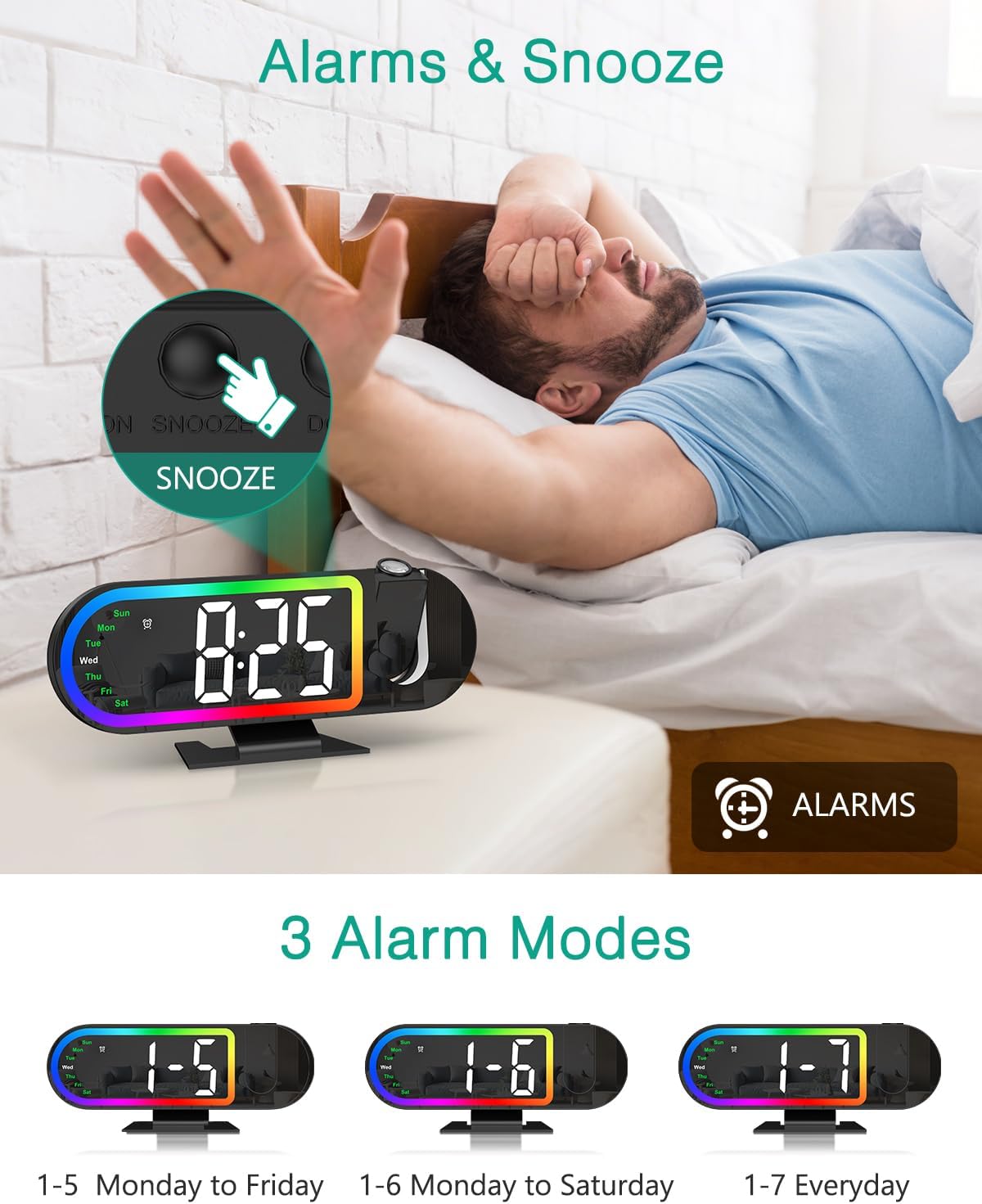
Image 4.1: The alarm clock displaying the time with an illustration of the snooze button and the three available alarm modes (Monday-Friday, Monday-Saturday, Everyday).
4.5 स्नूझ फंक्शन
जेव्हा अलार्म वाजतो तेव्हा मोठा दाबा स्नूझ button on the back of the clock to activate snooze. The default snooze duration is 5 minutes. You can customize the snooze duration from 1 to 60 minutes in the alarm settings.
4.6 Projection Features
The clock features a 180° rotatable HD projector that displays the time on your ceiling or wall. The projection distance ranges from 1.6ft to 16ft.
- Projection On/Off: दाबा प्रोजेक्शन button to turn the projection on or off.
- Adjust Projection Brightness: While projection is on, short press the प्रोजेक्शन button to cycle through High, Low, and Off brightness levels.
- प्रोजेक्शन फिरवा: दाबा आणि धरून ठेवा प्रोजेक्शन button for 3 seconds to switch the projection orientation by 180°. This allows you to adjust the display for optimal viewing
Note: The projection is available only in red color.
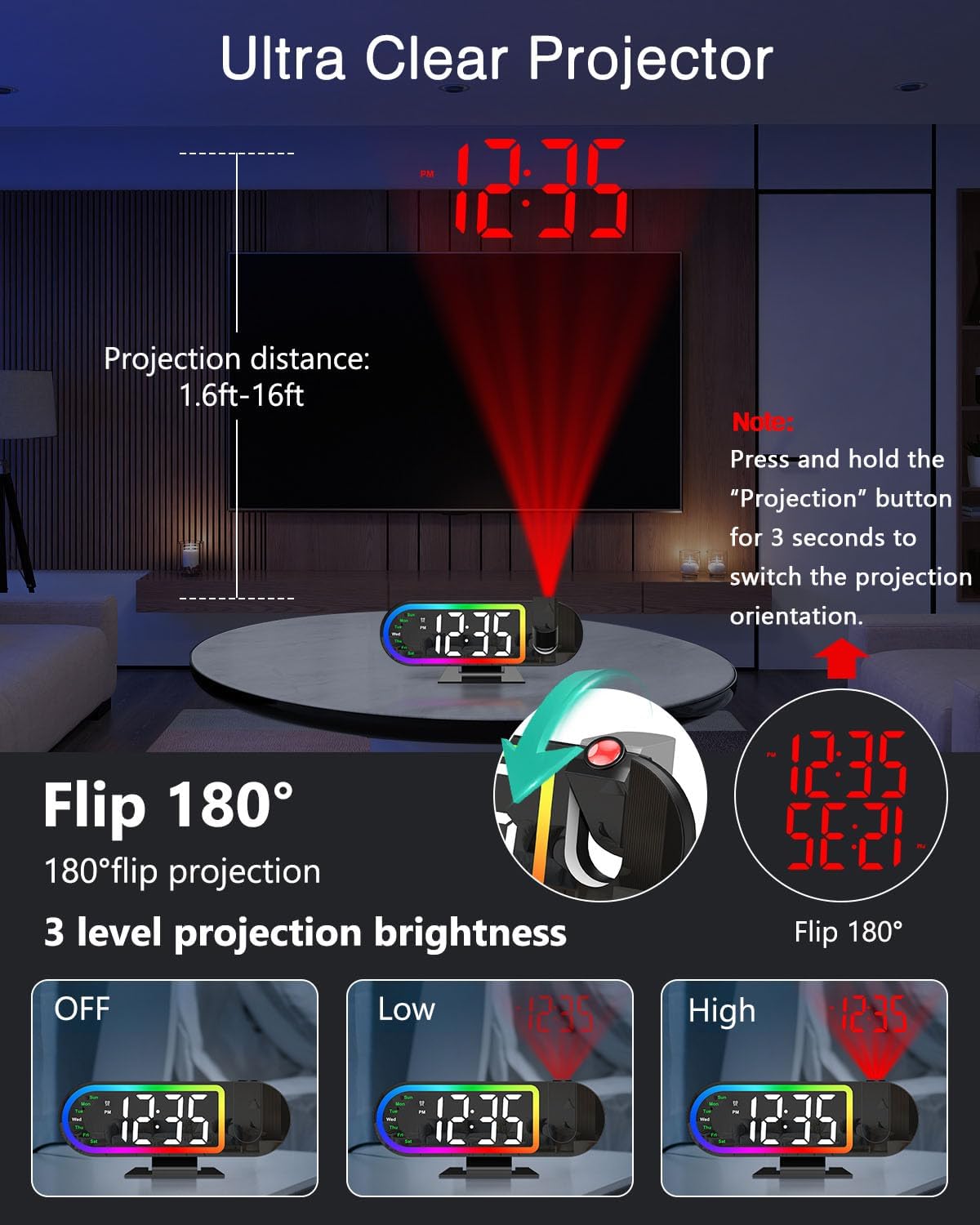
Image 4.2: Demonstrates the projection distance range (1.6ft-16ft), the 180° flip feature for projection orientation, and the three projection brightness levels (Off, Low, High).
4.7 Display Brightness and Auto-Night Mode
The 8.5-inch LED display has 4 brightness levels (High/Medium/Low/Off).
- प्रदर्शन चमक समायोजित करा: शॉर्ट दाबा डिमर button to cycle through High, Medium, Low, and Off brightness levels for the main display.
- Auto-Night Mode: Enable Night Mode to automatically dim the screen from 6:00 PM to 6:00 AM. This time range is customizable. Refer to the full manual for detailed customization steps.

Image 4.3: Illustrates the four screen brightness levels (High, Medium, Low, Off) and the automatic night mode function, which dims the display during specified hours.
4.8 17 RGB Night Light Modes
The clock features 17 vibrant RGB lighting options to enhance your room's ambiance.
- Change Night Light Mode: दाबा RGB button to cycle through the 17 different RGB lighting modes, including various monochrome colors, gradients, flowing effects, and breathing patterns.

Image 4.4: Displays the alarm clock with its RGB border light, showcasing various color options and dynamic lighting effects available.
६.५ उत्पादन व्हिडिओ मार्गदर्शक
Video 4.1: An official product video demonstrating the ORIA Projection Alarm Clock's features, including its projection capabilities and display. This video is 16 seconds long.
5. देखभाल
- घड्याळ मऊ, कोरड्या कापडाने स्वच्छ करा. अपघर्षक क्लीनर किंवा सॉल्व्हेंट्स वापरू नका.
- घड्याळ पाणी आणि जास्त आर्द्रतेपासून दूर ठेवा.
- Avoid placing the clock in direct sunlight or near heat sources.
6. समस्या निवारण
| समस्या | संभाव्य कारण | उपाय |
|---|---|---|
| घड्याळाचा डिस्प्ले बंद आहे. | शक्ती किंवा शक्ती ou नाहीtage. | Ensure the Type-C cable is securely connected to a power source. If there was a power outage, the display will return when power is restored (settings are saved by backup battery). |
| प्रोजेक्शन मंद किंवा अस्पष्ट आहे. | Incorrect brightness setting or projection distance. | Adjust projection brightness (High/Low). Ensure the clock is within the 1.6ft-16ft projection range. |
| अलार्म वाजत नाही. | Alarm is not set or turned off. | Verify alarm settings and ensure the alarm is enabled for the desired days. |
| वेळ/तारीख चुकीची आहे. | Initial setup error or time zone issue. | Re-enter time and date settings as per section 4.1. |
7. तपशील
- ब्रँड: ओरिया
- मॉडेल क्रमांक: OUS-WA183
- डिस्प्ले प्रकार: डिजिटल एलईडी
- स्क्रीन आकार: 8.5 इंच
- प्रक्षेपण: 180° Rotatable, Red Color, Adjustable Brightness (High/Low/Off)
- प्रोजेक्शन अंतर: 1.6ft - 16ft
- रात्रीचा प्रकाश: 17 RGB मोड
- चमक दाखवा: 4 Levels (High/Medium/Low/Off) + Auto-Night Mode
- अलार्म मोड: Mon-Fri, Mon-Sat, Everyday
- स्नूझ कालावधी: 1-60 minutes (customizable)
- उर्जा स्त्रोत: यूएसबी-सी (अॅडॉप्टर समाविष्ट नाही)
- मेमरी बॅकअप: Built-in battery (retains settings during power outage)
- परिमाणे: ३"प x ११"प (अंदाजे)
8. हमी आणि समर्थन
ORIA is committed to providing high-quality products and customer satisfaction. Your ORIA Projection Alarm Clock comes with the following support:
- २ वर्षांची वॉरंटी: सामान्य वापरात उत्पादनातील दोष आणि बिघाड कव्हर करते.
- 90-Day Free Replacements: For eligible issues within 90 days of purchase.
- 30-Day Free Returns: For eligible returns within 30 days of purchase.
- 24/7 ग्राहक समर्थन: Assistance available around the clock for any inquiries or issues.
- आजीवन तांत्रिक समर्थन: तुमच्या उत्पादनाच्या आयुष्यासाठी सतत तांत्रिक सहाय्य.
For support, please visit the official ORIA website or contact our customer service team through your purchase platform.