
परिचय
Welcome to the user manual for your Samsung QN65QN990FFXZA 65 Inch QN990F Neo QLED 8K TV. This document provides essential information for setting up, operating, maintaining, and troubleshooting your television. Please read these instructions carefully to ensure proper use and to maximize your viewअनुभव.

आकृती 1: समोर view of the Samsung QN65QN990FFXZA 65 Inch QN990F Neo QLED 8K TV.
सेटअप
१. अनपॅकिंग आणि प्लेसमेंट
- पॅकेजिंगमधून टीव्ही आणि सर्व अॅक्सेसरीज काळजीपूर्वक काढा.
- Place the TV on a stable, flat surface or mount it on a wall using a VESA 400mm x 300mm compatible mount. Ensure adequate ventilation around the TV.
2. Connecting the Wireless One Connect Box
The Samsung QN990F utilizes a Wireless One Connect Box to manage all external connections, reducing cable clutter around the TV. Connect all your devices to this box.

Figure 2: Wireless One Connect Box for streamlined connections.
3. External Device Connections
Connect your external devices (e.g., Blu-ray player, game console, soundbar) to the Wireless One Connect Box using the appropriate ports.

Figure 3: Detailed diagram of the Wireless One Connect Box ports.
- केबल/एएनटी: ओव्हर-द-एअर अँटेना किंवा केबल टीव्ही सिग्नलसाठी कनेक्ट करा.
- USB-A: पॉवर किंवा मीडिया प्लेबॅकसाठी मानक आयताकृती पोर्ट.
- एक्स-लिंक: बाह्य नियंत्रण आणि निदानासाठी सॅमसंग सर्व्हिस पोर्ट.
- एचडीएमआय १, २, ३: Transmits high-definition video and audio from external devices. Supports 8K@120Hz / 4K@240Hz for Gaming.
- HDMI 3 (eARC): Enhanced audio return for high-quality sound and advanced formats. Supports 8K@120Hz / 4K@240Hz for Gaming.
- इथरनेट: स्ट्रीमिंग, अपडेट्स आणि स्मार्ट वैशिष्ट्यांसाठी वायर्ड इंटरनेट कनेक्शन.
- ऑडिओ आउट (ऑप्टिकल): साउंडबार किंवा रिसीव्हरवर उच्च-गुणवत्तेचा डिजिटल ऑडिओ वितरीत करते.
- शक्ती: Connects the power cable to the Wireless One Connect Box.
4. वीज जोडणी
- Connect the power cable to the Wireless One Connect Box, then plug it into a wall outlet.
- Ensure the TV is properly connected to the One Connect Box.
ऑपरेटिंग सूचना
२. प्रारंभिक सेटअप आणि स्मार्ट वैशिष्ट्ये
Upon first power-on, the TV will guide you through the initial setup process, including network connection, channel scanning, and smart feature configuration. The TV runs on the One UI Tizen operating system.
- NQ8 AI Gen3 प्रोसेसर: This processor optimizes content for enhanced viewing
- ४के एआय अपस्केलिंग प्रो: Lower resolution content is automatically upscaled to near 8K clarity.

Figure 4: 8K AI Upscaling Pro enhances content to near 8K resolution.
३. चित्र गुणवत्ता सुधारणा
- चकाकी मुक्त: This technology minimizes reflections on the screen, improving visibility in bright environments.
- Neo Quantum HDR 8K+: Experience enhanced contrast and color depth.
- क्वांटम मॅट्रिक्स तंत्रज्ञान प्रो: Precise light control for detailed images.
- अल्ट्रा Viewकोन: Maintains picture quality from various viewing पोझिशन्स.
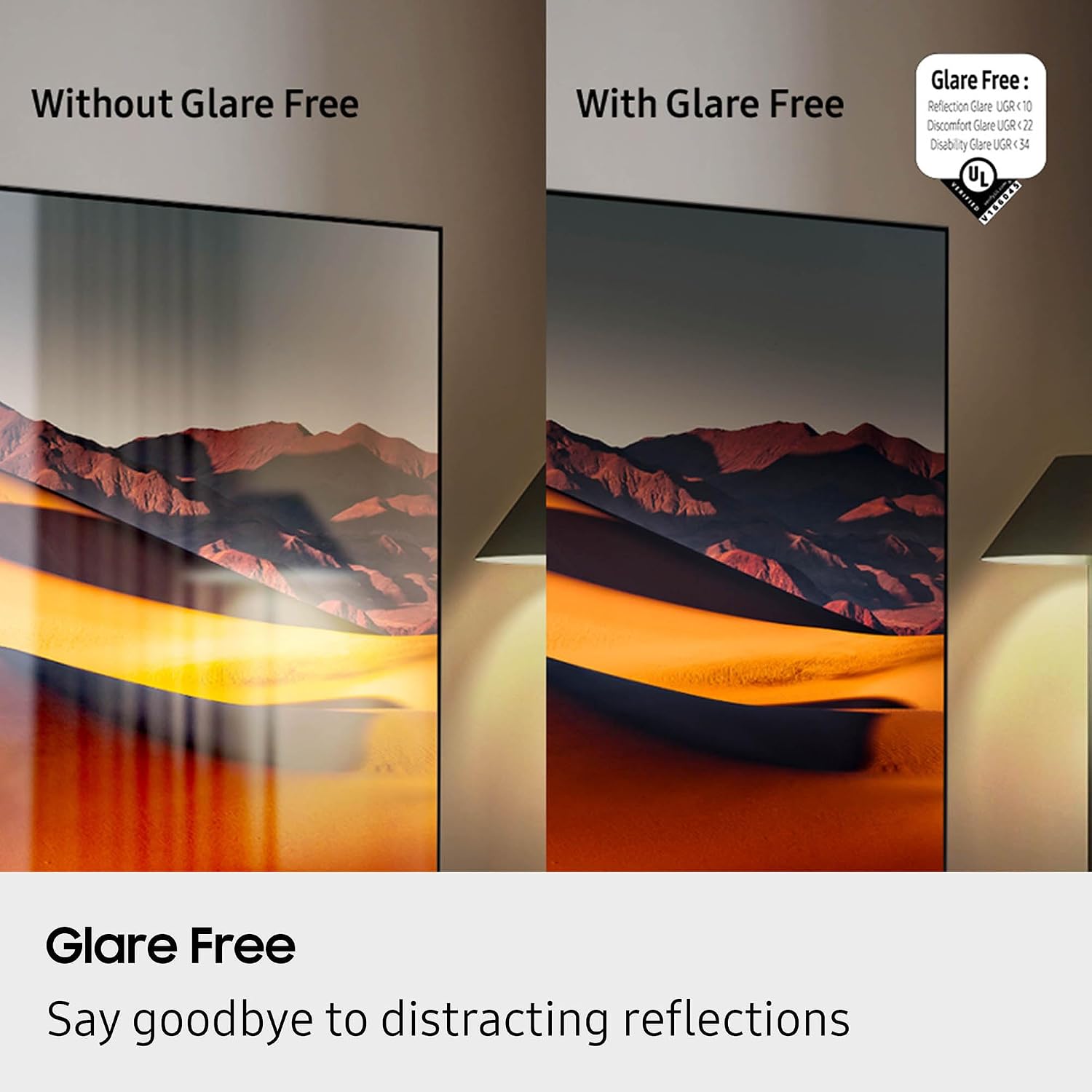
Figure 5: Glare Free technology reduces screen reflections.
५. ऑडिओ वैशिष्ट्ये
- डॉल्बी ॲटमॉस: विसर्जित, बहुआयामी आवाज प्रदान करते.
- क्यू-सिंफनी: Synchronizes TV speakers with compatible Samsung soundbars for a richer audio experience.
- AVA Pro (Active Voice Amplifier Pro): Enhances dialogue clarity in noisy environments.
- अॅडॉप्टिव्ह साउंड प्रो: सामग्री आणि खोलीतील ध्वनीशास्त्रावर आधारित ध्वनी ऑप्टिमाइझ करते.
- ५.१ चॅनल सराउंड साउंड: Integrated speaker system for a comprehensive audio field.
५. गेमिंग वैशिष्ट्ये
- गेमिंग हब: Access cloud gaming services and console games directly from your TV.
- 120Hz Refresh Rate & VRR FreeSync Premium Pro: गुळगुळीत, अश्रूमुक्त गेमिंग सुनिश्चित करते.

Figure 6: Samsung Gaming Hub for integrated gaming experience.
९. अधिकृत उत्पादन व्हिडिओ
Video 1: An informational overview of the Samsung QN990F Series TV features and capabilities.
देखभाल
६.७. स्क्रीन साफ करणे
To clean your TV screen, use a soft, lint-free cloth. For stubborn marks, a non-ammonia and alcohol-free screen cleaning solution is recommended.

Figure 7: Recommended screen cleaning solution for display screens.
- Apply cleaning solution to the cloth, not directly to the screen.
- धूळ, घाण आणि बोटांचे ठसे काढण्यासाठी स्क्रीन हळूवारपणे पुसून टाका.
- कठोर रसायने किंवा अपघर्षक पदार्थ टाळा.
2. सॉफ्टवेअर अद्यतने
Periodically check for and install software updates to ensure optimal performance and access to the latest features. This can usually be done through the TV's settings menu under "Support" or "Software Update."
समस्यानिवारण
तुमच्या टीव्हीमध्ये समस्या येत असल्यास, खालील सामान्य समस्यानिवारण चरणांचा संदर्भ घ्या.
वीज नाही / चित्र नाही
- Ensure the power cable is securely connected to both the One Connect Box and the wall outlet.
- Verify the One Connect Box is properly connected to the TV.
- दुसरे उपकरण प्लग इन करून वॉल आउटलेट काम करत आहे का ते तपासा.
- रिमोट कंट्रोलवर किंवा टीव्हीवरच पॉवर बटण दाबा.
आवाज नाही
- Check the volume level on both the TV and any connected audio devices (soundbar, receiver).
- टीव्ही म्यूट केलेला नाही याची खात्री करा.
- ऑडिओ केबल्स वन कनेक्ट बॉक्सशी योग्यरित्या जोडलेले आहेत का ते तपासा.
- If using external audio, check the audio output settings on the TV.
खराब चित्र गुणवत्ता
- Check the source resolution. While 8K AI Upscaling Pro enhances content, native 8K content will provide the best quality.
- Adjust picture settings (brightness, contrast, sharpness, color) in the TV menu.
- Ensure all video cables are securely connected and not damaged.
- If using an antenna, check antenna positioning and signal strength.
रिमोट कंट्रोल काम करत नाही
- रिमोट कंट्रोलमध्ये बॅटरी बदला.
- रिमोट आणि टीव्हीमध्ये कोणतेही अडथळे नाहीत याची खात्री करा.
- Try re-pairing the remote control with the TV if it's a Bluetooth remote (refer to the TV's on-screen guide for pairing instructions).
तपशील
| वैशिष्ट्य | तपशील |
|---|---|
| मॉडेलचे नाव | QN65QN990FFXZA साठी चौकशी सबमिट करा, आम्ही तुमच्याशी थेट संपर्क करू. |
| स्क्रीन आकार | 65 इंच |
| प्रदर्शन तंत्रज्ञान | निओ QLED |
| ठराव | 8K |
| रीफ्रेश दर | 120 Hz |
| प्रोसेसर | NQ8 AI Gen3 प्रोसेसर |
| अपस्केलिंग तंत्रज्ञान | ४के एआय अपस्केलिंग प्रो |
| ऑपरेटिंग सिस्टम | वन यूआय टिझेन |
| कनेक्टिव्हिटी | HDMI x 5, USB-A x 3, USB-C x 1, Ethernet, RF, Wireless One Connect, Bluetooth, Wi-Fi |
| ऑडिओ आउटपुट मोड | Surround (6.2.4 channel) |
| Integrated Surround Sound | डॉल्बी ॲटमॉस |
| HDR स्वरूप समर्थित | HDR10+, HDR10 |
| उत्पादनाचे परिमाण (D x W x H) | १६"उ x २६"प x ४७"उ |
| आयटम वजन | 66.6 पाउंड |
| VESA माउंट स्टँडर्ड | 400 मिमी x 300 मिमी |
| रंग | ग्रेफाइट ब्लॅक |
हमी आणि समर्थन
उत्पादकाची हमी
Your Samsung QN65QN990FFXZA 65 Inch QN990F Neo QLED 8K TV comes with a full 1-year manufacturer's warranty. This warranty covers defects in materials and workmanship under normal use. Please retain your proof of purchase for warranty claims.
ग्राहक समर्थन
For technical assistance, troubleshooting beyond this manual, or warranty service, please contact Samsung Customer Support. Refer to the official Samsung website or your product registration documents for the most current contact information.
- ऑनलाइन समर्थन: अधिकृत सॅमसंग सपोर्टला भेट द्या. webसाइट
- फोन सपोर्ट: Contact the Samsung customer service hotline.