
1. परिचय
This manual provides essential information for the safe and efficient use of your Baseus Picogo 100W USB C Charger. Please read this manual thoroughly before operating the device and retain it for future reference.

Figure 1: Baseus Picogo 100W USB C Charger and included cables.
The Baseus Picogo 100W USB C Charger is a multi-port power adapter designed for fast charging a variety of devices, including laptops, tablets, and smartphones. It features a smart digital display for real-time monitoring and incorporates advanced GaN technology for efficient and safe operation.
2. उत्पादनाची वैशिष्ट्ये
- ४५ वॅट अल्ट्रा-फास्ट चार्जिंग: Delivers up to 100W power from either USB-C port, enabling rapid charging for compatible devices.
- स्मार्ट डिजिटल डिस्प्ले: Provides real-time information on charging status, temperature, and individual port output.
- 3-in-1 Multi-Port Design: एकाच वेळी तीन उपकरणांच्या चार्जिंगसाठी दोन USB-C पोर्ट आणि एक USB-A पोर्टने सुसज्ज.
- कॉम्पॅक्ट आणि फोल्ड करण्यायोग्य: Features a compact design and foldable plug for enhanced portability, making it ideal for travel.
- Advanced GaN Technology with BCT: Utilizes Gallium Nitride (GaN) technology for high efficiency and reduced heat generation, complemented by AI-powered Baseus Cooling Technology (BCT) for continuous temperature monitoring.

Figure 2: The smart digital display provides real-time charging data.
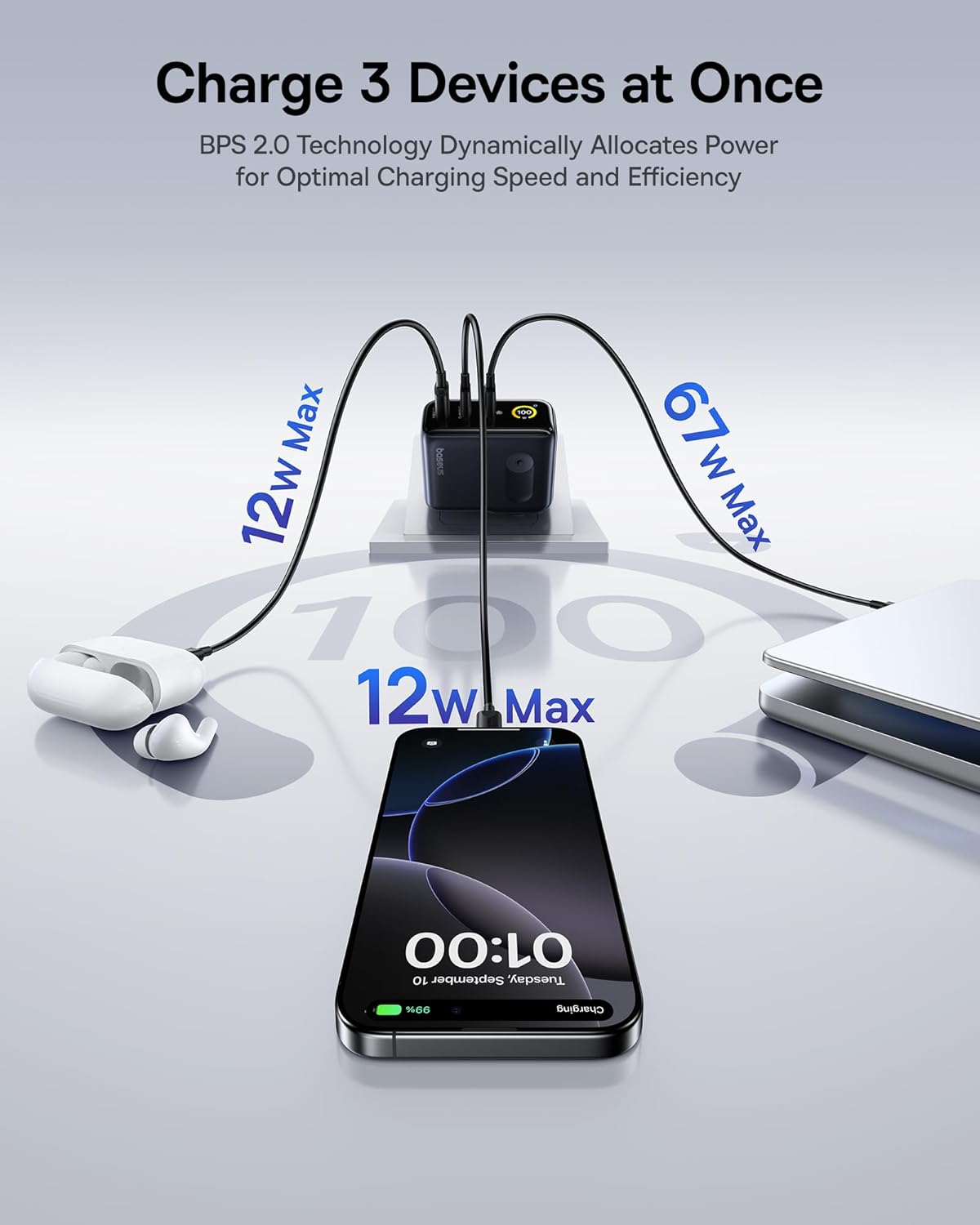
Figure 3: The charger supports simultaneous charging of multiple devices.
3. सेटअप
- चार्जर अनपॅक करा: Carefully remove the Baseus Picogo 100W USB C Charger and the included 100W USB C cable from its packaging.
- प्लग उघडा: If the AC prongs are folded, gently unfold them until they lock into place.
- पॉवर आउटलेटशी कनेक्ट करा: Insert the charger's AC prongs into a standard wall outlet. The smart digital display will illuminate.
- डिव्हाइसेस कनेक्ट करा: Use appropriate USB-C to USB-C or USB-C to USB-A cables to connect your devices to the available ports on the charger.
Video 1: Demonstrates connecting the Baseus Picogo 100W USB C Charger to a power outlet and observing the smart display.
4. ऑपरेटिंग सूचना
३.१ चार्जिंग उपकरणे
Once connected to a power outlet, plug your devices into the charger. The charger will automatically detect the connected devices and deliver optimal power. The smart digital display will show the real-time wattage output for each port and the overall charging status.
4.2 Understanding the Smart Digital Display
The display provides key information:
- Total Power Output (W): एकत्रित वॅट दाखवतेtage सर्व कनेक्ट केलेल्या उपकरणांवर वितरित केले जात आहे.
- Individual Port Output (W): वाट दाखवतोtage for each active USB-C (C1, C2) and USB-A (A) port.
- तापमान: Indicates the charger's operating temperature, monitored by BCT.
- Balanced Mode Indicator: A snowflake icon indicates the charger is in balanced cooling mode.
4.3 प्रदर्शन नियंत्रण
The charger features a touch-sensitive button on its side for display control:
- सिंगल प्रेस: Switches between different display interfaces (e.g., total wattage, individual port details).
- डबल प्रेस: Rotates the display 90 degrees for better viewing अभिमुखता.
- दाबा आणि धरून ठेवा: Turns the display off completely. Press again to turn it back on.
व्हिडिओ १: संपलेview of the Baseus Picogo AE21 100W Charger Block, including its ports and display functionality.
5. देखभाल
- स्वच्छता: साफ करण्यापूर्वी चार्जर पॉवर आउटलेटपासून डिस्कनेक्ट करा. पृष्ठभाग पुसण्यासाठी मऊ, कोरड्या कापडाचा वापर करा. द्रव क्लीनर किंवा एरोसोल वापरू नका.
- स्टोरेज: When not in use, store the charger in a cool, dry place away from direct sunlight and moisture. Ensure the foldable plug is retracted for compact storage.
- हाताळणी: चार्जर खाली पडणे किंवा त्याला जोरदार आघात देणे टाळा. चार्जर वेगळे करण्याचा किंवा बदलण्याचा प्रयत्न करू नका, कारण यामुळे वॉरंटी रद्द होईल आणि नुकसान किंवा दुखापत होऊ शकते.
6. समस्या निवारण
| समस्या | संभाव्य कारण | उपाय |
|---|---|---|
| चार्जर चालू होत नाही. | No power from outlet; loose connection. | Check if the wall outlet is functional. Ensure the charger is firmly plugged in. |
| डिव्हाइस चार्ज होत नाही किंवा हळू चार्ज होत आहे. | Incompatible cable; device not supporting fast charging; multiple high-power devices connected. | Use a certified fast-charging cable. Verify device compatibility. If charging multiple devices, power distribution may adjust; try charging fewer devices or check individual port outputs on the display. |
| Smart display is off. | Display turned off manually. | Press the side button once to reactivate the display. |
| चार्जर वापरताना गरम वाटते. | Normal operation; high power output. | This is normal due to GaN technology and high power delivery. The BCT system actively monitors temperature to ensure safe operation. If it becomes excessively hot, disconnect immediately and contact support. |
7. तपशील
| वैशिष्ट्य | तपशील |
|---|---|
| ब्रँड | बेसियस |
| मॉडेल क्रमांक | E0121C |
| वाटtage | 100 वॅट्स |
| एकूण यूएसबी पोर्ट | ४ (३x यूएसबी प्रकार सी, १x यूएसबी प्रकार ए) |
| इनपुट व्हॉल्यूमtage | 240 व्होल्ट |
| आयटम वजन | 9.9 औंस |
| पॅकेजचे परिमाण | 5.2 x 3.39 x 2.13 इंच |
| विशेष वैशिष्ट्ये | Fast Charging, Multi Device Charging, Smart Display Screen, Travel-friendly |
| सुसंगत साधने | Tablet, Laptop, Cell Phone, Headphone, Smart Watch, Switch, Steam Deck, ROG Ally |
| समाविष्ट घटक | Baseus Picogo AE21 100W USB C Charger, 100W USB C Cable, User Manual |
8. हमी आणि समर्थन
For warranty information and technical support, please refer to the documentation included with your product or contact Baseus directly.
संपर्क माहिती:
- Global Phone Support: +४९ ७११ ४०० ४०९९०
- Global Email Support: care@baseus.com
Please have your product model number (E0121C) and purchase details ready when contacting support.

Figure 4: Back of product packaging with support details and certifications.