
परिचय
The Zelaclock Sunrise Alarm Clock (Model YF01-C) is a versatile 4-in-1 device designed to enhance your sleep and wake-up experience. It functions as a sunrise alarm clock, white noise sound machine, night light, and Bluetooth speaker. This manual provides detailed instructions for setting up and operating your device, ensuring you can fully utilize its features for a peaceful morning and restful night.
प्रमुख वैशिष्ट्ये:
- सूर्योदय अनुकरण: Gradually brightens before your alarm, mimicking a natural sunrise.
- White Noise & Nature Sounds: Features 30 non-looping sounds for relaxation and sleep.
- आरजीबी नाईट लाईट: Offers 9 dynamic light themes and 20 adjustable brightness levels.
- ब्लूटूथ 5.3 स्पीकर: Connects seamlessly to your phone for music playback and automatic time synchronization.
- Smart Sleep Timer: Allows setting a fade-out timer for lights and sounds (10-480 minutes).
सुरक्षितता माहिती
- This device must be plugged into a power source to operate. It is not battery-operated.
- उपकरणाला पाणी किंवा जास्त आर्द्रतेच्या संपर्कात आणू नका.
- Avoid placing the device near heat sources or in direct sunlight for prolonged periods.
- फक्त प्रदान केलेले पॉवर ॲडॉप्टर वापरा.
- मुले आणि पाळीव प्राण्यांच्या आवाक्याबाहेर ठेवा.
- डिव्हाइस स्वतः वेगळे करण्याचा किंवा दुरुस्त करण्याचा प्रयत्न करू नका. सहाय्यासाठी ग्राहक समर्थनाशी संपर्क साधा.
उत्पादन संपलेview
Familiarize yourself with the components and controls of your Zelaclock Sunrise Alarm Clock.

Image: The Zelaclock Sunrise Alarm Clock, highlighting its functions as an alarm clock, wake-up light, white noise machine, and Bluetooth speaker. It is shown plugged into a wall outlet, emphasizing that it requires continuous power.
Video: An official Zelaclock video demonstrating the features and operation of the Sunrise Alarm Clock, including its light and sound functions.
The device features intuitive buttons and a scroll wheel for easy navigation and setting adjustments. The LED display shows the time and various indicators for active functions.

प्रतिमा: क्लोज-अप view of the Zelaclock Sunrise Alarm Clock, illustrating the various buttons and their corresponding functions for light, sound, and alarm settings.
सेटअप
- वीज कनेक्शन: Connect the provided USB cable to the device and plug the adapter into a standard wall outlet. The device will power on automatically.
- वेळ सेटिंग:
- दाबा आणि धरून ठेवा वेळ सेट button (often indicated by a clock icon) for 2 seconds to enter time setting mode.
- Rotate the scroll wheel to adjust the hour, then press the वेळ सेट पुष्टी करण्यासाठी बटण.
- Rotate the scroll wheel to adjust the minute, then press the वेळ सेट पुष्टी करण्यासाठी बटण.
- The time will be set.
- ब्लूटूथ पेअरिंग:
- दाबा आणि धरून ठेवा ब्लूटूथ button (often indicated by a Bluetooth icon) for 2 seconds to enable Bluetooth pairing mode. The Bluetooth indicator on the display will flash.
- On your smartphone or other Bluetooth-enabled device, search for "Zelaclock YF01-C" (or similar name) in the Bluetooth settings.
- Select the device to pair. Once connected, the Bluetooth indicator will stop flashing and remain solid.
ऑपरेटिंग सूचना
Setting the Alarm and Sunrise Simulation
- अलार्म वेळ सेट करा:
- दाबा आणि धरून ठेवा गजर button (bell icon) for 2 seconds. The hour display will flash.
- Rotate the scroll wheel to set the desired hour, then press the गजर पुष्टी करण्यासाठी बटण.
- Rotate the scroll wheel to set the desired minute, then press the गजर पुष्टी करण्यासाठी बटण.
- Set Sunrise Duration:
- After setting the alarm time, the display will show the sunrise duration (e.g., "00").
- Rotate the scroll wheel to select a sunrise duration from 10 to 60 minutes. This determines how long the light will gradually brighten before your alarm time.
- दाबा गजर पुष्टी करण्यासाठी बटण.
- Enable/Disable Alarm: दाबा गजर button briefly to toggle the alarm on or off. An alarm icon will appear/disappear on the display.
- स्नूझ फंक्शनः When the alarm sounds, press the scroll wheel (or a dedicated snooze button if present) to activate snooze. The alarm will sound again after 5-20 minutes (duration may be configurable, refer to specific button diagram).
- अलार्म थांबवा: To stop the alarm completely, press and hold the गजर 3 सेकंदांसाठी बटण.

Image: Illustration of the sunrise simulation feature, showing the alarm clock gradually increasing light intensity from dim to bright over a set period before the alarm time.
Using White Noise and Nature Sounds
- ध्वनी निवडा: दाबा आवाज button (wave icon) to cycle through the 30 available white noise and nature sounds.
- आवाज समायोजित करा: Rotate the scroll wheel to increase or decrease the volume of the selected sound.
- आवाज बंद करा: दाबा आणि धरून ठेवा आवाज button for 3 seconds to turn off the sound.
Image: The Zelaclock Sunrise Alarm Clock displaying sound options, with a person sleeping peacefully in the background, illustrating the white noise feature.
Adjusting Light Themes and Brightness
- लाईट चालू/बंद करा: दाबा प्रकाश button (sun icon) briefly to turn the light on or off.
- Change Light Theme: लाईट चालू असताना, दाबा प्रकाश button repeatedly to cycle through the 9 dynamic light themes, including music-reactive modes.
- ब्राइटनेस समायोजित करा: Rotate the scroll wheel to adjust the light brightness through 20 levels.

Image: The Zelaclock Sunrise Alarm Clock showcasing its 9 dynamic light themes, including gradient and solid color options.
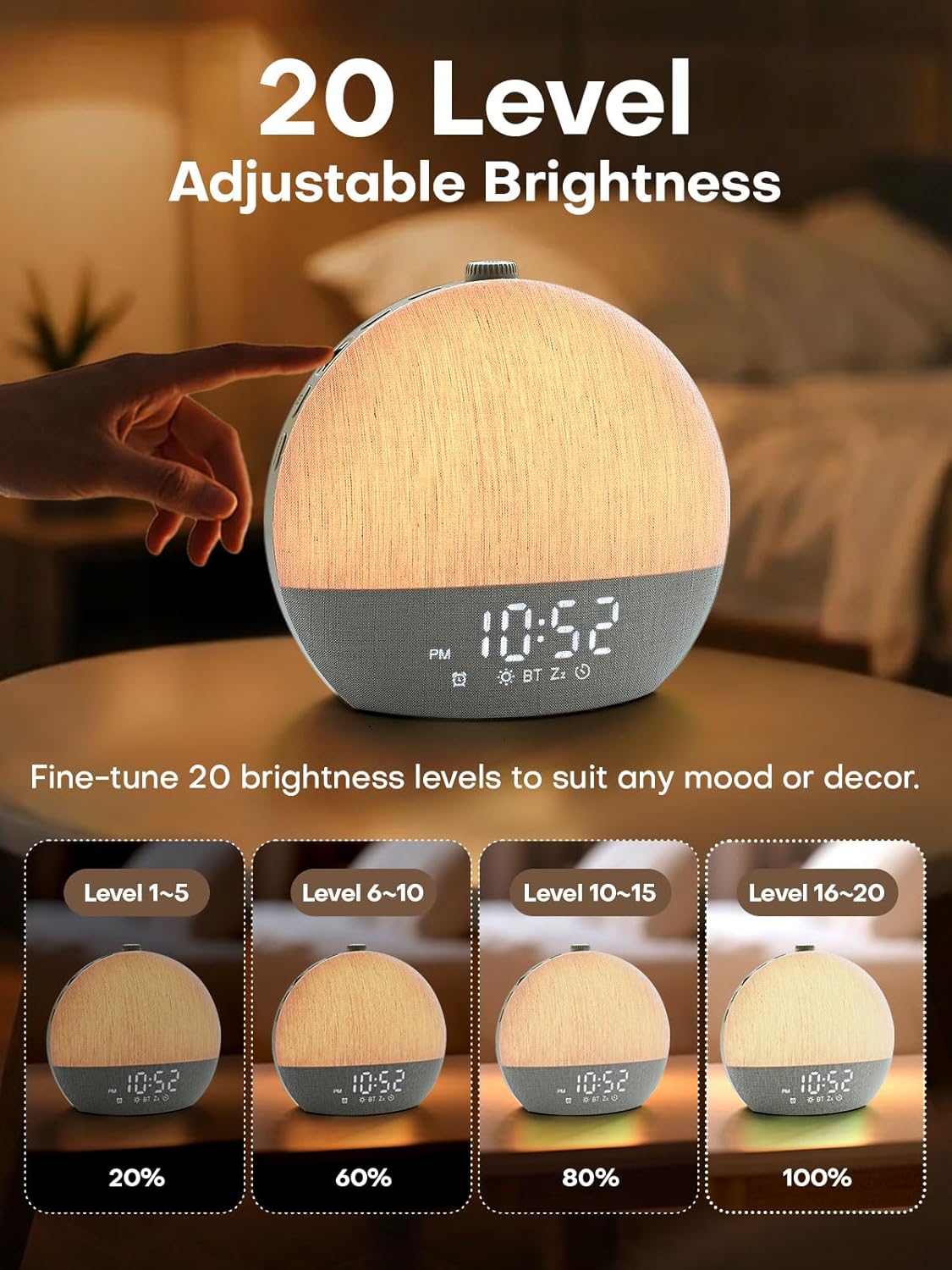
Image: Visual representation of the 20 adjustable brightness levels of the Zelaclock Sunrise Alarm Clock, from 20% to 100% illumination.
Using the Smart Sleep Timer
- स्लीप टाइमर सेट करा: दाबा स्लीप टाइमर button (moon icon) to activate the sleep timer.
- Adjust Duration: Rotate the scroll wheel to set the desired fade-out duration from 10 to 480 minutes. Both light and sound will gradually decrease and turn off after this period.
- Cancel Sleep Timer: दाबा आणि धरून ठेवा स्लीप टाइमर button for 3 seconds to cancel the active sleep timer.

Image: The Zelaclock Sunrise Alarm Clock in a bedroom setting, illustrating the gradual fade-out timer for both light and sound, with a person sleeping.
ब्लूटूथ स्पीकर फंक्शन
Once paired with your device (see Setup section), you can use the Zelaclock as a Bluetooth speaker.
- Play music directly from your phone or tablet.
- Use the scroll wheel on the Zelaclock to adjust the playback volume.
- ब्लूटूथ डिस्कनेक्ट करण्यासाठी, दाबा आणि धरून ठेवा ब्लूटूथ 2 सेकंदांसाठी बटण.

Image: A couple relaxing on a couch, with the Zelaclock Sunrise Alarm Clock playing music via Bluetooth from a smartphone.
देखभाल
- स्वच्छता: मऊ, कोरड्या कापडाने उपकरण पुसून टाका. अपघर्षक क्लीनर किंवा सॉल्व्हेंट्स वापरू नका.
- स्टोरेज: जास्त काळ वापरात नसताना उपकरण थंड, कोरड्या जागी ठेवा.
- शक्ती: Always ensure the device is unplugged before cleaning or moving.
समस्यानिवारण
| समस्या | संभाव्य कारण | उपाय |
|---|---|---|
| डिव्हाइस चालू होत नाही. | Not plugged in; power adapter faulty. | Ensure the device is properly plugged into a working power outlet. Check the power adapter and cable for damage. |
| अलार्म वाजत नाही. | Alarm is disabled; volume is too low. | Check if the alarm is enabled (alarm icon on display). Increase the alarm volume using the scroll wheel. |
| Sunrise light does not work. | Sunrise feature not enabled for alarm; light brightness set too low. | Ensure sunrise duration is set during alarm setup. Adjust light brightness using the scroll wheel. |
| ब्लूटूथ द्वारे कनेक्ट करू शकत नाही. | ब्लूटूथ पेअरिंग मोडमध्ये नाही; डिव्हाइस खूप दूर आहे; व्यत्यय. | Ensure the device is in Bluetooth pairing mode (flashing icon). Move your phone closer to the alarm clock. Try restarting both devices. |
| आवाजाची गुणवत्ता खराब आहे. | Low quality audio source; device placement. | Ensure the audio source (e.g., phone) is playing high-quality audio. Adjust device placement to avoid obstructions. |
तपशील
| वैशिष्ट्य | तपशील |
|---|---|
| मॉडेल क्रमांक | YF01-C |
| ब्रँड | Zelaclock |
| डिस्प्ले प्रकार | एलईडी |
| उर्जा स्त्रोत | कॉर्ड केलेले इलेक्ट्रिक |
| उत्पादन परिमाणे | ६.३"प x २.७२"प |
| कनेक्टिव्हिटी | ब्लूटूथ 5.3, यूएसबी |
| प्रकाश वैशिष्ट्ये | Sunrise Simulation, 9 Dynamic RGB Light Themes, 20 Brightness Levels |
| ध्वनी वैशिष्ट्ये | 30 Non-Looping Sleep Sounds (10 White Noise, 20 Nature Sounds/Melodies) |
| टाइमर कार्ये | Alarm Clock, Smart Sleep Timer (10-480 minutes) |
| साहित्य | प्लास्टिक |
हमी आणि समर्थन
For warranty information and customer support, please refer to the official Zelaclock webसाइटवर किंवा त्यांच्या ग्राहक सेवेशी थेट संपर्क साधा. तपशील सामान्यतः उत्पादन पॅकेजिंगवर किंवा उत्पादकाच्या अधिकृत ऑनलाइन चॅनेलवर प्रदान केले जातात.
निर्माता: Zelaclock
ASIN: B0FPRL993V
अधिक मदतीसाठी, तुम्ही येथे भेट देऊ शकता Zelaclock Store on Amazon.