
1. परिचय
The EARU Automatic Voltage Protector (Model EARU-1005) is an advanced electrical safety device designed to protect your valuable home and office appliances from damaging power fluctuations. This device offers comprehensive protection against over-voltage, अंडर-व्हॉलtage, and overcurrent conditions, ensuring the longevity and safe operation of your electrical equipment. It features adjustable thresholds and an auto-reconnect function for convenience and continuous protection.
2. प्रमुख वैशिष्ट्ये
- All-in-One Protection: Safeguards appliances from power surges, over-voltage (above 275V), under-voltage (below 175V), and adjustable overcurrent (1A-63A).
- अचूक समायोजन: Customizable cut-off thresholds for over-voltage (200V-275V) and under-voltage (175V-200V) to suit specific grid conditions and appliance needs.
- स्वयं-रीसेट कार्य: Automatically restores power within 60-300 seconds once grid voltage stabilizes within the set safe range, eliminating manual intervention.
- Superior Conductivity: Constructed with 100% pure copper conductors for minimal resistance, efficient operation, and enhanced long-term reliability under heavy 63A loads.
- डीआयएन रेलची स्थापना: Designed for easy and secure integration into standard 2-Pole, 36mm width DIN Rail electrical panels.
- सर्वसमावेशक सुरक्षा: Provides robust protection for an entire household against unpredictable voltage चढउतार आणि वाढ.
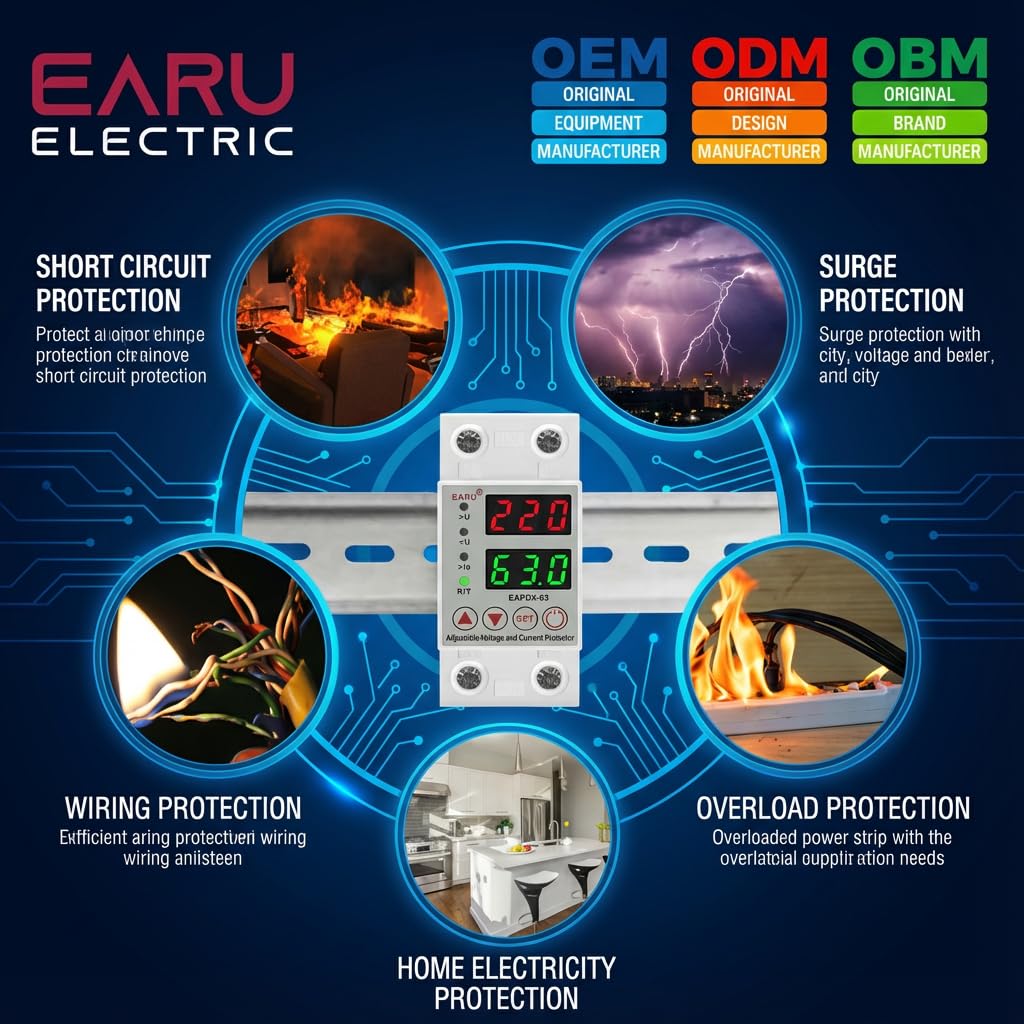
प्रतिमा 2.1: ओव्हरview of the protection capabilities of the EARU Automatic Voltage संरक्षक.
3. सुरक्षितता माहिती
Please read and understand all safety instructions before installing or operating the device. Failure to do so may result in electric shock, fire, or serious injury.
- स्थानिक विद्युत संहिता आणि नियमांनुसार केवळ पात्र इलेक्ट्रिशियननेच स्थापना करावी.
- कोणत्याही स्थापनेपूर्वी किंवा देखभालीच्या कामापूर्वी मुख्य वीजपुरवठा खंडित झाला आहे याची खात्री करा.
- जर उपकरण खराब झालेले दिसत असेल किंवा ओलाव्याच्या संपर्कात आले असेल तर ते चालवू नका.
- Verify correct wiring connections (Line and Neutral) to prevent malfunction or damage.
- डिव्हाइस केवळ घरातील वापरासाठी डिझाइन केले आहे.
- १६A च्या कमाल वर्तमान रेटिंगपेक्षा जास्त करू नका.
4. उत्पादन संपलेview
४.१. घटक आणि प्रदर्शन
The EARU Automatic Voltage Protector features a clear digital display and intuitive control buttons for easy monitoring and adjustment.
- खंडtagई डिस्प्ले: Shows the current line voltage.
- वर्तमान प्रदर्शन: Shows the current load in Ampइरेस
- निर्देशक दिवे:
>U: Over-voltagई सूचक.<U: अंडर-वॉल्यूमtagई सूचक.>Ie: Overcurrent indicator.R/T: Reset/Time indicator.
- नियंत्रण बटणे:
- Up Arrow (▲) / Down Arrow (▼): पॅरामीटर मूल्ये समायोजित करण्यासाठी वापरले जाते.
- सेट बटण: Press and hold for 3 seconds to enter setting mode.
- पॉवर चालू/बंद बटण: Toggles power to the protected circuit.
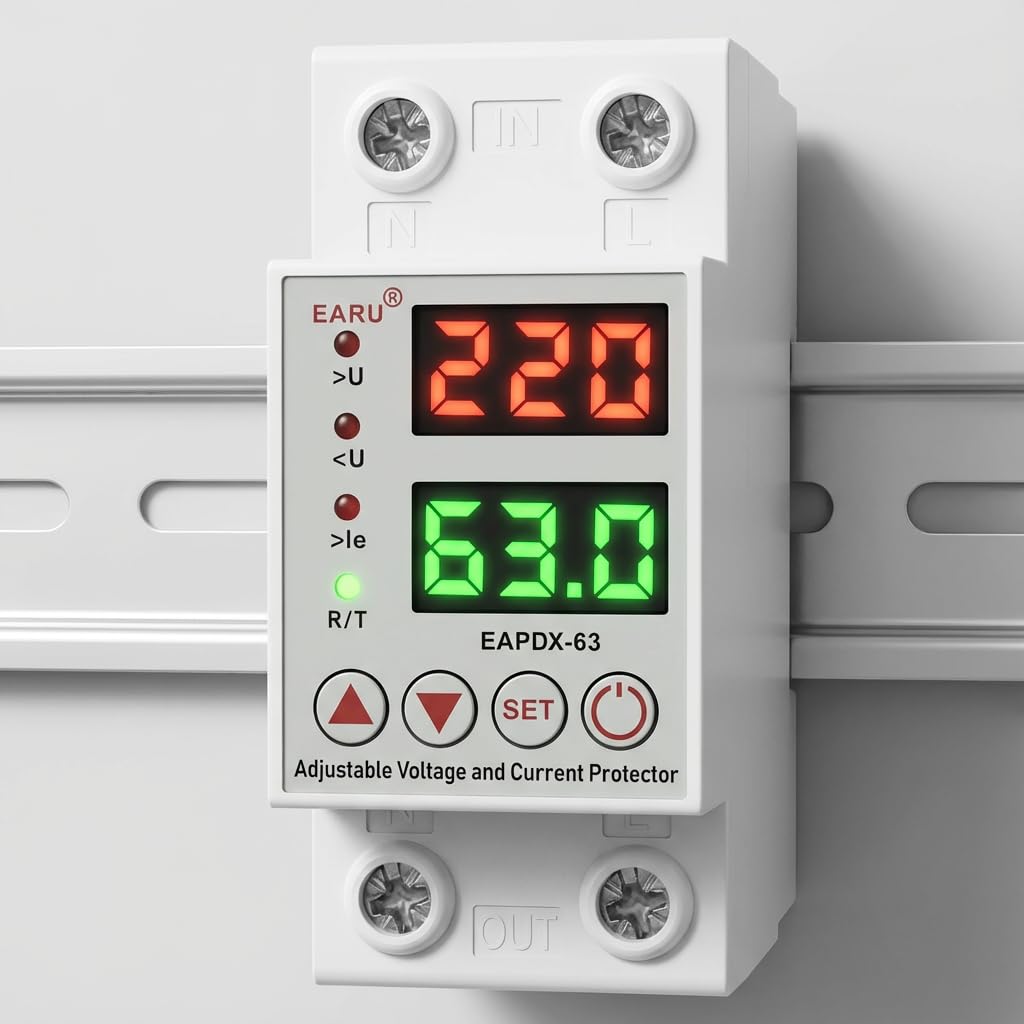
प्रतिमा 4.1: समोर view of the EARU Automatic Voltage Protector, highlighting its digital display and control buttons.
5. सेटअप आणि स्थापना
The EARU Automatic Voltage Protector is designed for DIN Rail mounting. Ensure proper wiring and secure installation.
5.1. माउंटिंग
Mount the device onto a standard 36mm width DIN Rail within your electrical panel. Ensure it is securely clipped into place.
5.2. वायरिंग आकृती
Connect the incoming power supply (Line and Neutral) to the "IN" terminals and the outgoing load to the "OUT" terminals. Refer to the diagram below for correct wiring.

प्रतिमा ५.२: उदा.ample wiring configuration for DIN Rail installation.

Image 5.2: Device dimensions for installation planning.
6. ऑपरेटिंग सूचना
The device allows for precise adjustment of protection parameters. Follow these steps to configure your voltagई रक्षक.
6.1. Parameter Setting Mode
- डिव्हाइस चालू असल्याची खात्री करा.
- दाबा आणि धरून ठेवा सेट button for approximately 3 seconds until the display changes to show "P-1" or a similar setting indicator. This indicates you are in parameter setting mode.
- वापरा वर बाण (▲) आणि खाली बाण (▼) buttons to navigate through the different parameters (P-1 to P-6).
- Once you have selected a parameter, press the सेट button briefly to enter its adjustment mode.
- वापरा वर बाण (▲) आणि खाली बाण (▼) मूल्य बदलण्यासाठी बटणे.
- दाबा सेट button again to confirm the value and move to the next parameter, or wait a few seconds for the device to automatically save and exit the setting mode.
6.2. पॅरामीटर वर्णन
| पॅरामीटर | वर्णन | समायोज्य श्रेणी |
|---|---|---|
| पी-1 | ओव्हर-व्हॉलtagई सेटिंग | 240V - 300V (or OFF) |
| पी-2 | अंडर-व्हॉलtagई सेटिंग | 140V - 200V (or OFF) |
| पी-3 | Overcurrent setting | 1A - 40A / 63A / 80A (depending on model) |
| पी-4 | रीसेट/सुरू विलंब | ०.०१से - १.९से |
| पी-5 | Relay recovery delay | ०.०१से - १.९से |
| पी-6 | Overcurrent recovery delay | ०.०१से - १.९से |
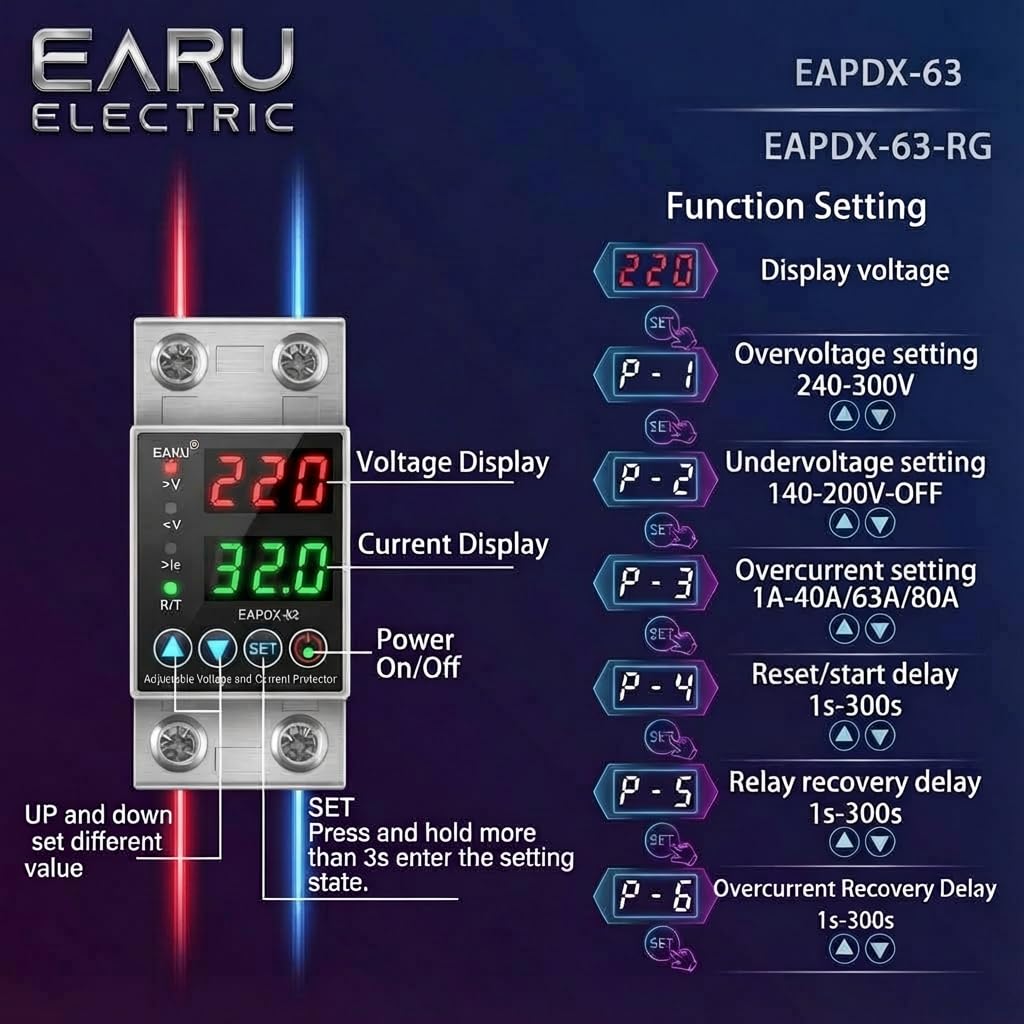
Image 6.1: Function setting guide for the device.
6.3. Video Guide: Setting Parameters
Video 6.1: This video demonstrates how to adjust the over-voltage, अंडर-व्हॉलtage, overcurrent, and recovery delay settings on the EARU Automatic Voltage Protector. It shows the step-by-step process of entering the setting mode and modifying each parameter.
7. देखभाल
The EARU Automatic Voltage Protector requires minimal maintenance. Regular checks can ensure optimal performance.
- Periodically inspect the device for any visible damage or loose connections.
- Ensure the ventilation slots are clear of dust and debris to prevent overheating.
- Clean the exterior with a dry, soft cloth. Do not use liquid cleaners or solvents.
- Do not attempt to open or repair the device yourself. Refer to qualified personnel for servicing.
8. समस्या निवारण
If you encounter issues with your EARU Automatic Voltage Protector, refer to the following common troubleshooting steps:
| समस्या | संभाव्य कारण | उपाय |
|---|---|---|
| डिव्हाइस चालू होत नाही | No input power; incorrect wiring; internal fault. | Check main power supply. Verify wiring connections. If problem persists, contact support. |
| Power cuts off frequently | खंडtage/current outside set thresholds; unstable grid. | Check current voltage/current readings. Adjust P-1, P-2, P-3 settings if necessary. Monitor grid stability. |
| Device does not auto-reconnect | Recovery delay (P-4, P-5, P-6) set too long; persistent fault. | Verify recovery delay settings. Ensure grid conditions have stabilized. Manually reset if safe to do so. |
| चुकीचे खंडtage/current reading | Calibration issue; faulty sensor. | सहाय्यासाठी ग्राहक समर्थनाशी संपर्क साधा. |
9. तपशील
| वैशिष्ट्य | तपशील |
|---|---|
| ब्रँड | EARU |
| मॉडेल | EARU-1005 |
| उत्पादनाचे परिमाण (LxWxH) | 7.7 x 3.5 x 6.5 सेमी |
| आयटम वजन | 450 ग्रॅम |
| इनपुट व्हॉल्यूमtage | 230 व्होल्ट एसी |
| कमाल वाटtage | 13800 वॅट्स |
| कमाल चालू | 63 Ampइरेस |
| ओव्हर-व्हॉलtagई संरक्षण श्रेणी | Adjustable 200V-275V (Cut-off above 275V default) |
| अंडर-व्हॉलtagई संरक्षण श्रेणी | Adjustable 175V-200V (Cut-off below 175V default) |
| Auto-Reconnect Delay | समायोज्य 60-300 सेकंद |
| माउंटिंग प्रकार | DIN Rail (2-Pole, 36mm width) |
| कंडक्टर साहित्य | 100% Pure Copper |
| मूळ देश | भारत |
10. हमी आणि समर्थन
The EARU Automatic Voltage Protector (Model EARU-1005) is backed by a 1-Year Manufacturer Warranty. This warranty covers defects in materials and workmanship under normal use.
- For warranty claims or technical support, please contact EARU customer service.
- Keep your purchase receipt as proof of purchase for warranty validation.
- अनधिकृत दुरुस्ती किंवा बदल हमी रद्द करतात.