
परिचय
The Intelbras SS 3532 MF is an advanced facial access controller from the Bio-T line, designed for secure and efficient access management. It supports multiple authentication methods including facial recognition, RFID MF 13.56 MHz cards, QR Codes, and passwords. This device is suitable for both indoor and outdoor environments and can be integrated with various door locking systems such as electric locks, electromagnets, or solenoids. This manual provides essential information for the proper installation, operation, and maintenance of your SS 3532 MF controller.
उत्पादन संपलेview
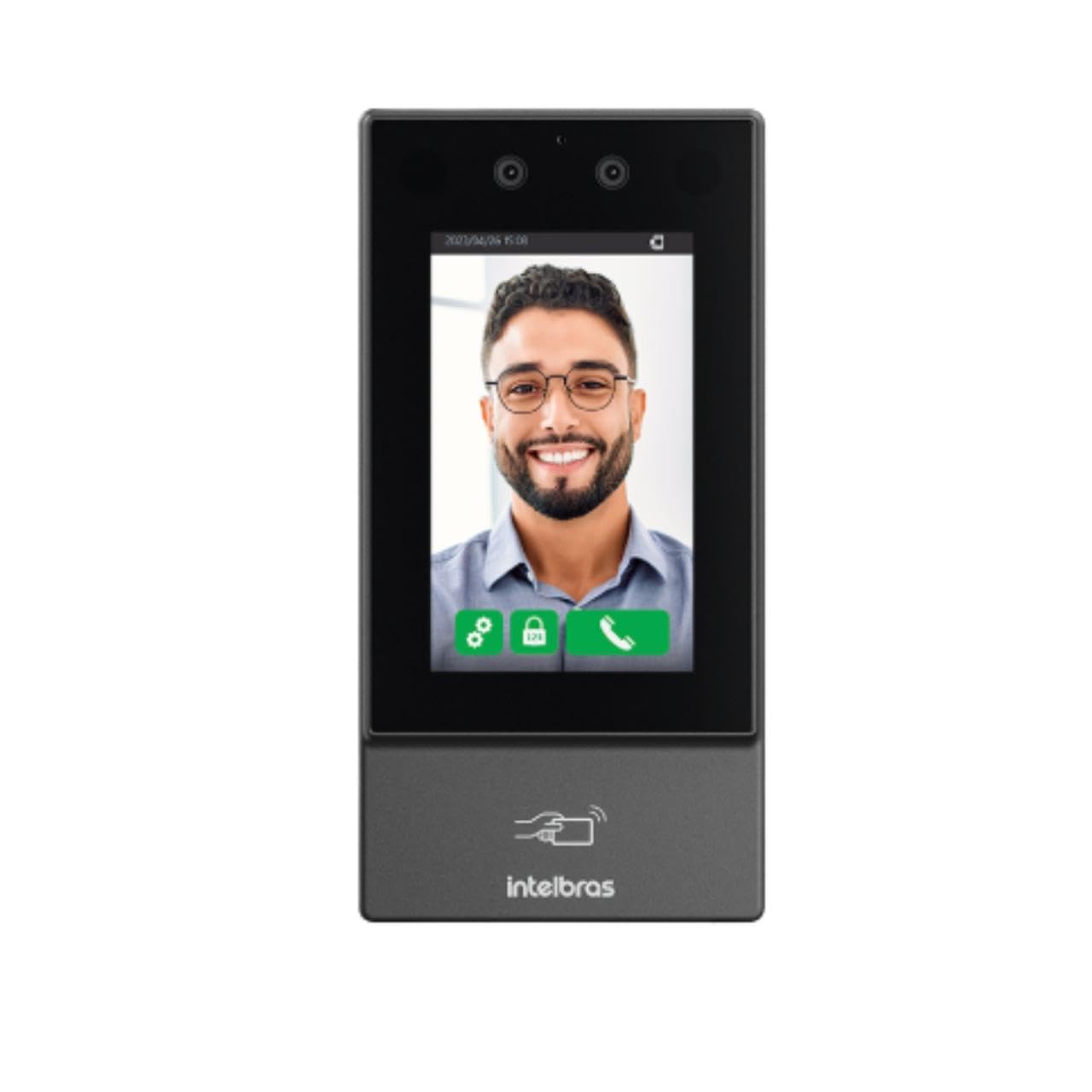
प्रतिमा: समोर view of the Intelbras SS 3532 MF Facial Access Controller. The device features a large screen displaying a smiling man's face, indicating successful facial recognition. Below the screen, the Intelbras logo and an RFID card icon are visible. The device is sleek and dark gray, designed for modern security applications.
प्रमुख वैशिष्ट्ये:
- चेहऱ्याची ओळख: Advanced anti-fake system prevents access via photos or videos.
- Multi-Authentication: Supports facial recognition, RFID MF 13.56 MHz cards, QR Codes, and passwords.
- Mask Detection: Alerts and/or blocks access if a mask is detected.
- टचस्क्रीन एलसीडी: Capacitive touch-sensitive LCD screen for intuitive operation.
- इनडोअर/आउटडोअर वापर: IP55 protection rating suitable for various environments.
- उच्च क्षमता: Stores up to 10,000 users, 20,000 cards/QR Codes (up to 5 per user), 10,000 passwords (1 per user), and 10,000 facial templates (up to 2 per user).
- जलद ओळख: Facial recognition time of 0.2 seconds with over 99.5% verification accuracy.
- डेटा स्टोरेज: User data saved directly on the controller.
- कनेक्टिव्हिटी: Ethernet connection (no Wi-Fi).
- सॉफ्टवेअर एकत्रीकरण: Compatible with InControl Web, Defense IA, and third-party software via SDK, API/CGI.
पॅकेज सामग्री
पॅकेजमध्ये सर्व वस्तू आहेत का ते तपासा:
- 1 × SS 3532 MF Access Controller (without Wi-Fi connection)
- 1 × Set of wall plugs and screws
- 1 × Wall mounting bracket
- 1, वापरकर्ता मार्गदर्शक
Note: The XR 2201 relay module and power supply are not included.
तपशील
| वैशिष्ट्य | तपशील |
|---|---|
| वीज पुरवठा खंडtage | 12 Vdc 2A (power supply not included) |
| जास्तीत जास्त वापर | 24 प |
| परिमाण (W × H × D) | 90.1 × 180.1 × 27 मिमी |
| ऑपरेटिंग तापमान | -30 °C ते 60 °C |
| ऑपरेटिंग सापेक्ष आर्द्रता | 0% ते 90% RH (नॉन-कंडेन्सिंग) |
| संरक्षण रेटिंग | IP55 (घरातील आणि बाहेरचा वापर) |
| एकूण वजन | 0.70 किलो |
| संलग्न साहित्य | PC+ABS |
| प्रतिष्ठापन वातावरण | इनडोअर आणि आउटडोअर |
| एकत्रीकरण | SDK, API/CGI |
| Facial Verification Accuracy | > ७८% |
| Facial Recognition Time | 0.2 सेकंद |
| फर्मवेअर अपडेट | Via DEFENSE IA |
सेटअप आणि स्थापना
१. जागा तयार करणे:
- Ensure the installation environment is suitable for an IP55 rated device, whether indoor or outdoor.
- Prepare a stable surface for mounting the device.
३. डिव्हाइस बसवणे:
- Use the provided wall mounting bracket as a template to mark drilling points on the wall.
- छिद्रे पाडा आणि भिंतीवरील प्लग घाला.
- दिलेल्या स्क्रूचा वापर करून माउंटिंग ब्रॅकेट भिंतीवर सुरक्षित करा.
- Attach the SS 3532 MF controller to the mounted bracket.
3. वीज जोडणी:
- Connect a 12 Vdc 2A power supply (not included) to the device's power input.
- वीज पुरवठा निर्दिष्ट व्हॉल्यूमची पूर्तता करत असल्याची खात्री कराtage and current requirements to prevent damage.
4. नेटवर्क कनेक्शन:
- Connect an Ethernet cable to the device's network port for online operation and software integration.
- The device does not support Wi-Fi connectivity.
5. Lock Integration:
- Connect the device to your electric lock, electromagnet, or solenoid system as per the wiring diagram in the full user manual (not provided here).
- Note that the XR 2201 relay module is not included and may be required for certain lock types.
ऑपरेटिंग सूचना
1. Initial Power-Up:
- Once powered, the device will boot up and display the main interface on its LCD touchscreen.
४. वापरकर्ता व्यवस्थापन:
- Access the device's menu via the touchscreen to add, edit, or delete users.
- Each user can be assigned facial templates, RFID cards, QR Codes, and passwords.
- The device supports up to 10,000 users and 10,000 facial templates (2 per user).
3. Authentication Methods:
- चेहऱ्याची ओळख: Stand in front of the device's camera. The system will automatically detect and verify your face. The anti-fake system prevents unauthorized access using photos or videos.
- आरएफआयडी कार्ड: Present your RFID MF 13.56 MHz card to the designated reader area on the device.
- QR कोड: Present a valid QR Code to the device's camera for scanning.
- पासवर्ड: Enter your assigned password using the touchscreen keypad.
4. Mask Detection:
- The device can be configured to alert or block access if a user is detected wearing a mask, depending on security policies.
5. Software Integration:
- For advanced management, connect the device to InControl Web, Defense IA, or other compatible third-party software via Ethernet.
- Refer to the respective software manuals for detailed configuration and operation instructions.
देखभाल
- स्वच्छता: Regularly clean the touchscreen and camera lenses with a soft, dry, lint-free cloth. Avoid abrasive cleaners or solvents.
- फर्मवेअर अद्यतने: Keep the device's firmware updated via DEFENSE IA software to ensure optimal performance and security.
- पर्यावरण तपासणी: Periodically inspect the device for any signs of wear or damage, especially if installed outdoors. Ensure connections are secure.
समस्यानिवारण
- डिव्हाइस चालू होत नाही:
- Check if the 12 Vdc 2A power supply is correctly connected and functioning.
- Verify the power outlet.
- Facial Recognition Failure:
- Ensure adequate lighting in front of the device.
- कॅमेरा लेन्स स्वच्छ करा.
- Confirm the user's facial template is properly enrolled and up-to-date.
- Adjust the user's distance and angle to the device.
- RFID Card Not Detected:
- Ensure the card is an RFID MF 13.56 MHz type.
- Present the card correctly to the reader area.
- Verify the card is enrolled for the user.
- नेटवर्क कनेक्शन नाही:
- इथरनेट केबल कनेक्शन तपासा.
- Verify network settings on the device and your network infrastructure.
- दरवाजा उघडत नाही:
- Confirm successful authentication on the device.
- Check wiring to the electric lock/electromagnet/solenoid.
- Ensure the lock mechanism is functioning correctly.