
1. परिचय
Thank you for choosing the PELONIS 40-Inch Tower Fan. This oscillating fan features an innovative washable design, providing 2000 CFM airflow at 28ft/s, 4 speeds, 2 modes, and 90° oscillation with a quiet 23dB operation. This manual provides important information for the safe and efficient use of your new tower fan. Please read it thoroughly before operation and retain it for future reference.

Figure 1: PELONIS 40-Inch Tower Fan (Model PSFZ40DR5ALG)
2. महत्त्वाच्या सुरक्षितता सूचना
विद्युत उपकरणे वापरताना, खालील गोष्टींसह आग, विद्युत शॉक आणि व्यक्तींना दुखापत होण्याचा धोका कमी करण्यासाठी मूलभूत खबरदारी नेहमी पाळली पाहिजे:
- हा पंखा वापरण्यापूर्वी सर्व सूचना वाचा.
- Use this fan only as described in this manual. Other uses not recommended by the manufacturer may cause fire, electric shock, or injury to persons.
- Do not operate the fan with a damaged cord or plug. Discard the fan or return to an authorized service facility for examination and/or repair.
- कार्पेटिंग अंतर्गत दोरखंड चालवू नका. थ्रो रग्ज, रनर्स किंवा तत्सम आवरणांनी कॉर्ड झाकून ठेवू नका. ट्रॅफिक क्षेत्रापासून दूर आणि जिथे ती ट्रिप होणार नाही अशा ठिकाणी कॉर्डची व्यवस्था करा.
- पंखा डिस्कनेक्ट करण्यासाठी, नियंत्रणे बंद करा, नंतर आउटलेटमधून प्लग काढा.
- कोणत्याही वायुवीजन किंवा एक्झॉस्ट ओपनिंगमध्ये परदेशी वस्तू घालू नका किंवा आत येऊ देऊ नका कारण यामुळे विजेचा धक्का लागू शकतो किंवा आग लागू शकते किंवा पंख्याला नुकसान होऊ शकते.
- Do not operate in areas where gasoline, paint, or flammable liquids are used or stored.
- Always unplug the fan before moving, cleaning, or when not in use.
- हा पंखा फक्त घरगुती वापरासाठी आहे.
3. पॅकेज सामग्री
पॅकेज उघडताना त्यातील सामग्री तपासा. जर काही वस्तू गहाळ किंवा खराब झाल्या असतील तर ग्राहक समर्थनाशी संपर्क साधा.
- PELONIS 40-Inch Tower Fan Unit
- Fan Base (2 parts)
- रिमोट कंट्रोल
- वापरकर्ता मॅन्युअल (हा दस्तऐवज)
१. सेटअप आणि असेंब्ली
Follow these steps to assemble your PELONIS Tower Fan:
- बेस एकत्र करा: Connect the two halves of the fan base together. Ensure they snap securely into place.
- Attach Base to Fan Unit: Align the assembled base with the bottom of the main fan unit. Secure the base to the fan unit using the provided nut, turning clockwise until tight. Route the power cord through the designated channel in the base for stability.
- रिमोट कंट्रोल बॅटरी: Open the battery compartment on the remote control and insert the required batteries (not always included, check packaging).
- प्लेसमेंट: Place the fan on a firm, level surface. Ensure there is adequate space around the fan for proper airflow and oscillation.
- वीज कनेक्शन: पॉवर कॉर्डला मानक 120V AC इलेक्ट्रिकल आउटलेटमध्ये प्लग करा.

Figure 2: Effortless Setup - Twist Lock and Lift the Upper Body
Video 1: How to install Pelonis Washable Tower Fan. This video demonstrates the assembly process for the PELONIS tower fan, including attaching the base and preparing it for use.
5. ऑपरेटिंग सूचना
Your PELONIS Tower Fan can be operated using the control panel on the top of the unit or the included remote control.
नियंत्रण पॅनेल आणि रिमोट फंक्शन्स:
- पॉवर बटण (🏻): पंखा चालू किंवा बंद करतो.
- स्पीड बटण (⇌): Cycles through 4 fan speeds (Low, Medium, High, Turbo).
- मोड बटण (☽): Selects between 2 wind modes:
- सामान्य मोड: एकसमान वायुप्रवाह प्रदान करते.
- स्लीप मोडः Gradually decreases fan speed for quiet operation during sleep.
- दोलन बटण (↻): Activates or deactivates the 90° oscillation feature, distributing air across a wider area.
- टायमर बटण (⏱): Sets the auto-off timer for up to 7 hours. Press repeatedly to cycle through timer settings.

Figure 3: Remote Control and Fan Settings

Figure 4: 90° Oscillation for Wide Coverage
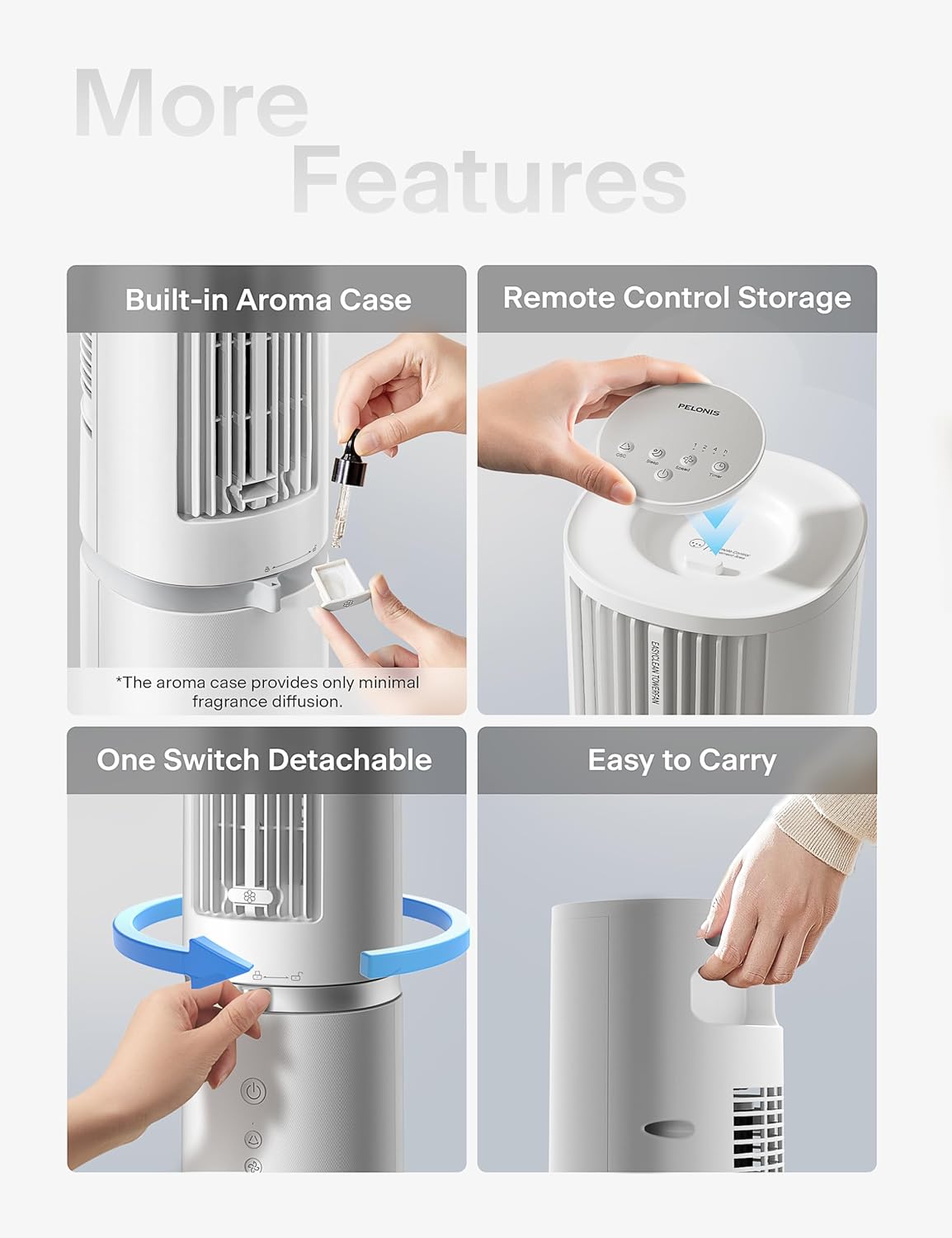
Figure 5: Additional Features including Aroma Case and Remote Storage
6. देखभाल आणि स्वच्छता
The PELONIS Tower Fan features an innovative washable design for easy cleaning. Regular cleaning ensures optimal performance and extends the life of your fan.
साफसफाईच्या सूचना:
- पंखा अनप्लग करा: Always ensure the fan is unplugged from the power outlet before cleaning.
- Detach Upper Body: The fan's upper body is detachable for thorough cleaning. Twist the lock mechanism at the base of the upper section and lift it off the motor unit.
- धुण्यायोग्य घटक: The detachable upper body, including the air outlet grille and internal components, can be washed directly with water. Use mild soap and a soft cloth or sponge if necessary. Ensure no electronic components are exposed to water.
- पूर्णपणे कोरडे करा: Allow all washed parts to air dry completely before reassembling. Ensure no moisture remains, especially in crevices.
- Wipe Base Unit: Wipe the motor base unit with a soft, damp कापड बेस युनिट पाण्यात बुडवू नका.
- पुन्हा एकत्र करणे: Once all parts are dry, carefully reattach the upper body to the motor unit, ensuring it locks securely into place.
Note: The aroma case (if present) can be cleaned by wiping it with a damp कापड कठोर रसायने वापरू नका.
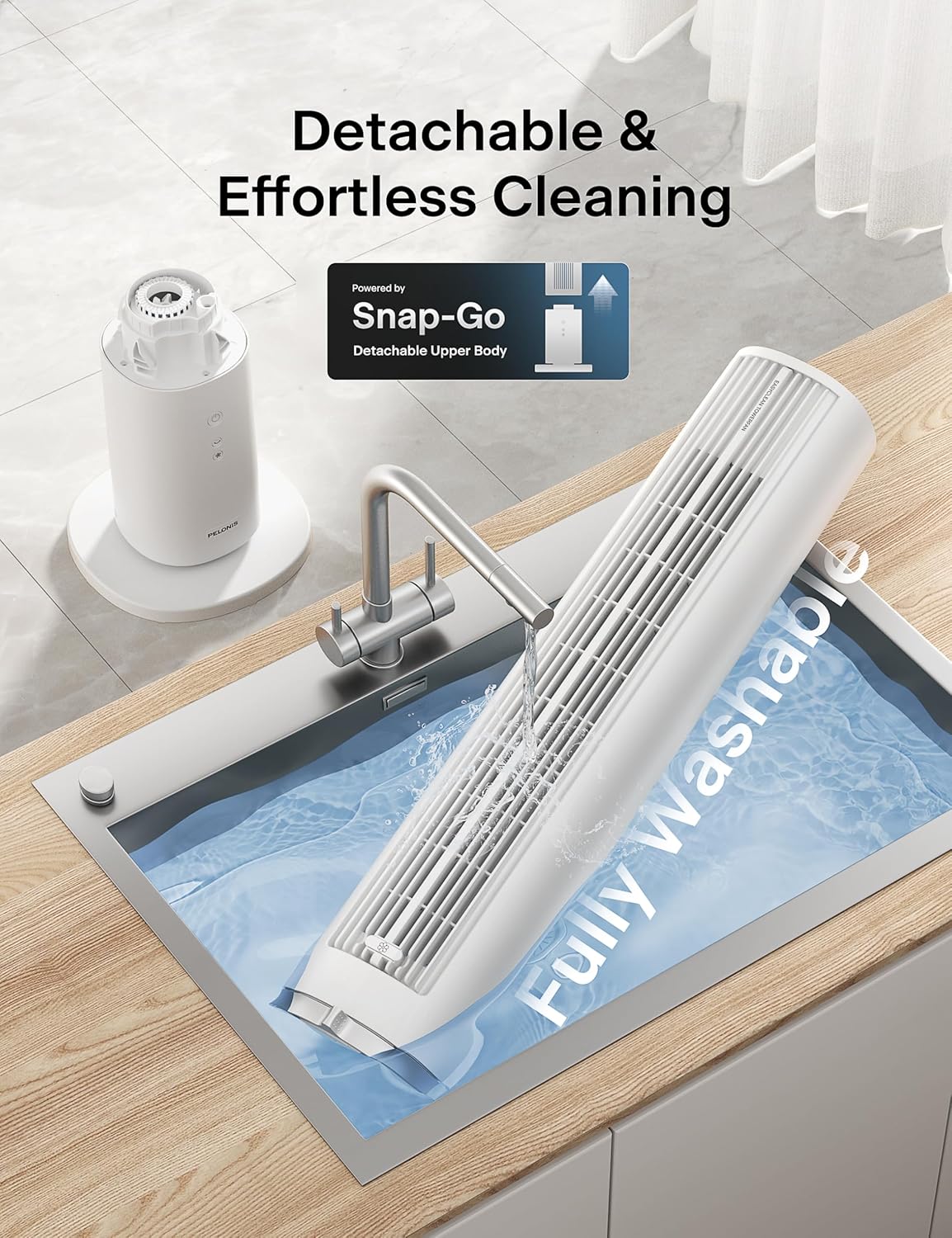
Figure 6: Detachable and Fully Washable Design

Figure 7: One-Twist Detachable Mechanism
7. समस्यानिवारण मार्गदर्शक
जर तुमचा पंखा योग्यरित्या चालू नसेल, तर कृपया खालील सामान्य समस्या आणि उपाय पहा:
| समस्या | संभाव्य कारण | उपाय |
|---|---|---|
| पंखा चालू होत नाही. | प्लग इन केलेले नाही; पॉवर आउटलेट काम करत नाही; पॉवर बटण दाबलेले नाही. | Ensure fan is securely plugged into a working outlet. Press the power button. |
| कमकुवत किंवा हवेचा प्रवाह नाही. | Fan speed too low; air intake/outlet blocked; internal components dirty. | Increase fan speed. Check for obstructions. Clean the fan as per maintenance instructions. |
| Fan is noisy during operation. | Fan not on a level surface; internal components dirty; foreign object inside. | Place fan on a flat, stable surface. Clean the fan. If noise persists, contact support. |
| रिमोट कंट्रोल काम करत नाही. | बॅटरीज संपल्या आहेत किंवा चुकीच्या पद्धतीने घातल्या आहेत; रिमोट रिसीव्हरकडे वळलेला नाही. | Replace batteries. Ensure correct polarity. Point remote towards the fan's control panel. |
| दोलन काम करत नाही. | दोलन कार्य सक्रिय केलेले नाही. | कंट्रोल पॅनल किंवा रिमोटवरील ऑसिलेशन बटण दाबा. |
8. उत्पादन तपशील
| वैशिष्ट्य | तपशील |
|---|---|
| ब्रँड | पेलोनिस |
| मॉडेलचे नाव | PSFZ40DR5ALG |
| मॉडेल क्रमांक | PSFZ40DR5ALG |
| रंग | पांढरा |
| शैली | Upgraded with Washable Design |
| उत्पादनाचे परिमाण (D x W x H) | १६"उ x २६"प x ४७"उ |
| आयटम वजन | 7.03 किलोग्रॅम |
| उर्जा स्त्रोत | एसी/डीसी |
| वाटtage | 45 वॅट्स |
| खंडtage | 120 व्होल्ट |
| वेगांची संख्या | 4 |
| वारा मोड | Normal, Sleep |
| दोलन | ७२° |
| आवाज पातळी | ३० डेसिबल |
| वायु प्रवाह क्षमता | 2000 घनफूट प्रति मिनिट (CFM) |
| हवेचा वेग | २८ फूट प्रति सेकंद (फूट/सेकंद) |
| टाइमर | 7 तासांपर्यंत |
| नियंत्रण पद्धत | Button Control, Remote Control |
| समाविष्ट घटक | रिमोट |
| इनडोअर/आउटडोअर वापर | इनडोअर |
७. वॉरंटी आणि ग्राहक समर्थन
PELONIS products are manufactured to the highest quality standards. For specific warranty information, please refer to the warranty card included with your product or visit the official PELONIS webसाइट
If you encounter any issues or have questions regarding your PELONIS 40-Inch Tower Fan, please contact our customer support team:
- ऑनलाइन समर्थन: ला भेट द्या PELONIS Store on Amazon वारंवार विचारले जाणारे प्रश्न आणि उत्पादन माहितीसाठी.
- संपर्क माहिती: Refer to your product packaging or the official PELONIS website for direct customer service contact details (phone, email).
Please have your model number (PSFZ40DR5ALG) and purchase date ready when contacting support.


