
Amazon Echo Dot (5th Gen) and TIE Fighter Stand Bundle
Amazon STAR WARS Echo Dot (5th Gen) and TIE Fighter Stand Bundle User Manual
1. परिचय
Welcome to the user manual for your Amazon STAR WARS Echo Dot (5th Gen) and TIE Fighter Stand Bundle. This guide provides essential information for setting up, operating, maintaining, and troubleshooting your new smart speaker and its unique display stand. Please read this manual thoroughly to ensure optimal performance and enjoyment of your product.
2. उत्पादन संपलेview
2.1 Echo Dot (5th Gen, 2022 release)
The Echo Dot (5th Gen) is a compact smart speaker with Alexa, designed to deliver improved audio quality with clearer vocals and deeper bass. It allows you to play music, set timers, get information, control smart home devices, and more, all using voice commands.
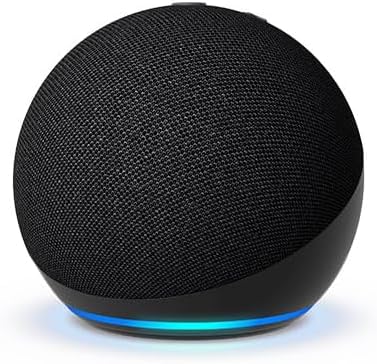
Image: The Echo Dot (5th Gen) in charcoal, a spherical smart speaker with a fabric finish and a light ring at its base.
2.2 STAR WARS TIE Fighter Stand
The Limited Edition STAR WARS TIE Fighter Stand is a custom-designed accessory that transforms your Echo Dot into an iconic Imperial TIE Fighter. It provides a secure and visually appealing display for your Echo Dot, integrating it into a TIE Fighter hangar diorama. The stand is designed for easy interaction and does not interfere with the Echo Dot's functions.

Image: The STAR WARS TIE Fighter Stand, shown from the front, ready to house the Echo Dot.

Image: The Echo Dot (5th Gen) integrated into the TIE Fighter Stand, illuminated by its base light.
3. सेटअप
२.१ अनबॉक्सिंग आणि सामग्री
Carefully remove all components from the packaging. The bundle typically includes:
- अमेझॉन इको डॉट (चौथी पिढी)
- STAR WARS TIE Fighter Stand
- Power adapter for Echo Dot
- द्रुत प्रारंभ मार्गदर्शक

Image: The product packaging, featuring the TIE Fighter Stand and Echo Dot, designed as a hangar diorama.
3.2 Echo Dot (5th Gen) Initial Setup
- पॉवर चालू: Connect the included power adapter to your Echo Dot and then to a wall outlet. The light ring on the Echo Dot will turn blue, then orange, indicating it's ready for setup.
- अलेक्सा अॅप डाउनलोड करा: तुमच्या स्मार्टफोन किंवा टॅबलेटवर, तुमच्या डिव्हाइसच्या अॅप स्टोअरमधून Amazon Alexa अॅप डाउनलोड करा.
- अॅपमधील सूचनांचे अनुसरण करा: Open the Alexa app and sign in with your Amazon account. The app will guide you through connecting your Echo Dot to your Wi-Fi network and personalizing settings.
- व्हॉइस प्रोfile (पर्यायी): Consider setting up a voice profile for a more personalized Alexa experience.
3.3 TIE Fighter Stand Assembly
- इको डॉट ठेवा: Gently insert your Echo Dot (5th Gen) into the central spherical housing of the TIE Fighter Stand. Ensure it sits securely.
- केबल व्यवस्थापनः Route the Echo Dot's power cable through the designated channel at the bottom or rear of the stand to maintain a clean appearance.

प्रतिमा: मागचा भाग view of the Echo Dot within the TIE Fighter Stand, illustrating the power cable connection point.

प्रतिमा: एक कोन view of the Echo Dot securely nestled in the TIE Fighter Stand, showcasinत्याची रचना.
4. ऑपरेटिंग सूचना
4.1 Using Your Echo Dot (5th Gen)
Your Echo Dot is voice-controlled. Simply say the wake word "Alexa" followed by your command.
- संगीत आणि ऑडिओ: "Alexa, play pop music," "Alexa, play my audiobook," "Alexa, play the news." You can also connect via Bluetooth: "Alexa, pair Bluetooth."
- माहिती: "Alexa, what's the weather?" "Alexa, what's 5 plus 7?" "Alexa, tell me a joke."
- टायमर आणि अलार्म: "Alexa, set a timer for 10 minutes," "Alexa, set an alarm for 7 AM." Tap the top of the Echo Dot to snooze an alarm.
- स्मार्ट होम कंट्रोल: "Alexa, turn on the living room lights" (requires compatible smart home devices).
- संवाद: "Alexa, call Mom" (requires Alexa Calling setup).
4.2 Displaying Your TIE Fighter Stand
The TIE Fighter Stand is designed to be a prominent display piece. Place it on a shelf, desk, or end table where it can be admired and where your Echo Dot has clear access to power and Wi-Fi. Ensure the stand is on a stable, flat surface.

Image: The Echo Dot within the TIE Fighter Stand, showcased as a decorative item on a bookshelf.
5. देखभाल
5.1 स्वच्छता
To clean your Echo Dot and TIE Fighter Stand:
- Unplug the Echo Dot from the power outlet.
- Use a soft, dry, lint-free cloth to wipe down both devices.
- अपघर्षक क्लीनर, सॉल्व्हेंट्स किंवा एरोसोल स्प्रे वापरू नका.
- कोणत्याही छिद्रांमध्ये ओलावा जाण्यापासून टाळा.
5.2 सॉफ्टवेअर अद्यतने
तुमच्या इको डॉटला वाय-फाय द्वारे सॉफ्टवेअर अपडेट्स आपोआप मिळतात. नवीनतम वैशिष्ट्ये आणि सुरक्षा सुधारणा मिळविण्यासाठी तुमचे डिव्हाइस इंटरनेटशी कनेक्ट केलेले असल्याची खात्री करा.
6. समस्या निवारण
If you encounter issues with your Echo Dot or TIE Fighter Stand, refer to the following common solutions:
- No Power/Not Responding: Ensure the power adapter is securely connected to both the Echo Dot and a working wall outlet. Try a different outlet.
- वाय-फाय कनेक्टिव्हिटी समस्या: Check your Wi-Fi router and internet connection. Restart your router. Use the Alexa app to reconfigure Wi-Fi settings for your Echo Dot.
- खराब आवाज गुणवत्ता: Ensure the Echo Dot is not obstructed. Adjust volume using voice commands or the Alexa app.
- अलेक्सा प्रतिसाद देत नाही: Ensure the microphone is not muted (the light ring will be red). Speak clearly and ensure you are within range.
- TIE Fighter Stand Fit: If the Echo Dot does not fit correctly, ensure you have the correct Echo Dot model (5th Gen) and that no debris is obstructing the stand's housing.
- डिव्हाइस रीस्टार्ट करा: For many issues, unplugging the Echo Dot from power for 30 seconds and then plugging it back in can resolve the problem.
7. तपशील
7.1 Echo Dot (5th Gen)
- ऑडिओ: Front-firing speaker (improved audio quality)
- कनेक्टिव्हिटी: Dual-band Wi-Fi (2.4 GHz and 5 GHz), Bluetooth Low Energy (BLE)
- मायक्रोफोन: Multiple microphones for far-field voice recognition
- परिमाणे: Approximately 3.9” x 3.9” x 3.5” (99 x 99 x 89 mm)
- वजन: अंदाजे 10.7 औंस (304 ग्रॅम)
7.2 STAR WARS TIE Fighter Stand
- सुसंगतता: Specifically designed for Echo Dot (5th Gen)
- साहित्य: टिकाऊ प्लास्टिक
- डिझाइन: TIE Fighter with hangar diorama base
- वय शिफारस: 13+ वयोगटासाठी
8. हमी आणि समर्थन
Your Amazon Echo Dot (5th Gen) and STAR WARS TIE Fighter Stand Bundle is covered by a limited warranty. For specific warranty details, please refer to the warranty information provided with your product or visit the Amazon Devices Support page on the official Amazon webसाइट
For further assistance, technical support, or to report issues, please contact Amazon Customer Service through the Alexa app or the Amazon webसाइट
Ask a question about this manual
Ask about setup, troubleshooting, compatibility, parts, safety, or missing instructions. Manuals+ will review the question and use this page’s manual context to help answer it.