
परिचय
This manual provides essential information for the setup, operation, maintenance, and troubleshooting of your Onn 22 inch 1080P 100 Hz FHD LED Monitor. Please read this guide thoroughly before using the product to ensure optimal performance and safety.
The Onn 22 inch FHD LED Monitor is designed for a variety of applications, offering a vivid 1920x1080 resolution, a 100Hz refresh rate, and a 6.5ms response time for efficient performance. Its slim profile and T-shaped base are ideal for saving desk space.
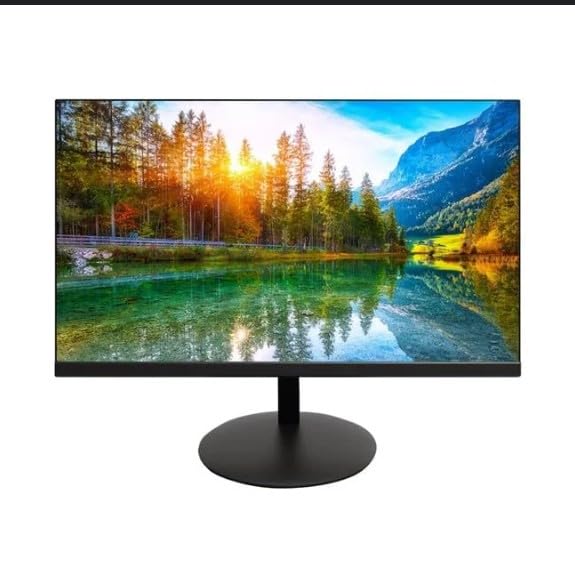
The image shows the Onn 22 inch FHD LED Monitor, highlighting its 100Hz refresh rate and 1080p resolution. The monitor features a slim design and a T-shaped base.
सेटअप सूचना
- अनपॅक करणे: Carefully remove the monitor and all accessories from the packaging. Ensure all components are present: monitor, T-shaped base, HDMI cable, and power adapter.
- स्टँड एकत्र करणे: Attach the T-shaped base to the monitor. The design is screw-less for easy assembly. Ensure it is securely fastened.
- डिव्हाइसशी कनेक्ट करत आहे:
The monitor supports both HDMI and VGA inputs. Connect the provided HDMI cable from your computer's HDMI output to the HDMI IN port on the monitor. Alternatively, use a VGA cable for VGA input.

This image displays the rear panel of the Onn monitor, illustrating the available input ports: HDMI IN, VGA IN, and the DC 12V power input. These ports are essential for connecting the monitor to a computer or other devices.
- वीज कनेक्शन: Connect the power adapter to the DC 12V input port on the monitor, then plug the adapter into a power outlet.
- मॉनिटर समायोजित करणे: The monitor is capable of swivel, tilt, rotation, and height adjustment. Adjust the screen to your preferred viewअर्गोनॉमिक आरामासाठी कोन.
- ड्युअल मॉनिटर सेटअप: This monitor is suitable for a fully functioning dual monitor setup. Connect a second monitor using the appropriate cables and configure your operating system's display settings.
ऑपरेटिंग सूचना
- पॉवर चालू/बंद: Press the power button, usually located on the bottom or back of the monitor, to turn it on or off.
- इनपुट निवड: If the monitor does not automatically detect the input source, use the On-Screen Display (OSD) menu buttons to manually select between HDMI and VGA inputs.
- OSD मेनू नेव्हिगेशन: Use the physical buttons on the monitor (typically on the back or bottom edge) to navigate the OSD menu. This allows you to adjust settings such as brightness, contrast, color temperature, and input source.
- रिझोल्यूशन आणि रिफ्रेश रेट: The monitor supports a native resolution of 1920x1080 at a 100Hz refresh rate. Ensure your computer's display settings are configured to these specifications for the best visual experience.
- अनुकूली सिंक: The monitor features Adaptive Sync for gaming, which helps to reduce screen tearing and stuttering. Ensure this feature is enabled in your graphics card settings if supported.
देखभाल
- स्क्रीन साफ करणे: मऊ, लिंट-फ्री कापडाने स्क्रीन हळूवारपणे पुसून टाका. हट्टी खुणा असल्यास, हलकेचampen the cloth with water or a non-abrasive, monitor-specific cleaning solution. Avoid spraying liquids directly onto the screen.
- सी साफ करणेasing: मॉनिटर स्वच्छ करण्यासाठी मऊ, कोरडे कापड वापरा casing. Do not use strong detergents or solvents, as they may damage the finish.
- वायुवीजन: जास्त गरम होण्यापासून रोखण्यासाठी मॉनिटरचे वायुवीजन उघडे बंद केलेले नाहीत याची खात्री करा.
- स्टोरेज: जास्त काळ वापरात नसताना, मॉनिटर थंड, कोरड्या जागी, थेट सूर्यप्रकाश आणि अति तापमानापासून दूर ठेवा.
समस्यानिवारण
- शक्ती नाही:
- पॉवर केबल मॉनिटर आणि पॉवर आउटलेट दोन्हीशी सुरक्षितपणे जोडलेली आहे का ते तपासा.
- पॉवर आउटलेट योग्यरित्या कार्य करत असल्याचे सत्यापित करा.
- सिग्नल नाही:
- Ensure the video cable (HDMI or VGA) is firmly connected to both the monitor and the computer.
- Select the correct input source using the monitor's OSD menu.
- तुमचा संगणक चालू आहे का आणि स्लीप मोडमध्ये नाही का ते तपासा.
- Flickering Screen or Poor Image Quality:
- व्हिडिओ केबल खराब झाली आहे किंवा कनेक्शन तुटले आहे का ते तपासा.
- Adjust the resolution and refresh rate settings on your computer to match the monitor's specifications (1920x1080, 100Hz).
- OSD मेनूद्वारे मॉनिटर सेटिंग्ज फॅक्टरी डीफॉल्टवर रीसेट करा.
- बटणे प्रतिसाद देत नाहीत:
- Unplug the monitor from the power outlet, wait for 30 seconds, and then plug it back in.
If problems persist, please refer to the support information provided in the "Support and Warranty" section.
तपशील
| ब्रँड | ओन |
| मॉडेल क्रमांक | 100140681 |
| मॉडेलचे नाव | OTTO |
| स्क्रीन आकार | 21.5 इंच |
| डिस्प्ले प्रकार | एलईडी, एलसीडी |
| ठराव | १९२० x १०८० (FHD १०८०p) |
| रीफ्रेश दर | 100 Hz |
| प्रतिसाद वेळ | 6.5 मिलीसेकंद |
| हार्डवेअर इंटरफेस | एचडीएमआय, व्हीजीए |
| विशेष वैशिष्ट्ये | उंची समायोजन |
| Viewकोन | 160 अंश |
| गुणोत्तर | १६:१० |
| उत्पादन परिमाणे | 49.2 x 20 x 37.2 सेमी; 3.24 किलो |
समर्थन आणि हमी
For technical support, product inquiries, or warranty information, please visit the official Onn support webसाइट किंवा त्यांच्या ग्राहक सेवेशी संपर्क साधा.
- अधिकृत समर्थन Webसाइट: onnsupport.ca वरील
- हमी: Specific warranty details may vary by region and purchase date. Please refer to the documentation included with your product or visit the support webसर्वात अद्ययावत वॉरंटी माहितीसाठी साइट.