
परिचय
Thank you for choosing the Cuifati Mini Body Camera. This manual provides detailed instructions for the proper use, setup, and maintenance of your device. Please read this manual thoroughly before operating the camera to ensure optimal performance and longevity.
पॅकेज सामग्री
- 1 x Wearable Camera
- 1 x कॅरींग बॅग
- 1 x वापरकर्ता मॅन्युअल
- 1 x डोरी
- 1 x Back Shell Bracket
- 1 x ट्रायपॉड
- 1 x USB केबल
- 1 x क्लिनिंग क्लॉथ

Figure 1: Cuifati Mini Body Camera and included accessories.

Figure 2: Multi-scenario application examples for the body camera.
उत्पादन संपलेview
Familiarize yourself with the components and controls of your Cuifati Mini Body Camera.
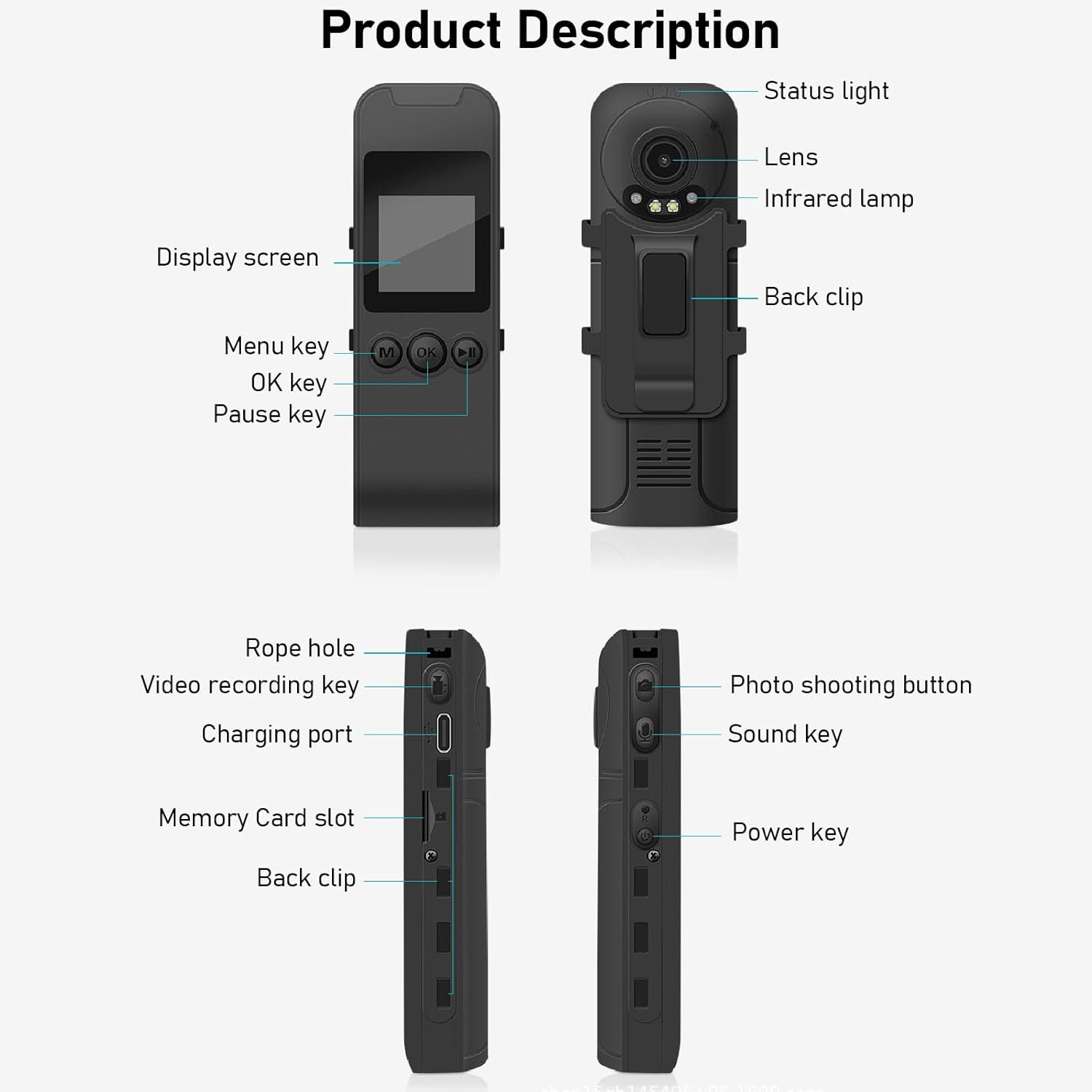
Figure 3: Labeled components of the Cuifati Mini Body Camera.
- स्थिती प्रकाश: डिव्हाइसची स्थिती दर्शवते (उदा. रेकॉर्डिंग, चार्जिंग).
- लेन्स: व्हिडिओ आणि फोटो कॅप्चरसाठी मुख्य कॅमेरा लेन्स.
- इन्फ्रारेड एलamp: रात्रीच्या दृष्टीसाठी प्रकाश प्रदान करते.
- मागील क्लिप: For attaching the camera to clothing or other surfaces.
- डिस्प्ले स्क्रीन: 1.3-inch LCD for live view, प्लेबॅक आणि मेनू नेव्हिगेशन.
- Menu Key (M): Accesses device settings.
- ओके की: Confirms selections or starts/stops functions.
- विराम की: प्लेबॅक किंवा रेकॉर्डिंगला विराम देते.
- दोरीचे भोक: Attachment point for the lanyard.
- Video Recording Key: व्हिडिओ रेकॉर्डिंग सुरू करते आणि थांबवते.
- चार्जिंग पोर्ट (टाइप-सी): डिव्हाइस चार्ज करण्यासाठी आणि संगणकाशी कनेक्ट करण्यासाठी.
- मेमरी कार्ड स्लॉट: Insert microSD card for storage.
- Photo Shooting Button: स्थिर प्रतिमा कॅप्चर करते.
- Sound Key: Controls audio recording.
- पॉवर की: डिव्हाइस चालू किंवा बंद करते.
सेटअप
1. बॅटरी चार्ज करणे
Before first use, fully charge the camera's built-in lithium-ion battery. Connect the camera to a power source using the provided Type-C USB cable. The status light will indicate charging status. A full charge provides approximately 20 hours of work time and 10 hours of video recording.
Figure 4: Built-in 1200mAh battery for extended use.
२०.१. मेमरी कार्ड टाकत आहे
The camera supports up to a 256GB memory card (not included). Locate the memory card slot on the side of the camera. Gently insert the microSD card with the gold contacts facing down until it clicks into place. To remove, push the card in slightly until it springs out.

Figure 5: Memory card slot for storage expansion.
ऑपरेटिंग सूचना
1. पॉवर चालू/बंद
- चालू करण्यासाठी: Press and hold the Power Key until the display screen illuminates.
- पॉवर ऑफ करण्यासाठी: Press and hold the Power Key until the device shuts down.
2. व्हिडिओ रेकॉर्डिंग
The camera records in 1440P HD at 30 frames per second with a 120° wide-angle lens and infrared night vision.
- रेकॉर्डिंग सुरू करण्यासाठी: Press the Video Recording Key. The status light will change, and a recording indicator will appear on the screen.
- रेकॉर्डिंग थांबवण्यासाठी: Press the Video Recording Key again.
- लूप रेकॉर्डिंग: कॅमेरा लूप रेकॉर्डिंगला समर्थन देतो, सर्वात जुने स्वयंचलितपणे ओव्हरराइट करतो files जेव्हा मेमरी कार्ड भरलेले असते.
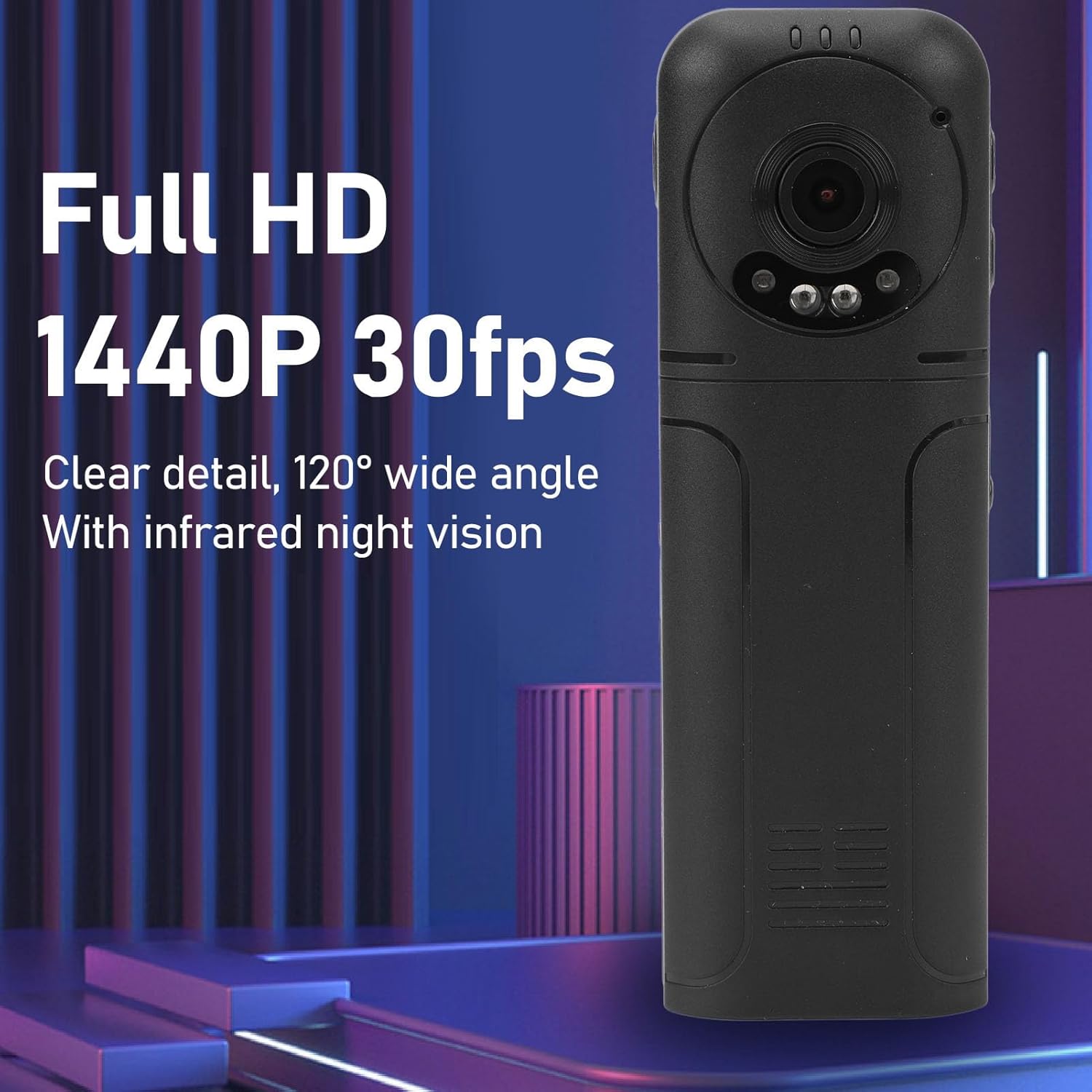
Figure 6: 1440P HD video recording with night vision.
५.३. फोटो काढणे
- फोटो काढण्यासाठी: In standby mode, press the Photo Shooting Button.
4. ऑडिओ रेकॉर्डिंग
- To Start Audio Recording: Press the Sound Key.
- To Stop Audio Recording: Press the Sound Key again.

Figure 7: Audio recording functionality.
5. प्लेबॅक आणि File व्यवस्थापन
The 1.3-inch LCD screen supports live playback, browsing, and pausing of videos, photos, and recordings directly on the device.

Figure 8: 1.3-inch color screen for on-device playback.
- डिव्हाइसवरील प्लेबॅक: Use the Menu, OK, and Pause keys to navigate and play fileस्क्रीनवर एस.
- संगणकाशी कनेक्ट करत आहे: Connect the camera to a computer via the Type-C USB cable to transfer, view, or delete files.
- OTG फंक्शन: If your mobile phone supports OTG, you can connect the camera directly to your phone for playback and file व्यवस्थापन
देखभाल
७.२. साफसफाई
- Use the provided cleaning cloth or a soft, dry cloth to wipe the camera body and lens.
- Do not use liquid cleaners or solvents, as they may damage the device.
2. स्टोरेज
- कॅमेरा थेट सूर्यप्रकाश आणि अति तापमानापासून दूर थंड, कोरड्या जागी ठेवा.
- Remove the memory card if storing for extended periods.
समस्यानिवारण
जर तुम्हाला तुमच्या कॅमेऱ्यात समस्या येत असतील, तर खालील सामान्य समस्या आणि उपाय पहा:
| समस्या | उपाय |
|---|---|
| कॅमेरा चालू होत नाही. | बॅटरी चार्ज झाली आहे याची खात्री करा. पॉवर सोर्सशी कनेक्ट करा आणि पुन्हा प्रयत्न करा. |
| व्हिडिओ/फोटो रेकॉर्ड करू शकत नाही. | Check if a memory card is inserted correctly and has sufficient free space. Format the memory card if necessary (this will erase all data). |
| मेमरी कार्ड ओळखले गेले नाही. | Ensure the memory card is inserted correctly. Try a different compatible memory card. Format the card using the camera's menu or a computer. |
| Poor video/audio quality. | Ensure the lens is clean. Check lighting conditions. For audio, ensure the microphone is not obstructed. |
| डिव्हाइस गोठते किंवा प्रतिसाद देत नाही. | Press and hold the Power Key for 10-15 seconds to force a restart. |
तपशील
Below are the technical specifications for the Cuifati Mini Body Camera (Model CUIFATI2vg0ri8moa):
- आयटम प्रकार: Wearable Camera
- साहित्य: ABS
- रात्रीची दृष्टी: 2pcs Night Vision Light Beads
- व्हिडिओ रिझोल्यूशन: 1440P (Maximum)
- फ्रेम दर: 30FPS
- बॅटरी प्रकार: लिथियम आयन बॅटरी
- बॅटरी क्षमता: ३००० एमएएच (अंगभूत)
- स्टोरेज सहाय्य: जास्तीत जास्त १२८ जीबी मेमरी कार्ड (समाविष्ट नाही)
- चार्जिंग पोर्ट: टाइप-सी
- APP नाव: For RoadCam (if applicable for advanced features)
- मॉडेलचे नाव: CUIFATI2vg0ri8moa
- निर्माता: CUIFATI
हमी आणि समर्थन
For warranty information or technical support, please refer to the documentation provided at the time of purchase or contact Cuifati customer service directly. Keep your purchase receipt as proof of purchase.