
1. परिचय
Thank you for choosing the HUANUO HNESD122B-EU 4-Leg Dual Motor Height Adjustable Standing Desk Frame. This manual provides essential information for the safe assembly, operation, and maintenance of your new desk frame. Please read these instructions carefully before use and retain them for future reference.
2. सुरक्षितता माहिती
- वापरण्यापूर्वी सर्व घटक सुरक्षितपणे बांधलेले असल्याची खात्री करा.
- कमाल वजन क्षमता १५० किलो (३३० पौंड) पेक्षा जास्त करू नका.
- दुखापत टाळण्यासाठी काम करताना मुलांना आणि पाळीव प्राण्यांना डेस्कपासून दूर ठेवा.
- द्रव थेट नियंत्रण पॅनेलवर किंवा विद्युत घटकांजवळ ठेवणे टाळा.
- साफसफाई करण्यापूर्वी किंवा देखभाल करण्यापूर्वी वीज खंडित करा.
- Use only the provided power adapter and components.
- Ensure there is sufficient clearance around the desk during height adjustments to prevent collisions.
3. पॅकेज सामग्री
असेंब्ली सुरू करण्यापूर्वी सर्व भाग उपस्थित आहेत आणि त्यांना नुकसान झालेले नाही याची खात्री करा. जर कोणतेही भाग गहाळ किंवा खराब झाले असतील, तर कृपया ग्राहक समर्थनाशी संपर्क साधा.
- डेस्क लेग्ज (२)
- क्रॉसबार (2)
- बाजूचे कंस (2)
- Digital Memory Control Panel (1)
- पॉवर अॅडॉप्टर आणि केबल (१)
- केबल व्यवस्थापन ट्रे (१)
- Hanging Hooks (2)
- Assembly Hardware (screws, Allen wrenches)
- वापरकर्ता मॅन्युअल (हा दस्तऐवज)

This image displays all the primary components included with the HUANUO HNESD122B-EU standing desk frame, ready for assembly. It features the robust steel legs, adjustable crossbars, the digital control panel with memory presets, and accessories for cable organization.
4. तपशील
| वैशिष्ट्य | तपशील |
|---|---|
| मॉडेल क्रमांक | HNESD122B-EU |
| उंची श्रेणी | ७० सेमी - १२५ सेमी (२७.५ इंच - ४९.२ इंच) |
| वजन क्षमता | 100 किलो (220 पौंड) |
| मोटर प्रकार | दुहेरी मोटर |
| आवाज पातळी | ≤ 55 dB |
| सुसंगत डेस्कटॉप रुंदी | ७० सेमी - १२५ सेमी (२७.५ इंच - ४९.२ इंच) |
| Compatible Desktop Depth | ७० सेमी - १२५ सेमी (२७.५ इंच - ४९.२ इंच) |
| साहित्य | Automotive-grade Cold-rolled Steel |
| Frame Dimensions (L x W) | 125.9 सेमी x 55.2 सेमी (49.6 इंच x 21.7 इंच) |

This diagram provides the precise dimensions of the HUANUO standing desk frame and indicates the range of compatible desktop sizes. It supports desktops with widths from 126cm to 180cm and depths from 60cm to 80cm, offering versatility for various workspace setups.

This image illustrates the exceptional stability of the HUANUO 4-leg standing desk frame, shown supporting a substantial 100kg load. The robust steel construction ensures reliable support for heavy equipment.
४. सेटअप आणि असेंब्ली सूचना
The HUANUO HNESD122B-EU desk frame is designed for straightforward assembly. All accessories are labeled, and a detailed user manual is included to guide you through the process.
- भाग अनपॅक करा आणि ओळखा: Carefully remove all components from the packaging. Refer to the 'Package Contents' section and the included assembly guide to identify each part.
- फ्रेम एकत्र करा: Follow the step-by-step instructions in the provided assembly manual to connect the legs, crossbars, and side brackets. Ensure all screws are tightened securely.
- Attach Desktop (Not Included): Place your chosen desktop (compatible dimensions: 126-180 cm width, 60-80 cm depth) onto the assembled frame. Secure it using appropriate screws. Pre-drilled holes on the desktop are recommended, or carefully drill new pilot holes if necessary.
- Connect Control Panel and Power: Mount the digital memory control panel to the underside of the desktop in an accessible location. Connect the motor cables and power cable to the control box, then plug the power adapter into a wall outlet.
- केबल्स व्यवस्थित करा: Utilize the provided cable management tray and hanging hooks to neatly route and secure cables, keeping your workspace tidy.

एक माजीample of the fully assembled HUANUO standing desk frame with a desktop, showcasing its integration into a functional workspace.
6. ऑपरेटिंग सूचना
The HUANUO HNESD122B-EU features an intuitive digital memory control panel for easy height adjustment and preset management.
४.१. उंचीचे मूलभूत समायोजन
- दाबा आणि धरून ठेवा वर (▲) तुमच्या इच्छित उभे उंचीवर डेस्क वाढवण्यासाठी बटण.
- दाबा आणि धरून ठेवा खाली (▼) तुमच्या इच्छित बसण्याच्या उंचीवर डेस्क खाली करण्यासाठी बटण.
- Release the button once the desired height is reached. The LED display will show the current height.
४.२. मेमरी प्रीसेट सेट करणे
The control panel allows you to save up to four preferred height settings for quick recall.
- वर/खाली बटणे वापरून डेस्क तुमच्या इच्छित उंचीवर समायोजित करा.
- दाबा "एम" button (or equivalent memory set button, if present, otherwise proceed to step 3).
- क्रमांकित प्रीसेट बटणांपैकी एक ताबडतोब दाबा (1, 2, 3, किंवा 4). The display will show "S-" followed by the number, indicating the height has been saved.
6.3. Recalling Memory Presets
To move the desk to a saved height:
- Simply press the corresponding numbered preset button (1, 2, 3, किंवा 4). डेस्क आपोआप जतन केलेल्या उंचीवर जाईल.

एक क्लोज-अप view of the intelligent control panel for the HUANUO standing desk. It features an LED display for current height, intuitive up and down adjustment buttons, and four programmable memory presets for quick height recall.

This image highlights the user-friendly control panel and the practical cable management solutions provided with the HUANUO desk frame, including a cable tray and two hooks for accessories like headphones.
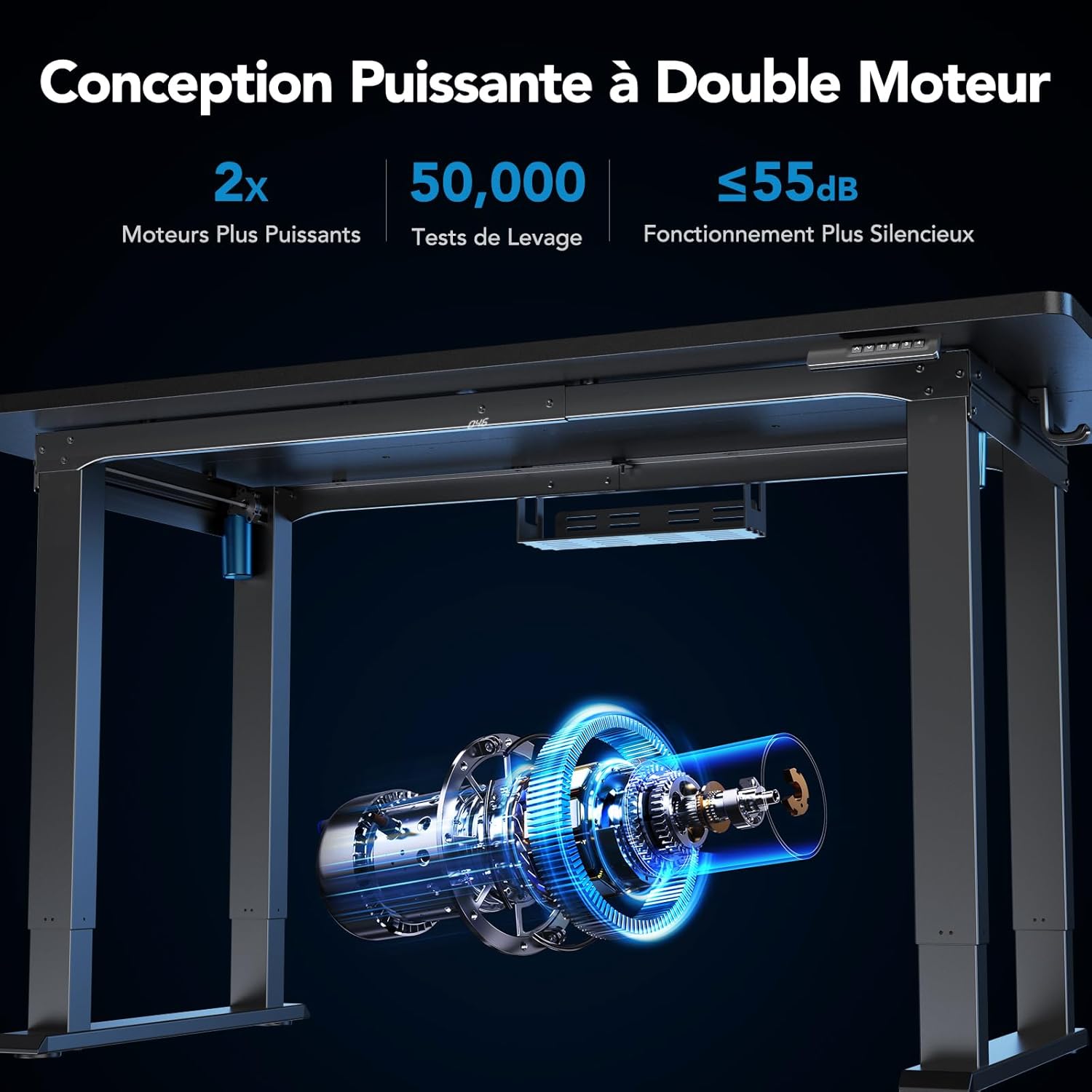
तपशीलवार आकृती दर्शविते कीasing the advanced dual motor system integrated into the HUANUO standing desk frame. This system provides smooth, quiet height adjustments (under 55dB) and has been tested for over 50,000 cycles for long-lasting performance.

This image presents the HUANUO standing desk frame at its lowest (68.7cm) and highest (116.7cm) adjustable positions, illustrating the flexible height range for comfortable sitting and standing postures.
7. देखभाल
- स्वच्छता: डेस्क फ्रेम सॉफ्टने पुसून टाका, damp कापड. फिनिश खराब करू शकणारे अपघर्षक क्लीनर किंवा सॉल्व्हेंट्स टाळा.
- नियमित तपासणी: Periodically inspect all screws and connections to ensure they remain tight. Retighten if necessary.
- केबल व्यवस्थापनः Ensure cables are neatly organized and not pinched or tangled, which could affect desk operation or cause damage.
- स्नेहन: The motor mechanisms are generally maintenance-free. Do not attempt to lubricate internal components unless specifically instructed by HUANUO support.
8. समस्या निवारण
If you encounter any issues with your HUANUO standing desk frame, please refer to the following common troubleshooting steps:
| समस्या | संभाव्य कारण | उपाय |
|---|---|---|
| डेस्क हलत नाही. | Power cable disconnected, motor cable loose, overload, or system error. | Check all power and motor connections. Reduce weight on the desk. Unplug and replug the power cable to reset the system. |
| असमान उंची समायोजन | Obstruction, uneven load, or calibration issue. | Ensure no obstructions are present. Distribute weight evenly. Perform a system reset (refer to specific instructions in the full manual or contact support). |
| ऑपरेशन दरम्यान असामान्य आवाज | Loose components, obstruction, or motor issue. | Check for loose screws and tighten them. Remove any obstructions. If noise persists, contact customer support. |
| Control panel display error | System error or connection issue. | Unplug and replug the power cable. If the error code persists, consult the full manual for specific error code meanings or contact support. |
If these steps do not resolve the issue, please contact HUANUO customer support for further assistance.
9. हमी आणि समर्थन
For warranty information, technical support, or replacement parts, please contact HUANUO customer service. Details can typically be found on the product packaging or the official HUANUO website. Please have your model number (HNESD122B-EU) and purchase information ready when contacting support.