
डोप्सप्ले DR1563
डोप्सप्ले १०.५" पोर्टेबल मॉनिटर वापरकर्ता मॅन्युअल
मॉडेल: DR1563
ब्रँड: डोप्सप्ले
परिचय
The Dopesplay 15.6-inch Portable Monitor is designed to enhance your productivity and entertainment on the go. Featuring a high-resolution, clear display in a compact and lightweight form factor, it's an ideal companion for laptops, gaming consoles, and other compatible devices. Its easy setup, adjustable stand, and anti-glare matte screen make it versatile for various environments, from travel to home office setups. The monitor operates efficiently with low power consumption, capable of being powered by a single Type-C cable from a compatible phone or power bank.
प्रमुख वैशिष्ट्ये
- 15.6" FHD 1080P IPS Display: Experience crisp, vibrant visuals with excellent color accuracy and wide viewकोन.
- HDR समर्थन: Enjoy enhanced contrast and brilliant colors for an immersive viewअनुभव.
- प्लग-अँड-प्ले कनेक्टिव्हिटी: Simple setup with USB-C and Mini HDMI inputs.
- Adjustable Integrated Stand: Provides stable support and allows for comfortable viewकोन.
- Matte Screen Surface: Reduces glare and reflections for improved visibility.
- Ultra-Slim and Lightweight Design: Easy to carry, fitting conveniently into laptop bags.
- कमी उर्जा वापर: Can be powered by a 5V USB source, including compatible smartphones.
- अंगभूत स्पीकर: Integrated audio for convenience.
- फ्रीसिंक तंत्रज्ञान: Reduces input lag, stuttering, and screen tearing for smoother visuals.
- VESA सुसंगत: Allows for flexible mounting options.
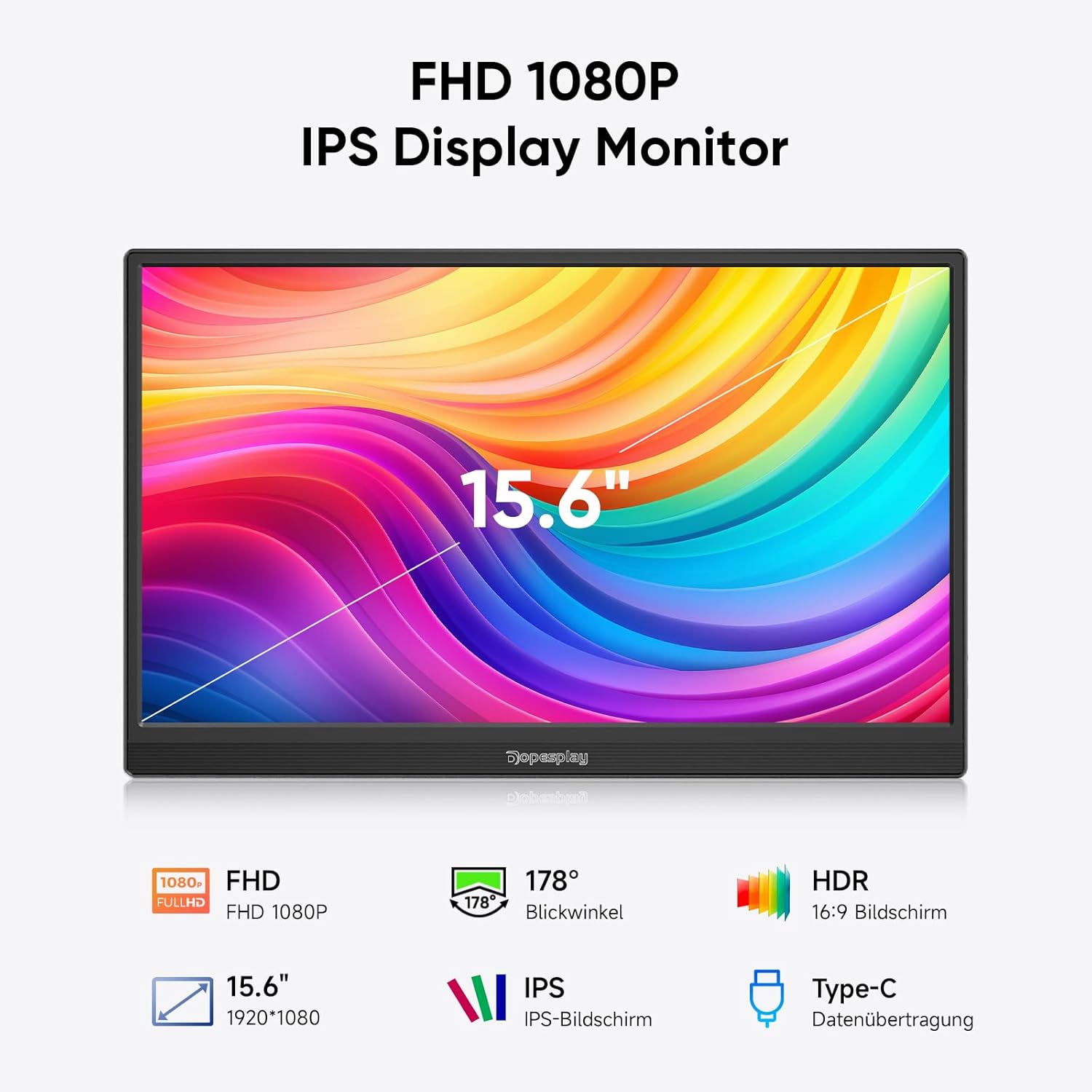
Figure 1: Key features of the Dopesplay 15.6" Portable Monitor.
सेटअप
आपले डिव्हाइस कनेक्ट करत आहे
The Dopesplay portable monitor offers flexible connectivity options to suit various devices. Ensure your device's USB-C port supports full functionality (DisplayPort Alternate Mode and Power Delivery) for single-cable connection.
Option 1: Single USB-C Cable Connection (for compatible devices)
If your laptop or device has a full-featured USB-C port, you can connect the monitor using a single USB-C to USB-C cable. This cable will transmit both video signal and power to the monitor.

Figure 2: Connection options for the portable monitor. The top diagram illustrates a single USB-C connection, while the bottom shows HDMI and USB-A connections with external power.
Option 2: HDMI and USB-A Connection (for devices without full-featured USB-C)
For devices that do not support video output over USB-C or require separate power, use the Mini HDMI to HDMI cable for video signal and a USB-A to USB-C cable for power. An external power adapter (5V/3A or higher) may be required, especially if adjusting brightness above 80% or if the connected device cannot supply sufficient power.
Monitor Ports and Buttons
Familiarize yourself with the ports and buttons on the side of the monitor for optimal use.
- मिनी एचडीएमआय इनपुट: HDMI आउटपुट असलेल्या उपकरणांमधून व्हिडिओ इनपुटसाठी.
- USB-C Input (x2): For video, data, and power input from compatible devices.
- हेडफोन जॅक: बाह्य ऑडिओ उपकरणे जोडण्यासाठी.
- बटण फिरवा: To adjust screen orientation.
- Power On/Off / Back Button: Controls power and navigates menus.
Note: If you wish to adjust the brightness above 80%, an external power supply of 5V/3A or higher is required.
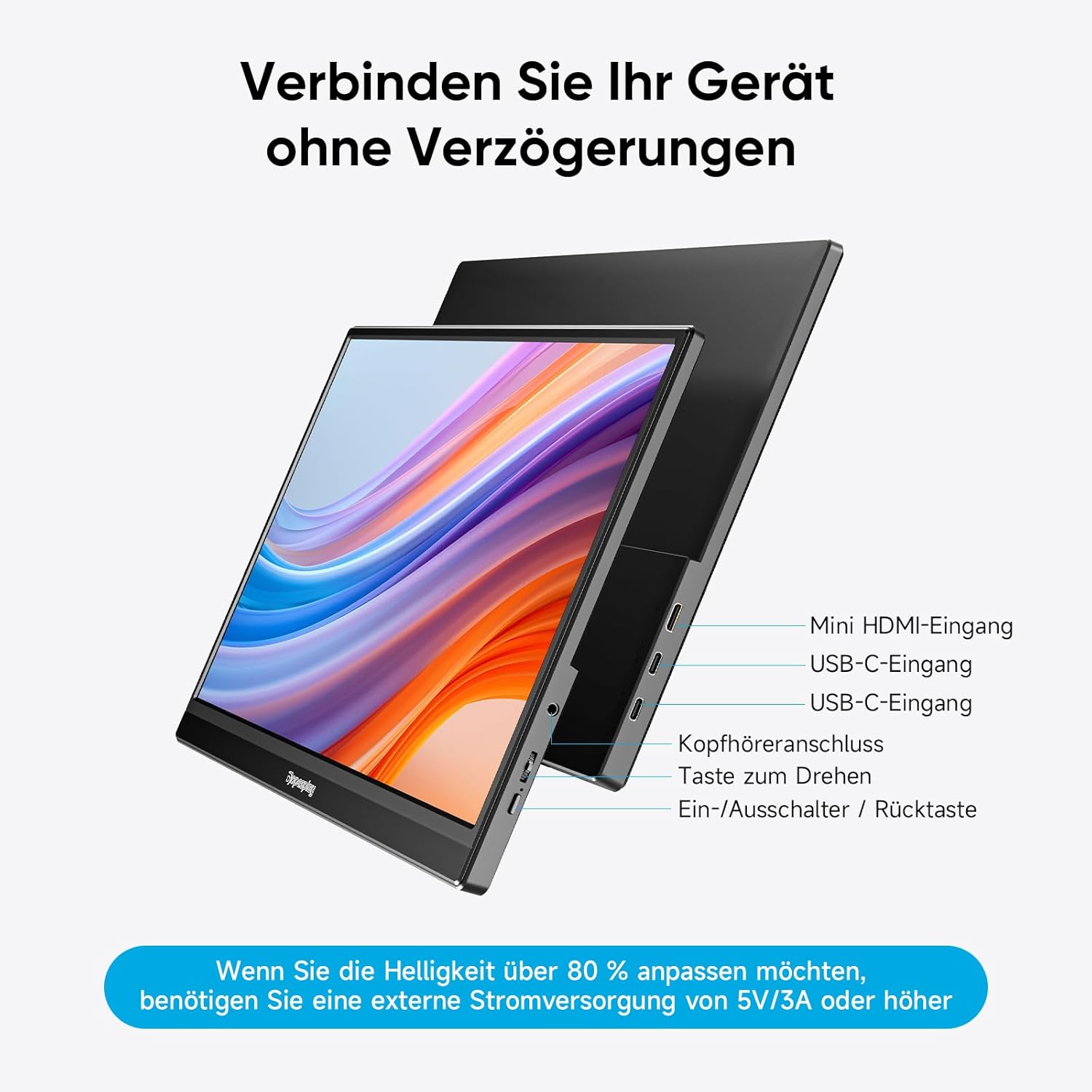
आकृती 3: ओव्हरview of monitor ports and controls.
ऑपरेटिंग सूचना
Display Modes (Mac & Windows)
The monitor supports both duplicate and extended display modes, allowing you to mirror your primary screen or expand your desktop workspace.
- डुप्लिकेट डिस्प्ले: Shows the same content on both your primary device and the portable monitor.
- विस्तारित प्रदर्शन: Expands your desktop across both screens, providing more space for multitasking.

Figure 4: Display modes for Mac and Windows devices.
Gaming Console Connection (e.g., Nintendo Switch)
Connect your gaming console directly to the monitor using a single USB-C cable (if supported by the console) or HDMI for video and a USB-C cable for power. The monitor can power both itself and the console simultaneously, eliminating the need for a separate dock.
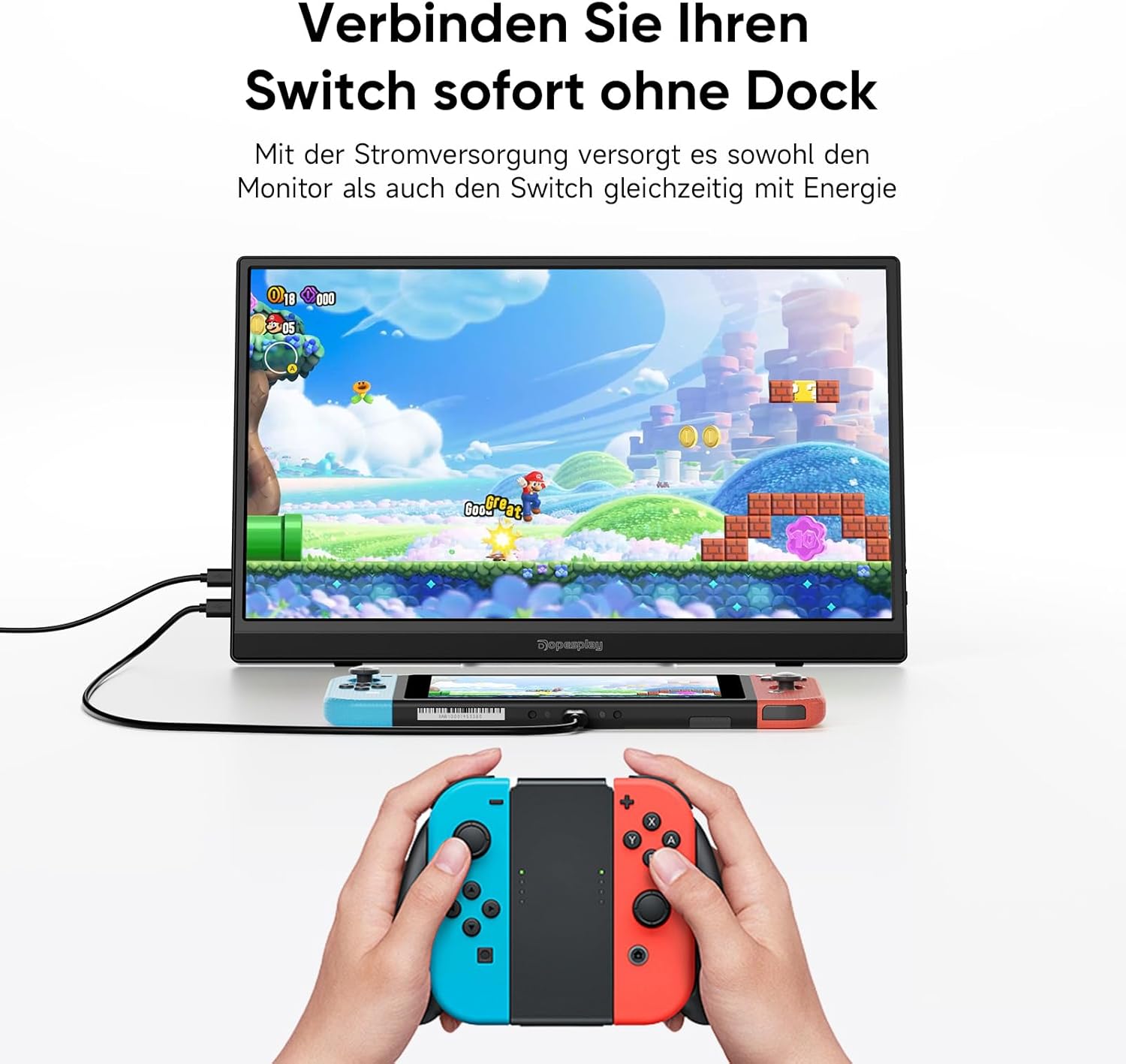
Figure 5: Connecting a Nintendo Switch to the portable monitor.
समायोज्य स्टँड
The integrated stand allows you to adjust the monitor to your preferred viewing angle for maximum comfort and ergonomics.

Figure 6: Adjustable stand for optimal viewing
VESA सुसंगतता
The monitor is VESA compatible, allowing it to be easily mounted on compatible monitor arms or wall mounts in both landscape and portrait orientations.
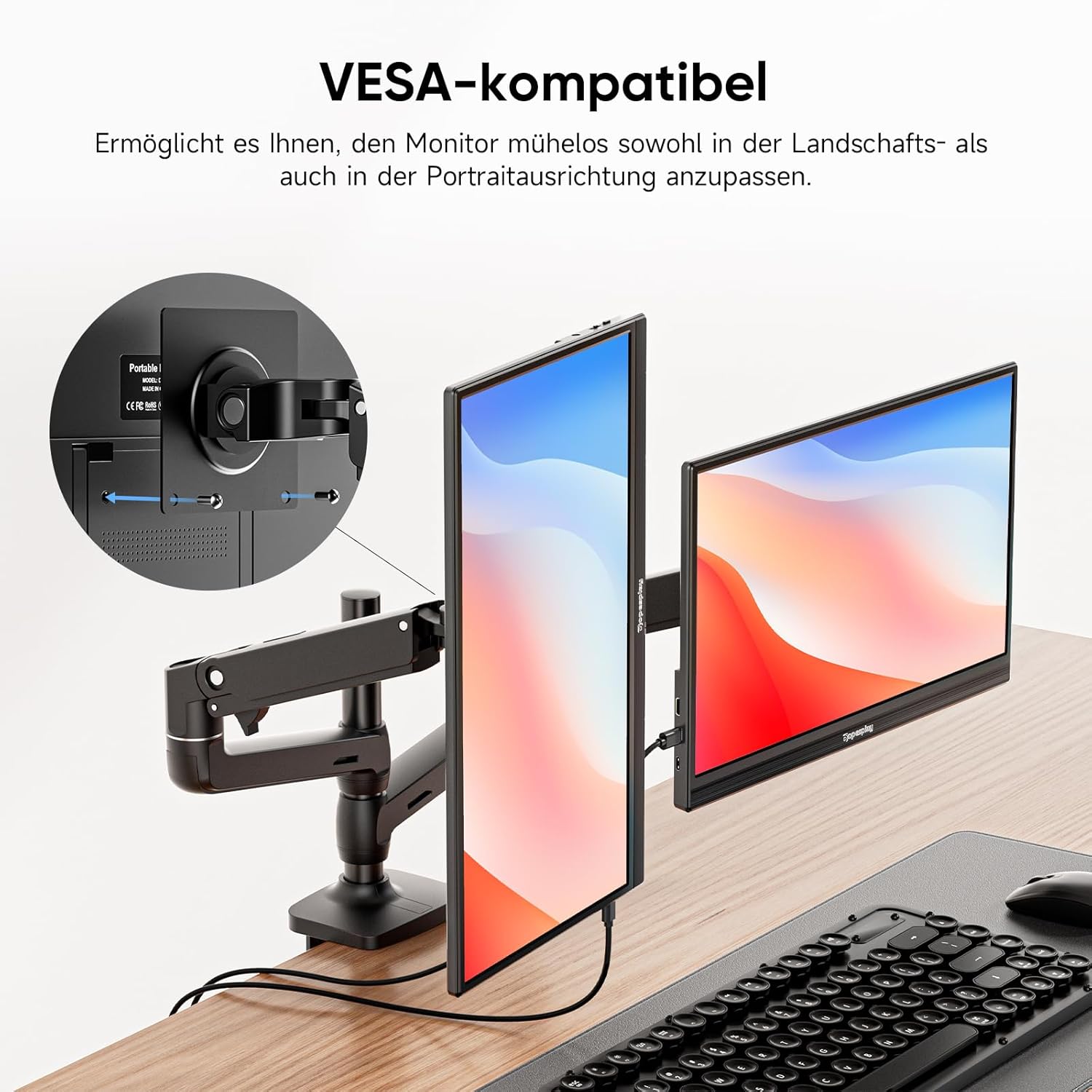
Figure 7: VESA mounting options.
फ्रीसिंक तंत्रज्ञान
For a smoother visual experience, especially during gaming or fast-paced video playback, the monitor features FreeSync technology. This helps to reduce input lag, stuttering, and screen tearing.

Figure 8: FreeSync technology in action.
देखभाल
To ensure the longevity and optimal performance of your Dopesplay portable monitor, follow these maintenance guidelines:
- स्वच्छता: Gently wipe the screen with a soft, lint-free cloth. For stubborn smudges, use a screen-specific cleaning solution applied to the cloth, not directly to the screen. Avoid abrasive cleaners or solvents.
- स्टोरेज: When not in use, store the monitor in a cool, dry place, preferably in its original packaging or a protective sleeve to prevent dust accumulation and scratches.
- हाताळणी: मॉनिटरला नेहमी त्याच्या कडांजवळ धरा. स्क्रीनवर दाब देणे टाळा.
- शक्ती: Disconnect the power cable during electrical storms or when unused for extended periods.
समस्यानिवारण
If you encounter issues with your Dopesplay portable monitor, refer to the following common troubleshooting steps:
| समस्या | संभाव्य कारण | उपाय |
|---|---|---|
| No display/No signal | Incorrect cable connection; Insufficient power; Device not outputting signal. |
|
| स्क्रीन चमकणे किंवा अस्थिर प्रतिमा | Loose cable connection; Power fluctuations; Incompatible resolution/refresh rate. |
|
| स्पीकर्समधून आवाज येत नाही | आवाज खूप कमी आहे; म्यूट केले आहे; डिव्हाइसवर चुकीचा ऑडिओ आउटपुट निवडला आहे. |
|
| Brightness cannot be adjusted above 80% | अपुरा वीज पुरवठा. |
|
तपशील
| वैशिष्ट्य | तपशील |
|---|---|
| ब्रँड | डोपप्ले |
| मॉडेल क्रमांक | DR1563 |
| स्क्रीन आकार | 15.6 इंच |
| ठराव | FHD १०८०p (१९२० x १०८०) |
| गुणोत्तर | १६:१० |
| स्क्रीन पृष्ठभाग | मॅट |
| कॉन्ट्रास्ट रेशो | १६:१० |
| प्रतिसाद वेळ | 3 मिलीसेकंद |
| रीफ्रेश दर | 60 Hz |
| जोडण्या | 2x USB Type-C, 1x Mini HDMI |
| विशेष वैशिष्ट्ये | Portable, Built-in Speaker, Ultra Slim, HDR, FreeSync, VESA Compatible |
| रंग | काळा |
हमी आणि समर्थन
For warranty information and technical support, please refer to the documentation included with your product or visit the official Dopesplay webसाइट. वॉरंटी दाव्यांसाठी खरेदीचा पुरावा म्हणून तुमची खरेदी पावती ठेवा.
नियामक माहिती
This product complies with relevant European Union regulations. For detailed product data and energy efficiency information, please refer to the EPREL database:

Figure 9: Product Data Sheet (EPREL).

आकृती १०: ऊर्जा कार्यक्षमता लेबल.
Ask a question about this manual
Ask about setup, troubleshooting, compatibility, parts, safety, or missing instructions. Manuals+ will review the question and use this page’s manual context to help answer it.