
परिचय
Thank you for choosing the Doubc Q13 Wireless Bluetooth 5.3 Earbuds. These earbuds are designed to provide a high-quality audio experience with advanced features such as HiFi stereo sound, ENC noise-cancelling microphones, and IPX7 waterproofing. This manual will guide you through the setup, operation, and maintenance of your new earbuds.

Image: The Doubc Q13 Wireless Bluetooth 5.3 Earbuds in their open charging case, displaying the digital battery indicator.
पॅकेज सामग्री
कृपया खालील वस्तूंसाठी पॅकेज तपासा:
- Doubc Q13 Wireless Earbuds (Left and Right)
- चार्जिंग केस
- यूएसबी टाइप-सी चार्जिंग केबल
- वापरकर्ता मॅन्युअल
- Eartips (various sizes, typically S/M/L)
सेटअप
१. सुरुवातीचे चार्जिंग
Before first use, fully charge the earbuds and the charging case. Connect the provided USB Type-C cable to the charging port on the case and a power source. The LED display on the charging case will show the battery percentage. पूर्ण चार्ज होण्यासाठी अंदाजे १.५ तास लागतात.
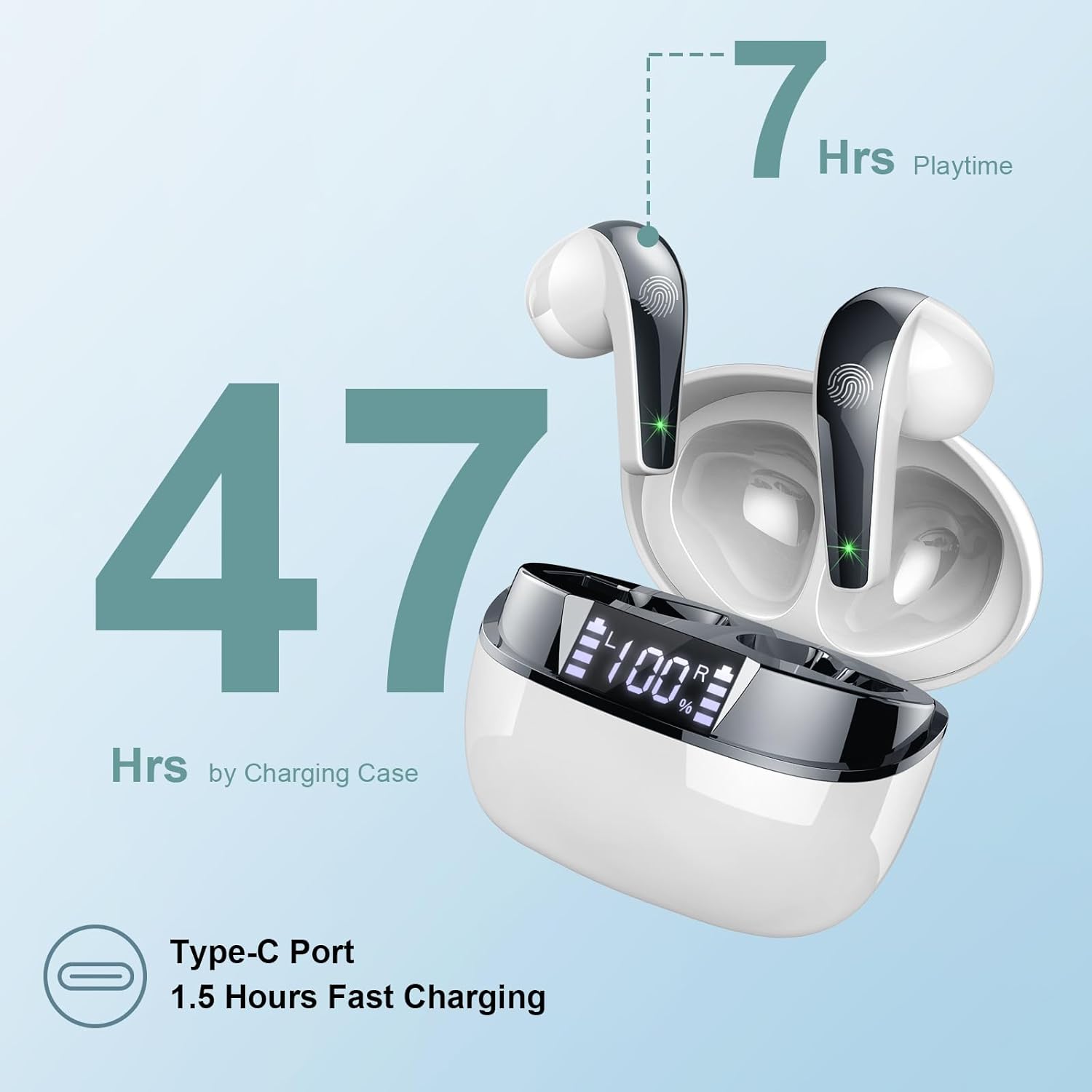
Image: The charging case highlighting 47 hours of total playtime and the Type-C charging port.

Image: A visual representation of the earbuds and charging case, emphasizing 7 hours of music time per charge and 47 hours total with the charging case, along with the dual LED digital display.
२. डिव्हाइससोबत पेअरिंग
- इयरबड चार्ज झाले आहेत याची खात्री करा.
- चार्जिंग केस उघडा. इअरबड्स आपोआप पेअरिंग मोडमध्ये येतील.
- तुमच्या डिव्हाइसवर (स्मार्टफोन, टॅबलेट, संगणक), ब्लूटूथ सेटिंग्जवर जा.
- साठी शोधा available devices and select "Q13" from the list.
- एकदा कनेक्ट झाल्यावर, तुम्हाला एक पुष्टीकरण टोन ऐकू येईल आणि इअरबड्स वापरण्यासाठी तयार होतील.
The Doubc Q13 earbuds feature one-step pairing and wide compatibility with iOS, Android, and Windows devices.

Image: The earbuds in their charging case next to a smartphone displaying Bluetooth settings, showing "Q13" as a discoverable device, illustrating the one-step pairing process.
ऑपरेटिंग सूचना
नियंत्रणांना स्पर्श करा
The Doubc Q13 earbuds feature smart touch controls for easy management of music and calls. The touch sensitive area is located on the outer surface of each earbud.

Image: A user wearing an earbud, with icons indicating various touch control functions such as volume adjustment, call management, music playback, and voice assistant activation.
| कृती | कार्य |
|---|---|
| सिंगल टॅप (L/R) | संगीत प्ले करा/थांबवा, कॉल उत्तर द्या/समाप्त करा |
| दोनदा टॅप करा (उजवीकडे) | पुढील ट्रॅक |
| दोनदा टॅप करा (डावीकडे) | मागील ट्रॅक |
| तिहेरी टॅप (उजवीकडे) | आवाज वाढवा |
| तिहेरी टॅप (डावीकडे) | आवाज कमी करा |
| दीर्घकाळ दाबा (२से) (L/R) | कॉल रिजेक्ट करा, व्हॉइस असिस्टंट सक्रिय करा |
पॉवर चालू/बंद
- पॉवर चालू: चार्जिंग केस उघडा आणि इअरबड्स आपोआप चालू होतील. पर्यायी म्हणून, दोन्ही इअरबड्सवरील टच एरिया ३ सेकंदांसाठी दाबून ठेवा.
- वीज बंद: Place the earbuds back into the charging case and close the lid. They will automatically power off and begin charging. Alternatively, long-press the touch area on both earbuds for 5 seconds.
देखभाल
साफसफाई
To ensure optimal performance and charging, regularly clean the charging contacts on both the earbuds and the charging case. Use a cotton swab lightly dampened with alcohol to gently wipe the contacts.

Image: A diagram illustrating the location of charging contacts on the earbuds and inside the charging case, with instructions to clean them if charging issues occur.
पाणी प्रतिकार
The earbuds are IPX7 waterproof, meaning they can withstand immersion in water up to 1 meter for 30 minutes. This makes them suitable for workouts and light rain. However, the charging case is not waterproof. Do not expose the charging case to water.

Image: Two earbuds covered in water droplets, visually representing their IPX7 waterproof capability.
स्टोरेज
वापरात नसताना इअरबड्स त्यांच्या चार्जिंग केसमध्ये ठेवा जेणेकरून त्यांचे संरक्षण होईल आणि ते चार्ज राहतील. अति तापमान आणि थेट सूर्यप्रकाश टाळा.
समस्यानिवारण
इअरबड चार्ज होत नाहीत
- चार्जिंग केबल केस आणि पॉवर सोर्स दोन्हीशी सुरक्षितपणे जोडलेली आहे याची खात्री करा.
- Verify that the charging contacts on both the earbuds and the case are clean and free of debris. Use alcohol to clean them if necessary.
- Check if the charging case itself has sufficient battery charge.
Only One Earbud Has Sound
- दोन्ही इअरबड्स परत चार्जिंग केसमध्ये ठेवा आणि झाकण बंद करा.
- On your phone's Bluetooth settings, manually "forget" or "unpair" the "Q13" device.
- After approximately 10 seconds, open the charging case. The earbuds should automatically re-enter pairing mode.
- Reconnect the earbuds with your phone via Bluetooth.
Image: A diagram illustrating solutions for common issues: cleaning charging contacts for charging problems and re-pairing steps for when only one earbud produces sound.
इअरबड्स कनेक्ट होत नाहीत
- तुमच्या डिव्हाइसवर ब्लूटूथ सक्षम असल्याची खात्री करा.
- Make sure the earbuds are within the effective range (typically 10 meters) of your device.
- Turn off and then turn on your device's Bluetooth.
- Repeat the pairing process as described in the "Setup" section.
तपशील
| वैशिष्ट्य | तपशील |
|---|---|
| मॉडेल क्रमांक | प्रश्न३० |
| ब्लूटूथ आवृत्ती | 5.3 |
| ऑडिओ ड्रायव्हर | 13mm Graphene Audio Driver |
| वारंवारता श्रेणी | 20Hz - 20,000Hz |
| खेळण्याचा वेळ (इअरबड्स) | ५ तासांपर्यंत (एकदा चार्ज केल्यानंतर) |
| एकूण खेळण्याचा वेळ (केससह) | 47 तासांपर्यंत |
| चार्जिंग पोर्ट | यूएसबी टाइप-सी |
| चार्जिंग वेळ | अंदाजे २ तास (केस) |
| जलरोधक रेटिंग | IPX7 (फक्त इअरबड्स) |
| मायक्रोफोन | 4 ENC Noise Cancelling Microphones |
| एरबड वजन | अंदाजे ४.७ ग्रॅम (प्रत्येकी) |
| चार्जिंग केस वजन | अंदाजे 29 ग्रॅम |
| उत्पादन परिमाणे | २.८३ x २.०१ x १ इंच (चार्जिंग केस) |

प्रतिमा: सविस्तर view of the 13mm Graphene Audio Driver, emphasizing HiFi Stereo Sound and built-in microphones with noise reduction for HD calling.

Image: A diagram illustrating the benefits of Advanced Bluetooth 5.3 technology, including faster transfer, lower power consumption, more stable connection, and lower latency.

Image: A visual showing the comfortable and lightweight design of the earbuds and charging case, including their dimensions and individual weights (3g per earbud, 29g for the case).
हमी आणि समर्थन
The Doubc Q13 Wireless Bluetooth 5.3 Earbuds come with a 3 वर्षाची वॉरंटी, उत्पादनाची गुणवत्ता आणि कामगिरीबाबत मनःशांती सुनिश्चित करणे.
For technical support, warranty claims, or any inquiries, please refer to the contact information provided on the product packaging or the official Doubc website. Specific support contact details are not available in this manual.
महत्वाची सुरक्षितता माहिती
- उत्पादन वेगळे करू नका किंवा त्यात बदल करू नका.
- अति तापमान आणि थेट सूर्यप्रकाशापासून दूर रहा.
- चार्जिंग केस पाण्यासमोर आणणे टाळा.
- फक्त दिलेली चार्जिंग केबल किंवा प्रमाणित समतुल्य केबल वापरा.
- स्थानिक नियमांनुसार उत्पादनाची जबाबदारीने विल्हेवाट लावा.