
Next YE-65GFSG8-QLED
Next YE-65GFSG8-QLED 65-inch UHD 4K QLED Google TV User Manual
Model: YE-65GFSG8-QLED
1. परिचय
खरेदी केल्याबद्दल धन्यवाद.asing the Next YE-65GFSG8-QLED 65-inch UHD 4K QLED Google TV. This manual provides essential information for setting up, operating, and maintaining your new television. Please read it thoroughly before use and keep it for future reference.

प्रतिमा 1.1: समोर view of the Next YE-65GFSG8-QLED 65-inch QLED Google TV.
2. सुरक्षितता माहिती
Please observe the following safety precautions to prevent damage and ensure safe operation:
- टीव्हीला पाऊस किंवा ओलावा दाखवू नका.
- वायुवीजन उघडण्यास अडथळा आणू नका.
- विद्युत जोडणीसाठी योग्य ग्राउंडिंगची खात्री करा.
- टीव्ही थेट सूर्यप्रकाश, उष्णतेचे स्रोत आणि उघड्या ज्वालांपासून दूर ठेवा.
- फक्त टीव्हीसोबत दिलेला पॉवर कॉर्ड वापरा.
- स्वतः टीव्हीची सेवा देण्याचा प्रयत्न करू नका. सर्व सेवा पात्र कर्मचाऱ्यांना द्या.
- टीव्ही एका स्थिर, समतल पृष्ठभागावर ठेवा किंवा भिंतीवर सुरक्षितपणे माउंट करा.
3. पॅकेज सामग्री
पॅकेजमध्ये सर्व वस्तू आहेत का ते तपासा:
- Next YE-65GFSG8-QLED 65-inch UHD 4K QLED Google TV
- रिमोट कंट्रोल
- पॉवर कॉर्ड
- वापरकर्ता मॅन्युअल (हा दस्तऐवज)
- टीव्ही स्टँड घटक (लागू असल्यास)
- Screws for Stand Assembly (if applicable)
4. सेटअप
३. स्टँड असेंब्ली (पर्यायी)
जर तुम्ही टीव्ही भिंतीवर लावत नसाल, तर स्टँड खालीलप्रमाणे जोडा:
- स्क्रीनचे नुकसान टाळण्यासाठी टीव्ही काळजीपूर्वक मऊ, स्वच्छ पृष्ठभागावर खाली ठेवा.
- टीव्हीच्या तळाशी असलेल्या माउंटिंग होलसह स्टँड घटक संरेखित करा.
- दिलेल्या स्क्रू वापरून स्टँड सुरक्षित करा. जास्त घट्ट करू नका.
- टीव्हीला स्थिर पृष्ठभागावर काळजीपूर्वक त्याच्या सरळ स्थितीत उचला.
4.2. कनेक्टिंग डिव्हाइसेस
तुमची बाह्य उपकरणे टीव्हीच्या मागील बाजूस असलेल्या योग्य पोर्टशी जोडा.
प्रतिमा 4.1: मागील view of the TV with connection ports labeled.
- HDMI (3 ports, one with ARC): Connect Blu-ray players, game consoles, set-top boxes, etc. Use the HDMI (ARC) port for audio return channel functionality with compatible sound systems.
- USB (2 पोर्ट): मीडिया प्लेबॅक किंवा सॉफ्टवेअर अपडेटसाठी USB स्टोरेज डिव्हाइस कनेक्ट करा.
- DVB-S / DVB-T (TV 1, TV 2): Connect satellite (DVB-S) or terrestrial (DVB-T) antenna cables for broadcast TV reception.
- CI Module: Insert a Conditional Access Module (CAM) for encrypted digital TV services.
- Mini AV-IN: Connect older devices using an AV adapter cable (not always included).
- ऑप्टिकल आउट: Connect to a soundbar or audio receiver for digital audio output.
- इथरनेट: वायर्ड इंटरनेट कनेक्शनसाठी इथरनेट केबल कनेक्ट करा.
4.3. वीज जोडणी
पॉवर कॉर्ड टीव्हीच्या पॉवर इनपुटमध्ये प्लग करा, नंतर भिंतीवरील आउटलेटमध्ये. टीव्ही स्टँडबाय मोडमध्ये जाईल.
5. ऑपरेटिंग सूचना
५.५. पहिल्यांदाच सेटअप
When you power on the TV for the first time, follow the on-screen instructions to:
- तुमची भाषा आणि प्रदेश निवडा.
- Connect to a Wi-Fi network or use the wired Ethernet connection.
- Sign in with your Google account to access Google TV features.
- Scan for available TV channels (if using antenna/satellite).

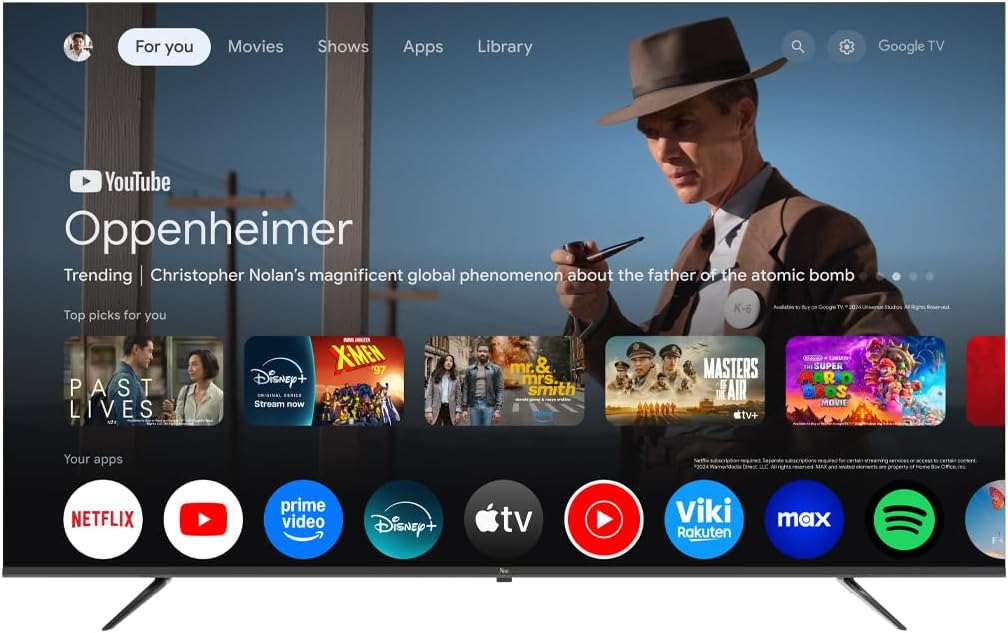
Image 5.1: Google TV interface on the Next QLED TV.
६. गुगल टीव्ही वैशिष्ट्ये
Your TV runs on Google TV, providing access to a wide range of content and smart features:
- वैयक्तिकृत शिफारसी: Get suggestions based on your viewइतिहास.
- आवाज नियंत्रण: Use the built-in Google Assistant via the remote control to search for content, control smart home devices, and more.
- ॲप प्रवेश: Download and stream from popular services like YouTube, Netflix, Disney+, and more via the Google Play Store.
- Chromecast अंगभूत: तुमच्या सुसंगत मोबाइल डिव्हाइसवरून थेट टीव्हीवर सामग्री कास्ट करा.
5.3. QLED Display Technology
The QLED display technology in your TV offers enhanced picture quality:
- दोलायमान रंग: Quantum Dot technology produces a wider color gamut and higher color saturation.
- उच्च चमक: Experience brighter images with improved contrast.
- HDR समर्थन: High Dynamic Range (HDR) content delivers greater detail in both bright and dark scenes.

Image 5.2: Visual representation of QLED technology's enhanced color saturation.

Image 5.3: Visual representation of HDR technology's improved dynamic range.
5.4. रिमोट कंट्रोल
The included remote control allows you to navigate the TV's interface, adjust settings, and access smart features. Refer to the remote control diagram (if available in the physical manual) for specific button functions.
5.5. उत्पादन संपलेview व्हिडिओ
Watch this video for a brief overview of the Next QLED Google TV's key features, including QLED technology, Ultra HD quality, Google TV integration, and frameless design.
व्हिडिओ १: संपलेview of Next QLED Google TV features.
6. देखभाल
तुमच्या टीव्हीचे दीर्घायुष्य आणि इष्टतम कामगिरी सुनिश्चित करण्यासाठी:
- स्क्रीन साफ करणे: मऊ, लिंट-फ्री कापडाने स्क्रीन हळूवारपणे पुसून टाका. हट्टी डागांसाठी, थेट स्क्रीनवर न लावता कापडावर लावलेले स्क्रीन-विशिष्ट क्लिनिंग सोल्यूशन वापरा.
- कॅबिनेट साफ करणे: टीव्ही कॅबिनेट पुसण्यासाठी मऊ, कोरडे कापड वापरा. अपघर्षक क्लीनर किंवा सॉल्व्हेंट्स वापरू नका.
- वायुवीजन: जास्त गरम होण्यापासून रोखण्यासाठी वायुवीजन उघड्या धूळ आणि अडथळ्यांपासून मुक्त असल्याची खात्री करा.
- वीज बंद: Disconnect the TV from the power outlet during electrical storms or when it will be unused for extended periods.
7. समस्या निवारण
तुमच्या टीव्हीमध्ये समस्या येत असल्यास, खालील सामान्य उपायांचा संदर्भ घ्या:
| समस्या | संभाव्य उपाय |
|---|---|
| शक्ती नाही | Check if the power cord is securely connected to both the TV and the wall outlet. Ensure the outlet is functional. |
| चित्र नाही, पण आवाज आहे. | योग्य इनपुट स्रोत निवडला आहे का ते तपासा. बाह्य उपकरणांशी केबल कनेक्शन तपासा. |
| आवाज नाही, पण चित्र आहे. | Check the volume level and mute status. Ensure audio cables are correctly connected. Check TV audio output settings. |
| रिमोट कंट्रोल काम करत नाही | बॅटरी बदला. रिमोट आणि टीव्हीच्या आयआर सेन्सरमध्ये कोणतेही अडथळे नाहीत याची खात्री करा. |
| खराब चित्राची गुणवत्ता | Check antenna/cable connections. Adjust picture settings (brightness, contrast, sharpness). Ensure the source content is high quality. |
| Wi-Fi शी कनेक्ट करू शकत नाही | Restart your router. Ensure the Wi-Fi password is correct. Move the TV closer to the router or use a wired Ethernet connection. |
या उपाययोजना वापरूनही समस्या कायम राहिल्यास, कृपया ग्राहक समर्थनाशी संपर्क साधा.
8. तपशील
Key technical specifications for the Next YE-65GFSG8-QLED 65-inch UHD 4K QLED Google TV:
| वैशिष्ट्य | तपशील |
|---|---|
| मॉडेल | YE-65GFSG8-QLED |
| स्क्रीन आकार | 65 इंच (165 सेमी) |
| प्रदर्शन तंत्रज्ञान | QLED |
| ठराव | ४के यूएचडी (अल्ट्रा हाय डेफिनेशन) |
| रीफ्रेश दर | 60 Hz |
| ऑपरेटिंग सिस्टम | Google TV |
| कनेक्टिव्हिटी | ब्लूटूथ, इथरनेट, एचडीएमआय (४ पोर्ट), यूएसबी (२ पोर्ट), वाय-फाय |
| गुणोत्तर | १६:१० |
| उत्पादनाचे परिमाण (D x W x H) | २३डी x १२३.५वॅट x ७८एच सेमी |
| उत्पादनाचे वजन | 16.3 किलोग्रॅम |
| समाविष्ट घटक | रिमोट कंट्रोल |
| विशेष वैशिष्ट्य | फ्रेमलेस डिझाइन |
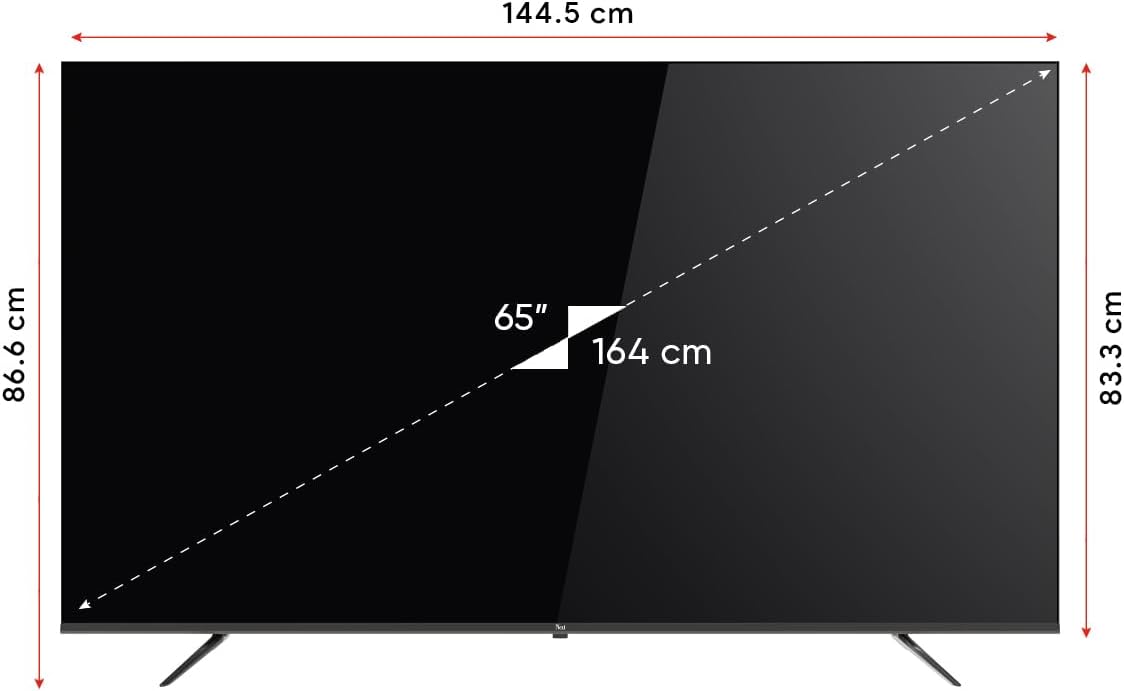
Image 8.1: TV dimensions (144.5 cm width, 86.6 cm height, 65" / 164 cm diagonal).
9. हमी आणि समर्थन
Your Next YE-65GFSG8-QLED TV comes with a manufacturer's warranty:
- वॉरंटी कालावधी: 2 Years Manufacturer Warranty.
- समर्थन: For technical assistance, warranty claims, or further inquiries, please refer to the contact information provided in your warranty card or visit the official Next webसाइट
Ask a question about this manual
Ask about setup, troubleshooting, compatibility, parts, safety, or missing instructions. Manuals+ will review the question and use this page’s manual context to help answer it.