
1. परिचय
Welcome to the user manual for your ZOMBIES CAT Transformers TF-T06 Wireless Earbuds. This guide provides detailed instructions on how to set up, operate, maintain, and troubleshoot your new earbuds. Please read this manual carefully to ensure optimal performance and longevity of your device.
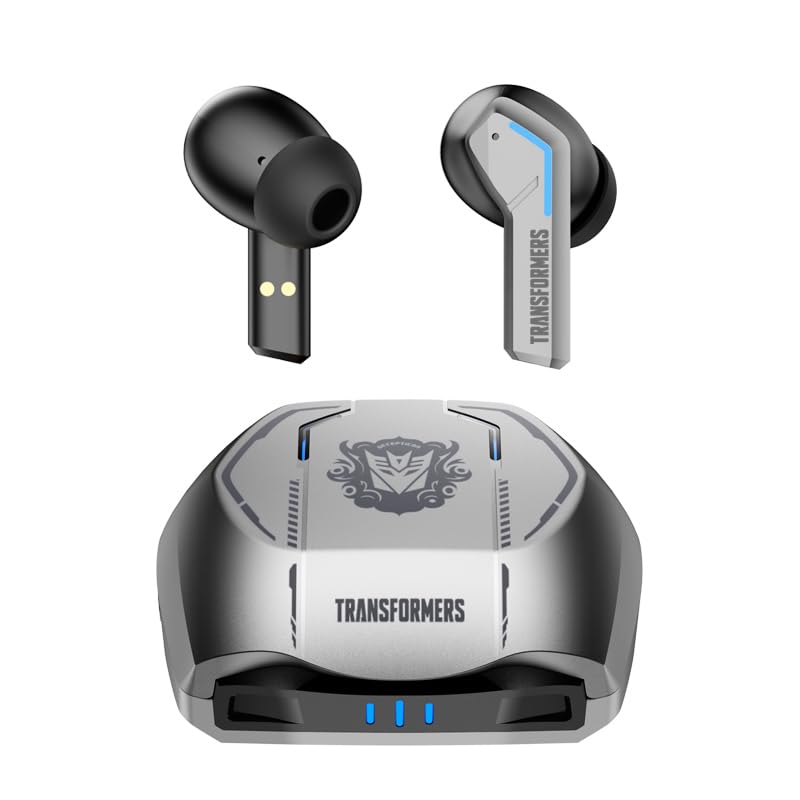
Image 1.1: The Transformers TF-T06 Wireless Earbuds and their charging case.
2. पॅकेज सामग्री
तुमच्या पॅकेजमध्ये सर्व वस्तू आहेत का ते तपासा:
- Transformers In-Ear Headphones (2 units)
- Earbuds Charging Case (1 unit)
- टाइप-सी चार्जिंग केबल (१ युनिट)
- वापरकर्ता मॅन्युअल (हा दस्तऐवज)

Image 2.1: The TF-T06 Earbuds, charging case, and packaging.
3. उत्पादन संपलेview
3.1 Earbud Design and Ergonomics
The TF-T06 earbuds are designed for a comfortable and secure fit within the ear, ensuring stability during various activities. Their lightweight and skin-friendly construction allows for extended wear without discomfort.

Image 3.1: An earbud shown in an ear, highlighting its ergonomic design for comfortable wear.
५.१ स्मार्ट टच नियंत्रणे
Each earbud features a touch-sensitive area for controlling various functions without needing to access your connected device. The controls are intuitive and responsive.

Image 3.2: Visual representation of the smart touch control functions on the earbuds.
- प्ले/पॉज: दोन्ही इयरबडवर एकदा टॅप करा.
- पुढील ट्रॅक: उजव्या इयरबडवर दोनदा टॅप करा.
- मागील ट्रॅक: डाव्या इयरबडवर दोनदा टॅप करा.
- आवाज वाढवणे: उजव्या इयरबडवर तीनदा टॅप करा.
- आवाज कमी: डाव्या इयरबडवर तीनदा टॅप करा.
- उत्तर द्या/कॉल संपवा: इनकमिंग कॉल किंवा अॅक्टिव्ह कॉल दरम्यान दोन्हीपैकी एका इअरबडवर एकदा टॅप करा.
- कॉल नाकारणे: इनकमिंग कॉल दरम्यान दोन्हीपैकी एक इयरबड २ सेकंद दाबा आणि धरून ठेवा.
- व्हॉईस सहाय्यक सक्रिय करा: दोन्हीपैकी कोणताही इयरबड २ सेकंदांसाठी दाबा आणि धरून ठेवा (कॉलवर नसताना).
4. सेटअप
४.१ इअरबड्स आणि केस चार्ज करणे
पहिल्या वापरापूर्वी, इअरबड्स आणि चार्जिंग केस पूर्णपणे चार्ज करा.
- इअरबड्स चार्जिंग केसमध्ये ठेवा. ते योग्यरित्या बसवले आहेत याची खात्री करा; चुंबकीय संपर्क त्यांना जागी धरून ठेवतील.
- Connect the Type-C charging cable to the charging port on the case and the other end to a USB power adapter (not included).
- The indicator lights on the charging case will illuminate to show charging status. A full charge typically takes approximately 3 hours for the case.
- Once fully charged, disconnect the charging cable. The earbuds will charge automatically when placed in the powered case.
4.2 Initial Pairing with a Device
The TF-T06 earbuds feature one-step pairing for convenience.
- चार्जिंग केस उघडा. इअरबड्स आपोआप चालू होतील आणि पेअरिंग मोडमध्ये प्रवेश करतील.
- तुमच्या स्मार्टफोन, टॅबलेट किंवा इतर ब्लूटूथ-सक्षम डिव्हाइसवर, ब्लूटूथ सेटिंग्जवर नेव्हिगेट करा.
- साठी शोधा available devices and select "TF-T06" from the list.
- एकदा कनेक्ट झाल्यावर, तुम्हाला ऐकू येईल असा पुष्टीकरण ऐकू येईल आणि इअरबड्स वापरण्यासाठी तयार होतील.

Image 4.1: The earbuds in their open charging case, indicating they are ready for Bluetooth pairing.
टीप: After the initial pairing, the earbuds will automatically connect to the last paired device when removed from the charging case, provided Bluetooth is enabled on the device and it is within range.
5. ऑपरेटिंग सूचना
5.1 पॉवर चालू/बंद
- पॉवर चालू: चार्जिंग केस उघडा, किंवा दोन्ही इअरबड्सवरील टच एरिया ३ सेकंद दाबा आणि धरून ठेवा.
- वीज बंद: इअरबड्स परत चार्जिंग केसमध्ये ठेवा आणि झाकण बंद करा, किंवा दोन्ही इअरबड्सवरील टच एरिया ५ सेकंद दाबा आणि धरून ठेवा.
5.2 संगीत प्लेबॅक
Use the smart touch controls as described in Section 3.2 to manage your music.
५.३ कॉल व्यवस्थापन
Handle incoming and active calls using the smart touch controls as described in Section 3.2. The built-in ENC noise-cancelling microphone ensures clear communication.
Voice. Voice व्हॉईस सहाय्यक
Activate your device's voice assistant (e.g., Siri, Google Assistant) by pressing and holding the touch area on either earbud for 2 seconds (when not on a call).
४.३ ध्वनी गुणवत्ता
The TF-T06 earbuds feature 10mm double-layer diaphragm drivers, delivering powerful bass, clear midrange, and bright treble for a high-fidelity audio experience.

Image 5.1: An illustration of the 10mm dynamic driver, responsible for the earbud's sound quality.
6. देखभाल
- स्वच्छता: इअरबड्स आणि चार्जिंग केस नियमितपणे मऊ, कोरड्या, लिंट-फ्री कापडाने स्वच्छ करा. अपघर्षक क्लीनर किंवा सॉल्व्हेंट्स वापरू नका.
- पाणी प्रतिकार: The earbuds have an IPX4 waterproof rating, meaning they are resistant to splashing water and sweat. Do not submerge them in water or expose them to heavy rain. Ensure they are dry before placing them back in the charging case.
- स्टोरेज: वापरात नसताना, इअरबड्स सुरक्षित ठेवण्यासाठी आणि चार्ज ठेवण्यासाठी त्यांच्या चार्जिंग केसमध्ये ठेवा. अति तापमानापासून दूर थंड, कोरड्या जागी साठवा.
- बॅटरी काळजी: बॅटरीचे आयुष्य वाढवण्यासाठी, इअरबड्स आणि चार्जिंग केस वारंवार पूर्णपणे डिस्चार्ज करणे टाळा. सतत वापरात नसले तरीही ते नियमितपणे चार्ज करा.
7. समस्या निवारण
If you encounter issues with your TF-T06 earbuds, refer to the following common solutions:
- इअरबड्स पेअर होत नाहीत:
- दोन्ही इयरबड चार्ज होत असल्याची खात्री करा.
- तुमच्या डिव्हाइसवरील ब्लूटूथ बंद करा आणि ते पुन्हा चालू करा.
- Forget "TF-T06" in your device's Bluetooth settings and attempt to pair again.
- तुमचे डिव्हाइस रीस्टार्ट करा.
- फक्त एकच इअरबड काम करत आहे:
- दोन्ही इयरबड चार्ज होत असल्याची खात्री करा.
- Place both earbuds back into the charging case, close the lid, wait a few seconds, then open the lid and remove them.
- Try resetting the earbuds (refer to specific reset instructions if available in a separate quick start guide, or try forgetting the device and re-pairing).
- आवाज नाही किंवा कमी आवाज नाही:
- तुमच्या इयरबड्स आणि कनेक्ट केलेल्या डिव्हाइसवर आवाजाची पातळी तपासा.
- तुमच्या डिव्हाइसशी इअरबड्स योग्यरित्या जोडलेले आहेत याची खात्री करा.
- इअरबड स्पीकर जाळीतील कोणताही कचरा साफ करा.
- चार्जिंग समस्या:
- चार्जिंग केबल केस आणि पॉवर सोर्स दोन्हीशी सुरक्षितपणे जोडलेली आहे याची खात्री करा.
- वेगळी चार्जिंग केबल किंवा पॉवर अॅडॉप्टर वापरून पहा.
- इअरबड्सवरील आणि केसच्या आत असलेले चार्जिंग कॉन्टॅक्ट स्वच्छ करा.
8. तपशील
| मॉडेलचे नाव | TF-T0602 |
| ब्रँड | ZOMBIES CAT |
| कनेक्टिव्हिटी तंत्रज्ञान | वायरलेस (ब्लूटूथ ५.३) |
| ब्लूटूथ आवृत्ती | 5.3 |
| ऑडिओ ड्रायव्हरचा प्रकार | डायनॅमिक ड्रायव्हर (१६.१ मिमी) |
| बॅटरी लाइफ (केससह एकूण) | 30 तासांपर्यंत |
| इअरबड प्लेटाइम (सिंगल चार्ज) | 3-4 तास |
| चार्जिंग वेळ | Approx. 3 Hours (Case) |
| नियंत्रण पद्धत | स्पर्श करा |
| पाणी प्रतिकार पातळी | IPX4 (जलरोधक) |
| आवाज रद्द करणे | ENC (Environmental Noise Cancellation) Mic |
| सुसंगत साधने | Most Bluetooth-enabled devices (smartphones, tablets, laptops, smartwatches) |
| कमाल ऑपरेटिंग अंतर | 10 मीटर |
| आयटम वजन | 132 ग्रॅम |
| उत्पादन परिमाणे | 3.3 x 2.18 x 1.83 सेमी |
9. हमी आणि समर्थन
वॉरंटी माहिती आणि ग्राहक समर्थनासाठी, कृपया खरेदीच्या ठिकाणी दिलेले कागदपत्रे पहा किंवा तुमच्या किरकोळ विक्रेत्याशी संपर्क साधा. कोणत्याही वॉरंटी दाव्यांसाठी तुमचा खरेदीचा पुरावा ठेवा.