
नेर्फ एफ५८७२
Nerf N Series Gear Up Pack Instruction Manual
Model: F8633 | Brand: Nerf
परिचय
The Nerf N Series Gear Up Pack provides an enhanced dart blasting experience with high-performance blasters and N1 darts. This pack includes three distinct blasters and two accessories, allowing for ten different blaster configurations. The N1 darts are engineered for extreme accuracy, speed, and distance, offering a superior edge in both indoor and outdoor play. This set is designed for users aged 8 years and up.

Image: The Nerf N Series Gear Up Pack, showcasing the three blasters (Wielder, Dealer, Flex) and the included N1 darts.
सुरक्षितता माहिती
चेतावणी: Small parts may be generated. Not for children under 3 years. Eyewear is recommended (not included) during play to prevent eye injuries.
बॉक्समध्ये काय आहे
Your Nerf N Series Gear Up Pack includes the following components:
- 3 Blasters (Flex, Dealer, Wielder)
- 1 Bolt (for Wielder blaster)
- 1 Removable Stock
- 1 Removable Scope
- 18 Nerf N1 Darts
- सूचना पुस्तिका

Image: All included components of the Gear Up Pack, including blasters, accessories, and darts, neatly arranged.
सेटअप
Before beginning play, ensure all components are present and familiarize yourself with each blaster and accessory.
अॅक्सेसरीज संलग्न करणे:
- Removable Scope: The scope can be attached to the tactical rail on top of all three blasters (Flex, Dealer, Wielder). Slide the scope onto the rail until it clicks into place.
- Removable Stock: The stock can be attached to the Wielder and Dealer blasters. Align the stock with the attachment point at the rear of the blaster and push firmly until it locks.

प्रतिमा: जवळून पाहिलेला फोटो view demonstrating the attachment of the removable stock to a blaster, highlighting the connection point.
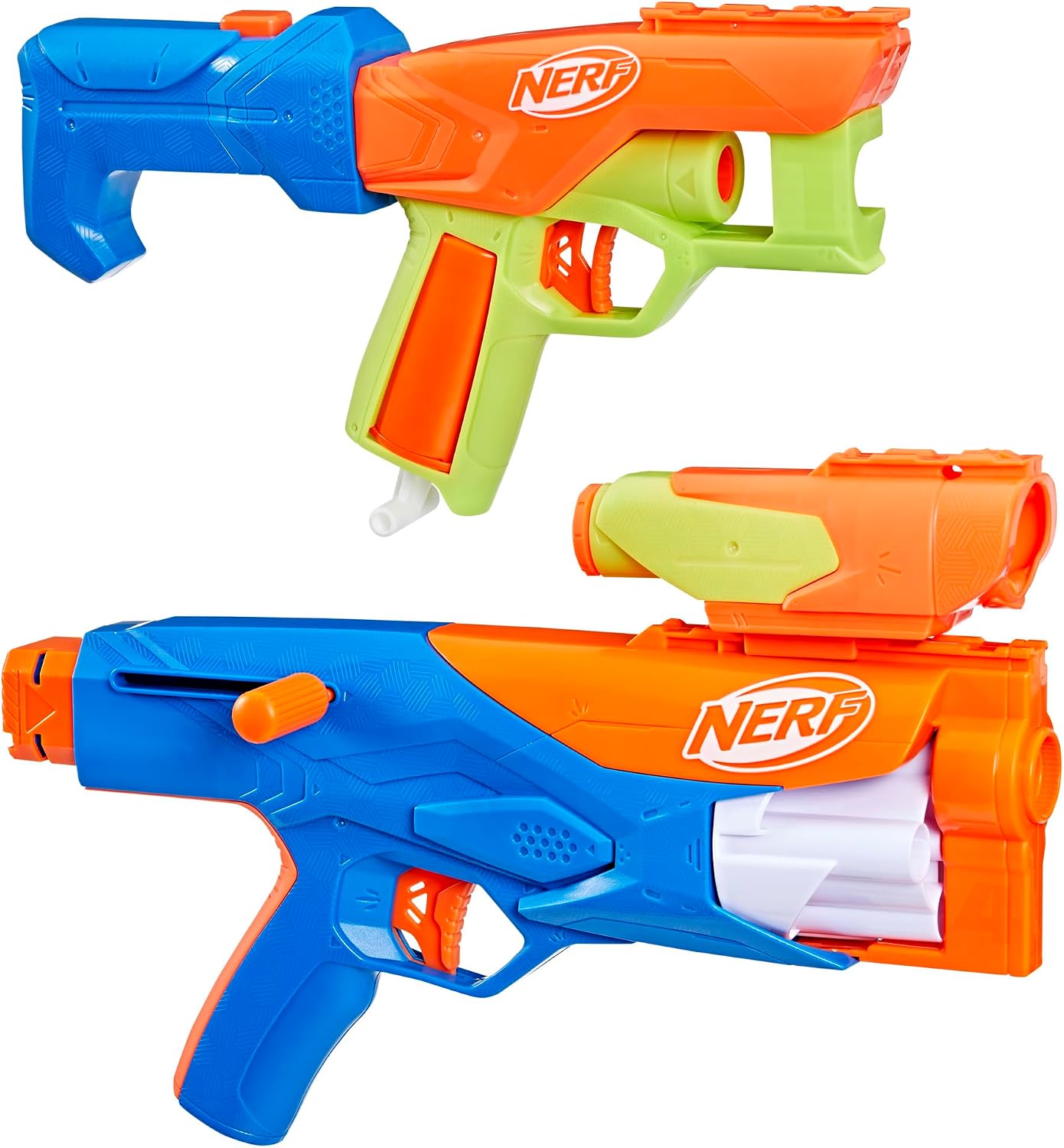
प्रतिमा: उदाamples of different blaster configurations achieved by attaching the scope and stock accessories.
ऑपरेटिंग सूचना
Always wear recommended eyewear during operation. Use only official Nerf N1 darts with these blasters.
Loading Darts:
- Flex Blaster: Insert one N1 dart into the front of the barrel.
- Dealer Blaster: Insert one N1 dart into the front of the barrel.
- Wielder Blaster: Load up to four N1 darts into the rotating cylinder at the front of the blaster.

Image: A user demonstrating how to load an N1 dart into the Wielder blaster and prime the bolt action mechanism.

Image: A user demonstrating how to load an N1 dart into the Dealer blaster and prime the pull-down mechanism.

Image: A user demonstrating how to load an N1 dart into the Flex blaster and prime the pull-down mechanism.
Priming and Firing:
- Flex Blaster: Pull down the priming handle located at the bottom of the grip until it locks. Aim at your target and press the trigger to fire.
- Dealer Blaster: Pull down the priming handle located at the bottom of the grip until it locks. Aim at your target and press the trigger to fire.
- Wielder Blaster: Pull back the bolt handle on the side of the blaster until it locks. Push the bolt handle forward to chamber a dart. Aim at your target and press the trigger to fire. Repeat for subsequent darts.
देखभाल
Proper maintenance ensures the longevity and optimal performance of your Nerf blasters.
- स्वच्छता: Wipe down the blasters with a damp cloth to remove dirt and dust. Do not submerge blasters in water.
- Dart Care: Keep N1 darts clean and dry. Avoid bending or crushing darts, as this can affect performance.
- स्टोरेज: Store blasters and darts in a cool, dry place away from direct sunlight and extreme temperatures.
समस्यानिवारण
If you encounter issues with your Nerf N Series Gear Up Pack, refer to the common solutions below:
| समस्या | उपाय |
|---|---|
| Dart not firing or jamming. |
|
| Darts not flying straight or far. |
|
| Accessories not attaching securely. |
|
तपशील
| वैशिष्ट्य | तपशील |
|---|---|
| उत्पादन परिमाणे | 2.63 x 24 x 10.25 इंच |
| आयटम वजन | 3.09 पाउंड |
| मॉडेल क्रमांक | F8633 |
| शिफारस केलेले वय | 8 वर्षे आणि वर |
| प्रकाशन तारीख | ३ जून २०२४ |
| उत्पादक | हसब्रो |
| डार्ट प्रकार | Nerf N1 Darts (exclusive) |
| Blaster Combinations | 10+ possible styles |
हमी आणि समर्थन
For information regarding product warranty, returns, or technical support, please contact Hasbro customer service directly or visit their official webसाइट. कोणत्याही वॉरंटी दाव्यांसाठी तुमचा खरेदीचा पुरावा ठेवा.
Manufacturer: Hasbro
Webसाइट: www.hasbro.com
Ask a question about this manual
Ask about setup, troubleshooting, compatibility, parts, safety, or missing instructions. Manuals+ will review the question and use this page’s manual context to help answer it.