
परिचय
Thank you for choosing the MIZISNR AX-60 6-Channel Audio Mixer. This professional digital sound board is designed for versatile audio mixing applications, featuring 48V phantom power, Bluetooth connectivity, and a USB MP3 interface. This manual provides detailed instructions for setup, operation, maintenance, and troubleshooting to ensure optimal performance and longevity of your device.
महत्वाची सुरक्षितता माहिती
- डिव्हाइस ऑपरेट करण्यापूर्वी सर्व सूचना काळजीपूर्वक वाचा.
- भविष्यातील संदर्भासाठी ही पुस्तिका ठेवा.
- Do not expose this equipment to rain or moisture to prevent fire or electric shock.
- वीज पुरवठा व्हॉल्यूमची खात्री कराtage युनिटवर निर्दिष्ट केलेल्या आवश्यकतांनुसार आहे.
- क उघडू नका.asing. सर्व सेवा पात्र कर्मचाऱ्यांकडे सोपवा.
- वीज पडताना किंवा बराच काळ वापरात नसताना वीज तारा डिस्कनेक्ट करा.
- युनिट उष्णतेच्या स्त्रोतांजवळ किंवा थेट सूर्यप्रकाशात ठेवणे टाळा.
- युनिटभोवती योग्य वायुवीजन असल्याची खात्री करा.
उत्पादन संपलेview
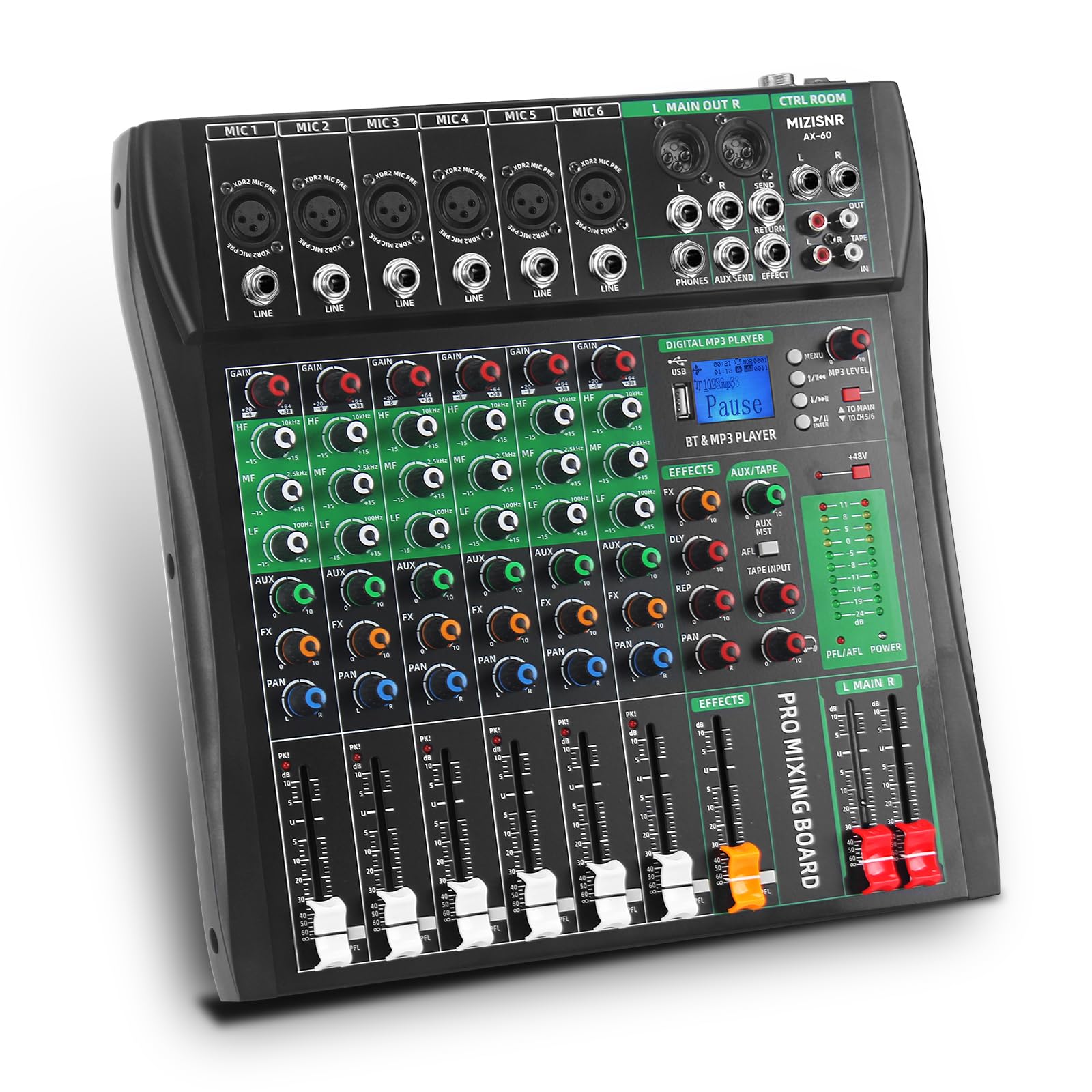
प्रतिमा: समोर view of the MIZISNR AX-60 6-Channel Audio Mixer, showcasinत्याची कॉम्पॅक्ट डिझाइन आणि नियंत्रण मांडणी.
The MIZISNR AX-60 is a compact yet powerful 6-channel audio mixer, ideal for various sound reinforcement and recording scenarios. It offers a range of features for precise audio control and flexible connectivity.
प्रमुख वैशिष्ट्ये:
- 6-Channel Mono Input: Each channel features a 3-band equalizer for independent high, mid, and low sound adjustments.
- Integrated Bluetooth Playback: Seamlessly connect external devices like mobile phones and computers wirelessly.
- USB MP3 Interface: Direct input from USB devices (MP3 players, U disks) with built-in MP3 player/recorder supporting MP3, WAV, and WMA formats. Supports computer recording and sound editing via USB.
- +48V फॅंटम पॉवर: Provides stable power for wired, wireless, and condenser microphones, ensuring clear and delicate sound capture.
- Real-Time Ear Monitoring: A 6.5mm interface allows for direct headphone connection to monitor sound feedback instantly.
- वाइड डिव्हाइस सुसंगतता: Connects with various electronic devices with audio input interfaces, suitable for home KTV, band performances, campus events, and conferences.
घटक ओळख:
Familiarize yourself with the various controls and connection points on your AX-60 mixer.

प्रतिमा: तपशीलवार view of the MIZISNR AX-60 mixer's front panel, highlighting various controls and input/output interfaces. Labels include Microphone/Instrument interface, Gain control, Balanced control, Auxiliary stereo input, Effect control, Sound balance control, Peak indicator, Volume adjustment, Effect sending/return, Audio input, Multifunctional Playback/Switching Window, Phantom Power Meter, Left and right channels Master volume control, Reverb volume fader, Main power switch, Power input, and High efficiency cooling network.
- Microphone/Instrument Interface (MIC 1-6): XLR and 1/4" TRS combo jacks for connecting microphones or instruments.
- नियंत्रण मिळवा: प्रत्येक चॅनेलसाठी इनपुट संवेदनशीलता समायोजित करते.
- 3-Band EQ (High, Mid, Low): Controls the treble, midrange, and bass frequencies for each channel.
- AUX/FX Send: Sends signal to external effects processors or monitor mixes.
- पॅन नियंत्रण: Positions the channel's signal in the stereo field (left to right).
- चॅनेल फेडरस: Adjust the volume level of individual channels.
- +४८ व्ही फॅंटम पॉवर बटण: Activates phantom power for condenser microphones.
- Digital MP3 Player/BT & MP3 Player Section: USB port, display, and controls for Bluetooth and USB playback/recording.
- मुख्य आउटपुट (L/R): XLR and 1/4" TRS outputs for connecting to main speakers or ampजीवनदायी
- फोन आउटपुट: 6.5mm stereo jack for headphone monitoring.
- Power Switch & Input: Located on the rear panel for power connection and unit activation.
सेटअप मार्गदर्शक
Follow these steps to set up your MIZISNR AX-60 mixer for operation.
1. अनपॅकिंग आणि प्लेसमेंट:
- Carefully remove the mixer from its packaging.
- Place the mixer on a stable, flat surface, ensuring adequate ventilation.
2. वीज जोडणी:
- मिक्सरचा पॉवर स्विच बंद स्थितीत असल्याची खात्री करा.
- Connect the provided power adapter to the "Power Input" on the rear of the mixer.
- पॉवर ॲडॉप्टरला योग्य इलेक्ट्रिकल आउटलेटमध्ये प्लग करा.
3. ऑडिओ उपकरणे कनेक्ट करणे:
The AX-60 supports various input and output devices. Refer to the connection diagram below for visual guidance.

प्रतिमा: Diagram illustrating various device connections to the MIZISNR AX-60 mixer. Examples include microphones, guitars, bass, active speakers, auxiliary output devices, and headphones. It shows XLR and 6.5mm inputs, main L/R outputs, and monitor headset connection.
- Microphones/Instruments: Connect microphones (XLR) or instruments (1/4" TRS) to the "MIC/LINE" inputs (Channels 1-6). If using condenser microphones, ensure +48V phantom power is activated for the respective channel (see Operating Instructions).
- मुख्य वक्ते/Ampजीवनदायी: तुमचे मुख्य स्पीकर किंवा पॉवर कनेक्ट करा amplifier to the "L MAIN OUT R" XLR or 1/4" TRS outputs.
- हेडफोन: Plug your headphones into the "PHONES" 6.5mm stereo jack for monitoring.
- External Audio Devices (AUX): Connect external audio sources to the AUX input if available.
ऑपरेटिंग सूचना
This section details the operation of the MIZISNR AX-60 mixer's various functions.
1. पॉवरिंग चालू/बंद:
- Before powering on, ensure all channel faders and the main output fader are set to their minimum positions.
- Flip the "POWER" switch on the rear panel to the ON position.
- To power off, reverse the process: lower all faders, then switch off the unit.
2. Channel Control (Channels 1-6):
- लाभ: Adjust this knob to set the input level for each channel. Aim for a strong signal without clipping (distortion).
- 3-बँड EQ:

प्रतिमा: Close-up of the 3-band EQ controls on the MIZISNR AX-60 mixer, showing knobs for High, Mid, and Low frequencies. Accompanying graphs illustrate the frequency response curves for Hi EQ (boost/cut above 12kHz), Mid EQ (sweeps from 250Hz to 6KHz), and Lo EQ (boost/cut below 80Hz).
- उच्च: Adjusts treble frequencies (above 12kHz).
- मध्यभागी: Adjusts midrange frequencies (sweeps from 250Hz to 6kHz).
- कमी: Adjusts bass frequencies (below 80Hz).
- AUX/FX: Controls the amount of signal sent to the auxiliary or effects bus.
- पॅन: Adjusts the stereo position of the channel's signal.
- चॅनेल फॅडर: Controls the output volume of the individual channel to the main mix.
3. +48V Phantom Power:

प्रतिमा: Illustration showing the activation of the +48V phantom power button on the MIZISNR AX-60 mixer, with a condenser microphone connected. The image emphasizes powering wired and condenser microphones for optimal performance.
To use condenser microphones, press the "+48V PHANTOM POWER" button. An indicator light will illuminate. Ensure dynamic microphones or other non-phantom powered devices are not connected when activating phantom power to prevent damage.
4. ब्लूटूथ प्लेबॅक:

प्रतिमा: Diagram showing the MIZISNR AX-60 mixer connecting wirelessly via Bluetooth to a smartphone playing music. The image highlights a 33ft transmission distance and the Bluetooth pairing name "BT-Speaker".
- Press the "MODE" button in the Digital MP3 Player section until "BT" or "Bluetooth" appears on the display.
- On your external device (smartphone, tablet), search for Bluetooth devices and select "BT-Speaker" to pair.
- Once paired, audio from your device will play through the mixer. Adjust the volume using the MP3 player section's controls and the main fader.
5. USB MP3 Player/Recorder:

प्रतिमा: Illustration of the MIZISNR AX-60 mixer's USB functionality, showing a USB drive connected and a laptop displaying music software. Text indicates support for lossless audio playback, plug and play, and audio input/output via USB. A note mentions long-pressing ENTER for recording and short-pressing to stop.
- प्लेबॅक: Insert a USB flash drive containing MP3, WAV, or WMA files into the USB port. The mixer will automatically switch to USB mode or you may need to press the "MODE" button. Use the controls (Play/Pause, Next/Previous) on the MP3 player section to navigate and play tracks.
- रेकॉर्डिंग: To record, ensure a USB drive is inserted. Long-press the "ENTER" button (or equivalent record button) on the MP3 player section to start recording. Short-press it again to stop recording. The mixer will record the main stereo mix.
- संगणक कनेक्शन: Connect the mixer to a computer via a USB cable for recording and sound editing. The mixer acts as an audio interface.
6. Real-Time Monitoring:

प्रतिमा: A close-up of the MIZISNR AX-60 mixer's control room section, showing headphones plugged into the 6.35mm monitor jack. The text emphasizes instant sound feedback for recording.
Plug 6.5mm headphones into the "PHONES" jack. Adjust the "PHONES" level knob to control the headphone volume. This allows you to hear the mixed audio in real-time without affecting the main output.
7. Master Volume Control:
Use the "L MAIN R" faders to control the overall output volume of the stereo mix to your main speakers or ampलाइफायर
देखभाल
- स्वच्छता: Use a soft, dry cloth to clean the exterior of the mixer. Do not use liquid cleaners or solvents.
- स्टोरेज: वापरात नसताना, मिक्सर थंड, कोरड्या जागी, थेट सूर्यप्रकाश आणि अति तापमानापासून दूर ठेवा.
- केबल व्यवस्थापनः नुकसान टाळण्यासाठी केबल्स जास्त वाकलेल्या किंवा गोंधळलेल्या नाहीत याची खात्री करा.
समस्यानिवारण
| समस्या | संभाव्य कारण | उपाय |
|---|---|---|
| आवाज आउटपुट नाही | Power off; cables disconnected; faders down; incorrect input/output selection. | Check power connection and switch; ensure all audio cables are securely connected; raise channel and main faders; verify correct input source and output routing. |
| विकृत आवाज | Input gain too high; damaged cables; faulty speaker/microphone. | Reduce input GAIN for the affected channel; check and replace damaged cables; test with different speakers/microphones. |
| Microphone not working (condenser mic) | +48V Phantom Power not activated. | Press the +48V Phantom Power button. Ensure the indicator light is on. |
| ब्लूटूथ कनेक्ट होत नाही | Mixer not in Bluetooth mode; device too far; interference. | Ensure mixer is in BT mode; move device closer to the mixer; minimize interference from other wireless devices. |
| USB playback/recording issues | असमर्थित file format; USB drive not recognized; incorrect operation. | खात्री करा files are MP3, WAV, or WMA. Try reformatting the USB drive to FAT32. Refer to the USB operation section for correct recording/playback steps. Note: Some USB drives or formats may not be fully compatible. |
तपशील
| वैशिष्ट्य | तपशील |
|---|---|
| मॉडेल | AX-60 |
| चॅनेलची संख्या | 6 |
| फॅंटम पॉवर | +48V |
| कनेक्टिव्हिटी तंत्रज्ञान | ब्लूटूथ, यूएसबी |
| ऑडिओ इनपुट | यूएसबी |
| आउटपुट कनेक्टर प्रकार | TRS, XLR |
| उर्जा स्त्रोत | कॉर्ड केलेले इलेक्ट्रिक |
| खंडtage | 110 व्होल्ट एसी |
| उत्पादनाचे परिमाण (D x W x H) | ९.४ x ५.६ x २.५९ सेमी (३.७ x २.२१ x १.०२ इंच) |
| आयटम वजन | 2.81 किलो |
| उत्पादक | MIZISNR |
| मूळ देश | चीन |

प्रतिमा: Diagram showing the dimensions of the MIZISNR AX-60 mixer, indicating a width of 12.8 inches, height of 13.2 inches, and depth of 1.57 inches. Also shows close-ups of the U Disk/MP3 Playback with LED Display, Headphone Volume Control, and Comfortable Damping Feel.
हमी आणि समर्थन
The MIZISNR AX-60 Audio Mixer comes with a 2 वर्षांची वॉरंटी खरेदीच्या तारखेपासून. ही वॉरंटी सामान्य वापरात उत्पादनातील दोष आणि खराबी कव्हर करते.
For technical support, warranty claims, or any questions regarding your product, please contact MIZISNR customer service through the retailer where the product was purchased or visit the official MIZISNR webसाइट (उपलब्ध असल्यास).
कृपया वॉरंटी सेवेसाठी तुमचा खरेदीचा पुरावा जपून ठेवा.