
1. परिचय
Thank you for choosing the Baseus AeQur G10 TWS Earphones. This manual provides detailed instructions on how to set up, operate, maintain, and troubleshoot your new earphones. Please read this manual thoroughly before using the product to ensure optimal performance and longevity.
2. पॅकेज सामग्री
बॉक्स काळजीपूर्वक उघडा आणि खाली सूचीबद्ध केलेल्या सर्व वस्तू उपलब्ध आहेत आणि चांगल्या स्थितीत आहेत याची खात्री करा. जर काही वस्तू गहाळ किंवा खराब झाल्या असतील तर कृपया तुमच्या किरकोळ विक्रेत्याशी संपर्क साधा.
- Baseus AeQur G10 TWS Earphones (Left and Right)
- चार्जिंग केस
- USB-A/USB-C Wireless Dongle
- USB-C चार्जिंग केबल
- कानाच्या टोकांचे अनेक आकार
- वापरकर्ता मॅन्युअल (हा दस्तऐवज)

Image 2.1: Complete package contents of the Baseus AeQur G10 TWS Earphones.
3. उत्पादन संपलेview
Familiarize yourself with the components of your Baseus AeQur G10 TWS Earphones.
3.1 इअरफोन
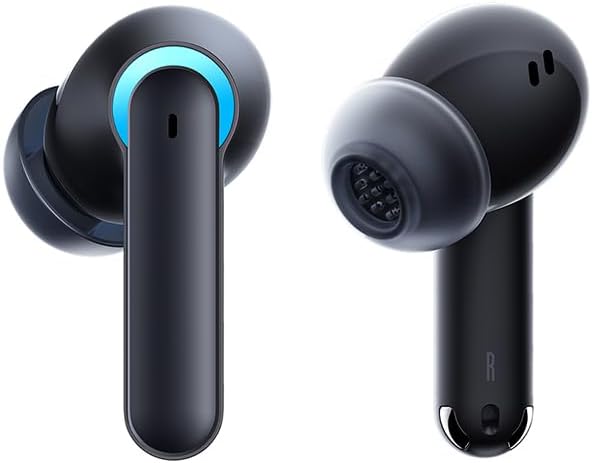
Image 3.1: Left and Right Baseus AeQur G10 Earphones. Each earphone features a touch control area, microphone, and charging contacts.
3.2 चार्जिंग प्रकरण

Image 3.2: Baseus AeQur G10 Earphones in their charging case with the lid open. The case has charging slots for each earphone and an LED indicator for battery status.
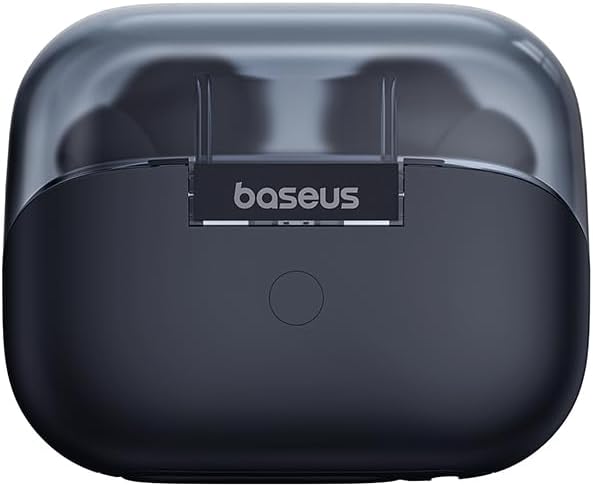
प्रतिमा 3.3: मागील view of the Baseus AeQur G10 charging case, displaying the Baseus brand logo and a USB-C charging port (not explicitly visible but implied by common design).
3.3 USB-A/USB-C Wireless Dongle
The included wireless dongle allows for low-latency connection to various devices, including PCs, laptops, gaming consoles, and mobile devices.

Image 3.4: Compatibility diagram for the Baseus AeQur G10, illustrating connections to Type-C Androids & Tablets, Type-C/USB-A PCs & Laptops, PS5/PS4/Switch, Steam Deck, and VR devices.
4. सेटअप
4.1 प्रारंभिक चार्जिंग
- दोन्ही इयरफोन चार्जिंग केसमध्ये ठेवा.
- Connect the USB-C charging cable to the charging port on the case and the other end to a USB power source (e.g., computer USB port, wall adapter).
- The LED indicator on the case will show charging status. A full charge typically takes approximately 1.5 hours for the earphones and 2 hours for the case.
४.३ ब्लूटूथ उपकरणांसह जोडणी
- Ensure the earphones are in the charging case and the case has sufficient charge.
- Open the charging case lid. The earphones will automatically enter pairing mode (indicated by a flashing LED on the earphones or case).
- तुमच्या डिव्हाइसवर (स्मार्टफोन, टॅबलेट, लॅपटॉप), ब्लूटूथ सक्षम करा आणि नवीन डिव्हाइस शोधा.
- Select "Baseus AeQur G10" from the list of available devices.
- Once connected, the LED indicator will stop flashing, and you will hear a confirmation tone.
4.3 Connecting via USB Wireless Dongle
- Insert the USB-A or USB-C end of the wireless dongle into the corresponding port on your device (PC, laptop, gaming console).
- Ensure the earphones are in the charging case and the lid is open.
- The earphones will automatically attempt to connect to the dongle. The dongle's LED indicator will show connection status.
- Once connected, the LED on the dongle will become solid, and you will hear a confirmation tone from the earphones.
5. ऑपरेटिंग सूचना
5.1 पॉवर चालू/बंद
- पॉवर चालू: Open the charging case lid, or take the earphones out of the case. They will power on automatically.
- वीज बंद: Place the earphones back into the charging case and close the lid. They will power off automatically and begin charging.
६.१ इअरफोन्स घालणे
- Identify the 'L' (left) and 'R' (right) markings on each earphone.
- Gently insert the earphones into your ear canals.
- Rotate them slightly to find a comfortable and secure fit. Choose the appropriate ear tip size for optimal sound quality and comfort.
5.3 स्पर्श नियंत्रणे
The Baseus AeQur G10 earphones feature touch-sensitive controls on each earbud. The specific functions may vary slightly depending on the device and application.
| कृती | कार्य |
|---|---|
| सिंगल टॅप (L/R) | संगीत प्ले करा/पॉज करा, कॉलला उत्तर द्या/समाप्त करा |
| डबल टॅप (L) | मागील ट्रॅक |
| डबल टॅप (R) | पुढील ट्रॅक |
| ट्रिपल टॅप (L/R) | व्हॉइस असिस्टंट सक्रिय करा |
| जास्त वेळ दाबा (L/R, 2s) | कॉल रिजेक्ट करा |
| जास्त वेळ दाबा (L/R, 3s) | Toggle Gaming/Music Mode (if applicable) |
6. देखभाल
6.1 स्वच्छता
- इअरफोन आणि चार्जिंग केस स्वच्छ करण्यासाठी मऊ, कोरडे, लिंट-फ्री कापड वापरा.
- For earwax or debris in the ear tips, gently remove the ear tips and clean them with a cotton swab lightly dampened with rubbing alcohol. Ensure they are completely dry before reattaching.
- अपघर्षक क्लीनर, सॉल्व्हेंट्स किंवा एरोसोल स्प्रे वापरू नका.
५.८.१ स्टोरेज
- वापरात नसताना इयरफोन्स नेहमी त्यांच्या चार्जिंग केसमध्ये ठेवा जेणेकरून ते सुरक्षित राहतील आणि चार्ज राहतील.
- थंड, कोरड्या जागी, अति तापमान आणि थेट सूर्यप्रकाशापासून दूर साठवा.
6.3 बॅटरी काळजी
- Charge the earphones and case regularly, even if not used frequently, to maintain battery health.
- Avoid fully discharging the batteries for extended periods.
7. समस्या निवारण
If you encounter issues with your Baseus AeQur G10 earphones, refer to the following common solutions:
७.१ आवाज किंवा अधूनमधून कनेक्शन नाही
- Ensure earphones are charged and properly connected to your device (Bluetooth or dongle).
- इयरफोन आणि तुमच्या कनेक्ट केलेल्या डिव्हाइसवरील आवाज पातळी तपासा.
- व्यत्यय किंवा रेंज समस्या टाळण्यासाठी तुमच्या डिव्हाइसच्या जवळ जा.
- Try disconnecting and re-connecting the earphones.
- For Bluetooth, forget the device on your phone and re-pair.
- For dongle, unplug and re-plug the dongle.
७.२ इअरफोन चार्ज होत नाहीत
- चार्जिंग केबल केस आणि पॉवर सोर्स दोन्हीशी सुरक्षितपणे जोडलेली आहे याची खात्री करा.
- पॉवर सोर्स सक्रिय आहे का ते तपासा.
- Clean the charging contacts on both the earphones and inside the case with a dry cotton swab.
- वेगळी चार्जिंग केबल किंवा पॉवर अॅडॉप्टर वापरून पहा.
7.3 Only One Earphone Working
- Place both earphones back into the charging case, close the lid, wait a few seconds, then open the lid and take them out again.
- दोन्ही इयरफोन चार्ज केलेले असल्याची खात्री करा.
- इयरफोन रीसेट करून पहा (निर्मात्याचे पहा) webआवश्यक असल्यास विशिष्ट रीसेट सूचनांसाठी साइट).
8. तपशील
Key technical specifications for the Baseus AeQur G10 TWS Earphones:
| वैशिष्ट्य | तपशील |
|---|---|
| मॉडेलचे नाव | A00055400111-00 |
| ब्रँड | बेसियस |
| रंग | काळा |
| कान प्लेसमेंट | कानात |
| फॉर्म फॅक्टर | कानात |
| कनेक्टिव्हिटी तंत्रज्ञान | वायरलेस (ब्लूटूथ) |
| वायरलेस कम्युनिकेशन तंत्रज्ञान | ब्लूटूथ |
| बॅटरीज | 1 लिथियम आयन बॅटरी आवश्यक (समाविष्ट) |
| उत्पादन परिमाणे | 10 x 5 x 1.27 सेमी |
| आयटम वजन | 220 ग्रॅम |
| उत्पादक | बेसियस |
| विशिष्ट उपयोग | प्रवास |
9. हमी आणि समर्थन
Baseus products are designed and manufactured to the highest quality standards. For information regarding warranty coverage, technical support, or service, please refer to the warranty card included with your product or visit the official Baseus webसाइट. वॉरंटी दाव्यांसाठी तुमचा खरेदीचा पुरावा ठेवा.
अधिक मदतीसाठी, तुम्ही बेसियस ग्राहक समर्थनाशी त्यांच्या अधिकृत चॅनेलद्वारे संपर्क साधू शकता.