
Star Micronics MCL32CBI
Star Micronics mC-Label3 MCL32CBI Direct Thermal Printer User Manual
Model: MCL32CBI
परिचय
This manual provides essential information for the setup, operation, maintenance, and troubleshooting of your Star Micronics mC-Label3 MCL32CBI Direct Thermal Printer. Please read this manual thoroughly before using the printer to ensure proper and safe operation.
पॅकेज सामग्री
खाली सूचीबद्ध केलेल्या सर्व वस्तू तुमच्या पॅकेजमध्ये समाविष्ट आहेत याची खात्री करा:
- mC-Label3 Multifunctional Printer
- एसी अडॅप्टर
- पॉवर केबल
- USB Cables (C-C 1.0m and C-A 1.8m)
- LAN केबल (1m)
- Simple Setup Sheet Safety Guide

प्रतिमा: समोर view of the Star Micronics mC-Label3 printer, showcasing its compact design and label output slot.
सेटअप
३. प्रिंटर कनेक्ट करणे
The mC-Label3 MCL32CBI printer offers multiple connectivity options:
- यूएसबी-सी: Connect the printer directly to your PC, Android, or iOS device using the provided USB-C to USB-C or USB-C to USB-A cables.
- इथरनेट (LAN): For network connectivity, connect the printer to your router or network switch using the supplied LAN cable.
- ब्लूटूथ: The MCL32CBI model supports Bluetooth connectivity for iOS and Android devices. Ensure Bluetooth is enabled on your device and pair with the printer.

प्रतिमा: मागचा भाग view of the mC-Label3 printer, highlighting the LAN, USB, and power ports for various connection types.
2. मीडिया लोड करत आहे
The printer supports various media types, including linerless labels, die-cut labels, continuous labels, and thermal receipt paper.
- Open the top cover of the printer by lifting the latch.
- Place the media roll into the media compartment, ensuring the leading edge feeds out from the top.
- Pull a small amount of media past the print head and close the top cover securely.
- Ensure the media is properly aligned within the guides.

प्रतिमा: वरपासून खालपर्यंत view of the mC-Label3 printer with its cover open, illustrating the internal mechanism for loading thermal paper or label rolls.
ऑपरेटिंग सूचना
1. पॉवर चालू/बंद
Connect the power cable to the printer and a power outlet. Press the power button located on the front of the printer to turn it on. The status indicator light will illuminate.
2. Printing Labels and Receipts
The mC-Label3 MCL32CBI printer is designed for efficient label and receipt printing. It supports various applications and cloud services.
- सॉफ्टवेअर सहत्वता: Works seamlessly with PC, Android, and iOS applications.
- क्लाउड सेवा: Utilize Star Micronics Cloud Services to design and manage labels.
- One Touch Label: This feature allows storing pre-made receipts and labels for quick and easy printing directly from the printer.
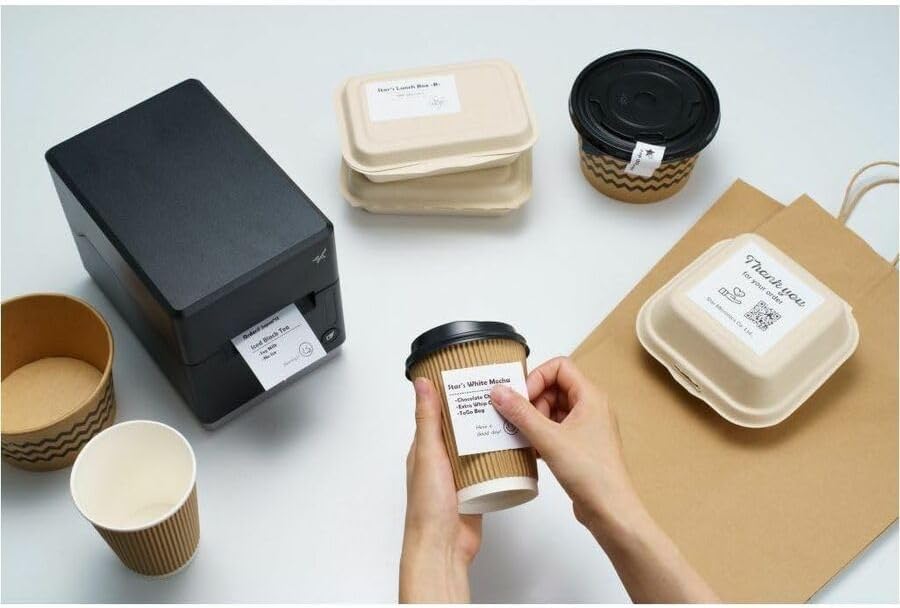
Image: A hand pressing the feed button on the mC-Label3 printer, demonstrating the printing of a 'Thank you' label.

Image: The mC-Label3 printer shown in a practical setting, printing labels for food containers and coffee cups, illustrating its versatility.
देखभाल
९.१. प्रिंटर साफ करणे
Regular cleaning ensures optimal performance and extends the life of your printer.
- मऊ, लिंट-फ्री कापड वापरा dampened with isopropyl alcohol to clean the print head.
- Wipe down the exterior of the printer with a soft, dry cloth.
- अपघर्षक क्लीनर किंवा सॉल्व्हेंट्स वापरणे टाळा.
2. Replacing Media
When the media roll is depleted, follow the media loading instructions in the Setup section to replace it.
3. Effortless Repairs
The mC-Label3 is designed for effortless, no-tools-required repairs with minimal upkeep, simplifying any necessary component replacements.
समस्यानिवारण
हा विभाग तुम्हाला येऊ शकणाऱ्या सामान्य समस्यांचे निराकरण प्रदान करतो.
| समस्या | संभाव्य कारण | उपाय |
|---|---|---|
| प्रिंटर चालू होत नाहीये | पॉवर केबल कनेक्ट केलेली नाही; पॉवर आउटलेटमध्ये समस्या आहे. | पॉवर केबल सुरक्षितपणे जोडलेली आहे याची खात्री करा; वेगळा पॉवर आउटलेट वापरून पहा. |
| प्रिंट आउटपुट नाही | Out of media; Media loaded incorrectly; Driver issue | Load new media; Re-load media correctly; Reinstall printer drivers. |
| खराब मुद्रण गुणवत्ता | Dirty print head; Low quality media | Clean the print head; Use recommended thermal media. |
| कनेक्टिव्हिटी समस्या | Incorrect cable connection; Bluetooth not paired; Network configuration | Check USB/Ethernet cables; Re-pair Bluetooth; Verify network settings. |
तपशील
| वैशिष्ट्य | तपशील |
|---|---|
| मॉडेलचे नाव | mC-लेबल3 |
| आयटम मॉडेल क्रमांक | MCL32CBI |
| मुद्रण तंत्रज्ञान | थेट थर्मल |
| प्रिंटर आउटपुट | मोनोक्रोम |
| कमाल प्रिंट स्पीड मोनोक्रोम | 23 पीपीएम |
| कमाल काळा आणि पांढरा प्रिंट रिझोल्यूशन | 203 DPI (203 x 203 DPI) |
| प्रिंट मीडिया | Labels (Linerless, Die-Cut, Continuous), Thermal Receipt |
| कनेक्टिव्हिटी तंत्रज्ञान | Bluetooth, Wired (USB, Ethernet) |
| हार्डवेअर इंटरफेस | यूएसबी, इथरनेट |
| सुसंगत साधने | PC, Android, iOS |
| कंट्रोलर प्रकार | iOS, Android |
| उत्पादन परिमाणे | ०.८"डी x ३.०"प x ४.४"एच (२.०५ x ७.७ x ११.२ सेमी) |
| आयटम वजन | 7.2 पौंड (3.27 किलो) |
| मेमरी स्टोरेज क्षमता | 64 MB |
| रंग | काळा |
| उत्पादक | STAR MICRONICS |
| मूळ देश | चीन |
हमी माहिती
The Star Micronics mC-Label3 MCL32CBI printer comes with a manufacturer's warranty. For specific terms and conditions, please refer to the warranty card included in your package or visit the official Star Micronics webसाइट
वॉरंटी प्रकार: उत्पादक
सपोर्ट
For further assistance, technical support, or to download the latest drivers and firmware, please visit the official Star Micronics support webसाइट किंवा त्यांच्या ग्राहक सेवेशी संपर्क साधा.
Star Micronics Official Webसाइट: www.starmicronics.com
सपोर्ट लिंक: www.starmicronics.com/support
Ask a question about this manual
Ask about setup, troubleshooting, compatibility, parts, safety, or missing instructions. Manuals+ will review the question and use this page’s manual context to help answer it.