
MEGATEK CP27BR
मेगाटेक पोर्टेबल सीडी प्लेयर वापरकर्ता मॅन्युअल
Model: CP27BR
परिचय
Thank you for choosing the MEGATEK Portable CD Player. This device is designed to provide a versatile and high-quality audio experience, supporting various media formats and offering multiple connectivity options. Please read this manual carefully to ensure proper use and maintenance of your new CD player.

Image: The MEGATEK Portable CD Player, showcasing its compact design, integrated speakers, control buttons, and included accessories like headphones and USB-C charging cables.
सुरक्षितता माहिती
सुरक्षित ऑपरेशन सुनिश्चित करण्यासाठी आणि नुकसान टाळण्यासाठी, कृपया खालील खबरदारी पाळा:
- डिव्हाइसला अत्यंत तापमान, आर्द्रता किंवा थेट सूर्यप्रकाशात उघड करू नका.
- डिव्हाइसवर जोरदार प्रभाव टाकणे किंवा त्याच्या अधीन करणे टाळा.
- डिव्हाइस स्वतः वेगळे करू नका किंवा दुरुस्त करण्याचा प्रयत्न करू नका. सर्व सर्व्हिसिंग पात्र कर्मचाऱ्यांना पाठवा.
- फक्त दिलेली चार्जिंग केबल आणि सुसंगत पॉवर अॅडॉप्टर वापरा.
- डिव्हाइसला पाणी आणि इतर द्रवांपासून दूर ठेवा.
- मऊ, कोरड्या कापडाने उपकरण स्वच्छ करा. अपघर्षक क्लीनर किंवा सॉल्व्हेंट्स वापरू नका.
- जास्त आवाजाच्या पातळीवर जास्त वेळ ऐकल्याने श्रवणशक्ती खराब होऊ शकते. आवाज सुरक्षित पातळीवर समायोजित करा.
पॅकेज सामग्री
पॅकेजमध्ये सर्व वस्तू आहेत का ते तपासा:
- MEGATEK Portable CD Player - Black
- वायर्ड हेडफोन्स
- USB-C चार्जिंग केबल
- वापरकर्त्याचे मॅन्युअल

Image: A visual representation of the package contents, including the CD player, headphones, USB-C cable, and user manual.
उत्पादन संपलेview
Familiarize yourself with the various parts and controls of your MEGATEK Portable CD Player.
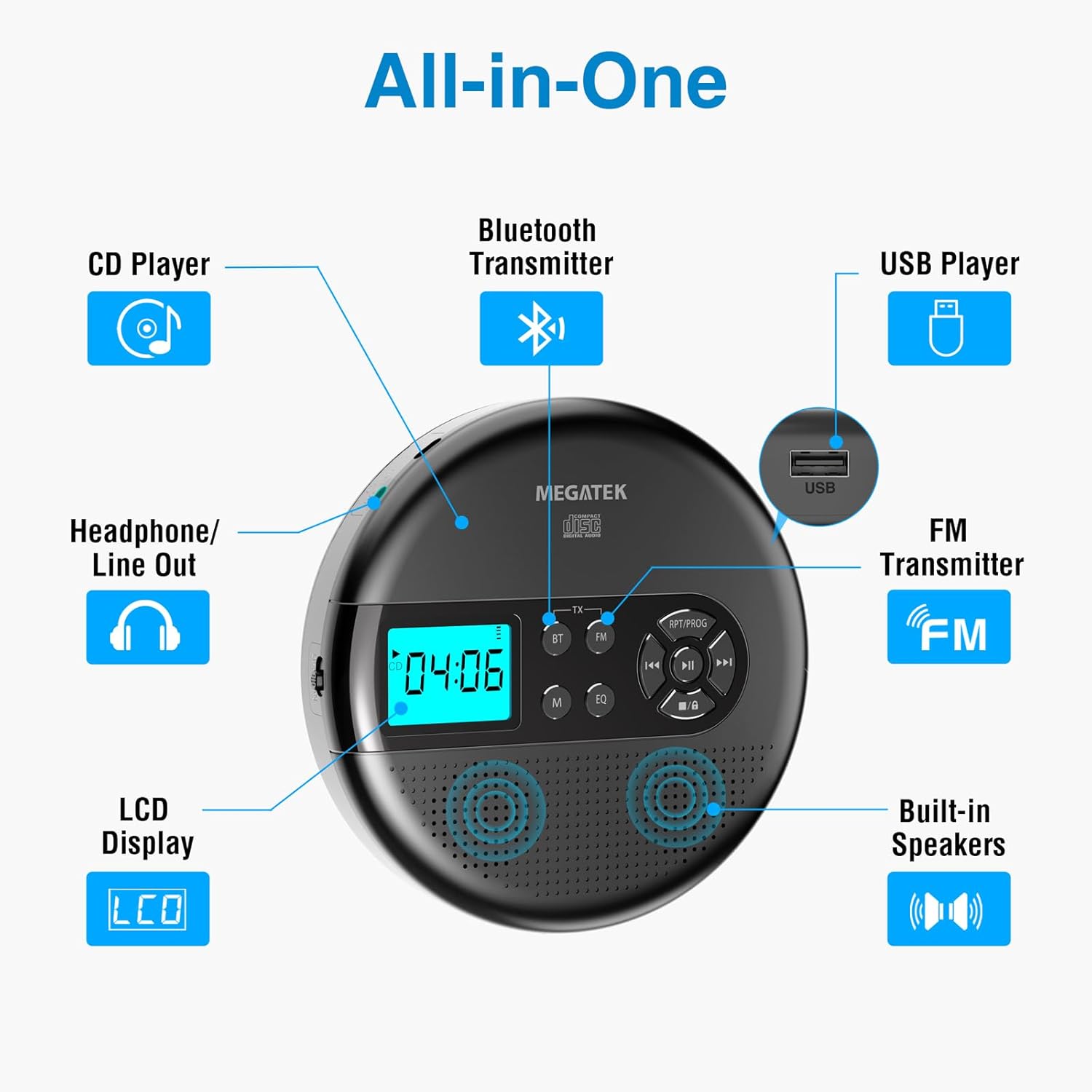
Image: An "All-in-One" diagram highlighting key features such as the CD Player, Bluetooth Transmitter, USB Player, FM Transmitter, Built-in Speakers, LCD Display, and Headphone/Line Out port.
नियंत्रणे आणि बंदरे:
- एलसीडी डिस्प्ले: Shows track number, time, mode, and battery status.
- प्ले/पॉज बटण: प्लेबॅक प्रारंभ किंवा विराम देते.
- मागील/पुढील बटणे: Skips tracks or fast-forwards/rewinds.
- स्टॉप बटण: प्लेबॅक थांबवते.
- RPT/PROG Button: Controls repeat modes and programming tracks.
- BT बटण: Activates Bluetooth transmission mode.
- FM बटण: Activates FM transmission mode.
- M (मोड) बटण: Switches between CD, USB, Bluetooth, and FM modes.
- EQ बटण: इक्वेलायझर प्रीसेटमधून फिरते.
- आवाज नियंत्रण: ऑडिओ आउटपुट पातळी समायोजित करते.
- यूएसबी पोर्ट: ऑडिओ प्ले करण्यासाठी fileयूएसबी ड्राइव्हवरून एस.
- टाइप-सी चार्जिंग पोर्ट: अंतर्गत बॅटरी चार्ज करण्यासाठी.
- 3.5mm Audio Out Jack: हेडफोन किंवा बाह्य स्पीकर कनेक्ट करण्यासाठी.
- अंगभूत स्टीरिओ स्पीकर्स: थेट ऑडिओ प्लेबॅकसाठी.
सेटअप
बॅटरी चार्ज करणे:
The device is equipped with a built-in 2000mAh rechargeable Li-ion battery. Before first use, fully charge the player.
- Connect the provided USB-C charging cable to the Type-C charging port on the player.
- USB-C केबलचे दुसरे टोक USB पॉवर अॅडॉप्टर (समाविष्ट नाही) किंवा संगणकाच्या USB पोर्टशी जोडा.
- The battery indicator on the LCD display will show charging status. A full charge provides up to 15 hours of playtime at medium volume.

Image: The portable CD player connected to a power source via its USB-C cable, resting on a nightstand next to a bed.
Inserting a CD:
- Locate the CD compartment latch/button on the side of the player and slide/press it to open the lid.
- Carefully place the CD onto the center spindle with the label side facing up.
- सीडी जागी येईपर्यंत हळूवारपणे दाबा.
- सीडी कंपार्टमेंटचे झाकण घट्ट बंद करा जोपर्यंत ते लॅच होत नाही.

Image: The portable CD player with its lid open, showing a blue CD disc inserted into the compartment, ready for playback.
ऑपरेटिंग सूचना
सीडी प्लेबॅक:
- Insert a CD as described in the Setup section.
- दाबा खेळा/विराम द्या प्लेबॅक सुरू करण्यासाठी बटण.
- वापरा मागील/पुढील buttons to navigate between tracks. Hold to fast-forward or rewind.
- दाबा RPT/PROG button to cycle through repeat modes (repeat one, repeat all, random) or to program a custom playback order.
- दाबा थांबा प्लेबॅक समाप्त करण्यासाठी बटण.
- Adjust volume using the dedicated volume control.
यूएसबी प्लेबॅक:
The player supports MP3, WMA, and WAV audio fileयूएसबी ड्राइव्हवरून एस.
- यूएसबी पोर्टमध्ये यूएसबी फ्लॅश ड्राइव्ह घाला.
- दाबा M (मोड) USB मोडवर स्विच करण्यासाठी बटण.
- वापरा खेळा/विराम द्या, मागील/पुढील, आणि RPT/PROG buttons as you would for CD playback.
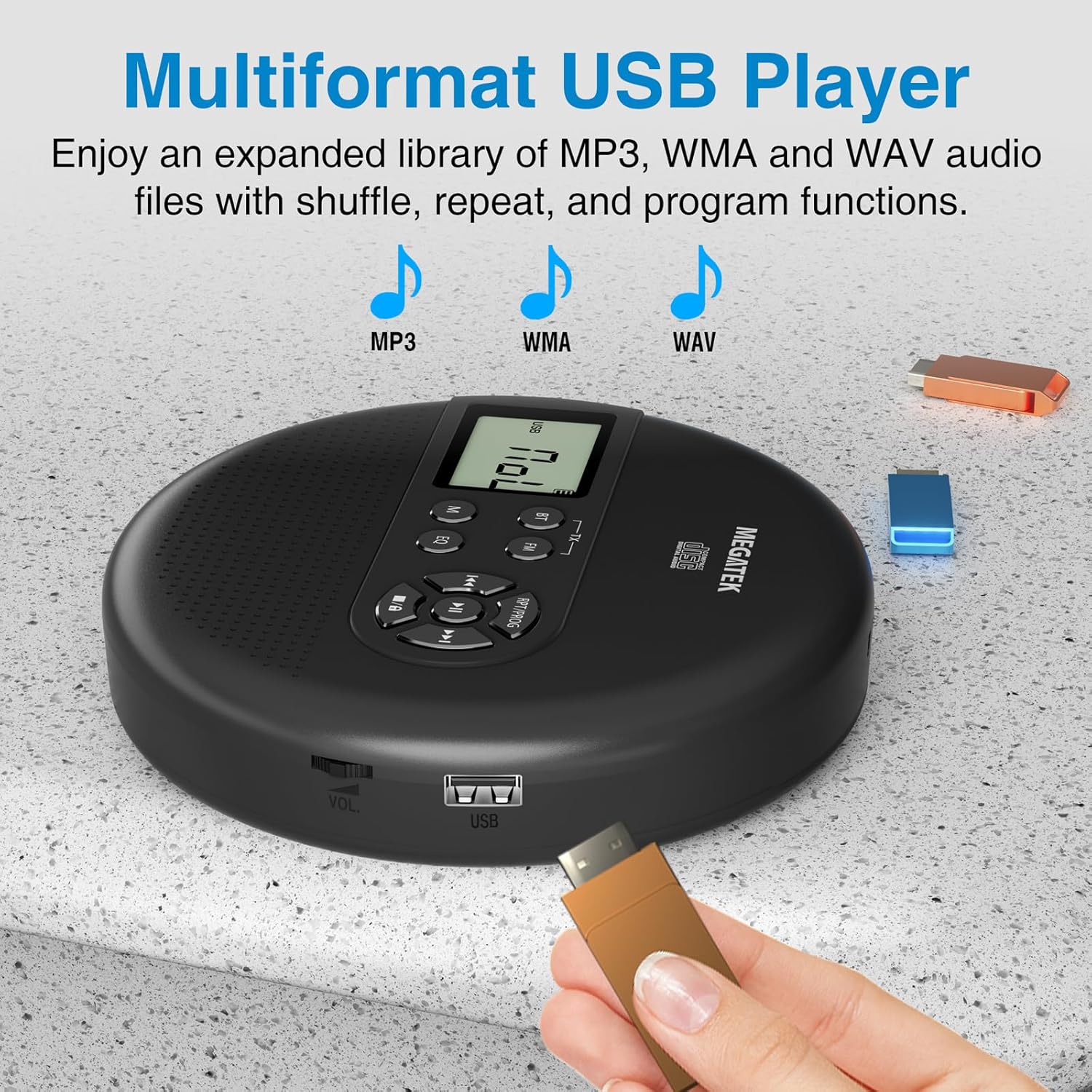
Image: The portable CD player with a USB flash drive inserted into its side port, illustrating its multi-format USB playback capability.
ब्लूटूथ ट्रान्समिशन:
Stream audio wirelessly to Bluetooth-enabled headphones or speakers. Note: This feature does not support connections to car stereo systems.
- तुमचे ब्लूटूथ हेडफोन किंवा स्पीकर पेअरिंग मोडमध्ये असल्याची खात्री करा.
- On the CD player, press the BT button. The Bluetooth indicator on the display will flash.
- The player will automatically search for and connect to nearby Bluetooth devices. Once connected, the indicator will stop flashing.

Image: The portable CD player wirelessly transmitting audio to two external Bluetooth speakers, demonstrating its Bluetooth transmission capability.
एफएम ट्रान्समिशन:
Transmit audio signals to nearby FM radios, including car FM stereos and home stereo systems.
- दाबा FM button on the CD player. The display will show an FM frequency.
- Tune your FM radio (car stereo, home stereo) to the same frequency displayed on the CD player.
- Adjust the frequency on the CD player using the मागील/पुढील buttons if interference occurs or to find a clearer channel.

Image: The portable CD player placed on a car dashboard, transmitting audio to the car's FM stereo system, indicated by an FM frequency on the car's display.
Using Headphones/External Speakers:
For private listening or connecting to wired audio systems:
- Plug the included wired headphones into the 3.5mm audio out jack.
- Alternatively, connect an audio cable (not included) from the 3.5mm audio out jack to the AUX input of external speakers or an audio system.
- The built-in speakers will automatically mute when headphones or external speakers are connected.

Image: A close-up of the portable CD player, visually representing sound waves emitting from its dual stereo speakers, emphasizing the built-in audio capability.
देखभाल
- स्वच्छता: Use a soft, dry, lint-free cloth to clean the exterior of the player. For the CD lens, use a specialized CD lens cleaner. Do not use liquids or aerosol cleaners directly on the device.
- स्टोरेज: When not in use for extended periods, store the player in a cool, dry place, away from direct sunlight and extreme temperatures.
- बॅटरी काळजी: बॅटरीचे आयुष्य वाढवण्यासाठी, बॅटरी वारंवार पूर्णपणे डिस्चार्ज करणे टाळा. सक्रिय वापरात नसले तरीही, डिव्हाइस नियमितपणे चार्ज करा.
समस्यानिवारण
| समस्या | संभाव्य कारण | उपाय |
|---|---|---|
| प्लेअर चालू होत नाही. | बॅटरी संपली आहे. | Charge the player using the USB-C cable. |
| स्पीकर्स/हेडफोन्समधून आवाज येत नाही. | Volume is too low; headphones not fully plugged in; incorrect mode selected. | Increase volume; ensure headphones are securely connected; press the M (मोड) योग्य स्रोत निवडण्यासाठी बटण. |
| सीडी वगळणे किंवा वाजवणे नाही. | CD is dirty, scratched, or inserted incorrectly; anti-skip function overwhelmed. | Clean the CD; ensure CD is properly seated; avoid strong vibrations. |
| ब्लूटूथ कनेक्शन समस्या. | Device not in pairing mode; too far from player; interference. | Ensure receiving device is in pairing mode; move closer to the player; restart both devices. |
| FM transmission static/poor quality. | Interference; incorrect frequency. | Adjust the FM frequency on the player and receiver to find a clear channel. |
तपशील
| वैशिष्ट्य | तपशील |
|---|---|
| मॉडेल क्रमांक | CP27BR |
| उत्पादन परिमाणे | 5.91 x 5.91 x 1.32 इंच |
| आयटम वजन | 10.9 औंस |
| बॅटरी | ८००० एमएएच लिथियम आयन (रिचार्ज करण्यायोग्य) |
| खेळण्याची वेळ | 15 तासांपर्यंत (मध्यम व्हॉल्यूमवर) |
| Supported CD Formats | CD, CD-R/RW, MP3 CD, Audio Book CD |
| समर्थित USB स्वरूपने | MP3, WMA, WAV |
| अँटी-स्किप संरक्षण | 60 सेकंद |
| कनेक्टिव्हिटी | USB, Bluetooth Transmitter, FM Transmitter, 3.5mm Audio Out |
| विशेष वैशिष्ट्ये | Built-in Stereo Speakers, Resume Play, Shuffle, Repeat, Program Functions, 5 EQ Options |
हमी आणि समर्थन
MEGATEK offers comprehensive support for its products:
- 12-Month Replacement: In case of product defects or issues within 12 months of purchase.
- आजीवन तांत्रिक समर्थन: Assistance with product usage, troubleshooting, and general inquiries.
- 24/7 ग्राहक सेवा: Available through Amazon buyer-seller messaging.
For any questions or problems, please contact MEGATEK customer service via the Amazon platform or refer to the contact information provided in the product packaging.
Image: A graphic detailing MEGATEK's customer support, including 12-month replacement, lifetime technical support, and 24/7 Amazon buyer-seller messaging, alongside an image of customer service representatives.
Ask a question about this manual
Ask about setup, troubleshooting, compatibility, parts, safety, or missing instructions. Manuals+ will review the question and use this page’s manual context to help answer it.